

惯性聚合 高效追踪和阅读你感兴趣的博客、新闻、科技资讯
阅读原文 在惯性聚合中打开

推荐订阅源

Security Latest
Security Latest
让小产品的独立变现更简单 - ezindie.com
Stack Overflow Blog
Stack Overflow Blog
WordPress大学
WordPress大学
N
Netflix TechBlog - Medium
GbyAI
GbyAI
云风的 BLOG
云风的 BLOG
Threat Intelligence Blog | Flashpoint
宝玉的分享
宝玉的分享
博客园 - 【当耐特】
C
Cyber Attacks, Cyber Crime and Cyber Security
雷峰网
雷峰网
奇客Solidot–传递最新科技情报
奇客Solidot–传递最新科技情报
T
Threat Research - Cisco Blogs
NISL@THU
NISL@THU
Spread Privacy
Spread Privacy
P
Proofpoint News Feed
J
Java Code Geeks
freeCodeCamp Programming Tutorials: Python, JavaScript, Git & More
MyScale Blog
MyScale Blog
T
Tor Project blog
P
Proofpoint News Feed
C
CERT Recently Published Vulnerability Notes
P
Privacy & Cybersecurity Law Blog
MongoDB | Blog
MongoDB | Blog
Simon Willison's Weblog
C
Cybersecurity and Infrastructure Security Agency CISA
L
LINUX DO - 热门话题
小众软件
小众软件
G
GRAHAM CLULEY
P
Privacy International News Feed
AWS News Blog
AWS News Blog
Know Your Adversary
Know Your Adversary
P
Palo Alto Networks Blog
人人都是产品经理
人人都是产品经理
S
Schneier on Security
Scott Helme
Scott Helme
OSCHINA 社区最新新闻
OSCHINA 社区最新新闻
B
Blog RSS Feed
T
The Exploit Database - CXSecurity.com
Recent Announcements
E
Exploit-DB.com RSS Feed
C
CXSECURITY Database RSS Feed - CXSecurity.com
U
Unit 42
The Register - Security
S
Securelist
Martin Fowler
Martin Fowler
Project Zero
Project Zero
大猫的无限游戏
大猫的无限游戏
Cisco Talos Blog
Cisco Talos Blog

博客园 - DHclly

Aspose.Words 合并单元格的原理、配置方式、代码示例以及常见误区 Gpustack 运行一段时间后出现 Failed to initialize NVML: Unknown Error 解决办法 wps dispimg python 解析实现参考 NVIDIA GPU 计算能力( compute capability,SM version)兼容性查询 Amazon S3 Tools:S3cmd 介绍 wsl 和win主机互相访问 nginx 根路径同时代理 http ws sse 三种请求 在 X86_64(amd64) 平台上的docker支持打包跨平台的镜像(如arm64) 以图搜图功能介绍 docker 容器调试技巧 open ai sdk 的额外请求头说明 x-stainless 大模型常见的概念 创建软连接的几种方式 基于node.js 的 web server 实现 对个人的警醒 jQuery对象与DOM对象之间的转换方法 【BUG】浏览器控制台提示:net::ERR_INVALID_CHUNKED_ENCODING 200 (OK) 的解决思路 关于Lambda表达式(箭头函数)的get属性访问器和常规的get属性访问器的差异 转换字符串为二进制编码字符串
实用浏览器脚本
DHclly · 2024-02-22 · via 博客园 - DHclly

原文链接:https://emlog.icedog.top/?post=28

浏览器打开空白页

在浏览器的地址栏输入如下代码即可

about:blank

在浏览器打开空白页作为临时内容存放区

有时候我们想找个地方存一些文本数据,但是又不一定有自己熟悉好用的工具,这时,浏览器就是一个不错的工具,按 F12 打开开发者工具,输入如下命令即可。

源码:

(function(){
var nw =window.open("about:blank","临时编辑页");
nw.document.title="临时编辑页";
nw.document.body.contentEditable=true;
nw.document.body.innerText="现在你可以直接在页面输入内容了";
})();

标签栏书签模式,打开开发者工具比较繁琐,安装浏览器插件又比较麻烦,直接创建个浏览器书签反而最简单,如下图填入内容即可
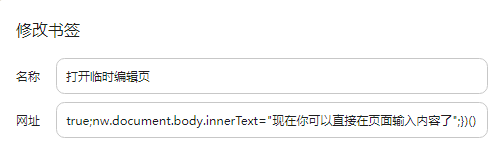
打开临时编辑页

名称:打开临时编辑页
网址:

javascript:(function(){var nw =window.open("about:blank","临时编辑页");nw.document.title="临时编辑页";nw.document.body.contentEditable=true;nw.document.body.innerText="现在你可以直接在页面输入内容了";})()

复制网页标题和url的脚本

在生活中,我们经常会访问各种网页查资料,做笔记,同时会存储这些网页地址,用于下次遇到类似的问题,好做参考,但是时间一久,只看链接就忘了之前存的是啥了,
所以一般会把网页标题和链接一起存下来,如下格式:

Chrome 文件选择延迟 Bug - 知乎
https://zhuanlan.zhihu.com/p/27946188

一行标题,一行内容,但是手动操作太过于繁琐,不如用浏览器书签脚本实现

名称:复制网页标题和链接
网址:

javascript:(function(f){var info =document.createElement('textarea');info.setAttribute('style','position:fixed;z-index:9999;width:400px;height:100px;user-select:text;');info.value=f;document.body.insertBefore(info,document.body.firstChild);var first=document.body.firstChild;first.select();document.execCommand('copy');document.body.firstElementChild.remove();
})(`${document.title}\r\n${document.URL}`)

复制网页标题和 url 为 markdown 超链接格式的脚本

现在做笔记基本上都使用 markdown 格式做笔记,因此链接存为 markdown 链接格式会更方便,脚本和上面一样,只是替换了传参字符串模板

名称:(md)复制网页标题和链接
网址:

javascript:(function(f){var info =document.createElement('textarea');info.setAttribute('style','position:fixed;z-index:9999;width:400px;height:100px;user-select:text;');info.value=f;document.body.insertBefore(info,document.body.firstChild);var first=document.body.firstChild;first.select();document.execCommand('copy');document.body.firstElementChild.remove();
})(`[${document.title}](${document.URL} \"${document.title}\")`)

效果:

[Chrome 文件选择延迟 Bug - 知乎](https://zhuanlan.zhihu.com/p/27946188 "Chrome 文件选择延迟 Bug - 知乎")

Chrome 文件选择延迟 Bug - 知乎

注意

有的网站是不允许通过书签这样执行脚本的(如 github),这种就没办法,只能按F12打开开发者工具执行。