








请先阅读此博客MMYOLO 自定义数据集从标注到部署保姆级教程_mmyolo 从零-CSDN博客
labelImg工具标注yolo后,将结果按照如下方式放置:
    └── $ROOT_PATH
        ├── classes.txt
        ├── labels
        │    ├── a.txt
        │    ├── b.txt
        │    └── ...
        ├── images
        │    ├── a.jpg
        │    ├── b.png
        │    └── ...
        └── ...
然后转coco数据集
    └── $ROOT_PATH
        ├── annotations
        │    ├── result.json
        │    └── ...
        ├── classes.txt
        ├── labels
        │    ├── a.txt
        │    ├── b.txt
        │    └── ...
        ├── images
        │    ├── a.jpg
        │    ├── b.png
        │    └── ...
        └── ...
进入到clone到本地的mmyolo目录,找到tools/dataset_converters/yolo2coco.py,此文件有瑕疵,添加黄色代码。
    # convert x,y,w,h to x1,y1,x2,y2
    x1 = (x - w / 2) * image_width
    y1 = (y - h / 2) * image_height
    x2 = (x + w / 2) * image_width
    y2 = (y + h / 2) * image_height

    #可能因精度误差超出图像边界
    x1 = max(0., x1)
    y1 = max(0., y1)
    x2 = min(x2, image_width)
    y2 = min(y2, image_height)
在mmyolo目录里打开终端,进入自己的虚拟环境后,转coco,注意自己的样本路径
python tools/dataset_converters/yolo2coco.py ~/datasets/yolo/
会得到 annotations/result.json 目录和文件
python tools/misc/coco_split.py --json ~/datasets/yolo/annotations/result.json --out-dir ~/datasets/yolo/annotations/ --ratios 0.8 0.2 --shuffle --seed 10
得到下图两个json文件
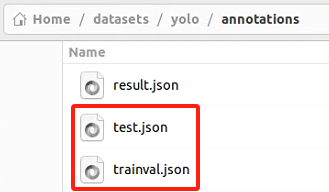
经验证,数据集会根据每个类别进行划分,而不是全局划分,因此不必担心某个类别样本少导致验证集里为0。验证代码如下:
import json
import os.path
from collections import defaultdict

def count_classes(json_file):
    with open(json_file) as f:
        data = json.load(f)
    class_counts = defaultdict(int)
    for ann in data['annotations']:
        class_counts[ann['category_id']] += 1
    return class_counts

if __name__=='__main__':
    train_counts = count_classes(os.path.expanduser('~/datasets/yolo_caiSe160/annotations/trainval.json'))
    val_counts = count_classes(os.path.expanduser('~/datasets/yolo_caiSe160/annotations/test.json'))
    print("Train class counts:", train_counts)
    print("Val class counts:", val_counts)

可以看到几乎每个类别按4:1划分的。
参考15 分钟上手 MMYOLO 目标检测 — MMYOLO 0.6.0 文档
我放到了自己新建的yolov8_12目录里
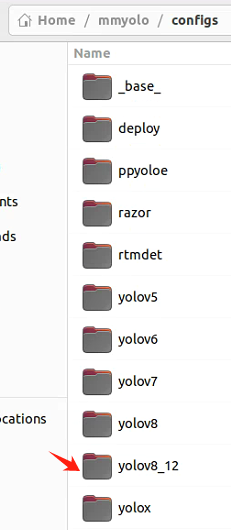
python tools/train.py configs/yolov8_12/yolov8_12.py
如果报“CUBLAS_WORKSPACE_CONFIG=:4096:8”之类的错误,先执行
export CUBLAS_WORKSPACE_CONFIG=:4096:8
临时设置(仅当前终端会话有效)
训练得到的pth 在~/mmyolo/work_dirs/yolov8_12/里
此内容由惯性聚合(RSS阅读器)自动聚合整理,仅供阅读参考。 原文来自 — 版权归原作者所有。