





商城平台在收到客户付款成功后自动语音播报“系统到账1000元”。
1、客户支付成功,后台生成订单;
2、后台推送一条消息到客户端;
3、客户端收到消息后调用第三方接口将文字转成语音文件播放。
1、申请百度智能云账号
2、进入语音技术模块创建一个应用(文档地址)
3、换取token
// appKey = Va5yQRHl********LT0vuXV4
// appSecret = 0rDSjzQ20XUj5i********PQSzr5pVw2

https://openapi.baidu.com/oauth/2.0/token?grant_type=client_credentials&client_id=Va5yQRHl********LT0vuXV4&client_secret=0rDSjzQ20XUj5i********PQSzr5pVw2
{
    "access_token": "1.a6b7dbd428f731035f771b8d********.86400.1292922000-2346678-124328",
    "expires_in": 2592000,
    "refresh_token": "2.385d55f8615fdfd9edb7c4b********.604800.1293440400-2346678-124328",
    "scope": "public audio_tts_post ...",
    "session_key": "ANXxSNjwQDugf8615Onqeik********CdlLxn",
    "session_secret": "248APxvxjCZ0VEC********aK4oZExMB",
}
3、访问合成接口
http://tsn.baidu.com/text2audio?lan=zh&ctp=1&cuid=abcdxxx&tok=1.a6b7dbd428f731035f771b8d****.86400.1292922000-2346678-124328&tex=%e7%99%be%e5%ba%a6%e4%bd%a0%e5%a5%bd&vol=9&per=0&spd=5&pit=5&aue=3
// 这是一个正常MP3的下载url
// tex在实际开发过程中请urlencode2次
4、测试客户端截图
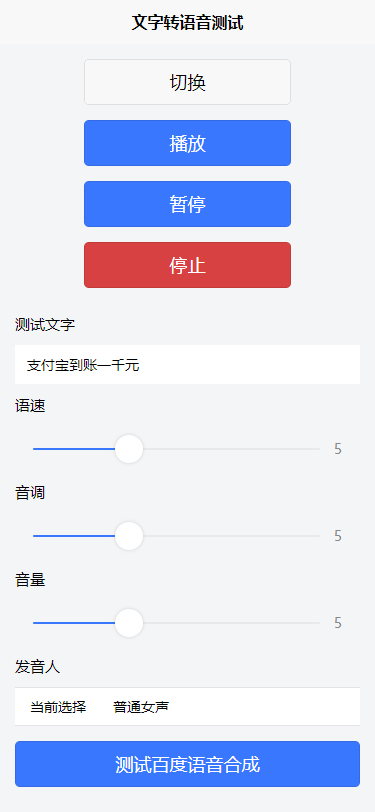
5、测试客户端代码(本案例使用uniapp)
  1 <template>
  2     <view>
  3         <view class="uni-padding-wrap uni-common-mt">
  4             <view class="button-sp-area">
  5                 <button type="default" @click="changeAudio()">切换</button>
  6                 <button type="primary" @click="play()">播放</button>
  7                 <button type="primary" @click="pause()">暂停</button>
  8                 <button type="warn" @click="stop()">停止</button>
  9             </view>
 10             <view>
 11                 <view class="uni-title">测试文字</view>
 12                 <view>
 13                     <input v-model="readText" class="uni-input" maxlength="10" placeholder="最大输入长度为10" />
 14                 </view>
 15                 <view class="uni-title">语速</view>
 16                 <view>
 17                     <slider v-model="spd" min="0" max="15" show-value @change="spdSliderChange" />
 18                 </view>
 19                 <view class="uni-title">音调</view>
 20                 <view>
 21                     <slider v-model="pit" min="0" max="15" show-value @change="pitSliderChange" />
 22                 </view>
 23                 <view class="uni-title">音量</view>
 24                 <view>
 25                     <slider v-model="vol" min="0" max="15" show-value @change="volSliderChange" />
 26                 </view>
 27
 28                 <view class="uni-title">发音人</view>
 29                 <view class="uni-list">
 30                     <view class="uni-list-cell">
 31                         <view class="uni-list-cell-left">
 32                             当前选择
 33                         </view>
 34                         <view class="uni-list-cell-db">
 35                             <picker @change="bindPickerChange" :value="index" range-key="lable" :range="array">
 36                                 <view class="uni-input">{{array[index].lable}}</view>
 37                             </picker>
 38                         </view>
 39                     </view>
 40                 </view>
 41                 <button type="primary" @click="loadBaiduAudio2()">测试百度语音合成</button>
 42             </view>
 43         </view>
 44     </view>
 45 </template>
 46
 47 <script>
 48     export default {
 49         data() {
 50             return {
 51                 innerAudioContext: null,
 52                 readText: '支付宝到账一千元',
 53                 access_token: '00.ae748a58ea3160facbdf707c923b5309.2592000.1574926792.282335-16656017',
 54                 spd: 5,
 55                 pit: 5,
 56                 vol: 5,
 57                 per: 0,
 58                 array: [{
 59                         value: 0,
 60                         lable: '普通女声'
 61                     },
 62                     {
 63                         value: 1,
 64                         lable: '普通男生'
 65                     },
 66                     {
 67                         value: 3,
 68                         lable: '情感合成-度逍遥'
 69                     },
 70                     {
 71                         value: 4,
 72                         lable: '情感合成-度丫丫'
 73                     }
 74                 ],
 75                 index: 0
 76             }
 77         },
 78         onLoad() {
 79             const innerAudioContext = uni.createInnerAudioContext();
 80             innerAudioContext.autoplay = true;
 81             innerAudioContext.src = 'https://img-cdn-qiniu.dcloud.net.cn/uniapp/audio/music.mp3';
 82             innerAudioContext.pause();
 83             innerAudioContext.onPlay(() => {
 84                 console.log('开始播放');
 85             });
 86             innerAudioContext.onError((res) => {
 87                 console.log(res.errMsg);
 88                 console.log(res.errCode);
 89             });
 90             this.innerAudioContext = innerAudioContext;
 91         },
 92         methods: {
 93             changeAudio: function() {
 94                 this.innerAudioContext.src = 'http://m10.music.126.net/20191029152112/53749fba54e8903c0daa20d7c723f3d6/ymusic/374b/8502/4d09/798b85bbef3192e6de5675159073e941.mp3';
 95             },
 96             play: function() {
 97                 this.innerAudioContext.play();
 98             },
 99             pause: function() {
100                 this.innerAudioContext.pause();
101             },
102             stop: function() {
103                 this.innerAudioContext.stop();
104             },
105             // GET方式
106             loadBaiduAudio2: function() {
107                 this.innerAudioContext.src = 'http://tsn.baidu.com/text2audio?tex=' + encodeURIComponent(encodeURIComponent(this.readText)) +
108                     '&tok=' + this.access_token + '&cuid=test_001&ctp=1&lan=zh&spd=' +
109                     this.spd + '&pit=' + this.pit + '&vol=' + this.vol + '&per=' + this.per
110             },
111             // POST方式
112             loadBaiduAudio: function() {
113                 uni.request({
114                     url: 'http://tsn.baidu.com/text2audio',
115                     method: 'POST',
116                     data: {
117                         // 必填    合成的文本,使用UTF-8编码。小于2048个中文字或者英文数字。(文本在百度服务器内转换为GBK后,长度必须小于4096字节)
118                         tex: encodeURIComponent(encodeURIComponent(this.readText)),
119                         // 必填    开放平台获取到的开发者access_token
120                         tok: this.access_token,
121                         // 必填    用户唯一标识,用来计算UV值。建议填写能区分用户的机器 MAC 地址或 IMEI 码,长度为60字符以内
122                         cuid: 'test_001',
123                         // 必填    客户端类型选择,web端填写固定值1
124                         ctp: 1,
125                         // 必填    固定值zh。语言选择,目前只有中英文混合模式,填写固定值zh
126                         lan: 'zh',
127                         // 选填    语速,取值0-15,默认为5中语速
128                         spd: 5,
129                         // 选填    音调,取值0-15,默认为5中语调
130                         pit: 5,
131                         // 选填    音量,取值0-15,默认为5中音量
132                         vol: 5,
133                         // 选填    发音人选择, 0为普通女声,1为普通男生,3为情感合成-度逍遥,4为情感合成-度丫丫,默认为普通女声
134                         per: 0,
135                         // 选填    3为mp3格式(默认); 4为pcm-16k;5为pcm-8k;6为wav(内容同pcm-16k); 注意aue=4或者6是语音识别要求的格式,但是音频内容不是语音识别要求的自然人发音,所以识别效果会受影响。
136                         aue: 3
137                     },
138                     header: {},
139                     success: (res) => {
140                         // this.innerAudioContext.src = res.data;
141                     }
142                 });
143             },
144             bindPickerChange: function(e) {
145                 console.log('picker发送选择改变,携带值为', e.target.value)
146                 this.index = e.target.value
147                 this.per = this.array[e.target.value].value || 0;
148             },
149             spdSliderChange: function(e) {
150                 console.log('value 发生变化:' + e.detail.value);
151                 this.spd = e.detail.value;
152             },
153             pitSliderChange: function(e) {
154                 console.log('value 发生变化:' + e.detail.value);
155                 this.pit = e.detail.value;
156             },
157             volSliderChange: function(e) {
158                 console.log('value 发生变化:' + e.detail.value);
159                 this.vol = e.detail.value;
160             }
161         }
162     }
163 </script>
164
165 <style>
166     button {
167         margin-top: 30upx;
168         margin-bottom: 30upx;
169     }
170
171     .button-sp-area {
172         margin: 0 auto;
173         width: 60%;
174     }
175
176     .mini-btn {
177         margin-right: 10upx;
178     }
179 </style>
此内容由惯性聚合(RSS阅读器)自动聚合整理,仅供阅读参考。 原文来自 — 版权归原作者所有。