





ROS2中话题通讯可以实现多个ROS节点之间数据的单向传输,不过话题通讯是一种异步通信机制,发布者无法准确知道订阅者是否收到消息。而服务通信是一种基于请求响应的通信模型,在通信双方中客户端发送请求数据到服务端,服务端响应结果给客户端。
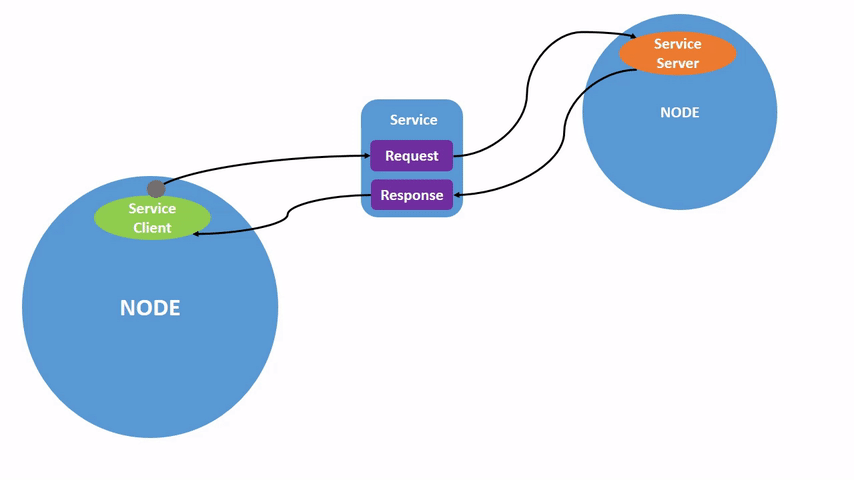
从服务实现机制看这种形式是CS模型,客户端需要数据时针对具体的服务发送请求信息,服务端收到请求后进行处理并返回应答信息。
以加法计算器为例
ros2 pkg create pkg_service --build-type ament_python --dependencies rclpy --node-name server_demo
编写服务端server_demo.py文件实现服务端功能
import rclpy
from rclpy.node import Node
from example_interfaces.srv import AddTwoInts

class Service_Server(Node):
    def __init__(self, name):
        super().__init__(name)
        # 创建一个服务端,使用的是create_service函数
        # 参数分别为:服务数据类型、服务名称、服务回调函数
        self.src = self.create_service(AddTwoInts, "/add_two_ints", self.AddTwoInts_callback)

    # 定义服务回调函数
    def AddTwoInts_callback(self, request, response):
        response.sum = request.a + request.b
        print("result.sum = ", response.sum)
        return response

def main():
    rclpy.init()
    server_demo = Service_Server("server_node")
    rclpy.spin(server_demo)
    server_demo.destroy_node()
    rclpy.shutdown()
服务回调函数AddTwoInts_callback这里需要传入参数除了self,还有requesst和response,request是服务需要的参数,response是服务返回的结果。request.a和request.b是request部分的内容,response.sum是response部分的内容。
AddTwoInts是类型,可以通过如下命令查看类型
ros2 interface show example_interfaces/srv/AddTwoInts

其中“--”上面部分是request,下面部分是response。request包含两个变量a,b;response包含变量sum
在server_demo.py统计目录下创建文件client_demo.py,编写客户端功能代码:
import rclpy
from rclpy.node import Node
from example_interfaces.srv import AddTwoInts

class Service_Client(Node):
    def __init__(self, name):
        super().__init__(name)
        # 创建客户端,使用create_client函数
        # 传入参数分别是:服务数据类型、服务名称
        self.client = self.create_client(AddTwoInts, "/add_two_ints")
        # 循环等待服务端启动
        while not self.client.wait_for_service(timeout_sec=1.0):
            print("service not available, waiting...")
        # 创建服务请求数据对象
        self.request = AddTwoInts.Request()

    def send_request(self):
        self.request.a = 10
        self.request.b = 20
        # 发送服务请求
        self.future = self.client.call_async(self.request)

def main():
    rclpy.init()
    client_demo = Service_Client("client_node")
    client_demo.send_request()  # 发送服务请求
    while rclpy.ok():
        rclpy.spin_once(client_demo)
        # 判断数据是否处理完成
        if client_demo.future.done():
            try:
                # 获取服务返回结果
                response = client_demo.future.result()
                print("request.a = ", client_demo.request.a)
                print("request.b = ", client_demo.request.b)
                print("response.sum = ", response.sum)
            except Exception as e:
                print("Service call failed")
        break
    client_demo.destroy_node()
    rclpy.shutdown()
配置文件setup.py
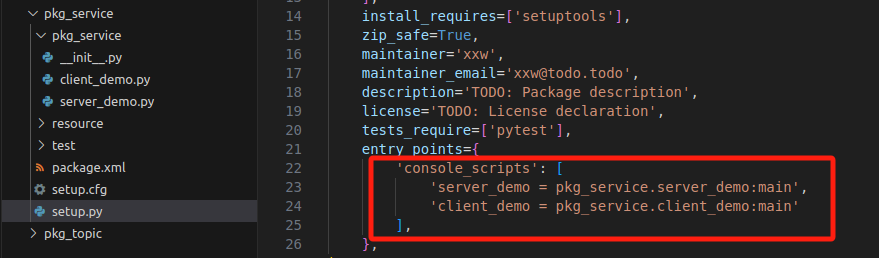
编译工作空间
cd ~/ros_ws colcon build --package-selects pkg_service source install/setup.bash
分终端分别启动服务端节点和客户端节点
ros2 run pkg_service server_demo
ros2 run pkg_service client_demo
服务端打印:

客户端打印:

此内容由惯性聚合(RSS阅读器)自动聚合整理,仅供阅读参考。 原文来自 — 版权归原作者所有。