







frp(fast reverse proxy)是一款高性能的反向代理应用,专注于内网穿透。它支持多种协议,包括 TCP、UDP、KCP、HTTP、HTTPS 等,并且具备 P2P 通信功能。使用 frp,您可以安全、便捷地将内网服务暴露到公网,通过拥有公网 IP 的节点进行中转。
个人觉得这个需求应该是最强烈的,有时需要远程桌面连接公司自己的电脑处理问题或者自己家里连着宽带的电脑,没有 frp 以前只能找类似花生壳提供的解决方案。
2. webhook 接收
接收类似 Github 或者第三方提供 Webhook 的场景。
3. 反向代理
有些国外 vps 被 gfw 墙了不能 ssh 连接,也可以通过frp 进行访问
frp 主要由两个组件组成:客户端(frpc) 和 服务端(frps)。通常情况下,服务端部署在具有公网 IP 地址的机器上,而客户端部署在需要穿透的内网服务所在的机器上。
由于内网服务缺乏公网 IP 地址或者某些原因用户不能直接访问,用户通过访问服务端的 frps,frp 负责根据请求的端口或其他信息将请求路由到相应的内网机器,从而实现通信。实际流量会变成 client->frps->frpc
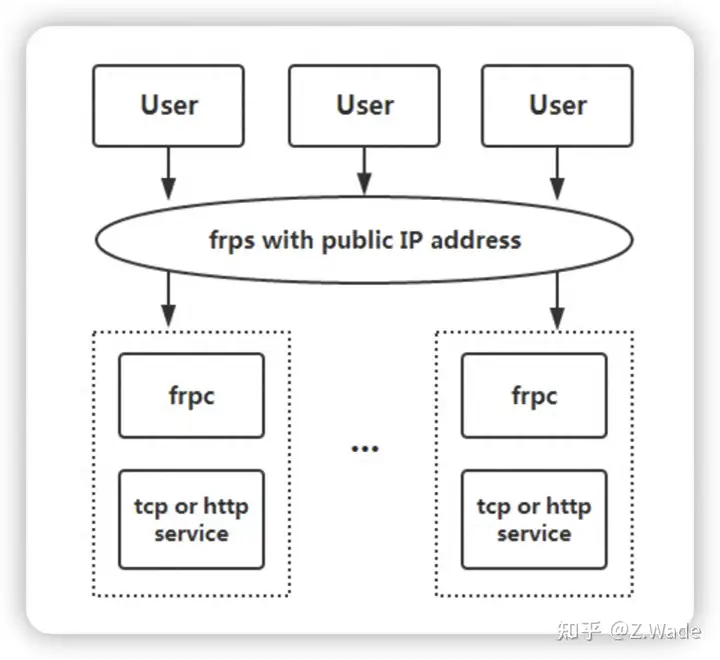
frp 架构图
我们需要有一台公网 ip 的服务器作为 frps 服务端,这里我使用自己购买的阿里云服务器,一台实现内网穿透的windows pc作为 frpc 客户端。下表是实验环境:
| # | OS | frps/frpc监听端口 | 内网穿透服务和监听端口 |
|---|---|---|---|
| frps | centos8 | 17000 | N/A |
| frpc | win10 | 60002 | 远程桌面/3389 |
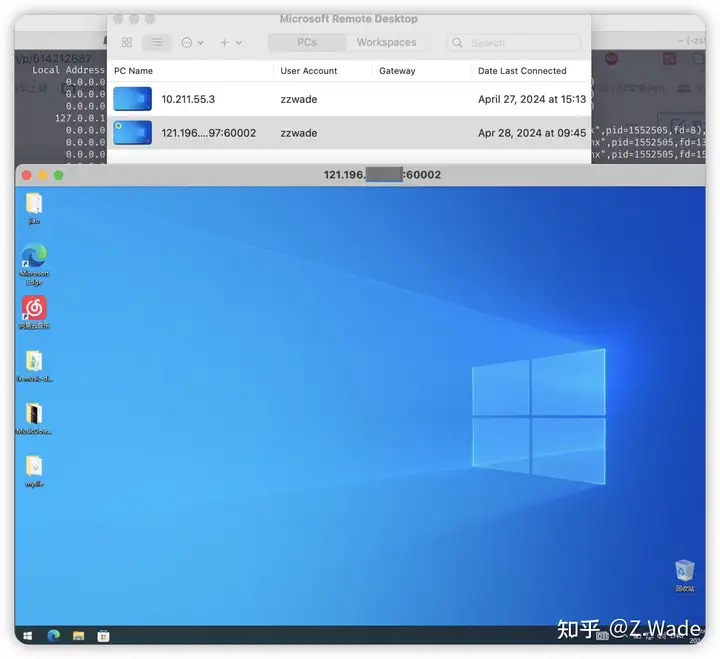
frps 和 frpc 服务配置完成后,用户可以使用frps_ip:60002 地址远程桌面连接到内网 win10 pc。
右击我的电脑->属性->远程桌面->启用远程桌面
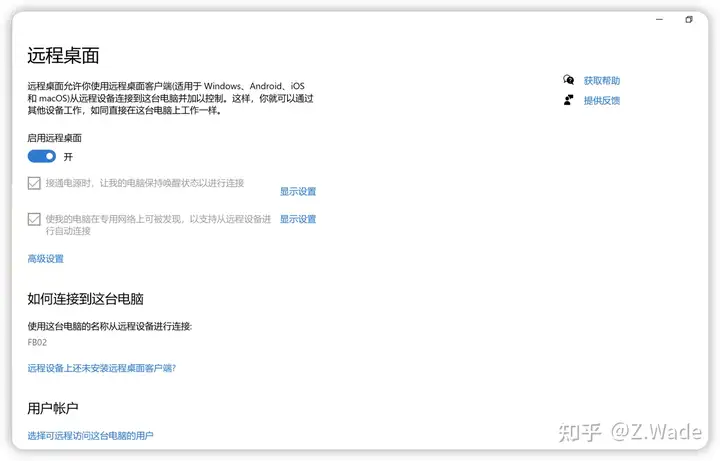
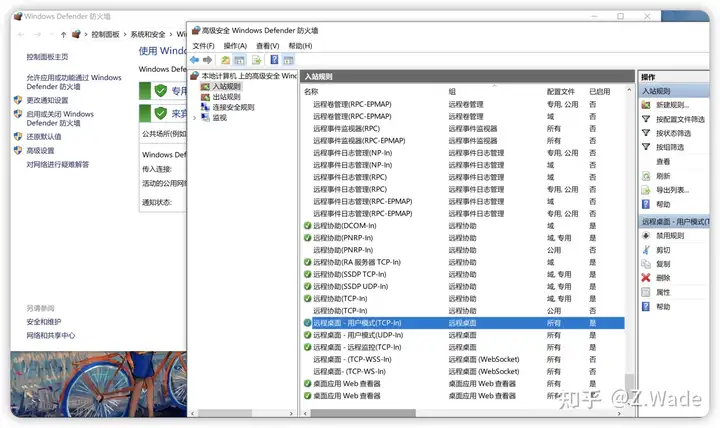
另外还需要检查 win10防火墙的入站规则有没远程桌面策略或者选择关闭防火墙,还可以在跟 win10 相同的内网其他机器测试网络连通性。
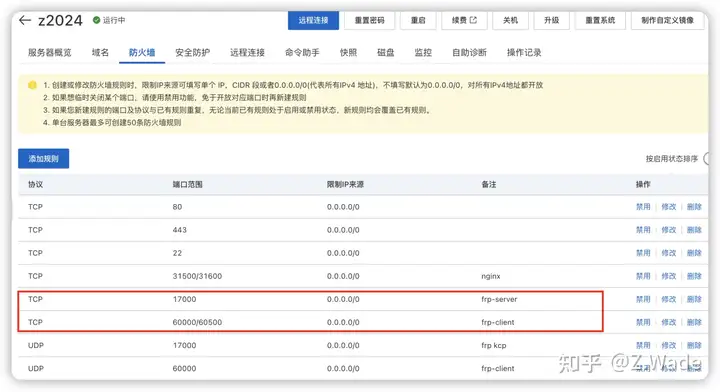
frps server 如果是在公有云,还要在公有云上防火墙放行相关策略
frps server上的centos 需要检查 selinux 和防火墙iptables 或者 firewalld
注:在国内公有云上如果使用域名,请确认域名有备案,要不然还是建议使用 ip 连接,要不然会有意想不到的连接错误。
frp 采用 Go 语言编写,只需下载对应平台的二进制文件即可执行
下载linux frp 对应二进制包到 frps server,解压到对应目录上
# 下载 frp 二进制压缩包
wget https://github.com/fatedier/frp/releases/download/v0.57.0/frp_0.57.0_linux_amd64.tar.gz

# 解压
tar xf frp_0.57.0_linux_amd64.tar.gz -C /usr/local/
cd /usr/local/frp_0.57.0_linux_amd64/
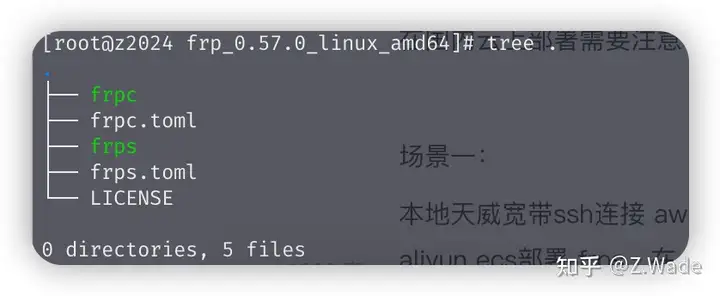
frp程序目录
frps server的配置文件是frps.toml,frpc client的配置文件是frpc.toml,下面配置frps.toml
# 可以参考官方配置frps_full_example.toml,里面有详细配置说明
# https://github.com/fatedier/frp/blob/405969085fb6b5c8058c88ca250e930ba6092153/conf/frps_full_example.toml

#frps监听端口
bindPort = 17000

# 配置 frp dashboard
webServer.addr = "127.0.0.1"
webServer.port = 7500
webServer.user = "admin"
webServer.password = "*******"

# 配置 token 认证,frpc 客户端也需指定一样的token
auth.method = "token"
auth.token = "abc123jki"

# 只允许frpc绑定指定ports.
allowPorts = [
  { start = 60000, end = 60500 }
]
使用 systemd 来管理 frps 服务,并设置开机自启,创建frps.service文件
写入frps.service内容如下:
[Unit]
Description=FRP Server
After=network.target

[Service]
# 启动frps的命令,需修改为您的frps的安装路径
ExecStart=/usr/local/frp_0.57.0_linux_amd64/frps -c /usr/local/frp_0.57.0_linux_amd64/frps.toml
Type=simple

[Install]
WantedBy=multi-user.target
设置frps开机启动,并启动 frps
# 设置frps开机启动
systemctl enable frps
# 启动frps
systemctl start frps
# 查看frps服务状态
systemctl status frps
下载windows frp 对应二进制包到 frpc client,解压到对应目录上,下载地址https://github.com/fatedier/frp/releases/download/v0.57.0/frp_0.57.0_windows_amd64.zip
frpc client的配置文件是frpc.toml,编辑frpc.toml
# 可以参考官方配置frpc_full_example.toml,里面有详细配置说明
# https://github.com/fatedier/frp/blob/405969085fb6b5c8058c88ca250e930ba6092153/conf/frpc_full_example.toml

# 填写你的frps server的ip 和 port
serverAddr = "1.1.1.1"
serverPort = 17000

# 配置 token 认证,frpc 客户端需指定frps一样的token
auth.method = "token"
auth.token = "abc123jki"

# 在 frp 中,一个代理对应一个需要公开访问的内网服务。
# 一个客户端可以同时配置多个代理,以满足不同的需求。
# 下面配置的是将 win10 远程桌面暴露到 frps_ip 60002端口上
[[proxies]]
name = "windows remote desktop"
type = "tcp"
localIP = "127.0.0.1"
localPort = 3389
remotePort = 60002
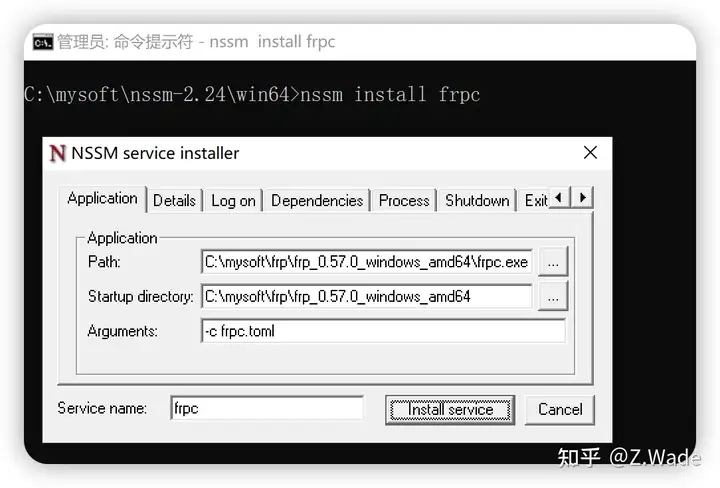
使用NSSM - the Non-Sucking Service Manager将frpc注册成windows服务并设置开机启动
在nssm 官网下载 nssm 程序,地址 https://nssm.cc/release/nssm-2.24.zip,解压压缩包,win64下面会有 nssm 程序,程序可以放在任何位置都可以。
以管理员权限运行cmd,切换到 nssm 程序目录,执行下面命令
命令执行后,它会以 GUI显示服务安装窗口,填写 frpc 程序的路径和启动参数,点击 Install service 即可
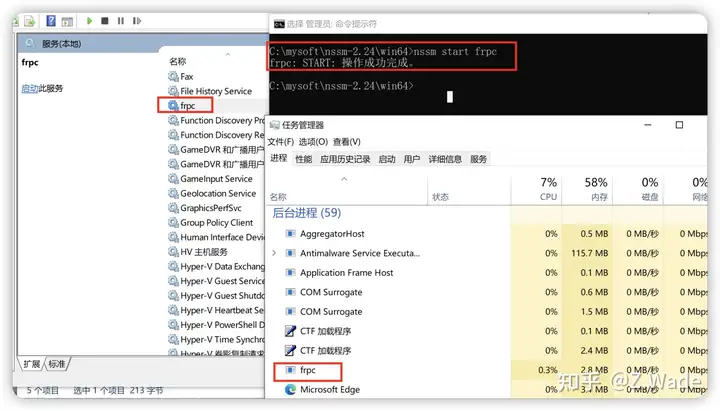
在上面打开的管理员cmd 窗口,启动 frpc 服务
nssm start frpc # 或者可以使用 net start frpc可以看到frpc 进程已经启动
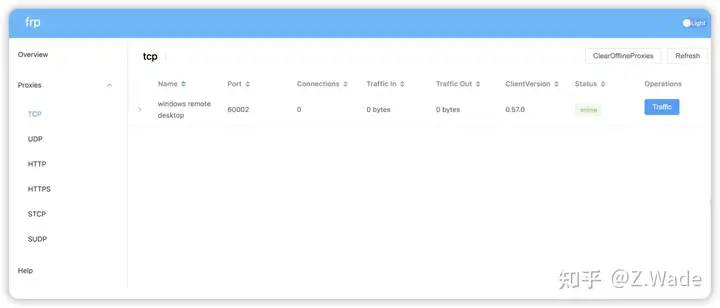
这时候可以在frps dashboard(这里可以配置nginx反向代理访问)查看frpc客户端是否注册上,注册上 status 会显示 online
client通过frps_ip:60002 远程桌面到 frpc win10 pc 上
以上是本次关于 frp 内网穿透的介绍和搭建使用,希望对大家有所帮助。如果你还有任何疑问,欢迎留言讨论。
此内容由惯性聚合(RSS阅读器)自动聚合整理,仅供阅读参考。 原文来自 — 版权归原作者所有。