惯性聚合 高效追踪和阅读你感兴趣的博客、新闻、科技资讯
阅读原文 在惯性聚合中打开

推荐订阅源

酷 壳 – CoolShell
酷 壳 – CoolShell
H
Hacker News: Front Page
P
Palo Alto Networks Blog
T
ThreatConnect
Apple Machine Learning Research
博客园_首页
T
True Tiger Recordings
P
Privacy & Cybersecurity Law Blog
B
Blog
IT之家
IT之家
Last Week in AI
Last Week in AI
F
Full Disclosure
Hacker News: Ask HN
Hacker News: Ask HN
C
Comments on: Blog
Microsoft Azure Blog
C
Cybersecurity and Infrastructure Security Agency CISA
Microsoft Security Blog
博客园 - 【当耐特】
N
News and Events Feed by Topic
NISL@THU
NISL@THU
腾讯CDC
雷峰网
雷峰网
Security Latest
Security Latest
李成银的技术随笔
M
Microsoft Research Blog - Microsoft Research
L
LangChain Blog
L
Lohrmann on Cybersecurity
cs.CL updates on arXiv.org
C
Check Point Blog
Y
Y Combinator Blog
Recent Announcements
博客园 - Franky
N
News | PayPal Newsroom
V
V2EX
A
About on SuperTechFans
The Register - Security
月光博客
月光博客
奇客Solidot–传递最新科技情报
奇客Solidot–传递最新科技情报
Google Online Security Blog
MyScale Blog
MyScale Blog
Cisco Talos Blog
Cisco Talos Blog
Vercel News
Vercel News
WordPress大学
WordPress大学
C
Cyber Attacks, Cyber Crime and Cyber Security
The Hacker News
The Hacker News
IntelliJ IDEA : IntelliJ IDEA – the Leading IDE for Professional Development in Java and Kotlin | The JetBrains Blog
爱范儿
爱范儿
A
Arctic Wolf
L
LINUX DO - 最新话题
freeCodeCamp Programming Tutorials: Python, JavaScript, Git & More

博客园 - 遥月

畅网n100 dc版本 黑群晖风扇转速问题 黑群晖7.x ame半洗白加激活补丁 win10/11 系统频繁重启,bcd错误或丢失 jellyfine-code1008播放器无法实例化错误、群晖系统分区空间不足解决办法 为什么nas上不用joplin而用trilium笔记? 国内dockerhub镜像2025.3.5 群晖用软连接替换掉自带低版本python 群晖安装pip包管理器 docker save和docker export的区别 群晖套件正在开始...... jellyfine套件登录忘记密码 python装饰器详解 用vb6拖拽生成tkinter界面 python 打包exe文件 群晖虚拟window系统,远程连接3389 群晖虚拟openwrt做旁路由 黑群晖改造清单 windows下写sh脚本, 在linux下执行乱报错的问题 群晖drive的文件和目录挂载软链接问题,如何一个目录多头管理 拒绝算法推荐,使用rss订阅消息与新闻!订阅源推荐! 群晖docker-compose简单应用搭建zblog+mysql博客系统
Docker+Gunicorn+Flask部署项目(转载)
遥月 · 2025-03-27 · via 博客园 - 遥月

(一) Flask 应用

1. 创建一个目录并切换进去

$ mkdir gunicorn_demo
$ cd gunicorn_demo

2. 创建一个 Flask 应用

构建一个最基本的 Flask 项目
app.py 文件

from flask import Flask


app = Flask(__name__)


@app.route("/")
def index():
    return 'Hello World'
(二) Gunicorn 相关

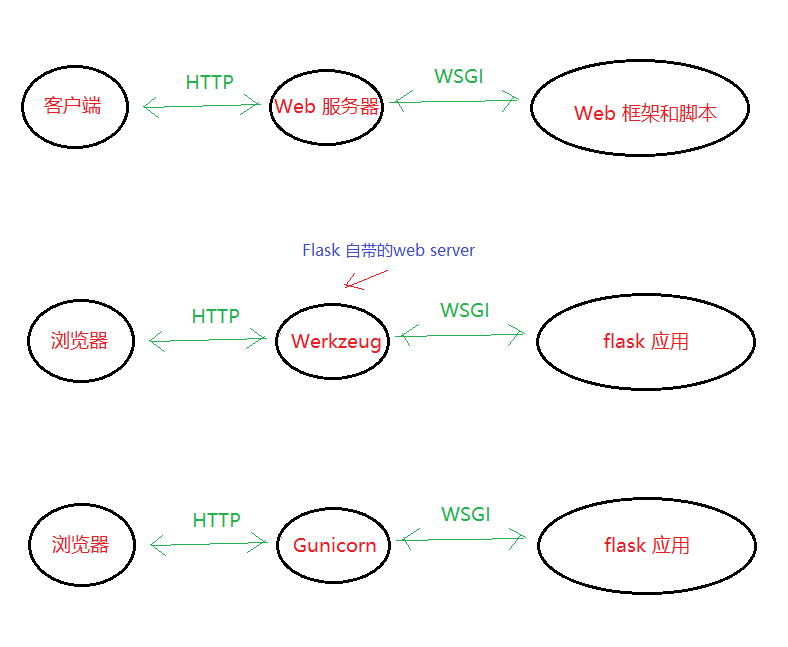
1. 后端工作的简单示意图

image

2. Gunicorn 概述

Gunicorn 是目前使用最广泛的高性能的 Python WSGI(WEB Server Gateway interface)服务器,移植自 Ruby 的 Unicorn 项目,使用 pre-fork worker 模式,具有简单、易用、轻量级、低资源消耗和高性能等特点。

什么是 pre-fork worker 模型?

  • worker 模型意味着:这个模型有一个中心主控 master进程,由它来管理一组 worker 进程;这个主控进程并不知晓任何客户端,所有的请求和响应都完全是由多个 worker 进程来处理的。
  • fork 意味着:worker 进程是由 master 进程 fork (复刻)出来的;
  • pre- 意味着:在任何客户端请求到来之前(程序启动的时候),就已从 master 进程 fork 出了多个 worker 进程,坐等请求到来。

3. Gunicorn 的工作方式

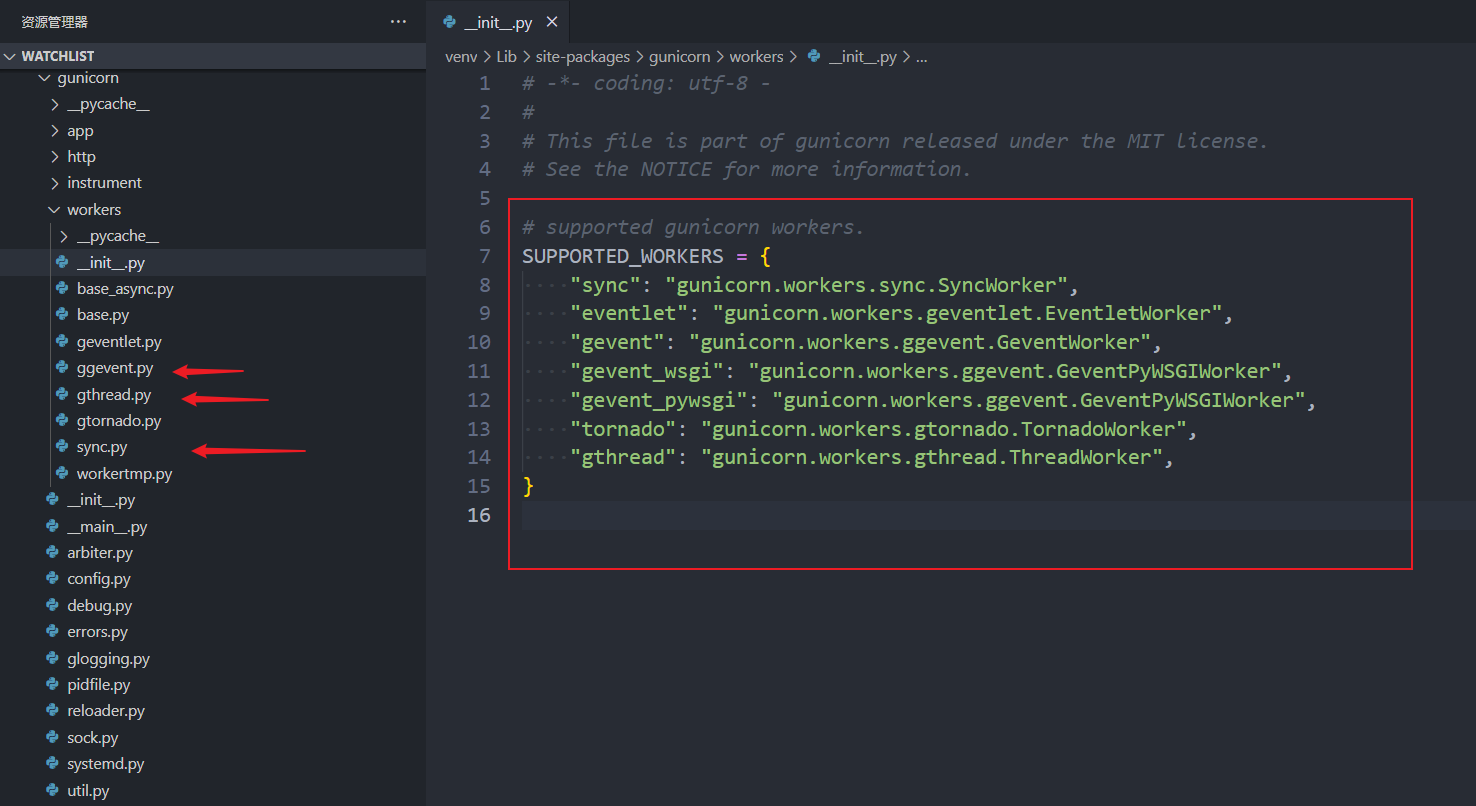
存放在 /gunicorn/workers/__init__.py 文件中
以下针对每一个 worker 进程中的工作模式

  • sync单进程单线程的工作模式,而且还是同步的,也就是说当前请求未处理结束,其他请求只能排队等待
  • eventlet单进程单线程多协程的工作模式(异步)
  • gevent单进程单线程多协程的工作模式(异步)
  • gthread单进程多线程的工作模式
  • ... 还有一些其他工作模式,具体请看官方文档
    image

注意事项:

  1. Gunicorn 建议设置的 workers 的数量为 (2 * CPU) + 1
  2. Gunicorn 默认启动的工作方式为 sync 模式
  3. Gunicorn 中的多线程和多协程的工作方式是互斥的,也就是说在一个 worker 进程中,单进程多线程和 单进程单线程多协程 这两种工作方式是可以的,但是 单进程多线程多协程 目前是不可以的

4. Gunicorn 的参数配置

bind、 -b、 --bind 服务监听地址和端口 127.0.0.1:8000 backlog、--backlog 等待连接的最大数 2048 workers、 -w、 --workers 用于处理工作进程的数量 1 worker_class、 -k、 --worker-class 工作模式 sync threads、 --threads 一个worker中的工作线程数 1 worker_connections、 --worker-connections 同时连接的客户端的最大数量,只影响 eventlet 和 gevent 类型 1000 keepalive、 --keep-alive 在 Keep-Alive 连接上等待请求的秒数。 2 debug debug 模式 - proc_name、 -n、 --name 进程名 None loglevel、 --log-level 日志级别 -
参数名描述默认值

更具体的内容请查看文档:Gunicorn Settings

5. 运行方式一(命令行 + 运行参数)

① 同步

$ gunicorn --workers=5 app:app

以上开启了 5 个 worker 进程,默认是以 sync 的工作模式运行的,也就是 同步 的工作模式
第一个 app 指的是 app.py 文件名
第二个 app 指的是文件中的实例变量 app

② 多线程

$ gunicorn --workers=5 --threads=2 app:app
# 等同于
$ gunicorn --workers=5 --threads=2 --worker-class=gthread app:app

开启了 5 个 workder 进程,每个进程中有两个线程,这里最大的并发请求数就是 worker * 线程数 = 10

③ 协程

$ gunicorn --workers=5 --worker-connections=1000 --worker-class=gevent app:app

开启了 5 个 workder 进程,每个进程中默认是一个线程,然后开启的协程数为 1000,在这种情况下,能够处理的最大并发请求数量为 worker * 协程数 = 5000

6. 运行方式二(将运行参数信息放到配置文件中)

在项目根目录上创建 gunicorn_config.py 文件,内容如下:

"""gunicorn + gevent 的配置文件"""

# 多进程
import multiprocessing

# 绑定ip + 端口
bind = '0.0.0.0:5000'

命令行运行:

$ gunicorn -c gunicorn_config.py app:app

(三) Docker 部署 Flask

1. 编写 Dockerfile 文件

app.py 和 Dockerfile 文件在同一个目录下

Dockerfile 文件的内容

# 指定下载 python 版本,说明该镜像以哪个镜像为基础
FROM python:3.8.5

此时的文件结构为:

├── gunicorn_demo
│   ├── app.py
│   ├── Dockerfile
│   ├── gunicorn_config.py

2. 构建镜像

# 构建镜像
docker build -t="gunicorn_demo" .
或
docker build -t gunicorn_demo .


3. 使用镜像,启动容器

# 使用镜像,启动容器
docker run -d -p 5000:5000 gunicorn_demo


4. 运行效果图