





其实原本是打算OpenTelemetry对应内容搞好后再做个简单的性能测试,也算表明自己写(抄)代码的能力(不至于用了反射什么的就把Kestrel这么好的底子的性能拖垮了)
但是最近看见一篇go的文章 报告揭示 OpenTelemetry 对 Go 的性能影响,说OpenTelemetry 拖慢了 go 30+% 的性能,
虽然个人还是保守持怀疑态度,但万一本人代码写得臭,到时候找不到地方怪怎么办
所以先留份简单的性能测试记录,后面搞好OpenTelemetry再做个比较
一切从简,就选大家都熟悉的初始demo项目做基准好了
[ApiController]
[Route("[controller]")]
public class WeatherForecastController : ControllerBase
{
    private static readonly string[] Summaries = new[]
    {
        "Freezing", "Bracing", "Chilly", "Cool", "Mild", "Warm", "Balmy", "Hot", "Sweltering", "Scorching"
    };

    private readonly ILogger<WeatherForecastController> _logger;

    public WeatherForecastController(ILogger<WeatherForecastController> logger)
    {
        _logger = logger;
    }

    [HttpGet(Name = "GetWeatherForecast")]
    public IEnumerable<WeatherForecast> Get()
    {
        this.Response.Headers["x-p"] = this.Request.Protocol;
        return Enumerable.Range(1, 5).Select(index => new WeatherForecast
        {
            Date = DateOnly.FromDateTime(DateTime.Now.AddDays(index)),
            TemperatureC = Random.Shared.Next(-20, 55),
            Summary = Summaries[Random.Shared.Next(Summaries.Length)]
        })
        .ToArray();
    }
}
启动最简单的代理配置(主要想看看最理想情况下的结果)
{
  "Logging": {
    "LogLevel": {
      "Default": "Warning"
    }
  },
  "ServerOptions": {
    "AddServerHeader": false
  },
  "ReverseProxy": {
    "ConnectionTimeout": "00:00:01.000",
    "Listen": {
      "https": {
        "Protocols": [ "Http1", "Http2", "Http3" ],
        "Address": [ "127.0.0.1:5001" ],
        "UseSni": true,
        "SniId": "test"
      },
      "http": {
        "Protocols": [ "Http1" ],
        "Address": [ "127.0.0.1:5000" ]
      },
      "tcptest": {
        "Protocols": [ "Tcp" ],
        "Address": [ "127.0.0.1:5002" ],
        "RouteId": "tcpTest"
      }
    },
    "Sni": {
      "test": {
        "Host": [ "*" ],
        "CheckCertificateRevocation": false,
        "Certificate": {
          "PEM": "-----BEGIN CERTIFICATE-----xxxxx\n-----END CERTIFICATE-----",
          "PEMKey": "-----BEGIN ENCRYPTED PRIVATE KEY-----\nxxxx\n-----END ENCRYPTED PRIVATE KEY-----",
          "Password": "testPassword"
        }
      }
    },
    "Routes": {
      "HTTPTEST": {
        "Match": {
          "Hosts": [ "*" ],
          "Paths": [ "*" ]
        },
        "ClusterId": "apidemo",
        "Timeout": "00:10:11"
      },
      "tcpTest": {
        "ClusterId": "apidemo",
        "Timeout": "00:10:11"
      }
    },
    "Clusters": {
      "apidemo": {
        "HttpClientConfig": {
          "DangerousAcceptAnyServerCertificate": true
        },
        "LoadBalancingPolicy": "RoundRobin",
        "Destinations": [
          {
            "Address": "https://127.0.0.1:4001"
          }
        ]
      }
    }
  }
}
vkproxy -c D:\code\github\VKProxy\samples\CoreDemo\test.json
这里会在本人电脑内测试理想情况,主要没有精力去搭建真实网络环境测试(贫穷的眼泪),哈哈
个人电脑情况:
Windows 11 (10.0.26100.4351)
Intel Core i7-10700 CPU 2.90GHz, 1 CPU, 16 logical and 8 physical cores
32G Memory
INTEL SSDPEKNW512GB
以前用过 ali 这个go写的测试工具,因为它会实时在命令行终端绘制性能测试图,在简单测试使用很方便,但可惜断更了,并且有个大bug没有修复:绘制的性能测试图错位了,非常影响观看,非常惋惜呀
所以这里找了个同样go写的工具 vegeta 主要看重它有命令可以生成图, 但可惜好像不支持 http3
测试命令
// 性能测试
.\vegeta.exe attack -insecure -rate=10000/s -duration=60s -format=http -targets=test -output=results -http2

// 汇总报告
.\vegeta.exe report .\results

// 绘图
.\vegeta.exe plot .\results  > plot.html
.\vegeta.exe attack -insecure -rate=10000/s -duration=60s -format=http -targets=base -output=baseresults -http2
// base content:
// GET https://127.0.0.1:4001/WeatherForecast

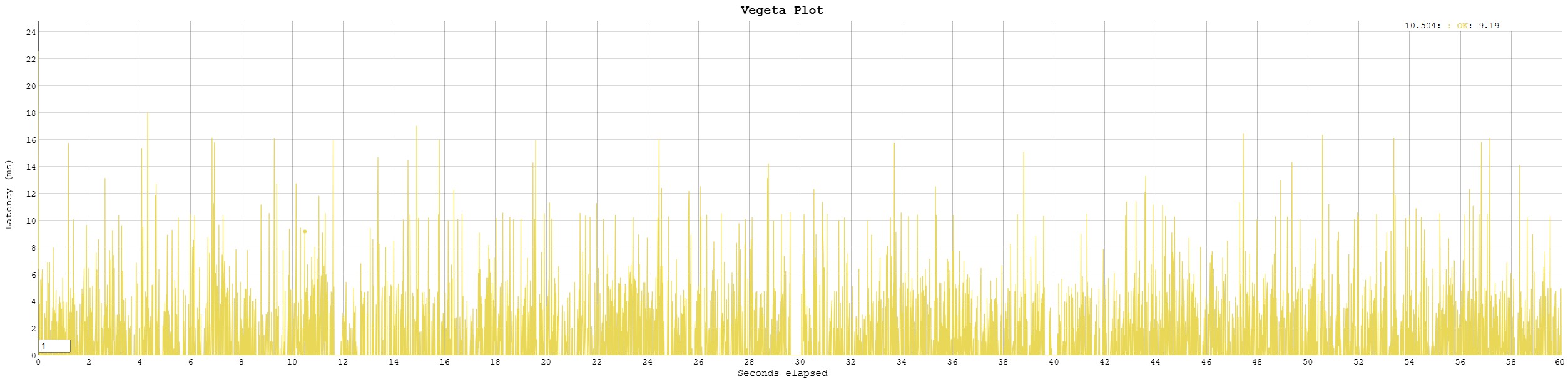
汇总
Requests      [total, rate, throughput]         599930, 9998.35, 9998.35
Duration      [total, attack, wait]             1m0s, 1m0s, 0s
Latencies     [min, mean, 50, 90, 95, 99, max]  0s, 676.024µs, 0s, 2.56ms, 3.705ms, 5.367ms, 26.437ms
Bytes In      [total, mean]                     232052167, 386.80
Bytes Out     [total, mean]                     0, 0.00
Success       [ratio]                           100.00%
Status Codes  [code:count]                      200:599930
Error Set:
.\vegeta.exe attack -insecure -rate=10000/s -duration=60s -format=http -targets=http2proxy -output=http2proxyresults -http2
// http2proxy content:
// GET https://127.0.0.1:5001/WeatherForecast
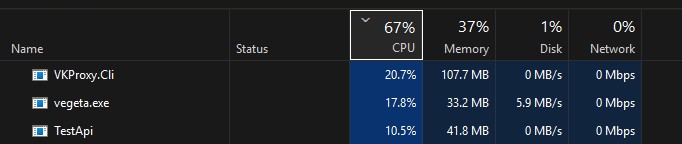
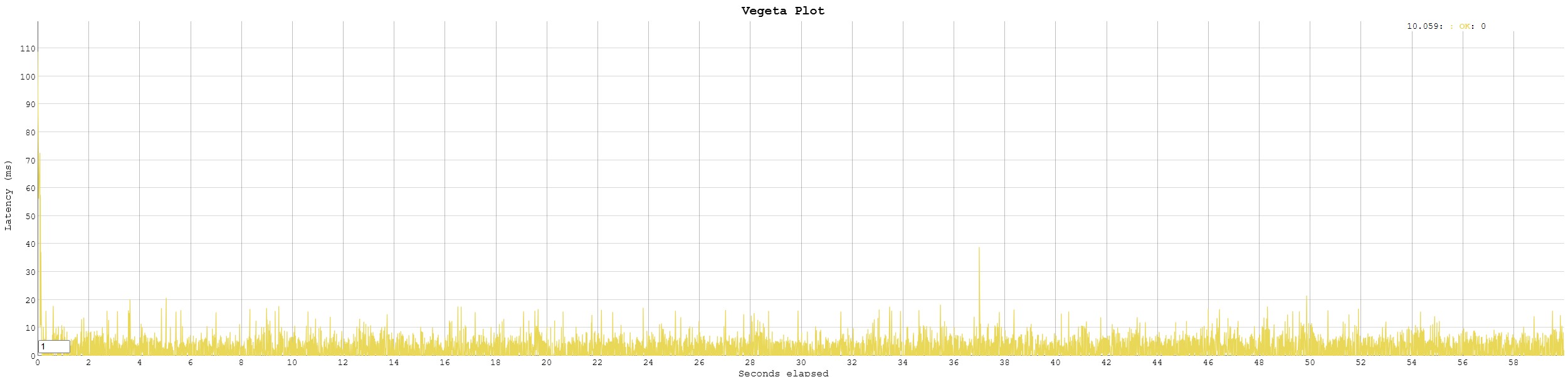
汇总
Requests      [total, rate, throughput]         599980, 9999.85, 9999.85
Duration      [total, attack, wait]             59.999s, 59.999s, 0s
Latencies     [min, mean, 50, 90, 95, 99, max]  0s, 2.199ms, 1.845ms, 5.162ms, 6.359ms, 9.217ms, 108.78ms
Bytes In      [total, mean]                     232078680, 386.81
Bytes Out     [total, mean]                     0, 0.00
Success       [ratio]                           100.00%
Status Codes  [code:count]                      200:599980
Error Set:
.\vegeta.exe attack -insecure -rate=10000/s -duration=60s -format=http -targets=tcpproxy -output=tcpproxyresults -http2
// tcpproxy content:
// GET https://127.0.0.1:5002/WeatherForecast
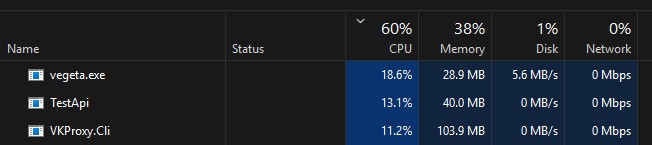
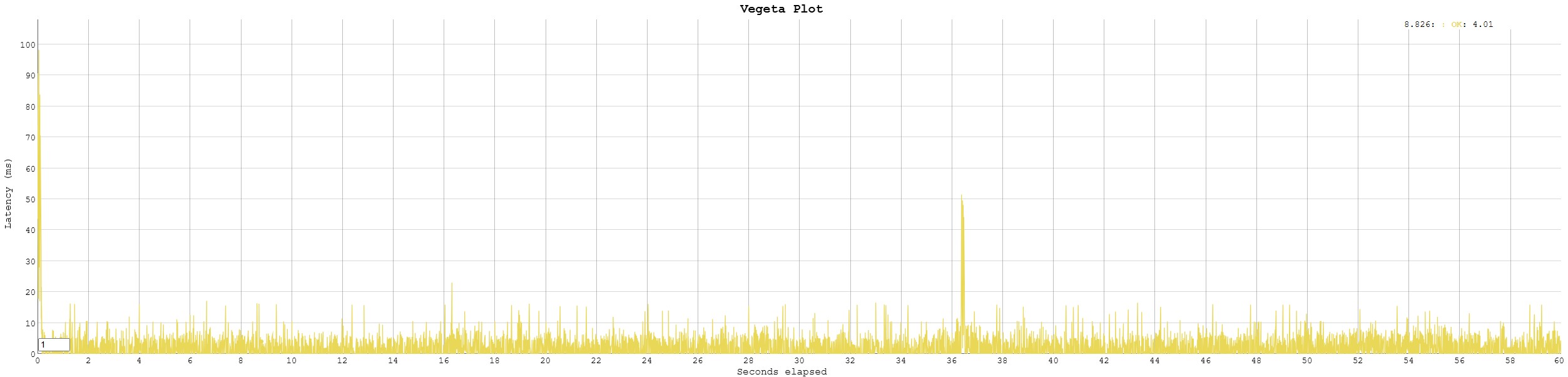
汇总
Requests      [total, rate, throughput]         599976, 9998.48, 9998.48
Duration      [total, attack, wait]             1m0s, 1m0s, 0s
Latencies     [min, mean, 50, 90, 95, 99, max]  0s, 1.809ms, 1.004ms, 4.736ms, 5.744ms, 8.995ms, 98.922ms
Bytes In      [total, mean]                     232069758, 386.80
Bytes Out     [total, mean]                     0, 0.00
Success       [ratio]                           100.00%
Status Codes  [code:count]                      200:599976
Error Set:
结果大致就是这样了,看起来个人写的代码也不至于太臭,至少理想情况下没有拖慢多少,
客官,你们怎么看?
VKProxy 是使用c#开发的基于 Kestrel 实现 L4/L7的代理(感兴趣的同学烦请点个github小赞赞呢)
此内容由惯性聚合(RSS阅读器)自动聚合整理,仅供阅读参考。 原文来自 — 版权归原作者所有。