


惯性聚合 高效追踪和阅读你感兴趣的博客、新闻、科技资讯
阅读原文 在惯性聚合中打开

推荐订阅源

酷 壳 – CoolShell
酷 壳 – CoolShell
H
Hacker News: Front Page
P
Palo Alto Networks Blog
T
ThreatConnect
Apple Machine Learning Research
博客园_首页
T
True Tiger Recordings
P
Privacy & Cybersecurity Law Blog
B
Blog
IT之家
IT之家
Last Week in AI
Last Week in AI
F
Full Disclosure
Hacker News: Ask HN
Hacker News: Ask HN
C
Comments on: Blog
Microsoft Azure Blog
C
Cybersecurity and Infrastructure Security Agency CISA
Microsoft Security Blog
博客园 - 【当耐特】
N
News and Events Feed by Topic
NISL@THU
NISL@THU
腾讯CDC
雷峰网
雷峰网
Security Latest
Security Latest
李成银的技术随笔
M
Microsoft Research Blog - Microsoft Research
L
LangChain Blog
L
Lohrmann on Cybersecurity
cs.CL updates on arXiv.org
C
Check Point Blog
Y
Y Combinator Blog
Recent Announcements
博客园 - Franky
N
News | PayPal Newsroom
V
V2EX
A
About on SuperTechFans
The Register - Security
月光博客
月光博客
奇客Solidot–传递最新科技情报
奇客Solidot–传递最新科技情报
Google Online Security Blog
MyScale Blog
MyScale Blog
Cisco Talos Blog
Cisco Talos Blog
Vercel News
Vercel News
WordPress大学
WordPress大学
C
Cyber Attacks, Cyber Crime and Cyber Security
The Hacker News
The Hacker News
IntelliJ IDEA : IntelliJ IDEA – the Leading IDE for Professional Development in Java and Kotlin | The JetBrains Blog
爱范儿
爱范儿
A
Arctic Wolf
L
LINUX DO - 最新话题
freeCodeCamp Programming Tutorials: Python, JavaScript, Git & More

博客园 - zqzdong

word 宏(图片锐度和对比度) Maven父子结构的项目依赖使用以及打包依赖 在linux下执行不带主函数的jar Maven项目打包 - zqzdong eclipse调用c语言类库 scala rdd的交集 差集 并集 cdh 的 oozie时间校准 java 调用c语言类库 java jar包代码混淆 AES 加密解密 logger日志配置 hadoop安装 flume配置及其执行命令 java批量导入数据 - zqzdong kafka配置及其使用 kafkaConsumer(从topic 拿数据存入hdfs) 自定义flume的sink mongodb3.2链接设置 在mongodb中存值,如果存在则修改,不存在插入
在windows下查找java服务cup过高问题
zqzdong · 2018-11-06 · via 博客园 - zqzdong

1:打开任务 管理器->查看->选择列->选中PID,找到javaw.exe的pid

2:在cmd命令窗口中执行命令:jstack pid > E:\log.log

3:利用微软提供的Process Explorer工具

一般在windows下只能查看进程的CPU占用率,想要查看线程的CPU占用率可以通过该工具。下载地址是:http://technet.microsoft.com/en-us/sysinternals/bb896653.aspx

4:下载后运行起来,找到PID为9272的进程   右键点击Properties...选项,看到如下信息:
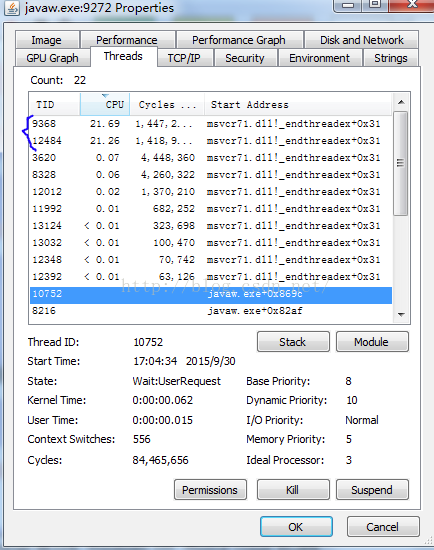
5:可以看到占用CPU最多的也是TID为9368和12484的两个线程。

将线程TID转换为十六进制  

6、在jstack工具导出的E:\log.log中查找 转化为16进制的值,找到代码行。

转自 https://blog.csdn.net/yangfengjueqi/article/details/81126914