惯性聚合 高效追踪和阅读你感兴趣的博客、新闻、科技资讯
阅读原文 在惯性聚合中打开

推荐订阅源

酷 壳 – CoolShell
酷 壳 – CoolShell
H
Hacker News: Front Page
P
Palo Alto Networks Blog
T
ThreatConnect
Apple Machine Learning Research
博客园_首页
T
True Tiger Recordings
P
Privacy & Cybersecurity Law Blog
B
Blog
IT之家
IT之家
Last Week in AI
Last Week in AI
F
Full Disclosure
Hacker News: Ask HN
Hacker News: Ask HN
C
Comments on: Blog
Microsoft Azure Blog
C
Cybersecurity and Infrastructure Security Agency CISA
Microsoft Security Blog
博客园 - 【当耐特】
N
News and Events Feed by Topic
NISL@THU
NISL@THU
腾讯CDC
雷峰网
雷峰网
Security Latest
Security Latest
李成银的技术随笔
M
Microsoft Research Blog - Microsoft Research
L
LangChain Blog
L
Lohrmann on Cybersecurity
cs.CL updates on arXiv.org
C
Check Point Blog
Y
Y Combinator Blog
Recent Announcements
博客园 - Franky
N
News | PayPal Newsroom
V
V2EX
A
About on SuperTechFans
The Register - Security
月光博客
月光博客
奇客Solidot–传递最新科技情报
奇客Solidot–传递最新科技情报
Google Online Security Blog
MyScale Blog
MyScale Blog
Cisco Talos Blog
Cisco Talos Blog
Vercel News
Vercel News
WordPress大学
WordPress大学
C
Cyber Attacks, Cyber Crime and Cyber Security
The Hacker News
The Hacker News
IntelliJ IDEA : IntelliJ IDEA – the Leading IDE for Professional Development in Java and Kotlin | The JetBrains Blog
爱范儿
爱范儿
A
Arctic Wolf
L
LINUX DO - 最新话题
freeCodeCamp Programming Tutorials: Python, JavaScript, Git & More

博客园 - 陌上花kai

openclaw实践 RooCode结合NacosMCP实践 Dify0.15.1升级1.4.3版本 本地密码管理器-Vaultwarden 从业务视角看AI落地:避免技术狂欢,聚焦真实需求 从"我要去山西旅游"看AI智能体的未来之旅:大模型如何重构自动化服务生态 OpenManus+DeepSeek体验 企业知识库落地实践 搭建个人AI知识库-DIFY 搭建个人AI知识库:RAG与本地模型实践指南 分享一个前后端分离后台管理系统 CV高手是怎么炼成的? linux下自建NAS教程 一个9年archlinux重度使用者自述 vim系列-文本操作篇 在日常工作和生活中使用Linux-开篇 springboot集成测试最小化依赖实践 ChatGpt怎么玩 如何通过电脑手柄玩安卓手游?
RooCode结合本地MCP实践
陌上花kai · 2025-05-09 · via 博客园 - 陌上花kai

引言

目前MCP也炒了一段时间,是骡子是马得拉出来溜溜。这篇文章偏向点技术,如果没有一点开发经验听个响就好。

实现两个简单功能

计算求和

显示本地目录列表

操作步骤

通过python实现一个server

文件创建

cd ~/workspace/python/demo
mkdir mcp && cd mcp
touch SumMCP.py

代码

"""
一个MCP Server, SumMCP.py
"""
from fastmcp import FastMCP
import os

mcp = FastMCP("Demo", log_level="ERROR")

@mcp.tool()
def add(a: int, b: int) -> int:
    """Add two numbers"""
    print("add", a, b)
    return a + b

@mcp.tool()
def listdir(path: str) -> list[str]:
    """show user dir list 显示用户文件列表"""
    return os.listdir(path)

if __name__ == "__main__":
    # mcp.run()
    # mcp.run(transport="sse", port=9123)
    # 基于标准输入输出实现,本地小工具推荐这种方式
    mcp.run(transport='stdio')

依赖安装

我这里使用的是anaconda,其它依赖管理都行

conda create -n py_3.12 python=3.12
source /opt/anaconda/bin/activate py_3.12
pip install fastmcp

参考

https://github.com/jlowin/fastmcp

vscode安装RooCode插件

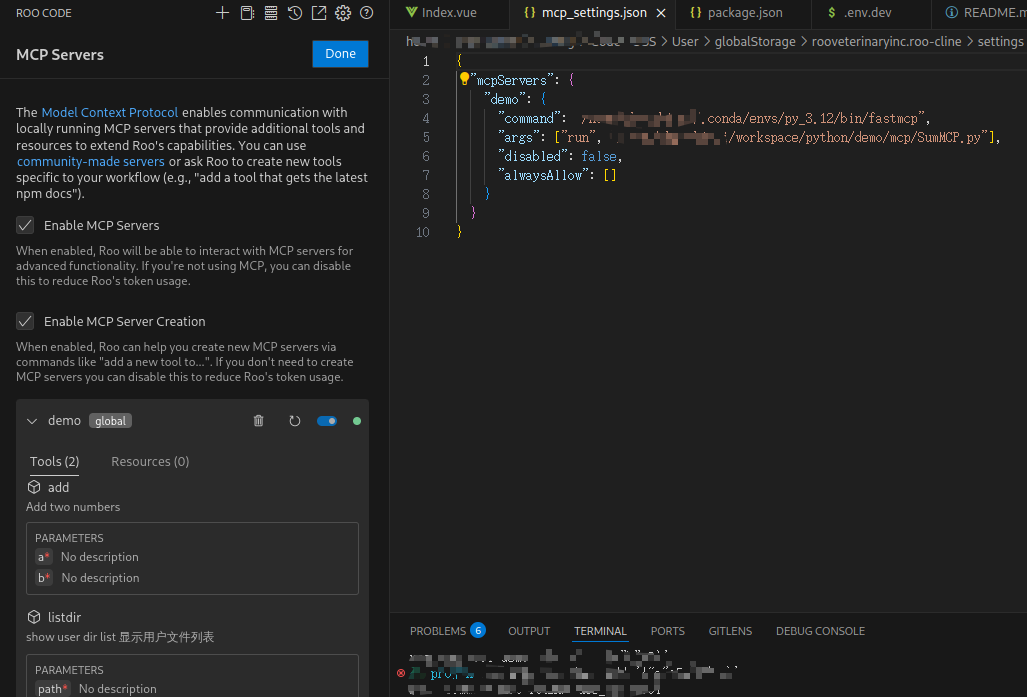
在RooCode插件中配置MCP

配置

在mcp_setting.json文件中配置自己的server

{
  "mcpServers": {
    "demo": {
      "command": "~/.conda/envs/py_3.12/bin/fastmcp",
      "args": ["run", "~/workspace/python/demo/mcp/SumMCP.py"],
      "disabled": false,
      "alwaysAllow": []
    }
  }
}

检查是否成功

配置完成后,mcpServer会显示绿色图标,如下

mcp配置

如果在之前SumMCP.py中增加了工具,一定要在这里刷新下,显示出新的工具,然后在插件中使用才会读取到。

测试

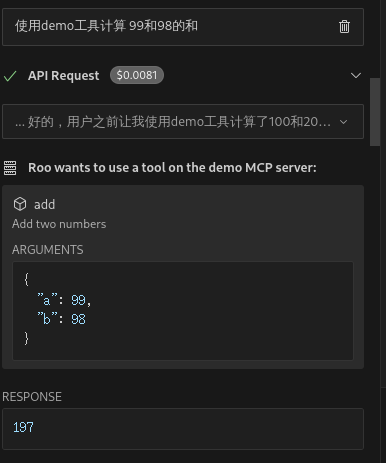
求和

使用demo工具, 计算99和98的和, 效果如下

显示求和

显示文件列表

使用listdir工具显示 /home/xx/Documents下的文件列表,效果如下
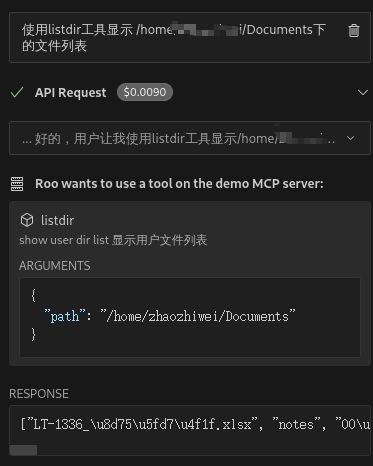
显示文件列表

总结

使用mcp的方式可以按照自己要求实现一些插件本身做不了或者不好实现的功能。目的是为了让外部交互的返回更好的跟模型上下文结合,从而产生更好的效果。如果对话过程中,模型能够自动识别是需要使用哪个mcp那么效果应该会更好。目前是需要明确告诉插件使用mcp,有时候甚至得告诉它具体是哪个tool。

这里只是一个最简单的使用,企业项目中能否使用该方式扩展业务,如何扩展,且听下回分解。