


朋友有个小项目的需求,想要用.NET Core 做后端,
前端使用React Antd Pro,比较正常的前后端分离项目需求。
研究了一下发现dotnet 项目模板里面自带react框架,是可以直接使用的。
PS:非服务端渲染,这里只是使用了Statis File中间件发布了前端页面。
➜  RCTableAdminTemplate git:(master) dotnet new
正在准备...
模板名                                           短名称             语言          标记
--------------------------------------------  --------------  ----------  ----------------------
Console Application                           console         [C#],F#,VB  Common/Console
Class library                                 classlib        [C#],F#,VB  Common/Library
Worker Service                                worker          [C#],F#     Common/Worker/Web
MSTest Test Project                           mstest          [C#],F#,VB  Test/MSTest
NUnit 3 Test Item                             nunit-test      [C#],F#,VB  Test/NUnit
NUnit 3 Test Project                          nunit           [C#],F#,VB  Test/NUnit
xUnit Test Project                            xunit           [C#],F#,VB  Test/xUnit
MVC ViewImports                               viewimports     [C#]        Web/ASP.NET
Razor Component                               razorcomponent  [C#]        Web/ASP.NET
MVC ViewStart                                 viewstart       [C#]        Web/ASP.NET
Razor Page                                    page            [C#]        Web/ASP.NET
Blazor Server App                             blazorserver    [C#]        Web/Blazor
Blazor WebAssembly App                        blazorwasm      [C#]        Web/Blazor/WebAssembly
ASP.NET Core Empty                            web             [C#],F#     Web/Empty
ASP.NET Core Web App (Model-View-Controller)  mvc             [C#],F#     Web/MVC
ASP.NET Core Web App                          webapp          [C#]        Web/MVC/Razor Pages
ASP.NET Core with React.js and Redux          reactredux      [C#]        Web/MVC/SPA
ASP.NET Core with Angular                     angular         [C#]        Web/MVC/SPA
ASP.NET Core with React.js                    react           [C#]        Web/MVC/SPA
Razor Class Library                           razorclasslib   [C#]        Web/Razor/Library
ASP.NET Core Web API                          webapi          [C#],F#     Web/WebAPI
ASP.NET Core gRPC Service                     grpc            [C#]        Web/gRPC
dotnet gitignore file                         gitignore                   Config
global.json file                              globaljson                  Config
NuGet Config                                  nugetconfig                 Config
Dotnet local tool manifest file               tool-manifest               Config
Web Config                                    webconfig                   Config
Solution File                                 sln                         Solution
Protocol Buffer File                          proto                       Web/gRPC

Examples:
    dotnet new mvc --auth Individual
    dotnet new nunit
    dotnet new --help
    dotnet new mstest --help
在新文件下执行 “dotnet new react ” ,于是生成了以下项目
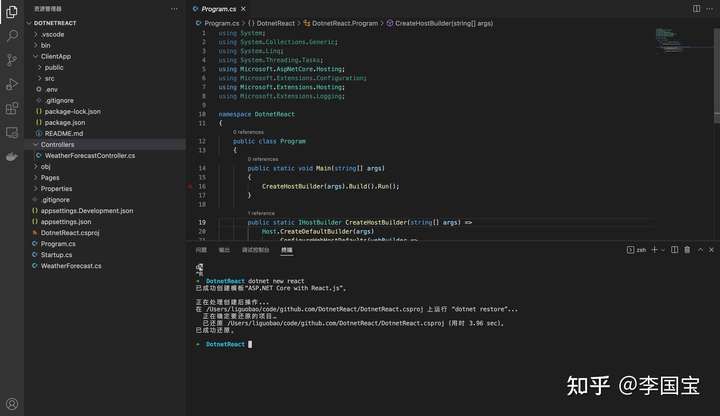
在这里可以看到
启动项目看一下
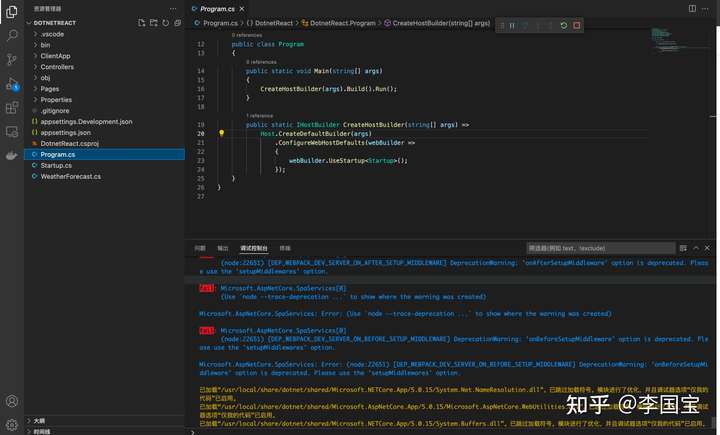
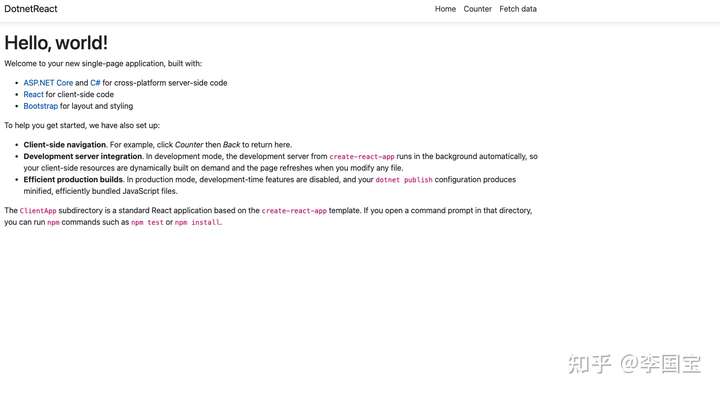
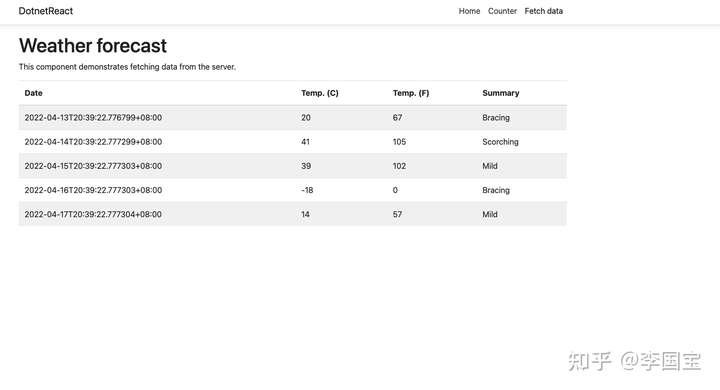
看起来基本没什么问题。
不过后端代码没有完整隔离在一个项目里面,看起来不太舒服,还是折腾一下。
所以,先搞个sln项目,在当前文件夹下面再创建一个src文件夹.
➜  DotnetReact dotnet new sln
已成功创建模板“Solution File”。
➜  DotnetReact pwd
/Users/liguobao/code/github.com/DotnetReact
➜  DotnetReact mkdir src
接着把所有的后端项目代码全部挪到src目录。
执行 "dotnet sln add src/DotnetReact.csproj "
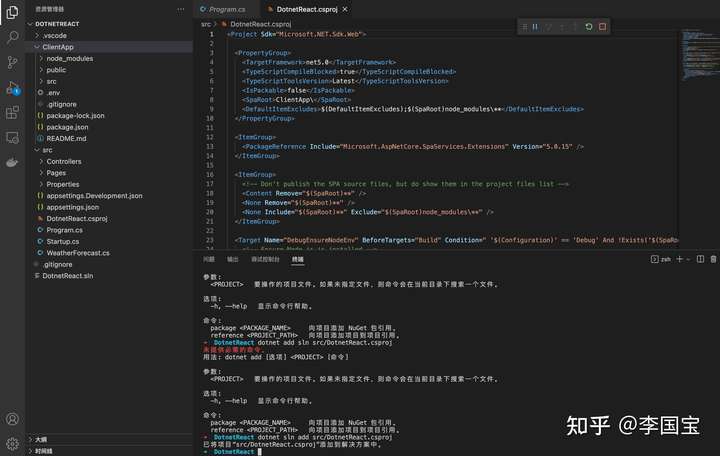
项目文件到这里已经调整完成了。
但是,因为DotnetReact.csproj项目引用ClientApp有所变化,构建打包逻辑还需要调整一下。
打开DotnetReact.csproj文件。
找到 <SpaRoot>ClientApp\</SpaRoot> 节点,
将其修改为 <SpaRoot>..\ClientApp\</SpaRoot>
执行一下“dotnet build”,确认没什么问题,该有的数据都有了
➜  DotnetReact dotnet build .
用于 .NET 的 Microsoft (R) 生成引擎版本 16.11.2+f32259642
版权所有(C) Microsoft Corporation。保留所有权利。

  正在确定要还原的项目…
  已还原 /Users/liguobao/code/github.com/DotnetReact/src/DotnetReact.csproj (用时 181 ms)。
  DotnetReact -> /Users/liguobao/code/github.com/DotnetReact/src/bin/Debug/net5.0/DotnetReact.dll
  DotnetReact -> /Users/liguobao/code/github.com/DotnetReact/src/bin/Debug/net5.0/DotnetReact.Views.dll

已成功生成。
    0 个警告
    0 个错误

已用时间 00:00:07.63
执行 ‘dotnet publish’, 发现打包有点问题 :
后端DLL正常打包,
前端ClientApp项目构建正常,但是没被复制到发布目录。
认真研究了一波 https://stackoverflow.com/questions/57526319/a-full-explanation-for-the-resolvedfiletopublish-xml-element 之后确认,需要调整一下 ResolvedFileToPublish 配置。
将RelativePath调整为
<RelativePath>./publish/%(DistFiles.Identity)</RelativePath>然后重新dotnet publish 构建,确认ClientApp正常构建
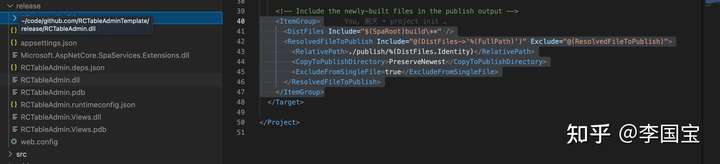
不过如果只设置这里,默认是publish到 debug/xxx/publish文件夹的,
比较合适的办法是设置一下默认发布文件夹
在 DotnetReact.csproj 文件<PropertyGroup>节点下新增 <PublishDir>..\release</PublishDir>
完整节点数据如下
  <PropertyGroup>
    <TargetFramework>net5.0</TargetFramework>
    <TypeScriptCompileBlocked>true</TypeScriptCompileBlocked>
    <TypeScriptToolsVersion>Latest</TypeScriptToolsVersion>
    <IsPackable>false</IsPackable>
    <SpaRoot>..\ClientApp\</SpaRoot>
    <PublishDir>..\release</PublishDir>
    <DefaultItemExcludes>$(DefaultItemExcludes);$(SpaRoot)node_modules\**</DefaultItemExcludes>
  </PropertyGroup>
然后再执行 dotnet publish 即可默认发布到release文件夹下,一切正常。
最后把整个前端项目替换成Antd Pro的项目代码即可。
完事。
完整代码可见:
GitHub - liguobao/RCTableAdminTemplate: RCTableAdminTemplate
PS: 包含Dockerfile + gitlab ci + k8s deployment 部署文件
此内容由惯性聚合(RSS阅读器)自动聚合整理,仅供阅读参考。 原文来自 — 版权归原作者所有。