

惯性聚合 高效追踪和阅读你感兴趣的博客、新闻、科技资讯
阅读原文 在惯性聚合中打开

推荐订阅源

酷 壳 – CoolShell
酷 壳 – CoolShell
H
Hacker News: Front Page
P
Palo Alto Networks Blog
T
ThreatConnect
Apple Machine Learning Research
博客园_首页
T
True Tiger Recordings
P
Privacy & Cybersecurity Law Blog
B
Blog
IT之家
IT之家
Last Week in AI
Last Week in AI
F
Full Disclosure
Hacker News: Ask HN
Hacker News: Ask HN
C
Comments on: Blog
Microsoft Azure Blog
C
Cybersecurity and Infrastructure Security Agency CISA
Microsoft Security Blog
博客园 - 【当耐特】
N
News and Events Feed by Topic
NISL@THU
NISL@THU
腾讯CDC
雷峰网
雷峰网
Security Latest
Security Latest
李成银的技术随笔
M
Microsoft Research Blog - Microsoft Research
L
LangChain Blog
L
Lohrmann on Cybersecurity
cs.CL updates on arXiv.org
C
Check Point Blog
Y
Y Combinator Blog
Recent Announcements
博客园 - Franky
N
News | PayPal Newsroom
V
V2EX
A
About on SuperTechFans
The Register - Security
月光博客
月光博客
奇客Solidot–传递最新科技情报
奇客Solidot–传递最新科技情报
Google Online Security Blog
MyScale Blog
MyScale Blog
Cisco Talos Blog
Cisco Talos Blog
Vercel News
Vercel News
WordPress大学
WordPress大学
C
Cyber Attacks, Cyber Crime and Cyber Security
The Hacker News
The Hacker News
IntelliJ IDEA : IntelliJ IDEA – the Leading IDE for Professional Development in Java and Kotlin | The JetBrains Blog
爱范儿
爱范儿
A
Arctic Wolf
L
LINUX DO - 最新话题
freeCodeCamp Programming Tutorials: Python, JavaScript, Git & More

博客园 - 雪莉06

antd vue 树形表格 vue2 jeecgBoot keepalive 解决方案 vue中实现页面全屏和指定元素全屏 screenfull全屏组件的基本使用 网页导出EXCEL格式数据,长数字变为科学计数法的解决方法 dedecms织梦自定义表单导出到excel的方法 织梦dede:arclist按最新修改排序orderby=pubdate无效的解决方法 vue-router报错:Uncaught (in promise) NavigationDuplicated {_name: ‘NavigationDuplicated‘, name: ‘Navig nvm的安装和使用(转) elementUI 的 input无法输入bug解决 vue数字翻牌效果 j-modal的 slot="footer" 失效 v-if判断页脚按钮 帝国CMS后台登录空白怎么办?如何修改成https ES6两个数组进行比较 element ui form表单 表格下嵌套动态表格,新增行,删除行 vue 父子组件传值报错:this.$emit is not a function 解决 dede列表页调用二三级导航栏(转载) a-table 鼠标滑过显示小手,当前行可点击(转载) vue里面修改title样式
echarts折线图使用dataZoom,切换数据时渲染异常,出现竖线bug
雪莉06 · 2024-04-24 · via 博客园 - 雪莉06

 今天做项目遇到一个省份过多时,要加滚动条的需求。但是切换数据的时候,出现上图所出现的问题。
经查资料,发现可以设置一个属性来解决这个问题。
      filterMode: 'empty'
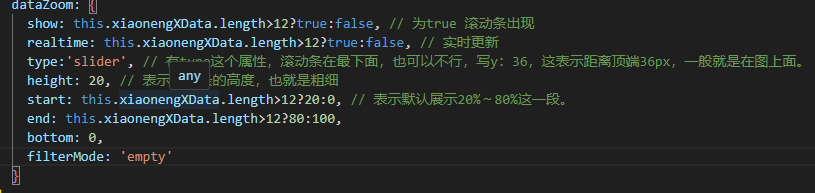
dataZoom: {

          show: this.xiaonengXData.length>12?true:false, // 为true 滚动条出现

          realtime: this.xiaonengXData.length>12?true:false, // 实时更新

          type:'slider', // 有type这个属性,滚动条在最下面,也可以不行,写y:36,这表示距离顶端36px,一般就是在图上面。

          height: 20, // 表示滚动条的高度,也就是粗细

          start: this.xiaonengXData.length>12?20:0, // 表示默认展示20%~80%这一段。

          end: this.xiaonengXData.length>12?80:100,

          bottom: 0,

          filterMode: 'empty'

        }

dataZoom 的运行原理是通过 数据过滤 以及在内部设置轴的显示窗口来达到 数据窗口缩放 的效果。

数据过滤模式(dataZoom.filterMode)的设置不同,效果也不同。

可选值为:

filter 当前数据窗口外的数据,被 过滤掉。即 会 影响其他轴的数据范围。每个数据项,只要有一个维度在数据窗口外,整个数据项就会被过滤掉。

weakFilter 当前数据窗口外的数据,被 过滤掉。即 会 影响其他轴的数据范围。每个数据项,只有当全部维度都在数据窗口同侧外部,整个数据项才会被过滤掉。

empty 当前数据窗口外的数据,被设置为空。即 不会 影响其他轴的数据范围。

none  不过滤数据,只改变数轴范围。

如何设置,由用户根据场景和需求自己决定。经验来说:

  • 当『只有 X 轴 或 只有 Y 轴受 dataZoom 组件控制』时,常使用 filterMode: 'filter',这样能使另一个轴自适应过滤后的数值范围。
  • 当『X 轴 Y 轴分别受 dataZoom 组件控制』时:
    • 如果 X 轴和 Y 轴是『同等地位的、不应互相影响的』,比如在『双数值轴散点图』中,那么两个轴可都设为 fiterMode: 'empty'
    • 如果 X 轴为主,Y 轴为辅,比如在『柱状图』中,需要『拖动 dataZoomX 改变 X 轴过滤柱子时,Y 轴的范围也自适应剩余柱子的高度』,『拖动 dataZoomY 改变 Y 轴过滤柱子时,X 轴范围不受影响』,那么就 X轴设为 fiterMode: 'filter',Y 轴设为 fiterMode: 'empty',即主轴 'filter',辅轴 'empty'

这里将其设置为 empty 就可以避免该问题。