


收到需求后,做了下调研。
在网上找了一下,发现大家都是在用itext。 iText是著名的开放项目,是用于生成PDF文档的一个java类库。通过iText不仅可以生成PDF或rtf的文档,而且可以将XML、Html文件转化为PDF文件。
具体使用开源参考:https://juejin.cn/post/6844903952933191687
但是我使用了后,发现问题不少。首先需要使用DC编辑模板。试用期30天,不好找到免费的版本。

其次完成功能后,几个典型问题:
1、字体不展示全,比如三个字只显示1个字
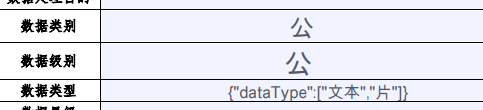
点进去才能看到是3个字:“公开级”,而不是我们看到的“公”
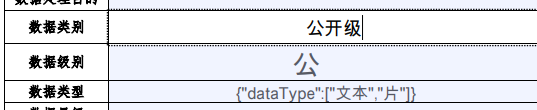
2、上述可以看到字体不一样,字体大小也不一样
所以我就放弃了使用itext,使用了别的方案
客户给的是word模板,我考虑了word转pdf,和excel转pdf,比较后,觉得excel转pdf很简单。于是把word模板内容换成了excel。模板的值都是变量。
1、先依靠模板model.xlsx,生成一个带数据的id.xlsx
2、再把id.xlsx转换为pdf
3、删除id.xlsx
上述是思路,具体使用的是第三方组件:spire.xls.free,我使用的是免费版的。正版的需要付费,不付费会带水印,水印也有办法可以破解
具体实现如下:
先制作模板文件:客户模板1.xlsx:
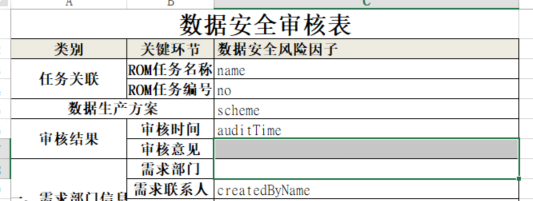
pom依赖:
<repository>
    <id>com.e-iceblue</id>
    <url>https://repo.e-iceblue.cn/repository/maven-public/</url>
</repository>

<dependency>
    <groupId>e-iceblue</groupId>
    <artifactId>spire.xls.free</artifactId>
    <version>2.2.0</version>
</dependency>
高级版本带有水印,免费版本无水印
map替换模板中的变量即可
Map map = new HashMap();
map.put("name", "测试方案");
map.put("no", "888888");
map.put("scheme", "生产方案001");
map.put("createdByName", "马飚");
map.put("auditTime", "2022-09-30");
replaceSheetsModel(map, "D:\\data\\客户模板1.xlsx", "D:\\data\\客户模板2.xlsx");
ExcelToPdf("D:\\data\\客户模板2.xlsx", "D:\\data\\客户模板44.pdf");
excel模板文件填充信息,生成excel详细文件:客户模板2.xlsx
public static void replaceSheetsModel(Map map,String intPath,String outPath) {
    try {
        FileInputStream fs = new FileInputStream(intPath);
        XSSFWorkbook workbook = new XSSFWorkbook(fs);
        XSSFWorkbook wb = (XSSFWorkbook) workbook;
        XSSFSheet sheet;
        for (int j = 0; j < wb.getNumberOfSheets(); j++) {
            sheet = workbook.getSheetAt(j);
            Iterator rows = sheet.rowIterator();
            while (rows.hasNext()) {
                XSSFRow row = (XSSFRow) rows.next();
                if (row != null) {
                    int num = row.getLastCellNum();
                    for (int i = 0; i < num; i++) {
                        XSSFCell cell = row.getCell(i);
                        if (cell != null) {
                            cell.setCellType(XSSFCell.CELL_TYPE_STRING);
                        }
                        if (cell == null || cell.getStringCellValue() == null) {
                            continue;
                        }
                        String value = cell.getStringCellValue();
                        if (!"".equals(value)) {
                            Set<String> keySet = map.keySet();
                            Iterator<String> it = keySet.iterator();
                            while (it.hasNext()) {
                                String text = it.next();
                                if (value.equalsIgnoreCase(text)) {
                                    cell.setCellValue((String) map.get(text));
                                    break;
                                }
                            }
                        } else {
                            cell.setCellValue("");
                        }
                    }
                }
            }
        }
        FileOutputStream fileOut = new FileOutputStream(outPath);
        wb.write(fileOut);
        fileOut.close();
    } catch (Exception e) {

        e.printStackTrace();
    }
}
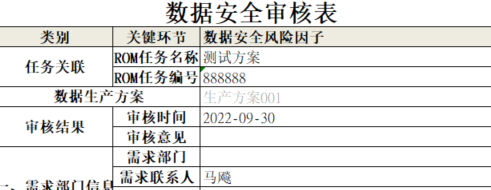
excel转PDF方法:
public static void ExcelToPdf(String fileName, String outfileName) throws Exception {

    Workbook wb = new Workbook();

    wb.loadFromFile(fileName);

    wb.saveToFile(outfileName, FileFormat.PDF);
}
完整代码块:
先准备模板,用map替换模板中的变量
Map map = new HashMap();
map.put("name", "测试方案");
map.put("no", "888888");
map.put("scheme", "生产方案001");
map.put("createdByName", "马飚");
map.put("auditTime", "2022-09-30");
replaceSheetsModel(map, "D:\\data\\客户模板1.xlsx", "D:\\data\\客户模板2.xlsx");  // 替换模板文件中的变量,生成新的excel-客户模板2.xlsx
ExcelToPdf("D:\\data\\客户模板2.xlsx", "D:\\data\\客户模板44.pdf");               //客户模板2.xlsx转PDF文件
File file = new File(outPath);
file.delete();                                                                 // 删除客户模板2.xlsx
到此就完成了模板文件转化为pdf文件。
此内容由惯性聚合(RSS阅读器)自动聚合整理,仅供阅读参考。 原文来自 — 版权归原作者所有。