


来吧,先给大家看一下,是否是你想要的简单轻便编辑器的效果。
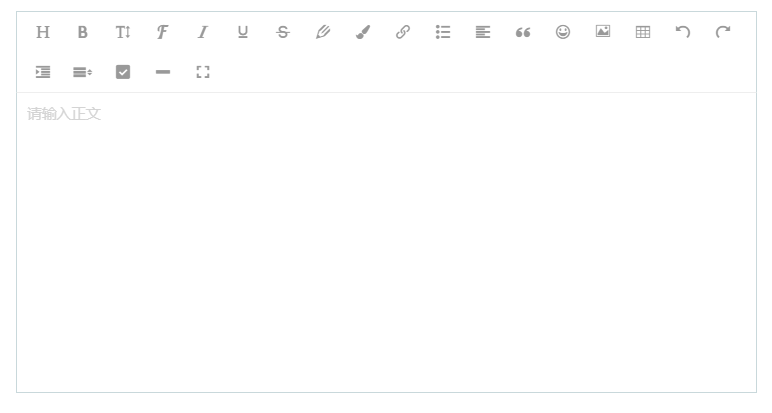
父组件:
<EditorView :content="value" @change="grtUrl"/>

<script>
import EditorView from "@/components/EditorView";
export default {
  components: {
    EditorView
      }
    },
  data() {
    return {
      value: ""  //传值给编辑器
    }
},
  methods: {
    grtUrl(val){
      this.value = val;
      }
    }
}
</script>
子组件:
<template>
  <div>
    <div id="editor"></div>
  </div>
</template>

<script>
import E from "wangeditor";
import { uploadImg } from "@/utils/uploadImg";

export default {
  name: "WangEditor",
  data() {
    return {
      result: "",
      editor: null, // WangEditor 实例
    };
  },
  props: {
    content: {
      type: String,
      default: "",
    },
  },
  watch: {
    // 当父组件传入的 content 变化时,更新编辑器内容
    content(newContent) {
      if (this.editor && newContent !== this.editor.txt.html()) {
        this.editor.txt.html(newContent);
      }
    },
  },
  mounted() {
    this.editor = new E("#editor");
    // 配置 server 接口地址
    this.editor.config.showLinkImg = false; //即可隐藏插入网络图片的功能
    // 配置菜单
    this.editor.config.menus = [
      "head", // 标题
      "bold", // 粗体
      "fontSize", // 字号
      "fontName", // 字体
      "italic", // 斜体
      "underline", // 下划线
      "strikeThrough", // 删除线
      "foreColor", // 文字颜色
      "backColor", // 背景颜色
      "link", // 插入链接
      "list", // 列表
      "justify", // 对齐方式
      "quote", // 引用
      "emoticon", // 表情
      "image", // 插入图片
      "table", // 表格
      // 'video', // 插入视频
      // 'code', // 插入代码
      "undo", // 撤销
      "redo", // 重复
      "fullscreen", // 全屏
      "indent",
      "lineHeight",
      "todo",
      "splitLine",
    ];
    this.editor.config.customUploadImg = function (resultFiles, insertImgFn) {
      // resultFiles 是 input 中选中的文件列表
      // insertImgFn 是获取图片 url 后,插入到编辑器的方法
      const formData = new FormData();
      formData.append("file", resultFiles[0]);
      uploadImg(formData).then((res) => {
        insertImgFn(res.data.url); // 页面插入图片
      });
    };
    this.editor.config.onchange = (html) => {
      this.content = html; // 绑定当前逐渐地值
      this.$emit("change", this.content); // 将内容同步到父组件中
    };
    this.editor.create();
    // 初始化时设置内容
    this.editor.txt.html(this.content);
  },
  beforeDestroy() {
    // 销毁编辑器实例,释放资源
    if (this.editor) {
      this.editor.destroy();
    }
  },
};
</script>
<style scoped>
/* 遮罩层级太高 */
#editor >>> .w-e-toolbar{
  z-index: 2 !important;
}
#editor >>> .w-e-text-container{
  z-index: 1 !important;
}
</style>
文件路径在src/utils/uploadImg下
import request from "./request";
// 图片上传
export const uploadImg = (formData) => {
  return request.post("/qiegang-system/api/v1/files", formData, {
    headers: {
      "Content-Type": "multipart/form-data",
    },
  });
};
此内容由惯性聚合(RSS阅读器)自动聚合整理,仅供阅读参考。 原文来自 — 版权归原作者所有。