


1.给自己的项目取一个名字,使用 vs2019 , .net core 3.0
引用 dapper

2.然后构建一个类
    public class Customer
    {
        public int CustomerID { get; set; }
        public string CustomerName { get; set; }public string Address { get; set; }
        public string City { get; set; }
        public string PostalCode { get; set; }
        public string Country { get; set; }
    }
3.数据库脚本
USE [Demo]
GO
/****** Object:  Table [dbo].[Customer]    Script Date: 2019/11/27 14:50:29 ******/
SET ANSI_NULLS ON
GO
SET QUOTED_IDENTIFIER ON
GO
CREATE TABLE [dbo].[Customer](
    [CustomerID] [int] IDENTITY(1,1) NOT NULL,
    [CustomerName] [nvarchar](200) NULL,
    [Address] [nvarchar](200) NULL,
    [City] [nvarchar](200) NULL,
    [PostalCode] [nvarchar](200) NULL,
    [Country] [nvarchar](200) NULL,
 CONSTRAINT [PK_Customer1] PRIMARY KEY CLUSTERED
(
    [CustomerID] ASC
)WITH (PAD_INDEX = OFF, STATISTICS_NORECOMPUTE = OFF, IGNORE_DUP_KEY = OFF, ALLOW_ROW_LOCKS = ON, ALLOW_PAGE_LOCKS = ON) ON [PRIMARY]
) ON [PRIMARY]
GO
4. 下面就开始使用dapper 了

 1 using Dapper;
 2 using System;
 3 using System.Data.SqlClient;
 4
 5
 6 namespace DotNetCoreDapper
 7 {
 8     public class Program
 9     {
10         public static void Main(string[] args)
11         {
12             var connectionString = "Server=.;Database=Demo;User Id=sa;Password = keno;";
13
14             //use package System.Data.SqlClient
15             using (var connection = new SqlConnection(connectionString))
16             {
17                 var customer = connection.QueryFirst<Customer>("select * from [dbo].[Customer] where customerid=1");
18
19                 Console.WriteLine("id: " + customer.CustomerID + " CustomerName:  " + customer.CustomerName + " ContactName: " + customer.ContactName + " Address: " + customer.Address + " City: " + customer.City + " PostalCode: " + customer.PostalCode);
20             }
21
22
23             Console.ReadKey();
24         }
25     }
26 }
View Code
5.最后是一个简单的结果
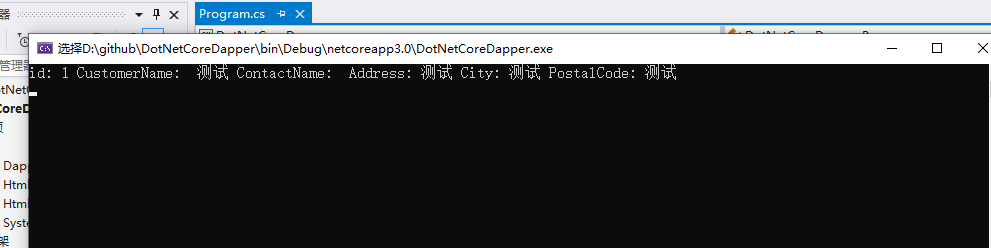
到此一个简答的demo 已经完成明天见......
此内容由惯性聚合(RSS阅读器)自动聚合整理,仅供阅读参考。 原文来自 — 版权归原作者所有。