惯性聚合 高效追踪和阅读你感兴趣的博客、新闻、科技资讯
阅读原文 在惯性聚合中打开

推荐订阅源

酷 壳 – CoolShell
酷 壳 – CoolShell
H
Hacker News: Front Page
P
Palo Alto Networks Blog
T
ThreatConnect
Apple Machine Learning Research
博客园_首页
T
True Tiger Recordings
P
Privacy & Cybersecurity Law Blog
B
Blog
IT之家
IT之家
Last Week in AI
Last Week in AI
F
Full Disclosure
Hacker News: Ask HN
Hacker News: Ask HN
C
Comments on: Blog
Microsoft Azure Blog
C
Cybersecurity and Infrastructure Security Agency CISA
Microsoft Security Blog
博客园 - 【当耐特】
N
News and Events Feed by Topic
NISL@THU
NISL@THU
腾讯CDC
雷峰网
雷峰网
Security Latest
Security Latest
李成银的技术随笔
M
Microsoft Research Blog - Microsoft Research
L
LangChain Blog
L
Lohrmann on Cybersecurity
cs.CL updates on arXiv.org
C
Check Point Blog
Y
Y Combinator Blog
Recent Announcements
博客园 - Franky
N
News | PayPal Newsroom
V
V2EX
A
About on SuperTechFans
The Register - Security
月光博客
月光博客
奇客Solidot–传递最新科技情报
奇客Solidot–传递最新科技情报
Google Online Security Blog
MyScale Blog
MyScale Blog
Cisco Talos Blog
Cisco Talos Blog
Vercel News
Vercel News
WordPress大学
WordPress大学
C
Cyber Attacks, Cyber Crime and Cyber Security
The Hacker News
The Hacker News
IntelliJ IDEA : IntelliJ IDEA – the Leading IDE for Professional Development in Java and Kotlin | The JetBrains Blog
爱范儿
爱范儿
A
Arctic Wolf
L
LINUX DO - 最新话题
freeCodeCamp Programming Tutorials: Python, JavaScript, Git & More

博客园 - Pavilion

windows下安装mingw-w64,c/c++编译器 word 文档,高亮关键字,因 DOM 结构复杂(跨段落、跨表格、跨样式)导致滚动定位偏差问题解决方案 python 命令行参数修改 安装Mysql macd指标 pyCharm 设置 签名,时间 Pycharm 设置 flask 监听端口 pycharm专业版的安装和破解教程 Python 虚拟环境安装flask框架 Read timed out. Python虚拟环境 解决pip无法更新问题的简单方法:WARNING: You are using pip version 20.2.1; however, version 24.2 is available. RequestsDependencyWarning: urllib3 (2.0.0.dev0) or chardet (3.0.4) doesn't match a supported version! RequestsDependencyWarning) - Pavilion PyCharm怎样添加Qt designer 十大排序算法 IntelliJ IDEA安装教程 JDK12的安装搭建 提交并发量的方法:Java GC tuning :Garbage collector VNPY加密教程(Python生成pyd文件) python 绘制点线
pyqt5 列表内添加按钮
Pavilion · 2021-08-10 · via 博客园 - Pavilion

pyqt5 列表内添加按钮

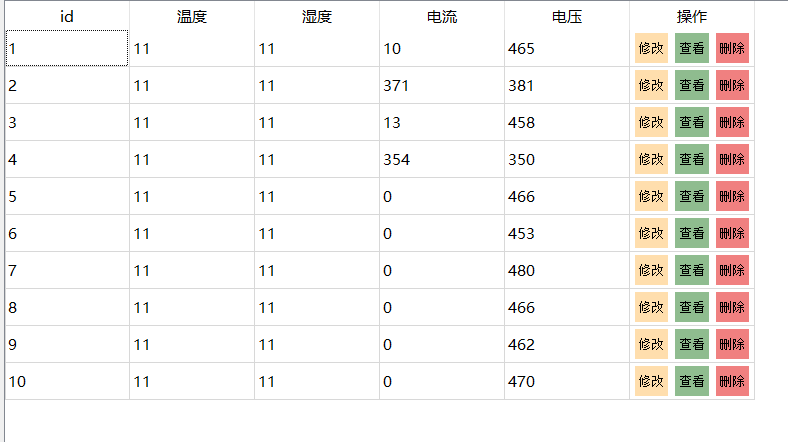
我们想在操作列表内添加按钮,例如查看、修改、删除

1、定义添加按钮的方法

复制代码

 1 # 列表内添加按钮
 2     def buttonForRow(self,id):
 3         widget=QWidget()
 4         # 修改
 5         updateBtn = QPushButton('修改')
 6         updateBtn.setStyleSheet(''' text-align : center;
 7                                           background-color : NavajoWhite;
 8                                           height : 30px;
 9                                           border-style: outset;
10                                           font : 13px  ''')
11 
12         updateBtn.clicked.connect(lambda:self.updateTable(id))
13 
14         # 查看
15         viewBtn = QPushButton('查看')
16         viewBtn.setStyleSheet(''' text-align : center;
17                                   background-color : DarkSeaGreen;
18                                   height : 30px;
19                                   border-style: outset;
20                                   font : 13px; ''')
21 
22         viewBtn.clicked.connect(lambda: self.viewTable(id))
23 
24         # 删除
25         deleteBtn = QPushButton('删除')
26         deleteBtn.setStyleSheet(''' text-align : center;
27                                     background-color : LightCoral;
28                                     height : 30px;
29                                     border-style: outset;
30                                     font : 13px; ''')
31 
32 
33         hLayout = QHBoxLayout()
34         hLayout.addWidget(updateBtn)
35         hLayout.addWidget(viewBtn)
36         hLayout.addWidget(deleteBtn)
37         hLayout.setContentsMargins(5,2,5,2)
38         widget.setLayout(hLayout)
39         return widget

复制代码

2、在向tableWidget里添加数据时插入即可

复制代码

1 for row_number, row_data in enumerate(rsdata):
2     self.ui.tableWidget.insertRow(row_number)
3     for i in range(len(row_data)+1):
4         if i<len(row_data):
5             self.ui.tableWidget.setItem(row_number, i, QtWidgets.QTableWidgetItem(str(row_data[i])))
6         # 添加按钮
7         if i==len(row_data):
8             # 传入当前id
9             self.ui.tableWidget.setCellWidget(row_number, i,self.buttonForRow(str(row_data[0])))

复制代码

效果图