惯性聚合 高效追踪和阅读你感兴趣的博客、新闻、科技资讯
阅读原文 在惯性聚合中打开

推荐订阅源

酷 壳 – CoolShell
酷 壳 – CoolShell
H
Hacker News: Front Page
P
Palo Alto Networks Blog
T
ThreatConnect
Apple Machine Learning Research
博客园_首页
T
True Tiger Recordings
P
Privacy & Cybersecurity Law Blog
B
Blog
IT之家
IT之家
Last Week in AI
Last Week in AI
F
Full Disclosure
Hacker News: Ask HN
Hacker News: Ask HN
C
Comments on: Blog
Microsoft Azure Blog
C
Cybersecurity and Infrastructure Security Agency CISA
Microsoft Security Blog
博客园 - 【当耐特】
N
News and Events Feed by Topic
NISL@THU
NISL@THU
腾讯CDC
雷峰网
雷峰网
Security Latest
Security Latest
李成银的技术随笔
M
Microsoft Research Blog - Microsoft Research
L
LangChain Blog
L
Lohrmann on Cybersecurity
cs.CL updates on arXiv.org
C
Check Point Blog
Y
Y Combinator Blog
Recent Announcements
博客园 - Franky
N
News | PayPal Newsroom
V
V2EX
A
About on SuperTechFans
The Register - Security
月光博客
月光博客
奇客Solidot–传递最新科技情报
奇客Solidot–传递最新科技情报
Google Online Security Blog
MyScale Blog
MyScale Blog
Cisco Talos Blog
Cisco Talos Blog
Vercel News
Vercel News
WordPress大学
WordPress大学
C
Cyber Attacks, Cyber Crime and Cyber Security
The Hacker News
The Hacker News
IntelliJ IDEA : IntelliJ IDEA – the Leading IDE for Professional Development in Java and Kotlin | The JetBrains Blog
爱范儿
爱范儿
A
Arctic Wolf
L
LINUX DO - 最新话题
freeCodeCamp Programming Tutorials: Python, JavaScript, Git & More

博客园 - 杭州铁锤

IC卡ID卡简介 博文阅读密码验证 - 博客园 win11系统优化(右键鼠标选项功能太多) SpaceDesk连接后黑白屏解决方法 博文阅读密码验证 - 博客园 搭建基于Grafana+Prometheus+Node_exporter的性能监控与分析平台 混沌测试和异常测试区别 博文阅读密码验证 - 博客园 fiddler模拟弱网测试 Fiddler如何抓取HTTPS请求 Fiddler如何设置只抓取固定域名的数据 博文阅读密码验证 - 博客园 Tabby开源终端工具使用教程 人力资源工作内容和职责 基础的软件测试面试题及答案 软件测试团队的管理 性能并发指标 VSCode编辑器极简使用入门 JavaScript基础教程前言
Jmeter修改界面字体大小
杭州铁锤 · 2025-06-24 · via 博客园 - 杭州铁锤

1.在jmeter.properties文件中将#jsyntaxtextarea.font.size=14改为jsyntaxtextarea.font.size=20,即可增大字体为20,注意去#号,否则不生效(被注释掉了).重启jmeter即可

2.Jmeter5.1.1版本使用第一种方法无效,查看网上资料使用第二种方法:

(1)在jmeter.properties文件中将#jsyntaxtextarea.font.size=14改为jsyntaxtextarea.font.size=20

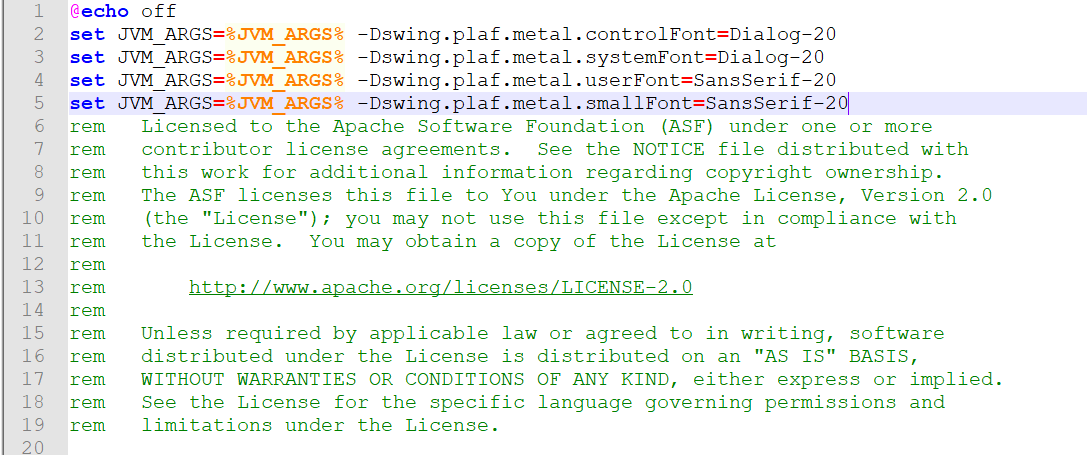
(2)在jmeter.bat文件中增加如下代码

1

2

3

4

set JVM_ARGS=%JVM_ARGS% -Dswing.plaf.metal.controlFont=Dialog-20

set JVM_ARGS=%JVM_ARGS% -Dswing.plaf.metal.systemFont=Dialog-20

set JVM_ARGS=%JVM_ARGS% -Dswing.plaf.metal.userFont=SansSerif-20

set JVM_ARGS=%JVM_ARGS% -Dswing.plaf.metal.smallFont=SansSerif-20

然后重启jmeterj即可,亲测有效。