


之前写Lua时,修改完代码 reload 就可以热重载代码,调试起来十分方便(重构则十分痛苦)。
现在使用 C# 做开发,目前还没找到比较方便地进行热重载的方式。只能退而求其次,在调试上找找方法,尽量能减少编译重启的次数。
基本原理是:动态编译生成dll,再调用 Assembly 中的方法。之前看到过一个关键词 REPL,原理肯定不同,但加上编辑器扩展或许能实现类似的交互效果。
作用实际上不是很大,基本和打断点调试时在即时窗口中运行代码是类似的(稍微好用一些,毕竟可以执行一段多行代码)。目前主要在测试特效之类时预留接口,便可以使用不同参数动态调试,或者打印一些不太好断点的单例变量。
2021-10 补充:用处还是挺多的。虽然不能添加和修改已有函数,但是程序中的静态方法,以及能获取到对象实例的成员方法都能调用,很适合用来调试已有的UI表现等。比如别人写了一个HUD提示功能,接入到你的模块中时,就不用每改一点代码就重新运行一次了。
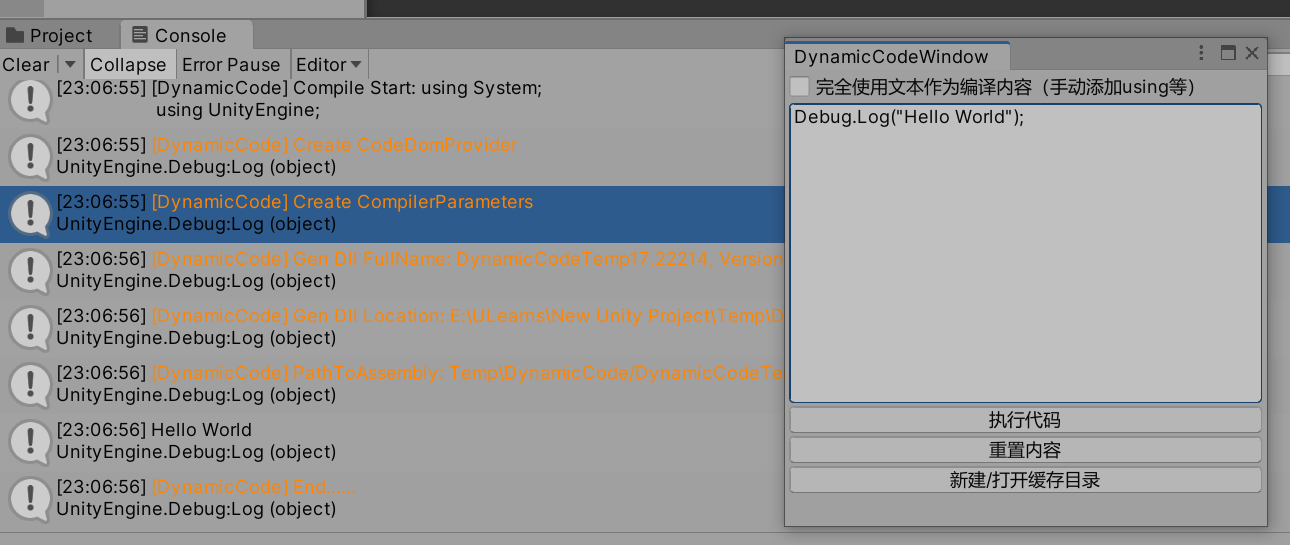
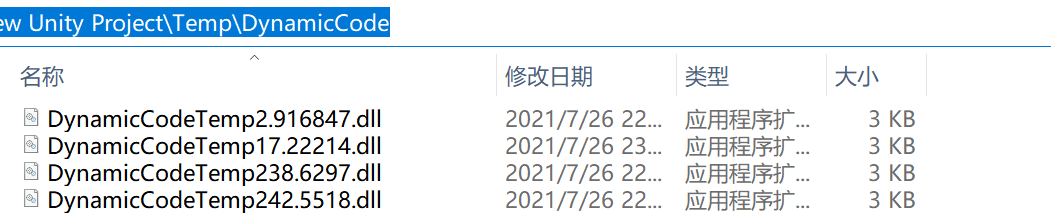
编译执行代码函数,其中这一段比较重要,会引用当前 Domain 中的所有程序集,否则调用项目中的方法会报错:
foreach (var assembly in AppDomain.CurrentDomain.GetAssemblies())
{
    _compileParams.ReferencedAssemblies.Add(assembly.Location);
}
完整代码:
using Microsoft.CSharp;
using System;
using System.CodeDom.Compiler;
using System.Reflection;
using System.Text;
using UnityEngine;

public class DynamicCodeHelper
{
    private CSharpCodeProvider _provider;
    private CSharpCodeProvider Provider
    {
        get
        {
            if (_provider == null)
            {
                DynamicCodeWindow.ColorDebug("[DynamicCode] Create CodeDomProvider");
                _provider = new CSharpCodeProvider();
            }
            return _provider;
        }
    }

    private CompilerParameters _compileParams;
    private CompilerParameters CompileParams
    {
        get
        {
            if (_compileParams == null)
            {
                DynamicCodeWindow.ColorDebug("[DynamicCode] Create CompilerParameters");
                _compileParams = new CompilerParameters();
                // Add ALL of the assembly references
                foreach (var assembly in AppDomain.CurrentDomain.GetAssemblies())
                {
                    _compileParams.ReferencedAssemblies.Add(assembly.Location);
                }
                _compileParams.GenerateExecutable = false;
                _compileParams.GenerateInMemory = false;
            }
            _compileParams.OutputAssembly = DynamicCodeWindow.OUTPUT_DLL_DIR + "/DynamicCodeTemp" + Time.realtimeSinceStartup + ".dll";
            return _compileParams;
        }
    }

    public void ExcuteDynamicCode(string codeStr, bool isUseTextAsAllContent)
    {
        if (codeStr == null) codeStr = "";
        string generatedCode;
        if (isUseTextAsAllContent)
        {
            generatedCode = codeStr;
        }
        else
        {
            generatedCode = GenerateCode(codeStr);
        }
        Debug.Log("[DynamicCode] Compile Start: " + generatedCode);
        CompilerResults compileResults = Provider.CompileAssemblyFromSource(CompileParams, generatedCode);
        if (compileResults.Errors.HasErrors)
        {
            Debug.LogError("[DynamicCode] 编译错误!");
            var msg = new StringBuilder();
            foreach (CompilerError error in compileResults.Errors)
            {
                msg.AppendFormat("Error ({0}): {1}\n",
                    error.ErrorNumber, error.ErrorText);
            }
            throw new Exception(msg.ToString());
        }
        // 通过反射,调用DynamicCode的实例
        //AppDomain a = AppDomain.CreateDomain(AppDomain.CurrentDomain.FriendlyName);
        Assembly objAssembly = compileResults.CompiledAssembly;
        DynamicCodeWindow.ColorDebug("[DynamicCode] Gen Dll FullName: " + objAssembly.FullName);
        DynamicCodeWindow.ColorDebug("[DynamicCode] Gen Dll Location: " + objAssembly.Location);
        DynamicCodeWindow.ColorDebug("[DynamicCode] PathToAssembly: " + compileResults.PathToAssembly);
        object objDynamicCode = objAssembly.CreateInstance("DynamicCode");
        MethodInfo objMI = objDynamicCode.GetType().GetMethod("CodeExecute");
        objMI.Invoke(objDynamicCode, null);
    }

    private string GenerateCode(string methodCode)
    {
        StringBuilder sb = new StringBuilder();
        sb.Append(@"using System;
                    using UnityEngine;
                    public class DynamicCode {
                    public void CodeExecute() {
                    ");
        sb.Append(methodCode);
        sb.Append("}}");
        string code = sb.ToString();
        return code;
    }
}
简单的编辑器扩展,不太重要。基本上就是获取文本然后调用DynamicCodeHelper.ExcuteDynamicCode
#if UNITY_EDITOR_WIN
using UnityEditor;
using UnityEngine;

/// <summary>
/// 字符串编译成DLL载入,只在编辑器中使用
/// </summary>
public class DynamicCodeWindow : EditorWindow
{
    // 生成在 ..\Client\Client\Temp\DynamicCode\DynamicCodeTemp.dll
    public const string OUTPUT_DLL_DIR = @"Temp\DynamicCode";
    [MenuItem("TestTool/DynamicRun")]
    private static void Open()
    {
        GetWindow<DynamicCodeWindow>();
    }

    private static DynamicCodeHelper _instance;
    private static DynamicCodeHelper Helper
    {
        get
        {
            if (_instance == null)
            {
                _instance = new DynamicCodeHelper();
            }
            return _instance;
        }
    }
    private bool isUseTextAsAllContent;
    private string content = @"Debug.Log(""Hello"");";
    private void OnGUI()
    {
        isUseTextAsAllContent = EditorGUILayout.ToggleLeft("完全使用文本作为编译内容(手动添加using等)", isUseTextAsAllContent);
        content = EditorGUILayout.TextArea(content, GUILayout.Height(200));
        if (GUILayout.Button("执行代码"))
        {
            Run(content, isUseTextAsAllContent);
        }
        if (GUILayout.Button("重置内容"))
        {
            if (isUseTextAsAllContent)
            {
                content = @"using System;
using UnityEngine;
public class DynamicCode {
    public void CodeExecute() {
        Debug.Log(""Hello"");
    }
}";
            }
            else
            {
                content = @"Debug.Log(""Hello"");";
            }
        }
        if (GUILayout.Button("新建/打开缓存目录"))
        {
            if (!System.IO.Directory.Exists(OUTPUT_DLL_DIR))
            {
                System.IO.Directory.CreateDirectory(OUTPUT_DLL_DIR);
            }
            System.Diagnostics.Process.Start(OUTPUT_DLL_DIR);
        }
    }

    private static void Run(string code, bool isUseTextAsAllContent)
    {
        ColorDebug("[DynamicCode] Start......");
        string codetmp = code;
        Helper.ExcuteDynamicCode(codetmp, isUseTextAsAllContent);
        ColorDebug("[DynamicCode] End......");
    }

    public static void ColorDebug(string content)
    {
        Debug.Log(string.Format("<color=#ff8400>{0}</color>", content));
    }
}
#endif
此内容由惯性聚合(RSS阅读器)自动聚合整理,仅供阅读参考。 原文来自 — 版权归原作者所有。