








Amazon describes Aurora as a scalable database that's simple to manage, but if you've ever gone through the "Create database" wizard, you know that's not quite an accurate statement. From instance types to storage configurations to monitoring your database, there is much to consider when trying to price an Amazon Aurora cluster.
In this article, we'll cover all the little details you'll need to understand the Amazon Aurora pricing model to get an accurate estimate for an Aurora database.
Note
The information provided in this article is specific to Aurora and not Aurora Serverless. Aurora Serverless is a different configuration that has its own pricing model.
What is Amazon Aurora
Amazon Aurora is a MySQL and Postgres-compatible database platform on AWS that simplifies the process of creating and managing a MySQL database. It streamlines the process of provisioning the necessary infrastructure to run a production MySQL database and provides a number of features that are not available in a standard RDS configuration. These features include automatic failover, read replicas, and the ability to scale the compute and storage resources of your database with minimal downtime.
That said, the pricing structure is not as straightforward as you may believe. There are a number of factors to consider when pricing an Aurora cluster. Let's take a look at what those are, specifically for running a MySQL workload.
Instance type
Instance type refers to the CPU and memory allocated to the underlying MySQL compute node.
When creating an Aurora cluster, one of the first things you are asked is what instance type to select. If you've ever looked at a list of instance types with no context, it's rather confusing. However, there is a naming convention that can be used to understand what each segment of the name means:
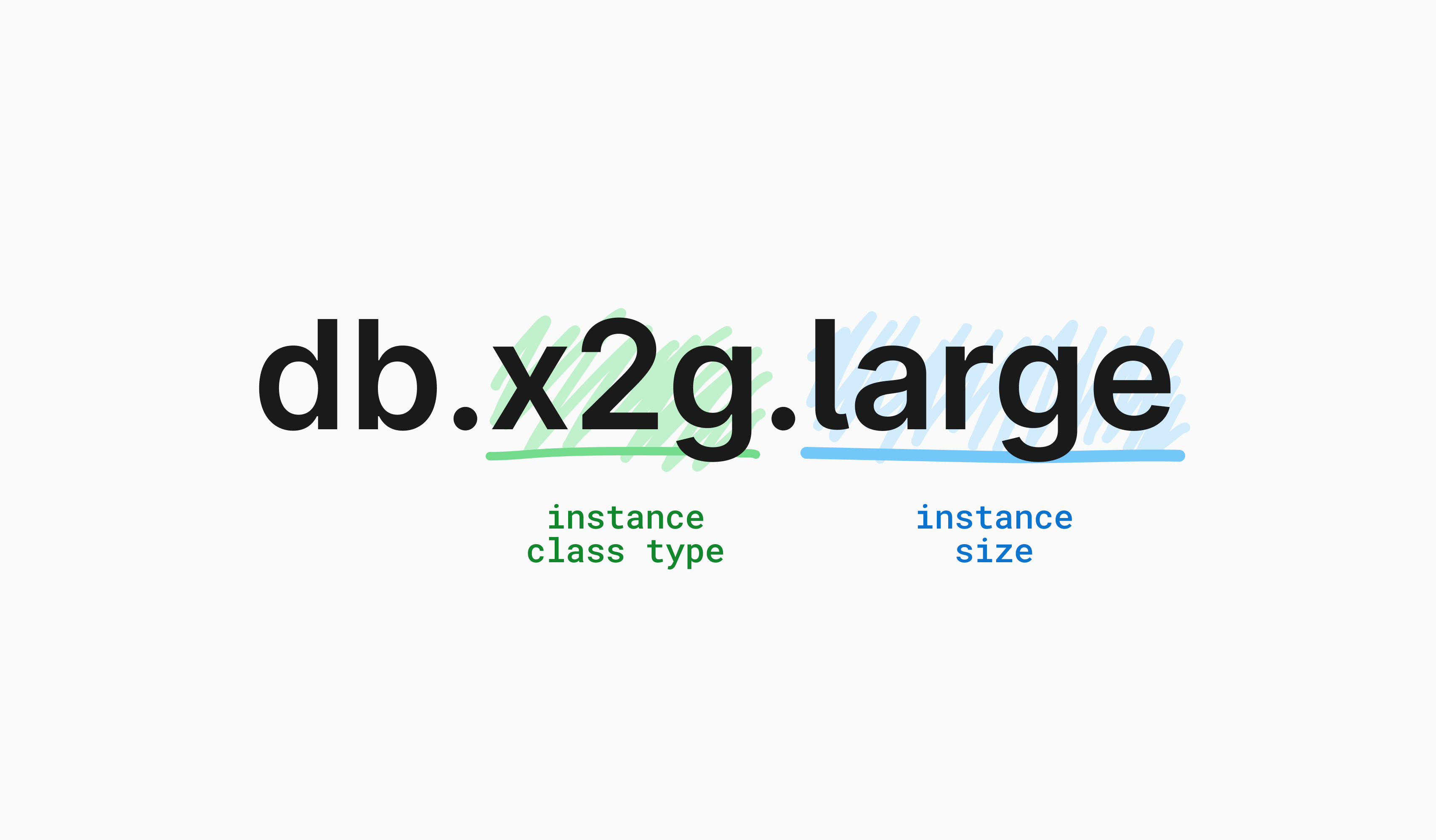
The class of instance type, along with the size, has a dramatic impact on the bottom line at the end of the month. For example, the table below outlines the cost differences between three different instance types that share the same class but have different costs per size:
| Instance type | vCPUs | Memory (GiB) | Hourly cost |
|---|---|---|---|
| db.x2g.large | 2 | 32 | $0.377 |
| db.x2g.4xlarge | 16 | 256 | $3.016 |
| db.x2g.16xlarge | 64 | 1024 | $12.064 |
Burstable vs. memory-optimized
Instance types are categorized into two buckets for Aurora: burstable and memory-optimized. Burstable instance types offer some cost advantages because Amazon runs them with fewer allocated resources during typical load while allowing them to 'burst' when higher demand hits for a limited amount of time. This is in contrast to memory-optimized instance types that consistently run at what they are advertised. Because the performance of burstable instances is relatively inconsistent when compared to memory-optimized, Amazon does not recommend them for production workloads.
Reserved instances vs. on-demand pricing
Another factor to consider is opting to prepay for a certain number of hours to use your compute nodes, which is known as using 'reserved instances.' Amazon will discount the on-demand rate if you opt to prepay for reserved instances for a term of either one or three years. The discount varies by the length of the contract, as well as the specific instance type selected. If you can account for how many instances you will use for how long, it can be a great way to lower the cost of your AWS bill.
Replicas
It is a best practice for all production databases to have at least one replica of the same instance type attached to the Aurora cluster but in a different AZ. Replicas are required for quicker failover in case the writer node goes offline. Replicas can also be used to help reduce downtime while rolling out required Aurora instance modifications that require restarts, like changing the instance size or configuration parameters. Therefore, for highly critical applications where downtime can result in significant financial loss or impact on reputation, you should consider having one primary and two replicas of the same instance type in different AZs. However, this effectively multiplies the costs of your selected instance type by the number of replicas you opt to have. It also increases the labor burden of administrating correct replica placement and rollover orchestration.
Storage configuration
In Amazon Aurora, storage works a bit differently when compared to RDS or even configuring your own database cluster on AWS using EC2. Those configurations store your data on underlying EBS volumes and provide a number of choices. On the other hand, Aurora uses dedicated storage appliances that auto-provision 'blocks' of data to store your data. This enables Amazon to auto-scale your storage without you having to worry about running out of space.
As a result, your storage configuration options are limited to standard vs I/O-optimized.
With a standard storage configuration, you are billed on the amount of storage used and the IOPS consumed. With I/O-optimized, Amazon increases the cost for the selected instance type but does not charge you for IOPS consumed. If your application is very I/O-heavy, selecting I/O-optimized storage may reduce your overall bill. Cost savings generally start to appear when your I/O charges exceed 25% of your total Aurora bill. To make the best choice that minimizes your cost, you'll need to have a good understanding of your application's I/O requirements as Amazon does not recommend one storage configuration over the other.
Data transfer costs
Another metric to consider is how much data will be sent to or read from your Aurora cluster. Amazon charges for data transfer in many scenarios, whether that's between availability zones within a region, between regions themselves, or even exiting the public internet. The specific amount charged depends on the services being used.
There are a few scenarios where Amazon does not charge for data transfer, such as data replication within a region or data transferred between an Aurora writer/reader node to an EC2 instance within the same AZ, most other scenarios would incur additional costs for data transfer. Ensuring that your application is hosted in the same region as the replica it is using can help reduce data transfer costs.
Cross-region replication
If you want data replicated to another region to be closer to users, Global database is the name of Amazon's service that enables this for Aurora clusters. Global database allows you to have a separate read-only Aurora cluster that your data will be replicated to. Each region is independently scalable, so understanding the compute requirements for that region and selecting an appropriate instance type can help optimize costs.
Using Global database has additional costs associated with it. To start, you'll pay for the compute instances and storage consumed just like you would in your primary region. In addition to that, Amazon charges additional fees per 1 million write operations performed, as well as standard data transfer costs to replicate data between regions.
Connection pooling
Every connection to a MySQL database consumes CPU and memory resources.
AWS offers RDS Proxy as a lightweight proxy layer between your database clients and writer/reader compute nodes. RDS Proxy will perform connection pooling as well to better manage the resources consumed by the compute nodes. In the case of a node outage, RDS Proxy can also more quickly detect the outage and redirect traffic to another node without dropping client connections.
This is an additional service on top of Aurora and thus incurs an additional charge on your AWS bill.
Change management
Many changes to your database will require your instances to be rebooted, which will incur some downtime while the operation is performed. Some operations, such as adjusting the instance type, can be performed using read replicas with minimal downtime. Another option to reduce downtime is to use a blue/green deployment to create an identical environment where changes can be made before redirecting traffic to that new environment. Amazon recommends using blue/green deployments to make various database configuration changes, such as performing version updates or making schema changes. The process of redirecting traffic is known as a switchover, and while all connections will still be dropped during the switchover, the downtime is reduced when compared to performing changes directly on the cluster.
As mentioned earlier, when creating a blue/green deployment, you'll have an identical environment set up for you. This means that your compute costs (selected instance type and replica count) will double while both environments are online. In addition to this, Amazon does not remove the old environment after a switchover and requires that you manually remove it before your bill goes back to normal.
Backups
Backups are a critical part of a disaster recovery plan and should be prioritized when pricing your database. With automated backups, you are charged for the amount of storage you use (in GB) minus the latest size of your database. This allows you to have one full backup at no charge, but you will be charged for any subsequent incremental backups. You can also configure how long you need these backups to be kept for before being automatically deleted.
You are also given the option to create manual snapshots of your database. These snapshots are not part of the automated system and are retained even if your database is deleted. Charges for manual snapshots are based on the size of the snapshot, which is not part of the free automated backup allowances.
Monitoring
There are a number of different solutions used to monitor an Aurora database.
By default, Amazon Aurora will send a wide array of metrics to CloudWatch every minute for both the cluster and each individual instance at no extra cost. Metrics range from the number of active transactions to the time it takes to replicate between replicas. There are far too many default metrics to cover here; check Amazon's documentation for the full list.
To get this information in real time, you can use Enhanced Monitoring as a service add-on. Enhanced Monitoring uses CloudWatch Logs, which are charged based on how much data is sent into CloudWatch each month. Associated costs may differ drastically between clusters, but you do get more granular data to analyze as needed.
Finally, Performance Insights allows you to gather data from the actual database engine, giving you information that the MySQL process sees such as database load and query performance. Performance Insights bills based on how long you wish to retain the data, up to two years. The first seven days are included at no additional cost, but you will be billed for any data retention beyond that.
Comparing to PlanetScale
After thoroughly covering various cost considerations when creating an Aurora cluster, let's look at how PlanetScale addresses the same areas and how we bill for these features.
Instance types
When creating a PlanetScale database, we also ask you to select an instance type. However, our selection is dramatically simplified from what Aurora offers. We do not have a concept of burstable vs. memory-optimized, and we display the CPU and memory allocation along with the price when choosing the type. Below is the current pricing grid for creating a Base plan database in the AWS us-east-1 region:
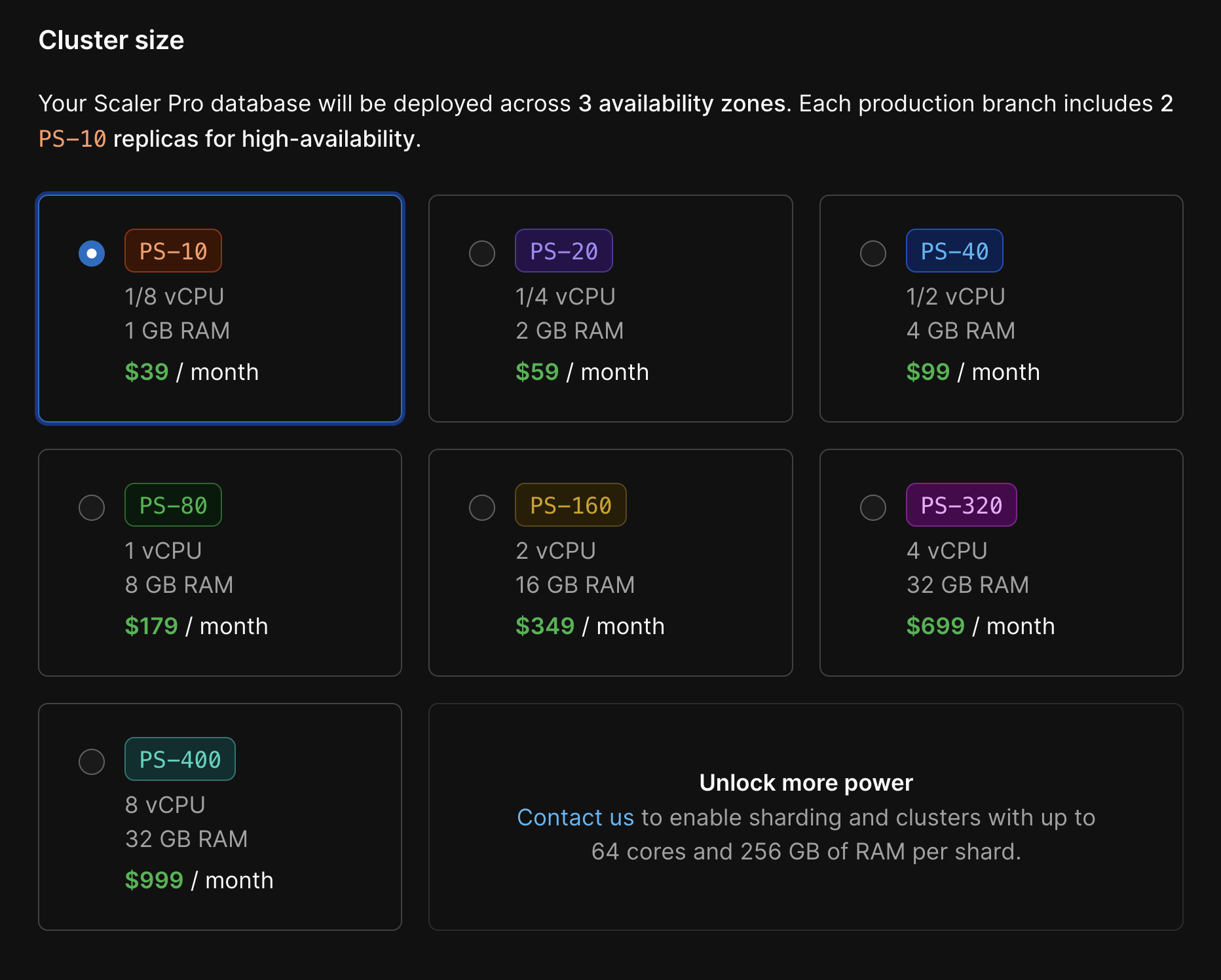
Additionally, each of the displayed types is actually for a cluster of MySQL servers. We follow best practices for all of the databases created on PlanetScale, including having your data replicated across three availability zones.
Storage configuration
Our storage configuration is also simplified in the sense that all storage on PlanetScale is the same on network-attached instance types. With PlanetScale Metal, you can choose the appropriate storage size for your workload.
One of the biggest benefits of Metal is the performance improvements. You don't have to purchase a special I/O optimized plan with PlanetScale. Metal instances come loaded with unlimited IOPS by default. On top of that, you will likely save money compared to your equivalent Aurora I/O optimized workload.
Data transfer
We don't have any data transfer costs. The only exception to this is PlanetScale Managed, where PlanetScale can be deployed within a sub-account in your AWS organization. Then, you would pay the same data transfer costs as AWS charges for Aurora databases.
Cross-region replication
PlanetScale offers the ability to create read-only regions, where your data is replicated to a selected region that is closer to your application servers in that region. It is very similar to Global database, except you don't need to pay for the data transfer costs, and you still get a full MySQL cluster with the same resources as the selected instance type.
Connection pooling
PlanetScale for Postgres clusters utilize PgBouncer for connection pooling and automated failovers.
PlanetScale also offers fully-managed Vitess clusters — a database clustering system that was originally developed at YouTube to address scaling issues in 2010. This allows us to take advantage of the connection pooling and load-balancing features that Vitess provides.
A component of all MySQL clusters managed by Vitess is known as vtgate, a lightweight proxy that routes traffic to the correct MySQL node in the cluster. This component is similar to RDS Proxy in that it speaks the MySQL protocol and manages all of the connections to the MySQL nodes, reducing the resources utilized by each node. vtgate communicates with our topology service to know which node in the cluster that traffic should be routed to, and in sharded configurations, it will actually split up the query and send it to the correct node to make sure the requested data can be returned to the client even if it exists across multiple shards.
Since vtgate is a core component of Vitess, PlanetScale can support a nearly unlimited number of connections and it is included in the cost of running a PlanetScale database.
Change management
PlanetScale is significantly more managed than Aurora. While Aurora requires you to create a blue/green deployment, which increases complexity and cost (along with dropping clients to apply changes), many of the scenarios that blue/green deployments are designed for are handled automatically by our platform or our engineers.
For example, when new versions of MySQL are released, our engineers meticulously test them to make sure the database engine is stable and capable of running on PlanetScale's infrastructure. For instance type changes, we take advantage of the fact that our database nodes run in pods on Kubernetes, a container orchestration tool. This allows us to perform rolling upgrades on your compute nodes by spinning up replicas that are configured with the new instance type, replicating your data to the new instances, and redirecting traffic using vtgate. This process is completely automated and does not require any downtime.
For schema updates, PlanetScale users can utilize the concept of database branches and deploy requests. A branch is a completely isolated MySQL cluster that contains a copy of the schema of the upstream branch. You can use this branch to apply and test changes to your schema before using a deploy request to merge changes into the upstream database branch without taking your database offline to do so. The branches used to apply schema changes (called development branches) are designed to consume minimal resources, so you won't pay for an exact copy of your database to take advantage of these features.
All databases on PlanetScale support at least one production branch and one development branch. Base plan databases have an additional development branch included, with the ability to add more at $10.00 per month. You can also add more production branches to Base plan databases at the cost of the selected instance type, which makes the plan very customizable. Enterprise databases have even further flexibility, more of which is detailed on the Pricing page in our documentation.
Backups
Our paid plans have a preconfigured, automatic backup that runs every twelve hours, included at no additional charge. You may also create your own schedule with a predefined retention period or a manual backup of your database, just like Aurora. For backups performed or scheduled outside of the defaults, you will be charged based on the size of those backups.
Monitoring
While Aurora sends your metrics to CloudWatch and requires you to monitor your Aurora database in a completely separate tool on AWS, PlanetScale prioritizes database monitoring directly with our dashboard. To check the health of any node within your cluster, simply select it from the Overview tab of your database.
Insights is the tool we provide to all databases to monitor queries and identify performance bottlenecks. Insights allows you to select a specific time range to see all queries executed within that range, which can be extremely useful for troubleshooting performance issues.
Insights is included with all databases at no additional cost, with 7 days of query data retention.
Conclusion
Aurora is a powerful and scalable database service, but Amazon Aurora pricing is not as straightforward as it is advertised. There are a number of factors to consider when pricing an Aurora cluster, and it can be difficult to get an accurate estimate without understanding all of the little details. This is in contrast to PlanetScale, where we strive to make pricing as simple and straightforward as possible while even including some features at no additional cost.