







When sizing resources for a database, we often focus on specs like vCPUs, RAM, and storage capacity. However, IOPS and throughput are crucial considerations for I/O intensive workloads like databases.
In this article, we'll look at how the IOPS and throughput requirements of a database affect cost and how sharding can help reduce this cost for large-scale workloads.
Before we jump into these details, let's first define what we mean by IOPS and throughput.
Note
Since this article was written, we have released PlanetScale Metal. Metal databases give you unlimited IOPS and ultra low latency reads and writes. If you need a database with incredible IO performance, check out Metal.
What are IOPS?
IOPS is shorthand for Input/Output Operations Per Second. In other words, how many times per-second does the system perform a read or write operation on the underlying storage volume.
But what counts as a single operation? This depends on the cloud provider and storage system being used.
AWS EBS IOPS
In AWS land, EC2 instances and RDS databases are often attached to EBS (Elastic Block Storage) volumes. Even within EBS, the definition of a single IOP varies between storage classes, of which there are several options (gp2, gp3, io1, io2, st1, sc1). If we choose to use gp3, a single operation is measured as a one 64 KiB disk read or write. If you have a gp3 volume with the default 3000 IOPS provisioned, that means it can handle a maximum of 64 * 3000 = 192000 = 192 MiB/s of I/O.
There are a few other things to consider with EBS IOPS:
EBS volumes also allow you to bank unused IOPS, up to a fixed limit. These stored IOPS can be redeemed in the future, allowing the volume to burst up beyond the set IOPS limit for stretches of time. Once the bank is depleted, it will not be able to burst until more IOPS are accumulated.

Computing the total amount of bytes we can move to and from disk per second is not as simple as calculating
number_of_iops * 64 KiB. This is due to the difference between how EBS handles sequential and random reads. For sequential reads, EBS will bundle requests together, allowing you to maximize IOPS. For random reads, each read counts as a full IOP, even if it is less than 64k. For example, a single random read of a 4k block from disk will count as a full 64k IOP. Some think that once you move to SSDs, your sequential vs random read patterns no longer matter. However, this applies to workloads on both HDDs and SSDs on EBS.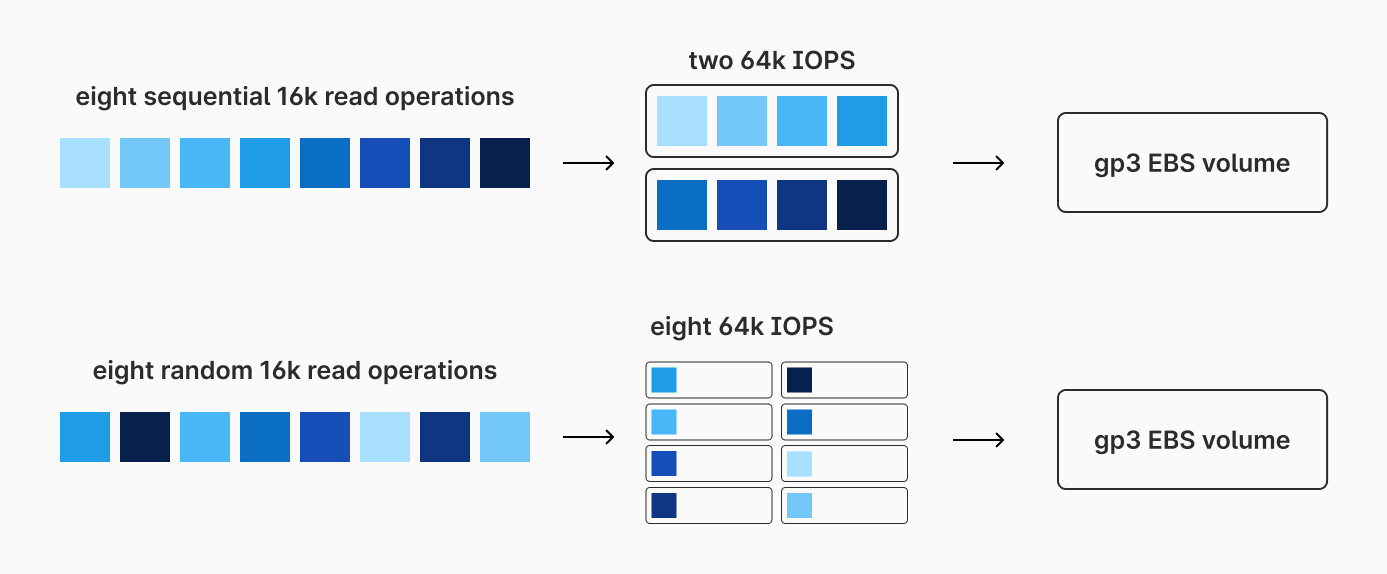
The more random reads you have, the less efficiently you'll use your IOPS. The more sequential reads, the better.
Throughput vs IOPS
Throughput is the total amount of data or requests than can move through a system over a defined span of time. Though throughput is related to IOPS, a volume's IOPS does not directly translate to a volume's throughput delivery at any given time.
Each EBS volume is given a set amount of IOPS. gp3 volumes are given a default value of 3000 IOPS per volume. More IOPS can be purchased for additional per-IOP-month cost, up to a 16,000 cap. Each gp3 volume is also given a default throughput limit of 125 MiB/s (again, with the ability to pay for more up to 1000 MiB/s). Based on the calculation from earlier, if we utilize our 3000 IOPS with perfectly sequential IO patterns, we could theoretically achieve 192 MiB/s. However, due to the default throughput limit of 125 MiB/s, we cannot actually reach this unless we purchase more throughput.
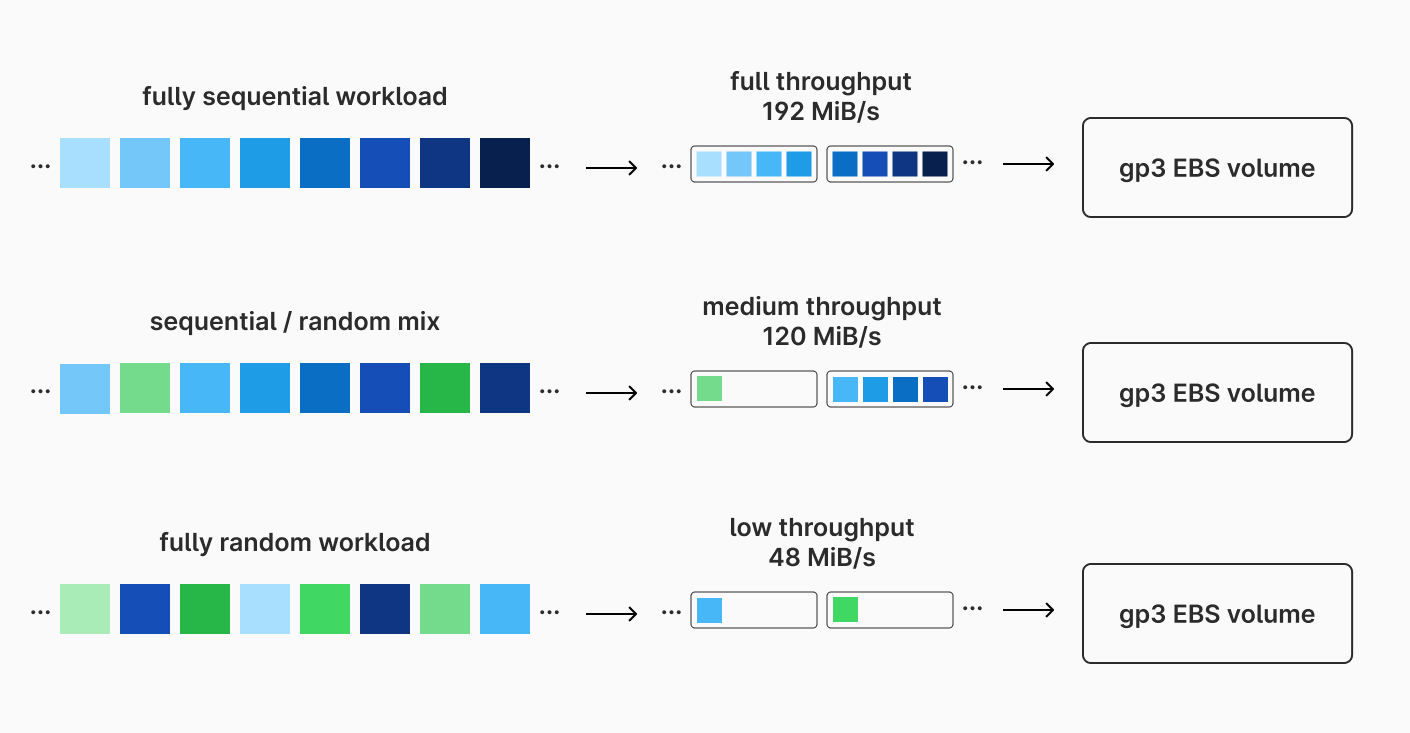
In practice, database workloads often have a mix of sequential and random disk IO operations. We rarely will be operating at maximum IOPS efficiency, so 3000 IOPS will pair acceptably with 125 MiB/s in many situations.
Database workloads
Databases are one of the most I/O intensive workloads we run in the cloud. For large databases, we may need to pay for extra throughput and IOPS to get the performance we want. There are a few options for this:
Use a general-purpose EBS type such as
gp3, and then pay for additional IOPS and throughput.Upgrade to AWS's provisioned IOPS SSD volume types such as
io1orio2. These volumes are significantly more expensive but also have higher maximum IOPS and throughput. Whereasgp3has a max of 16000 IOPS and 1000 MiB/s,io2has a max of 256,000 IOPS and 4000 MiB/s.
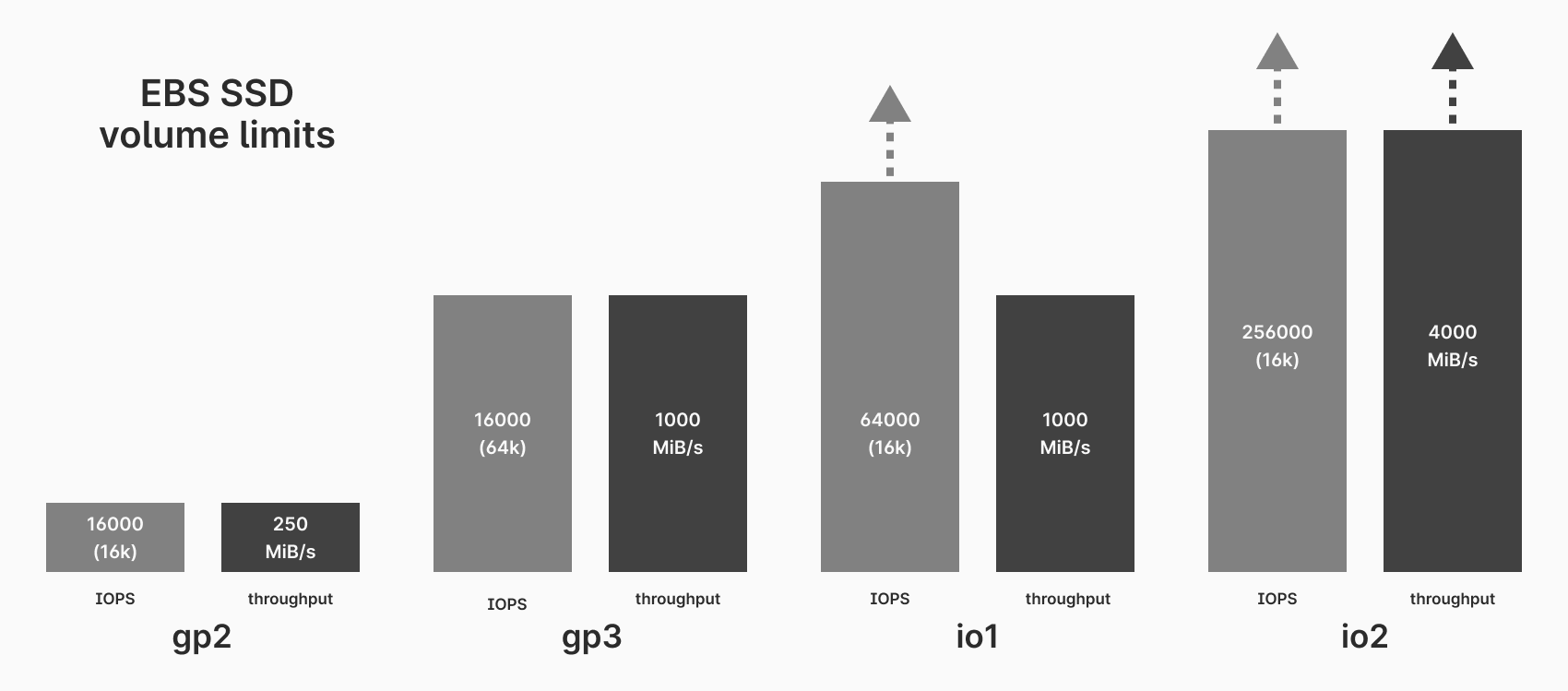
Provisioned IOPS volumes may be your only option if you are running a massive database with a single primary server.
Sharding for improved IOPS and throughput
Database sharding is an excellent technique to run huge databases efficiently, without needing to pay an EBS premium. In a sharded database, we spread out our data across many primaries. This also means that our IO and throughput requirements are distributed across these instances, allowing each to use a more affordable gp2 or gp3 EBS volume.
Baseline comparison
Lets look at some hard numbers to make this more clear. We'll start by looking at a small unsharded database, and then compare this to a larger database. All prices based on a us-east-1 database as of August 2024. Warning — math ahead!
Let's say we are in a situation where we need a cluster with one primary and two replicas, each with approximately 8 vCPUs, 32 GB of RAM, and 500 GB of storage. We'll compare three different configurations — two from RDS MySQL, two Aurora MySQL, and one on PlanetScale (powered by Vitess and MySQL).
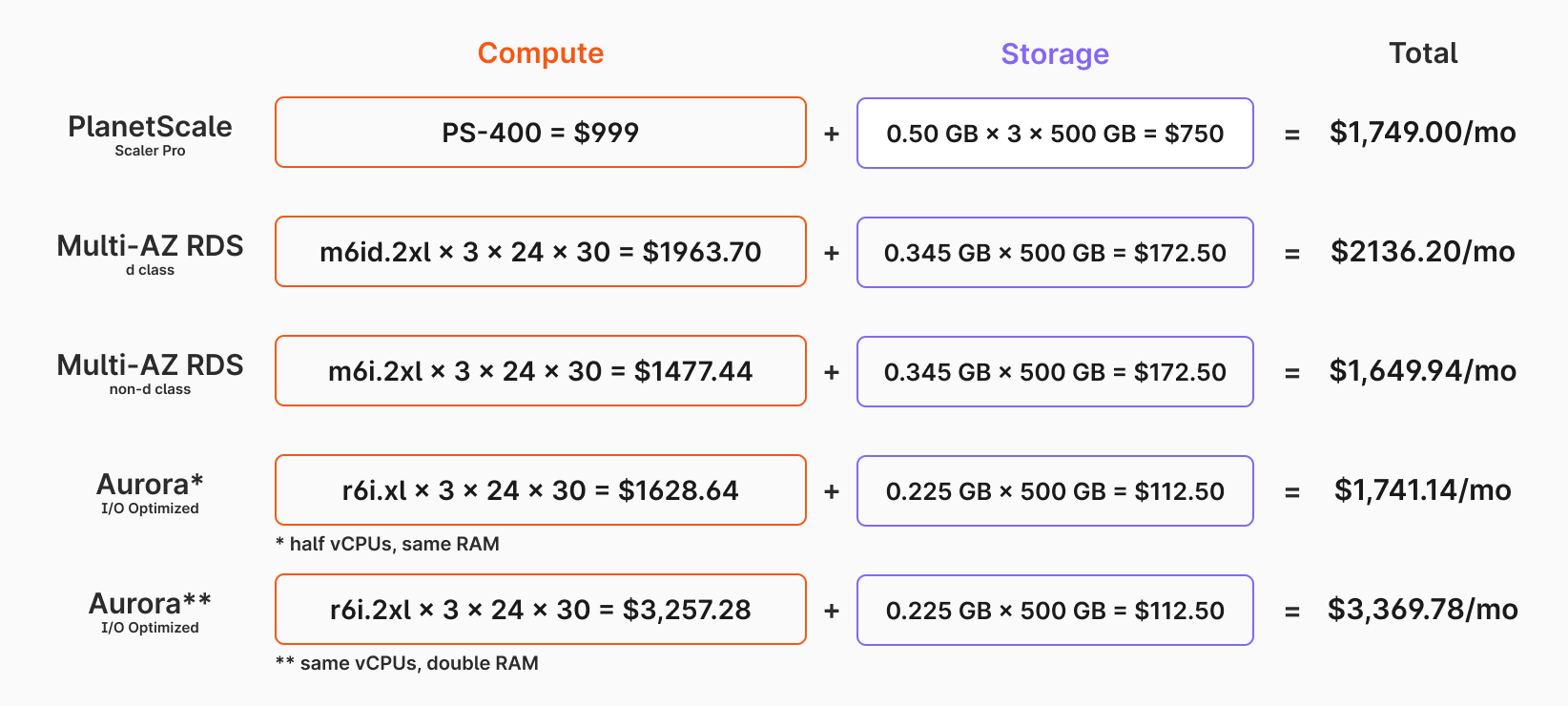
As shown in the image above, the monthly cost comes out to the following for PlanetScale, RDS d class, RDS non d class, and the two Aurora I/O optimized variants, respectively: $1749.00, $2136.20, $1649.94, $1741.14, and $3369.78. Aurora is significantly more expensive, whereas the others are in a similar ballpark.
All PlanetScale Base plan databases are configured as multi-AZ clusters with one primary and two read-only replicas. On PlanetScale, we would need to spin up a PS-400 database with 500 gigabytes of storage to achieve our compute requirements.
For a comparable 3 node, multi-AZ database from RDS, we would need to choose a db.m6id.2xlarge (or similar) with one primary and two replicas to achieve comparable vCPU and RAM capabilities to a PS-400. The pricing information for this can be found on Amazon's pricing page.
It's important to note that for 3-node multi-AZ RDS clusters, RDS only only supports the d class variants. These come with attached NVMe SSD storage, in addition to the vCPUs and RAM. The attached SSDs are utilized for fast I/O, but appropriately-sized EBS volumes are also used for asynchronous data writing.
Though they don't technically support it, pricing for a hypothetical 3-node cluster using db.m6i.2xlarge instances (non-d class) are also included to make the comparison more apples-to-apples. PlanetScale is cheaper than the multi-az RDS instance with db.m6id.2xlarge instances, and slightly higher than the theoretical one with db.m6i.2xlarge instances.
Two Aurora I/O optimized configurations with one primary and two read-only nodes is included as well. Due to instance class restrictions, we cannot match the same specifications exactly. One is show with half the vCPUs and equal RAM, the other is shown with equal vCPUs and double the RAM.
These prices are assuming that the default IOPS values will be sufficient to run our database. For the RDS option, the storage price is based on using General Purpose SSD storage (gp3) without paying for additional IOPS or throughput. PlanetScale also uses EBS volumes.
Higher compute, IOPS, and throughput requirements
Over time, demand on a database can grow significantly. Say that one year in the future, we now require 8x the compute, storage, IOPS, and throughput capabilities. Our new requirements are the following for the primary and replicas:
- 64 vCPUs
- 256 GB RAM
- 4 TB of storage
- 24000 IOPS
- 1000 MiB/s peak throughput
Let's again consider four database configurations. Two with RDS MySQL, two with Aurora MySQL, and one with PlanetScale.
Using d class instances, we would need 3 db.m6id.16xlarge instances. We could accomplish this either with io1/io2, or with 4-volume striping of gp3. We'll use io1 for this example, which comes with both a per GB/mo price and a per IOPS/mo price. We do not need to pay extra to achieve 1000 MiB bandwidth, so long as we have the IOPS to support it. The total for this configuration comes out to $24,196.56/mo (detailed breakdown below).
If we were able to use the more affordable db.m6i.16xlarge instances instead, this would bring the cost down a few thousand dollars to $20,519.52/mo.
For Aurora I/O optimized, we pay for instances and storage. All necessary IOPS are included.
Lower costs with sharding
Using a platform like PlanetScale, we do not need to rely on having a single, huge instance to handle a workload as high as this. If the database has grown by 8x, we could instead use sharding, and spread out data and compute across 8 shards.
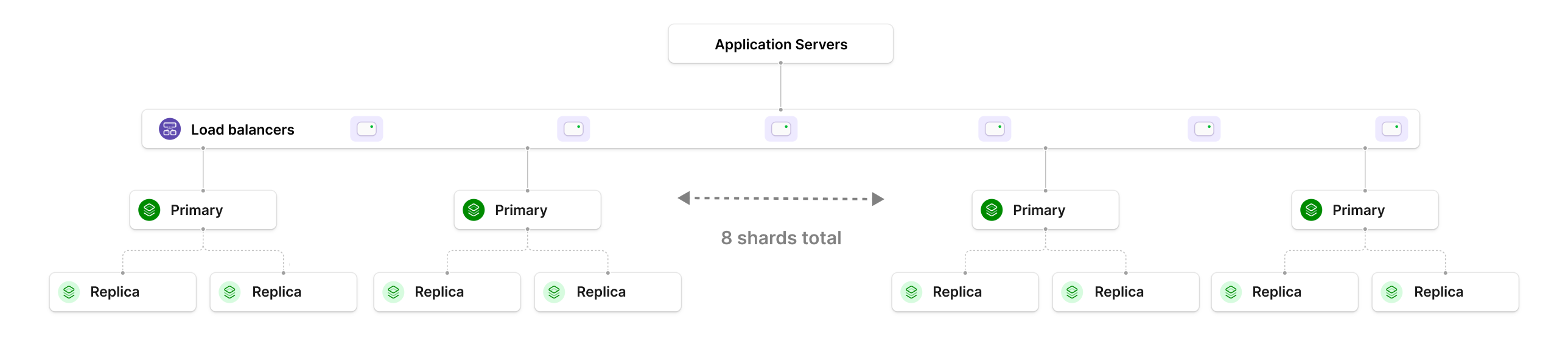
To shard, we'd need to choose a good sharding strategy that spreads the data and query load evenly across the shards. Each one of the shards is essentially a multi-AZ PS-400 cluster, with 8 vCPUs, 32 GB RAM, and ~500 GB of data stored. To compute the cost of this, we multiply the single-node cost by 8, giving a total of $13,992/mo In this situation, we do not need to pay extra for additional IOPS or dedicated io1 infrastructure. The IOPS and throughput demand is spread evenly across the 8 shards, allowing us to stick with a more affordable class of EBS volumes. In the pricing diagram, one additional PS-400 database is included for storing smaller, unsharded tables.
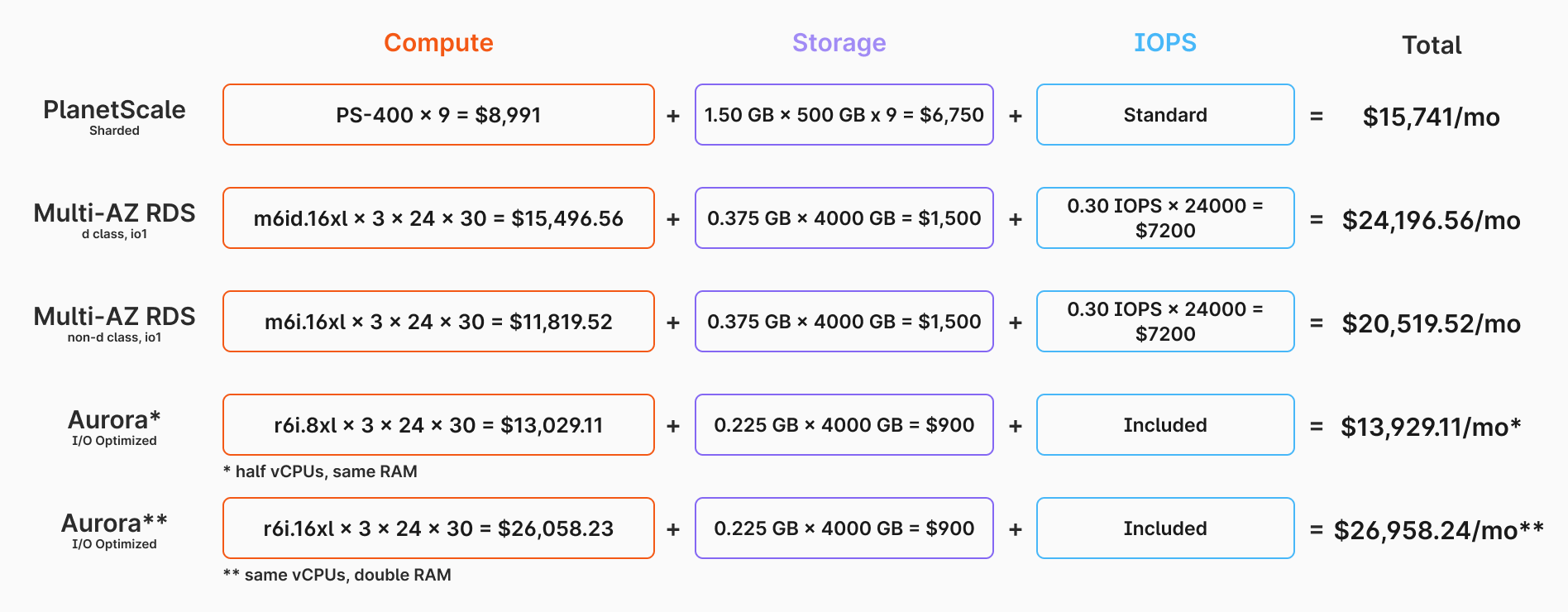
Notice that for the RDS instances, the pricing did not grow linearly. The cost jumped by 11-13x. For Aurora, the cost grew linearly, but the base costs were high to begin with. With sharding, we are afforded a linear growth rate and acceptable costs. This is a much better option for long term scalability.
Performance benchmarks are not included here. These four configurations would likely all have unique performance characteristics in production workloads. However, the purpose of this comparison was not to provide a detailed performance analysis, but rather to to demonstrate how pricing scales as I/O and other requirements increase.
Workload suitability
Each database has different characteristics. Some have large amounts of warm data, whereas for others it is small. Some workloads are spiky, where others are even. Some have large storage-to-compute ratios, and others are smaller. All of these factors will affect the IOPS and throughput needs of your database servers. If you are running a database where such requirements are high, you may find yourself in a situation where you need to pay significantly higher costs for this performance.
Sharding is an excellent alternative for these kinds of workloads. Spreading out your data also means spreading out IOPS and throughput demand, allowing you to get away with using more affordable volume types. Sharding also comes with a number of other benefits, including improved failure isolation, faster backups, and huge scalability.