


JD Lien |
Have you ever been working on an app, staring at your screen waiting for it to load, wondering what on Earth is going on? There are a lot of reasons why you could be experiencing performance issues, but a classic cause of performance issues in database-driven applications is the dreaded N+1 query problem.
Tip
If you're wondering if you have an N+1 problem, you can sign up for a PlanetScale account to access our Insights query monitoring dashboard. More information about identifying N+1s with Insights at the end of this article.
What is the N+1 query problem?
The chief symptom of this problem is that there are many, many queries being performed. Typically, this happens when you structure your code so that you first do a query to get a list of records, then subsequently do another query for each of those records.
You might expect that many small queries would be fast and one large, complex query will be slow. This is rarely the case. In practice, the opposite is true. Each query has to be sent to the database, the database has to perform the query, then it sends the results back to your app. The more queries you perform, the more time it takes to get the results back, with each trip to the database server taking time and resources. In contrast, a single query, even if it's complex, can be optimized by the database server and only requires one trip to the database, which will usually be much faster than many small queries.
An example N+1 query
Let's look at an example. Applications typically query several related records from the same database tables. Let's take an example of grocery items and categories from my previous article on joins. In this example scenario, we have a PlanetScale database with an items table and a categories table. The items table contains a list of grocery store items with their corresponding categories in the categories table. The examples are in PHP, but the same principles apply to any language.
categories table:
| id | name |
|---|---|
| 1 | Produce |
| 2 | Deli |
| 3 | Dairy |
items table:
| id | name | category_id |
|---|---|---|
| 1 | Apples | 1 |
| 2 | Cheese | 2 |
| 3 | Bread | NULL |
Let's say we want our application to list all of the items, including the name of the category they belong to. One straightforward way we could do this is by first querying a list of categories, and then looping over each of the categories, querying for each category's items.
First query — Grabbing the categories:
<?php
    $dbh = new Dbh();
    $conn = $dbh->connect();
    $sql = "SELECT * FROM categories;";
    $stmt = $conn->prepare($sql);
    $stmt->execute();
Second query — Looping over each category and grabbing the items:
<?php
while ($row = $stmt->fetch()) {
    // Show category name
    echo $row['name'];

    // Now query for the items for this category
    $sql = "
        SELECT id, name FROM items
        WHERE category_id = :category_id
        ORDER BY name;
    ";

    $stmt2 = $conn->prepare($sql);
    $stmt2->bindParam(':category_id', $row['id']);
    $stmt2->execute();
    $rowCount += $stmt2->rowCount();

    while ($row2 = $stmt2->fetch()) {
        // Show item ID and name
        echo $row2['id'];
        echo $row2['name'];
    }
}
This approach has the benefits of having two simple queries and clear, procedural code. Unfortunately, this approach is flawed, and you should avoid this situation where you are executing many database queries in a loop.
What caused the N+1 query problem?
This type of query execution is often called "N+1 queries" because instead of doing the work in a single query, you are running one query to get the list of categories, then another query for every N categories. Hence the term "N+1 queries".
In the above example, our database contains about 800 items across 17 categories. It takes over 1 second to run the 18 simple queries involved in this! That's pretty slow. If you have more complex queries with a lot of data, it will take even longer.
For this simple example, it's possible to perform the exact same job 10× faster by using only one query that uses a JOIN clause. We could refactor the above code to look something like this:
<?php
    $dbh = new Dbh();
    $conn = $dbh->connect();
    // Record the time before the query is executed
    $timeStart = microtime(true);

    $sql = "
        SELECT
            c.id AS category_id,
            c.name AS category_name,
            i.id AS item_id,
            i.name AS item_name
        FROM categories c
        LEFT JOIN items i ON c.id = i.category_id
        ORDER BY c.name, i.name;
    ";
    $stmt = $conn->prepare($sql);

    $stmt->execute();
    $rowCount = $stmt->rowCount();

    $lastCategoryId = null;

    while ($row = $stmt->fetch()) {
        // Render the heading for each category if this category is new
        if ($row['category_id'] != $lastCategoryId) {
            echo $row['category_name'];
        }

        // Display the row for each item
        if (!is_null($row['item_id'])) {
            echo $row['item_id'];
            echo $row['item_name'];
        }

        $lastCategoryId = $row['category_id'];
    }
With this update, we accomplished much the same work with a single, slightly more complicated query. Attempting our demo of this again, we can observe a significant performance difference between the original page and this one! The page loads in about 0.16 seconds, instead of 1.4 seconds.
In this simple example, with a database that isn't very large, the n+1 approach takes about 10 times longer!
Imagine you had thousands, or millions of records. The performance delta could be the difference between a reasonable load time and a page that takes so long to load that it causes a timeout on the server.
Creating data structures for more complicated queries
Sometimes you may have a more complicated operation in mind. Say you wanted to show the categories along with the count of each item in each category. You could use an aggregate query (GROUP BY), as shown below:
SELECT c.id, c.name, count(i.id) AS item_count FROM categories c
LEFT JOIN items i ON c.id = i.category_id
GROUP BY c.id, c.name
ORDER BY c.name;
But then how would we also get the list of items from a query like this where we are grouping?
While it's often most efficient to let the database server do a lot of the heavy lifting instead of our server-side code, for something like a simple count of items, it may not be necessary. If we actually just queried for the items, it's pretty easy to let the server-side code (PHP, in our example) do the count for us!
We can refactor this such that we do the job with a single query, then turn that query into a clean data structure.
<?php
$dbh = new Dbh();
$conn = $dbh->connect();
// Record the time before the query is executed
$timeStart = microtime(true);

$sql = "
    SELECT
        c.id AS category_id,
        c.name AS category_name,
        i.id AS item_id,
        i.name AS item_name
    FROM categories c
    -- Using a normal JOIN would not get the categories with 0 items
    LEFT JOIN items i ON c.id = i.category_id
    ORDER BY c.name, i.name;
";
$stmt = $conn->prepare($sql);

$stmt->execute();
$rowCount = $stmt->rowCount();

$lastCategoryId = null;
$lastCategoryName = null;

// Build a 2D array of categories with their items
$categories = [];
// A categoryItems array will become the value for each category
$categoryItems = [];

// Alternative approach: build a data structure with the data we want as a 2D array.
while ($row = $stmt->fetch()) {
    // Render the heading for each category if this category is new
    if (!is_null($lastCategoryId) && $row['category_id'] != $lastCategoryId) {
        $categories[$lastCategoryName] = $categoryItems;
        // Reset the categoryItems array
        $categoryItems = array();
    }

    // Create an array of all the non-null items
    if (!is_null($row['item_id'])) $categoryItems[$row['item_id']] = $row['item_name'];

    $lastCategoryId = $row['category_id'];
    $lastCategoryName = $row['category_name'];
}
// Add the last category to the array with its items
$categories[$lastCategoryName] = $categoryItems;
Now that we have this $categories array with arrays of items within, we can do a nested loop to render the data in the way we see fit. When we want the count of items, you can simply run count($items) to get the quantity.
<?php
foreach ($categories as $categoryName => $items) {
    echo $categoryName;
    // Show the count of items in the category
    echo count($items) . ' items';

    if (count($items)) {
        // Loop through all the items in the category and display them
        foreach($items as $itemId => $itemName) {
            echo $itemId;
            echo $itemName;
        }
    }
Using techniques like this, you can keep your page load times quite fast by being efficient with your use of the database. Instead of writing your code such that you have 1 query plus another for each record of that query, it is well-worth the effort to write your code such that you have 1 query that returns all the data you need.
Using this approach, you can also create data structures that are more useful for your application. For example, you may want to create a data structure that is keyed by the category ID, and then have the items as sub-arrays. This would allow you to easily access the items for a specific category by its ID.
Identifying N+1 queries
If you have a more complex application, you may have a lot of N+1 queries and not know it. There are a few ways to identify these queries and fix them.
If you're working on a Laravel app you can use Laravel Debug Bar. Laravel also allows you to fully disable N+1 queries by adding the following line to your AppServiceProvider inside the boot method:
Model::preventLazyLoading(!app()->isProduction());
This will cause the application to throw an exception if it detects an N+1 query when not in production, allowing you to detect and fix these issues.
PlanetScale Insights
PlanetScale also offers an analytics and monitoring solution called PlanetScale Insights. This is accessible from your PlanetScale dashboard and allows you to see the queries that are being run on your database. Using this, you can identify many types of issues with your queries, including N+1 queries and long-running queries. The screenshot below is from the demo database we've been using in this article.
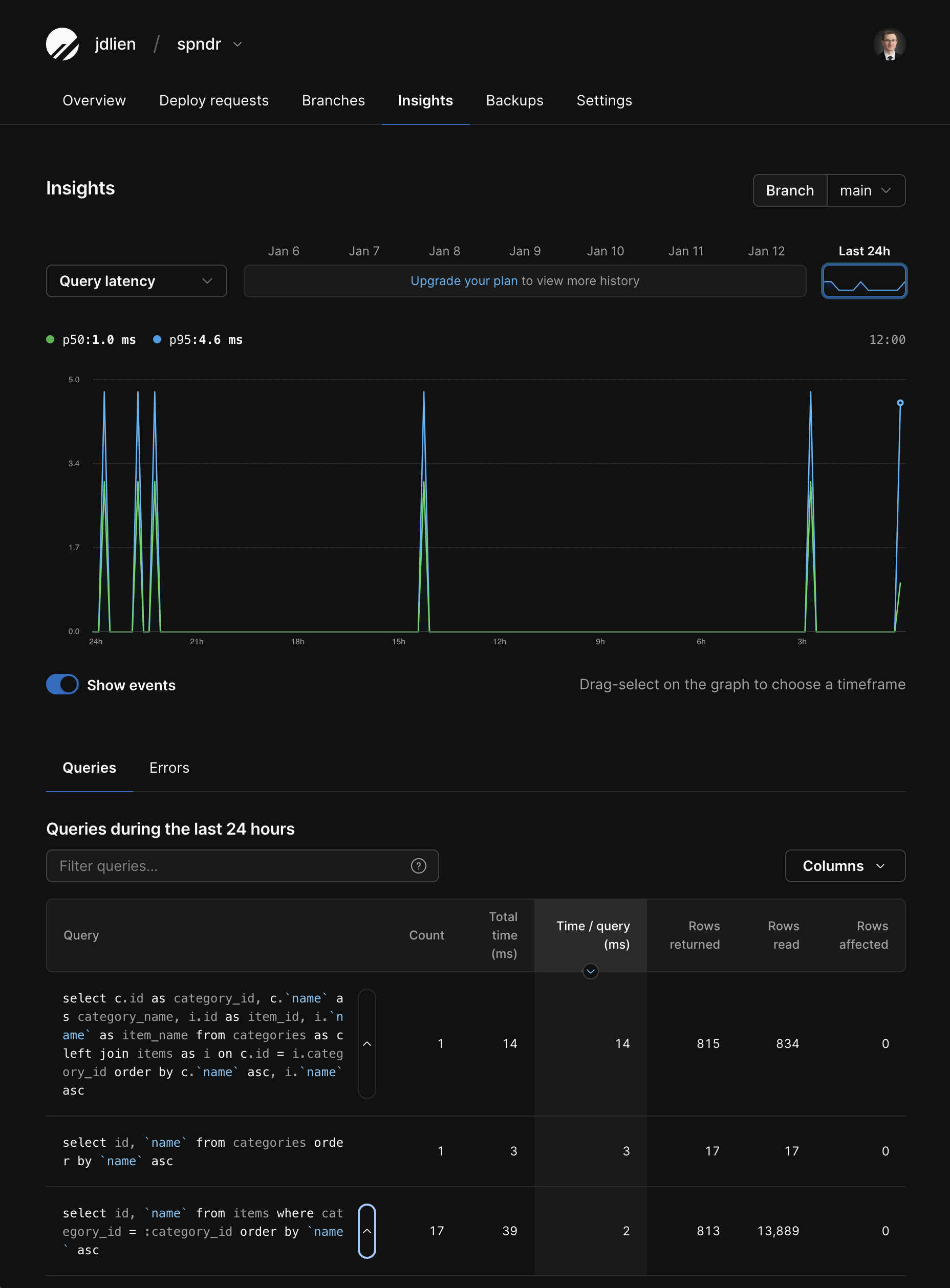
The first query is our more complex but efficient JOIN query, which read 834 rows, returned 815 rows, and took a total of 14ms.
The two queries below that are inefficient queries that resulted in the N+1 problem. Together, they took a total of 42ms and 13,889 rows read to give us the same results as the more complex query.
Overall, this shows us right away that our N+1 queries:
- Ran way too many times
- Read way more rows than returned
- And performance was relatively slow
Now you know how to identify N+1 queries, how to fix them, and how to use PlanetScale Insights to monitor your queries and identify performance issues so you can get out there and write some fast, lean code!