Schema versioning tools have existed long before their declarative counterparts. Instead of having a single file describing the state of the database schema, versioned schema migrations consist of multiple files or scripts that iterate on each other to describe the database as it moves through time. As changes are made to the schema, new files are added to describe those changes. It works very similarly to a system you may already be familiar with: git.
Migration files are typically stored along with the code and, using third-party tooling, are applied to the database incrementally as needed. Those files are usually numbered in the order they need to be applied. The system will use a dedicated table within your database to track which scripts have been applied, and which ones still need to be applied.
Note
If you're already well versed in versioned schema migrations and just want to see how they work using PlanetScale, skip to the How to use versioned schema migrations with PlanetScale section.
Example with Laravel and Artisan
The following example uses the default Laravel example application with the artisan command to perform versioned migrations. When the application is scaffolded, a database/migrations folder will be created within the project that contains a base set of migration scripts.
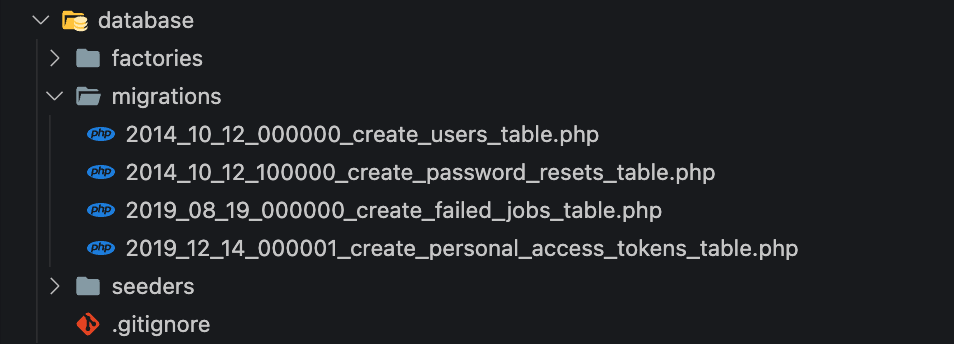
Here are the contents of that first file. It is using PHP to define the structure of a table. When read by artisan, it will be converted to the DDL that is required to create the same structure in MySQL.
# 2014_10_12_000000_create_users_table.php

<?php

use Illuminate\Database\Migrations\Migration;
use Illuminate\Database\Schema\Blueprint;
use Illuminate\Support\Facades\Schema;

return new class extends Migration
{
    public function up()
    {
        Schema::create('users', function (Blueprint $table) {
            $table->id();
            $table->string('name');
            $table->string('email')->unique();
            $table->timestamp('email_verified_at')->nullable();
            $table->string('password');
            $table->rememberToken();
            $table->timestamps();
        });
    }

    public function down()
    {
        Schema::dropIfExists('users');
    }
};
To create the basic structure of the database, the following command will be run. Notice how ALL migration scripts within that folder are run sequentially based on the file name.
~❯ ./vendor/bin/sail artisan migrate

# Output:
   INFO  Preparing database.

  Creating migration table .............................. 45ms DONE

   INFO  Running migrations.

  2014_10_12_000000_create_users_table .................. 45ms DONE
  2014_10_12_100000_create_password_resets_table ........ 64ms DONE
  2019_08_19_000000_create_failed_jobs_table ............ 38ms DONE
  2019_12_14_000001_create_personal_access_tokens_table . 44ms DONE
Next, we can explore the structure of the database. Notice how a migrations table exists now and it contains the name of each of the migration scripts, along with a batch number stored in the batch column to signal to artisan that it's been run previously.
mysql> show tables;
+------------------------+
| Tables_in_example_app  |
+------------------------+
| failed_jobs            |
| migrations             |
| password_resets        |
| personal_access_tokens |
| users                  |
+------------------------+
5 rows in set (0.01 sec)

mysql> select * from migrations;
+----+-------------------------------------------------------+-------+
| id | migration                                             | batch |
+----+-------------------------------------------------------+-------+
|  1 | 2014_10_12_000000_create_users_table                  |     1 |
|  2 | 2014_10_12_100000_create_password_resets_table        |     1 |
|  3 | 2019_08_19_000000_create_failed_jobs_table            |     1 |
|  4 | 2019_12_14_000001_create_personal_access_tokens_table |     1 |
+----+-------------------------------------------------------+-------+
4 rows in set (0.01 sec)
Now to upgrade the schema, we can run another migration script that follows the same naming convention as the others. This script will add a nickname column to the users table.
# 2023_01_13_000001_add_new_column.php

<?php

use Illuminate\Database\Migrations\Migration;
use Illuminate\Database\Schema\Blueprint;
use Illuminate\Support\Facades\Schema;

return new class extends Migration
{
    public function up()
    {
        Schema::table('users', function (Blueprint $table) {
            $table->string('nickname');
        });
    }

    public function down()
    {
        Schema::table('users', function (Blueprint $table) {
            $table->dropColumn('nickname');
        });
    }
};
Now we'll run the same migrate command as was run before. The output will be much less since it is only the one script that is run.
~❯ ./vendor/bin/sail artisan migrate

   INFO  Running migrations.

  2023_01_13_000001_add_new_column ...................... 32ms DONE
Reviewing the migrations table again shows that the script was run successfully.
mysql> select * from migrations;
+----+-------------------------------------------------------+-------+
| id | migration                                             | batch |
+----+-------------------------------------------------------+-------+
|  1 | 2014_10_12_000000_create_users_table                  |     1 |
|  2 | 2014_10_12_100000_create_password_resets_table        |     1 |
|  3 | 2019_08_19_000000_create_failed_jobs_table            |     1 |
|  4 | 2019_12_14_000001_create_personal_access_tokens_table |     1 |
|  5 | 2023_01_13_000001_add_new_column                      |     2 |
+----+-------------------------------------------------------+-------+
And if we inspect the users table, the nickname column now exists.
mysql> describe users;
+-------------------+-----------------+------+-----+---------+----------------+
| Field             | Type            | Null | Key | Default | Extra          |
+-------------------+-----------------+------+-----+---------+----------------+
| id                | bigint unsigned | NO   | PRI | NULL    | auto_increment |
| name              | varchar(255)    | NO   |     | NULL    |                |
| email             | varchar(255)    | NO   | UNI | NULL    |                |
| email_verified_at | timestamp       | YES  |     | NULL    |                |
| password          | varchar(255)    | NO   |     | NULL    |                |
| remember_token    | varchar(100)    | YES  |     | NULL    |                |
| created_at        | timestamp       | YES  |     | NULL    |                |
| updated_at        | timestamp       | YES  |     | NULL    |                |
| nickname          | varchar(255)    | NO   |     | NULL    |                |
+-------------------+-----------------+------+-----+---------+----------------+
Now if I wanted to undo the previous migration for whatever reason, the following command can be run to essentially execute the down() function from the previous migration.
~ ❯ ./vendor/bin/sail artisan migrate:rollback --step=1

   INFO  Rolling back migrations.

  2023_01_13_000001_add_new_column ...................... 41ms DONE
Reviewing the same tables one more time shows that the column has now been removed.
mysql> select * from migrations;
+----+-------------------------------------------------------+-------+
| id | migration                                             | batch |
+----+-------------------------------------------------------+-------+
|  1 | 2014_10_12_000000_create_users_table                  |     1 |
|  2 | 2014_10_12_100000_create_password_resets_table        |     1 |
|  3 | 2019_08_19_000000_create_failed_jobs_table            |     1 |
|  4 | 2019_12_14_000001_create_personal_access_tokens_table |     1 |
+----+-------------------------------------------------------+-------+
4 rows in set (0.01 sec)

mysql> describe users;
+-------------------+-----------------+------+-----+---------+----------------+
| Field             | Type            | Null | Key | Default | Extra          |
+-------------------+-----------------+------+-----+---------+----------------+
| id                | bigint unsigned | NO   | PRI | NULL    | auto_increment |
| name              | varchar(255)    | NO   |     | NULL    |                |
| email             | varchar(255)    | NO   | UNI | NULL    |                |
| email_verified_at | timestamp       | YES  |     | NULL    |                |
| password          | varchar(255)    | NO   |     | NULL    |                |
| remember_token    | varchar(100)    | YES  |     | NULL    |                |
| created_at        | timestamp       | YES  |     | NULL    |                |
| updated_at        | timestamp       | YES  |     | NULL    |                |
+-------------------+-----------------+------+-----+---------+----------------+
8 rows in set (0.01 sec)
Benefits of this strategy
As stated in the previous section, versioned schema migrations have been around for much longer than declarative migrations. This means developers are likely more familiar with how they work and may be more comfortable working in this environment.
Many tools that support versioned migrations support going both directions, upgrading and/or downgrading the schema. This makes reverting changes simpler since a single script will have instructions on performing a downgrade, assuming the developers or database administrators include those details in the migration scripts.
Finally, it's easier to track incremental changes without using a version control system. Since all of the migration scripts are stored alongside each other, diagnosing migration issues may be a bit more straightforward when compared to the declarative approach.
Drawbacks of this strategy
Since the schema is managed incrementally via scripts, it may be hard to get a full picture of what the database schema looks like at any given point in time. You’d essentially have to replay all of the previous scripts against a live system to see the schema in full.
Depending on the tool, it may not validate the current state of the schema before attempting to apply changes. This can cause major issues if the schema was modified outside of the tool and DDL was issued directly to the database.
How to use versioned schema migrations with PlanetScale
How you would use versioned migrations on PlanetScale ultimately depends on if safe migrations is enabled for your production branch.
Without safe migrations
If safe migrations is not enabled for your production branch, versioned migrations would work with PlanetScale branches just as they would with any other MySQL environment. Ideally, you would use different database branches to match your different environments. When your code is ready for production, simply run the upgrade command for your respective migration tools with the connection string for the branch you want the changes to, and your tooling should apply the changes.
That said, enabling safe migrations is a best practice to prevent unintended schema changes, among enabling other useful features.
With safe migrations
When safe migrations is enabled on your production branch, use of branching and deploy requests is enforced to enable zero-downtime migrations, and use of direct DDL is restricted as a result. In this scenario, you would create a development branch, connect your development environment to the PlanetScale development branch, and run your migrations there. Your development branch will now have the updated schema, and is ready to merge into your production database via a PlanetScale deploy request.
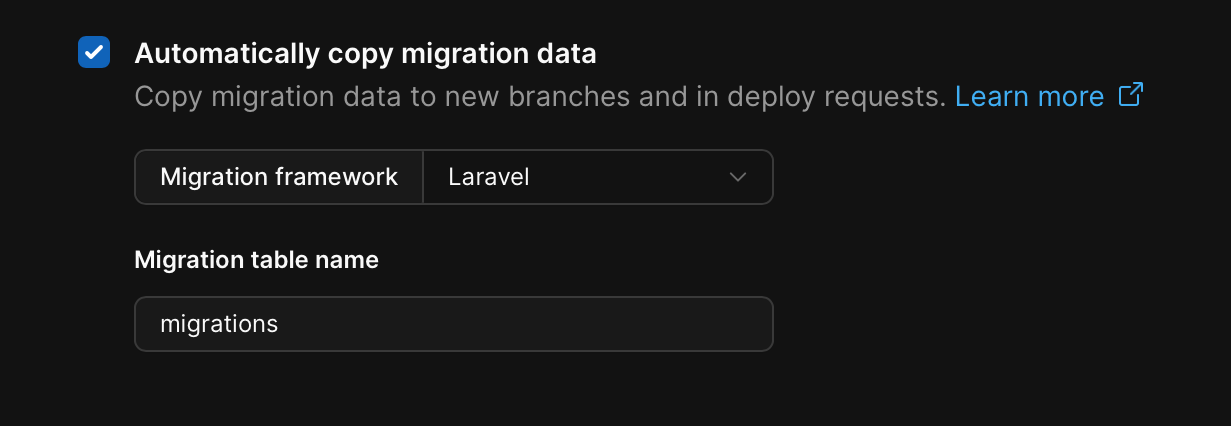
Typically when deploy requests are used to merge database branches, it's only the schema that is changed in the target without writing or altering any data. While this may seem like an issue at first (since a table is used to track what changes have been applied), PlanetScale offers a setting in every Vitess database to automatically copy migration data between branches. This can be set to several preconfigured ORMs, or you can provide a custom table name to sync between database branches.
For additional examples of handling versioned schema changes with PlanetScale, see the following blog posts: