





Holly Guevara [@hollylawly], Shlomi Noach |
Today, we released a new feature that allows you to instantly revert a recently deployed schema change without losing data that was written to the original schema during the time between deploying and reverting.
This is much more than a simple rollback.
Imagine you just deployed a schema change to your production database that drops a column on a table. You refresh your production application in the browser only to discover, to your horror, that your application is down.
Instead of scrambling to rollback to a previous state before the deployment, possibly losing data in the process, this lets you “undo” that schema change with the click of a button. If any data was written to your database while that bad schema change was live, we automatically retain that data even after you revert.
While this may sound like science fiction, it’s completely real and required a huge amount of underlying work to accomplish. This article will shed some light on what’s happening under the hood and how we built this feature.
The example at the end will walk you through exactly what happens in the time between deploying and reverting.
To understand how migration reverts work, we must first look into how online schema change tools work.
All online schema change techniques follow a common high-level pattern:
- Instead of altering your production table, they create an empty shadow table with the same schema as the production table but no data.
- They implement the schema change on the shadow table. This is a cheap operation, given the table has no data.
- They copy data from the original table, track incoming changes, and apply them to the shadow table.
- Finally, when the tables are in sync, the tools cut over. They move aside your original table and replace it with the shadow table.
In short, online schema change tools copy the production table without data, apply the schema change to the copy, sync the data, and swap the tables.
At PlanetScale, we leverage the power of Vitess' VReplication internals to run online schema changes. VReplication is a core component of Vitess, our underlying database system, that works behind the scenes to accomplish online schema changes, migration reverts, data imports with no downtime, and more.
Now that you know how online schema changes work in general, let’s look at how VReplication uniquely implements this, and in doing so, paves the way for migration reverts.
VReplication schema changes
Some online schema change tool techniques differ in implementation. VReplication, in particular, has some key design differences:
- It tracks the progress of both backfill (existing data) and ongoing changes (new incoming data) rather than just backfill.
- It uses precision logic to map every single transaction (a single, complete operation on the database) with the database position during that change using MySQL GTID (Global Transaction Identifier). This allows us to track these existing and incoming changes between the two tables with exact precision based on the time we started the new transaction.
- It switches back and forth between copy state and ongoing change tracking based on these position markers.
- It couples copy state and its progress transactionally. Likewise, it couples changelog events and their progress transactionally.
- Unlike any other schema change solution, Vitess does not terminate upon migration completion. This point is important when it comes to reverting schema changes.
In summary, VReplication has a transactionally accurate journal of the state of migration. At any time, it knows exactly which rows have been copied and which changelog events have been processed.
This is unique in the world of online schema change tools, and this unique feature is what allows us to instantly revert schema changes without losing data that was written to the original schema.
How VReplication allows us to revert schema changes
Let’s revisit the online schema change flow in the context of VReplication and drive this process home with an example.
Suppose in your deploy request you issue the following statement:
ALTER TABLE users DROP COLUMN title;
Here’s what happens behind the scenes right after you deploy:
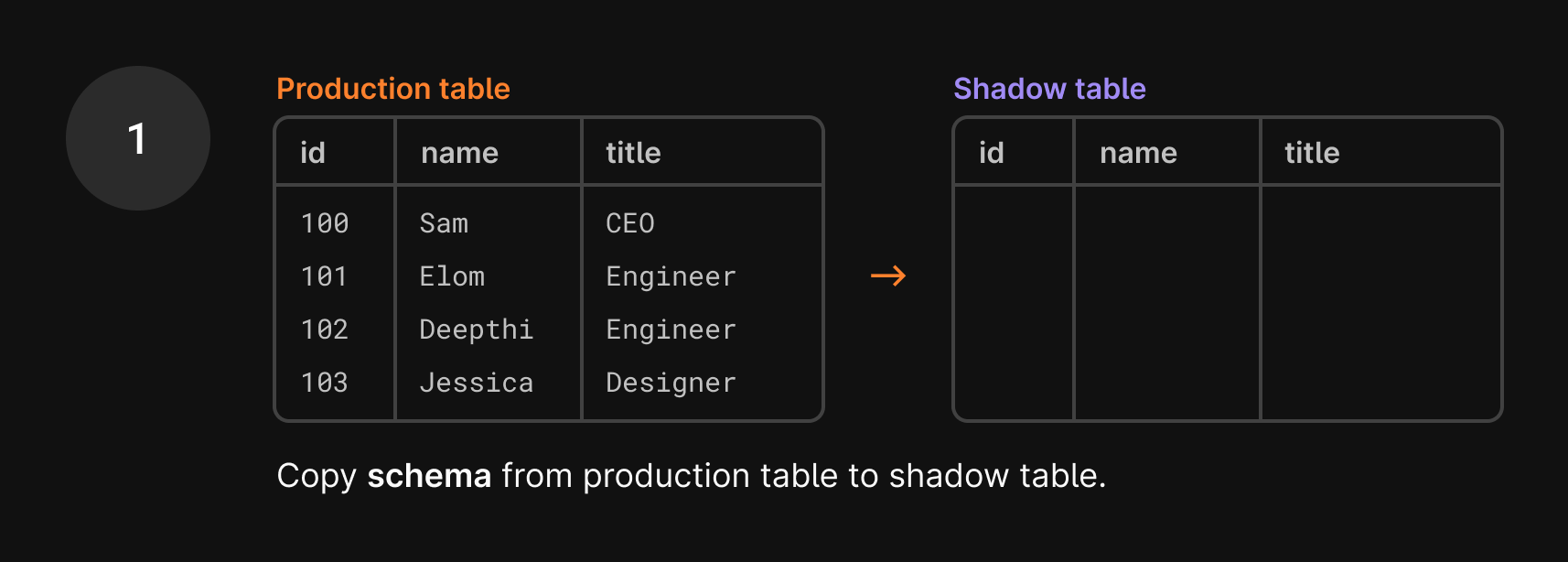
- We first make a copy of the
userstable that’s in production without any of the data. We essentially only copy the schema, which still includes thetitlecolumn. This is called a shadow table.
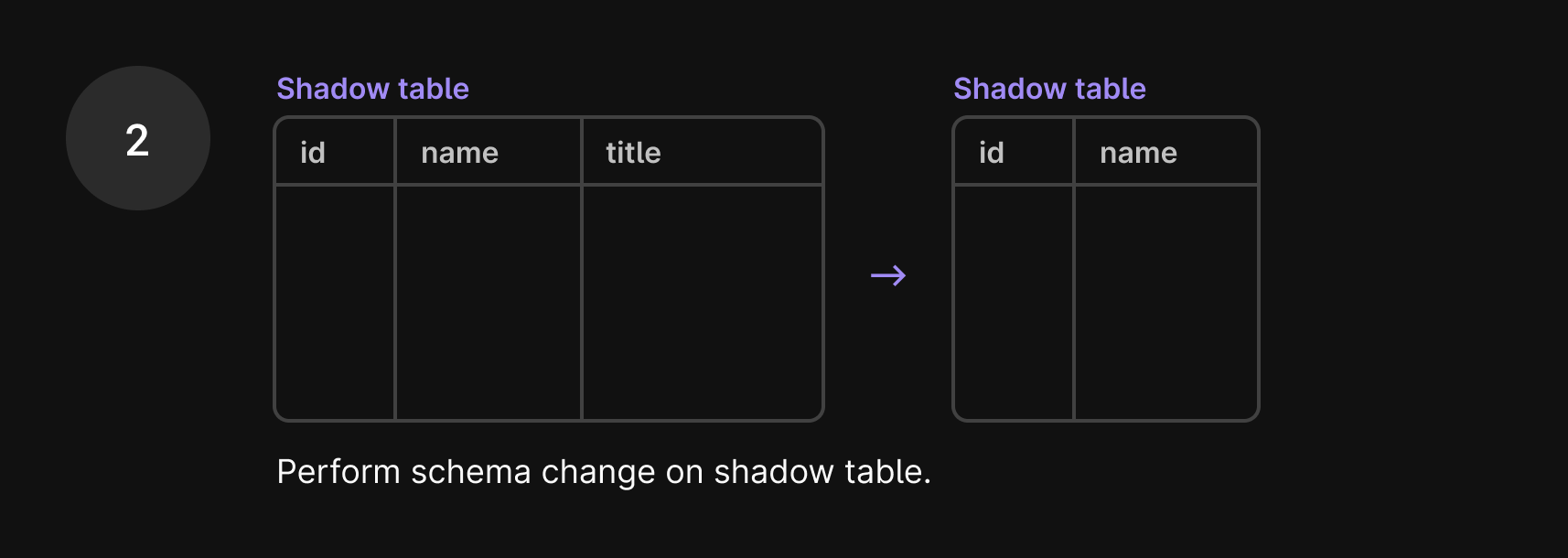
- We apply the
ALTER TABLE users DROP COLUMN titlestatement to the shadow table, dropping thetitlecolumn.
- We begin copying the data from the production table to the shadow table.
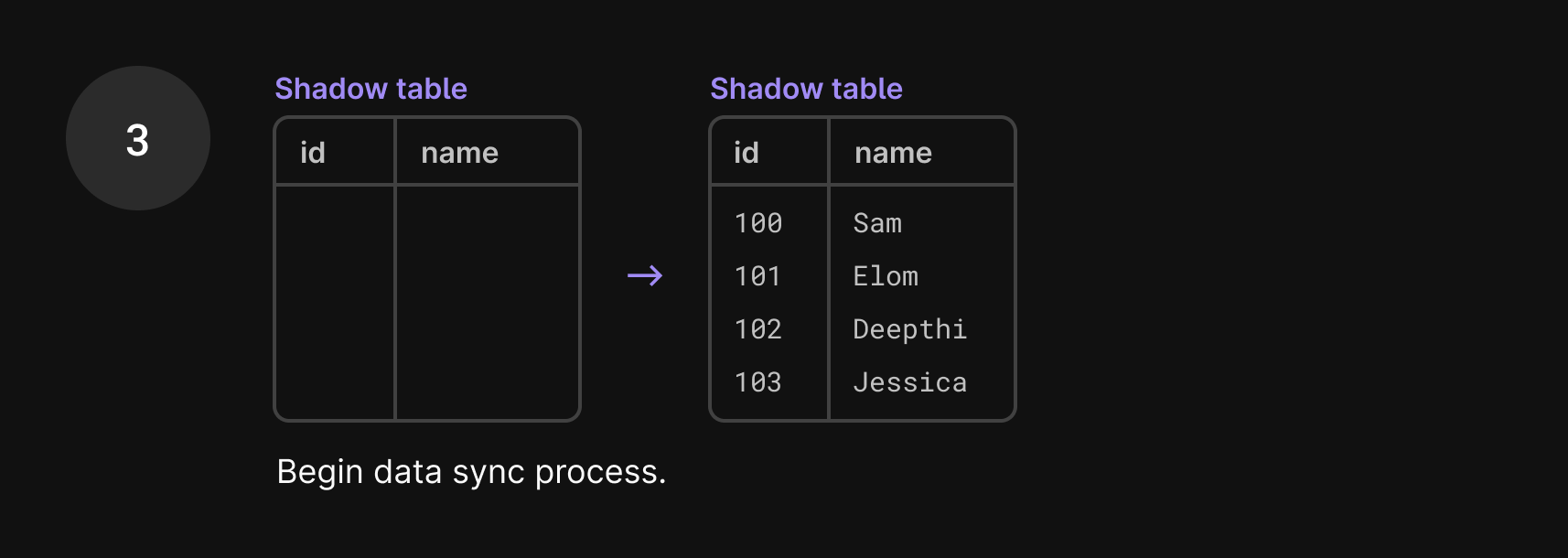
- Data is continuously copied, including new data, with the goal to get these two tables in sync.
As you can imagine, syncing data between these two tables is a huge task, especially because data is still being added to the production table during this process. So, if one row is copied over to the shadow table, you may think the work is done. But what if a new write comes in, changing that user’s name a few seconds later? That update goes to the current production table, so the production table and shadow table are again out of sync.
This is where VReplication shines. VReplication solves this problem by copying existing and incoming data in batches interchangeably. As mentioned earlier, VReplication tracks these existing and incoming changes between the two tables with exact precision based on the time we started the new transaction.
When we begin copying a set of rows, we run START TRANSACTION WITH CONSISTENT SNAPSHOT, which takes that snapshot and essentially freezes time while we copy the rows over. This is done using the GTID, Global Transaction ID, which captures the existing state down to the transaction level.
Once we’re done copying the first set of existing rows, we switch to copying incoming data. We only care about data that satisfies two conditions: it came in after the GTID point that we just used and it contains changes to the data we’ve already written to the shadow table.
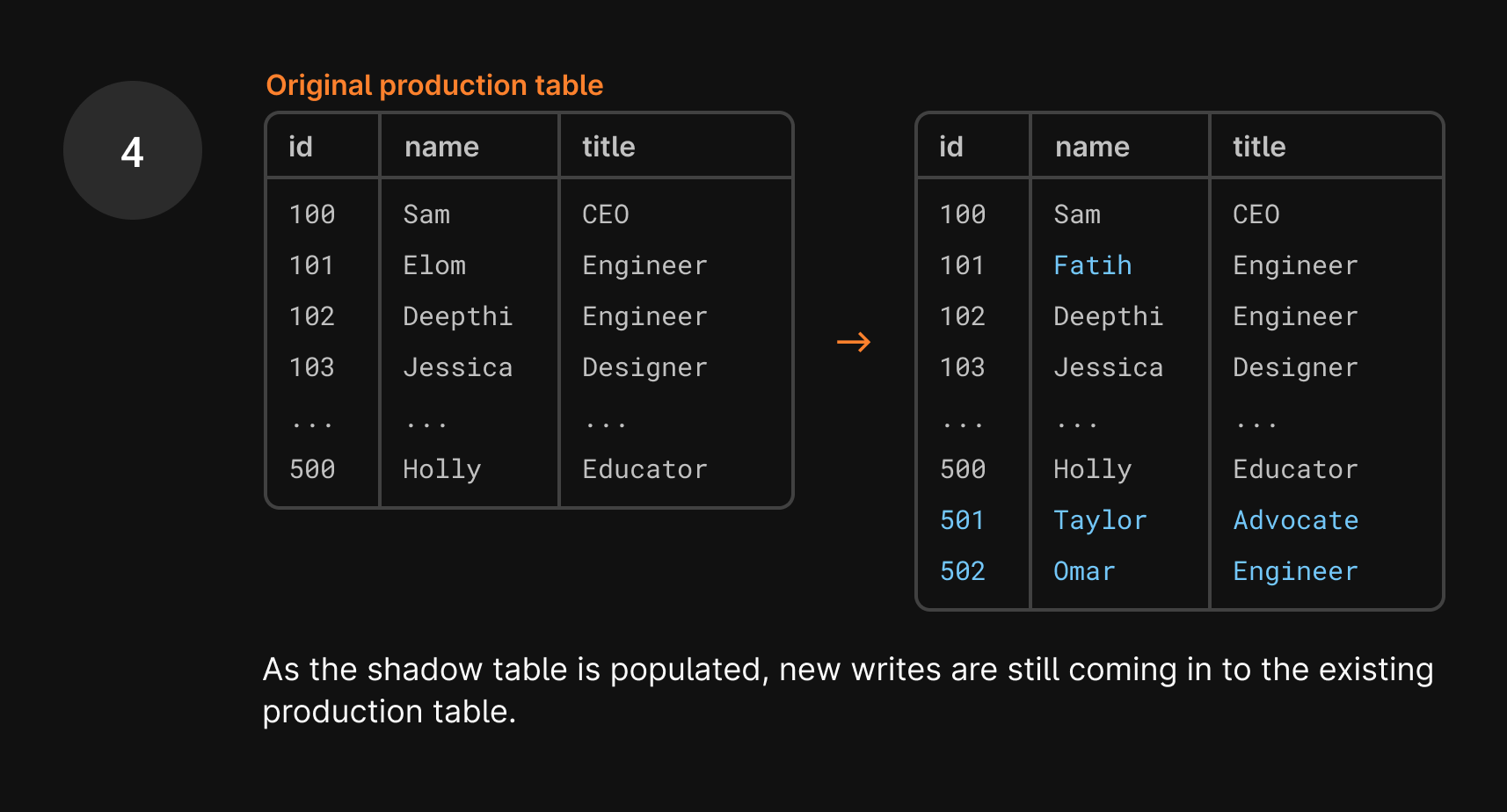
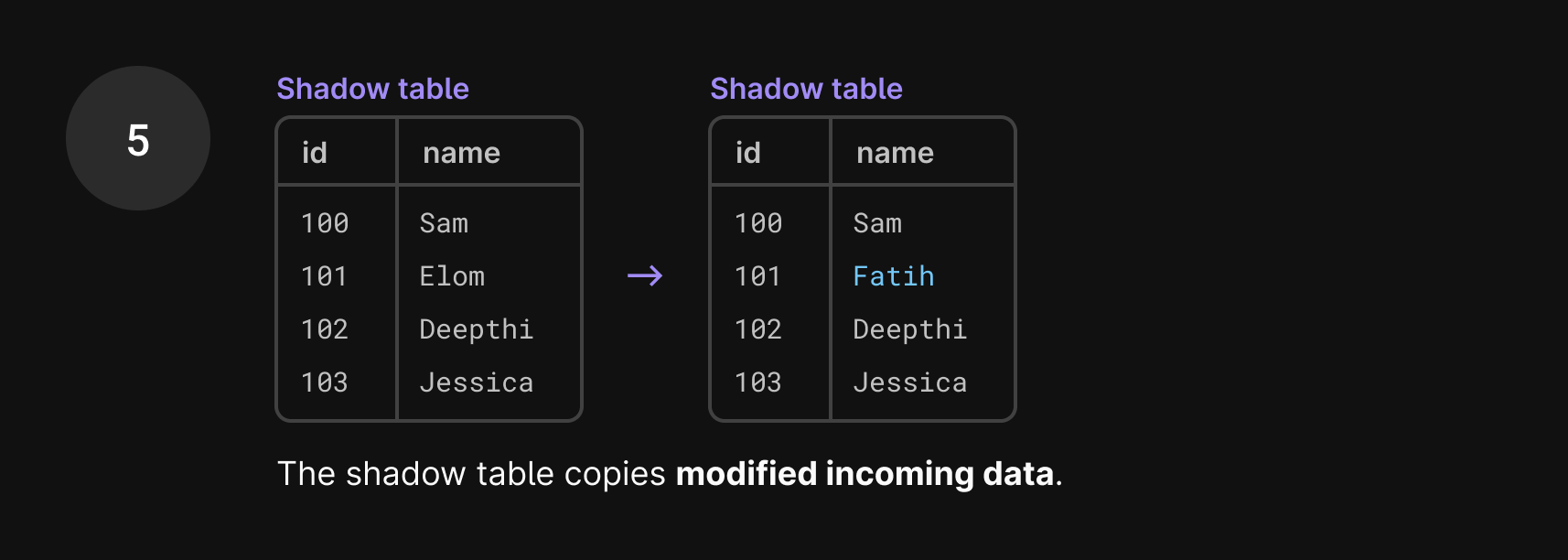
There are most likely new INSERTs in the binlog, but we don’t need to copy those over right now because we’ll encounter them eventually when we’re back in copy mode.
Once we’re finished with the set of incoming changes from the binlog, we capture a new GTID and switch back to copying from the production database.
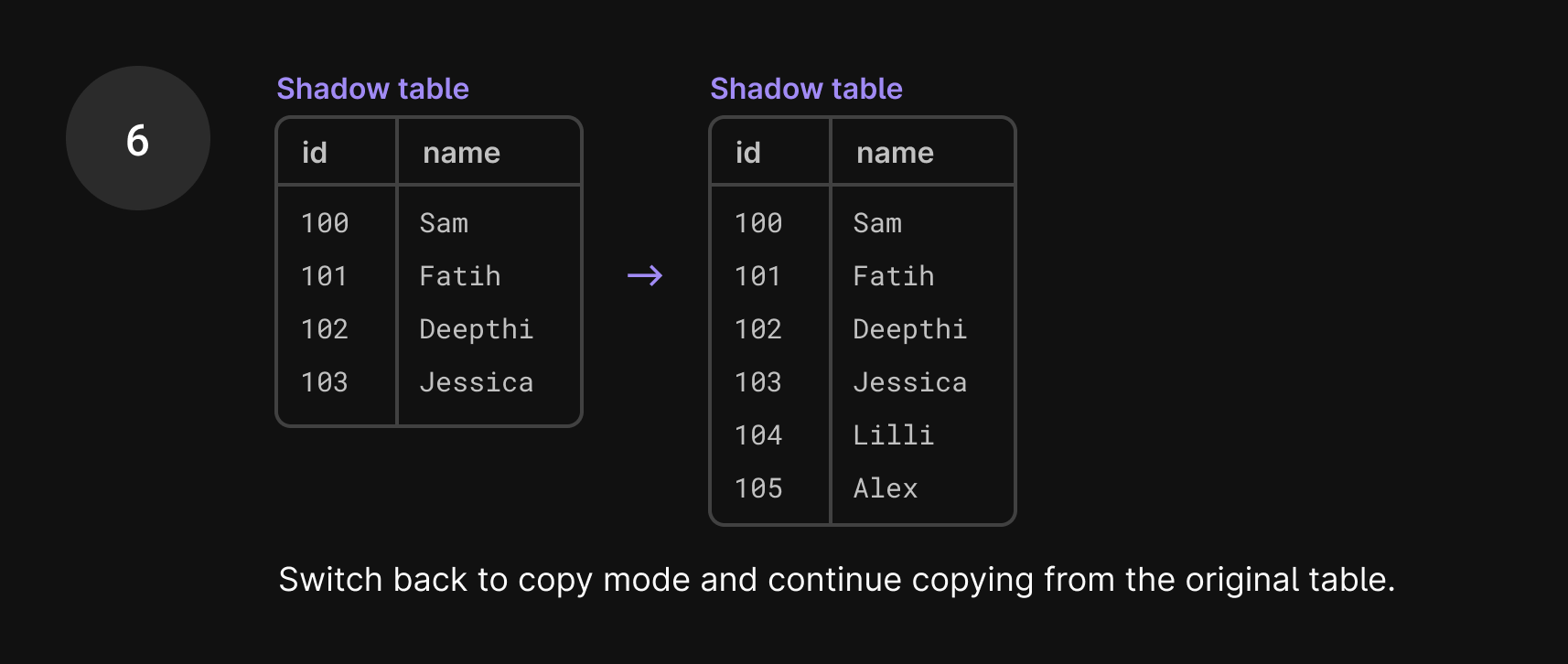
In the seconds it took to do that, more incoming traffic has arrived. We apply any changes to the shadow table and then continue copying data. This way, we know that we’ve consumed all events up until that GTID capture.
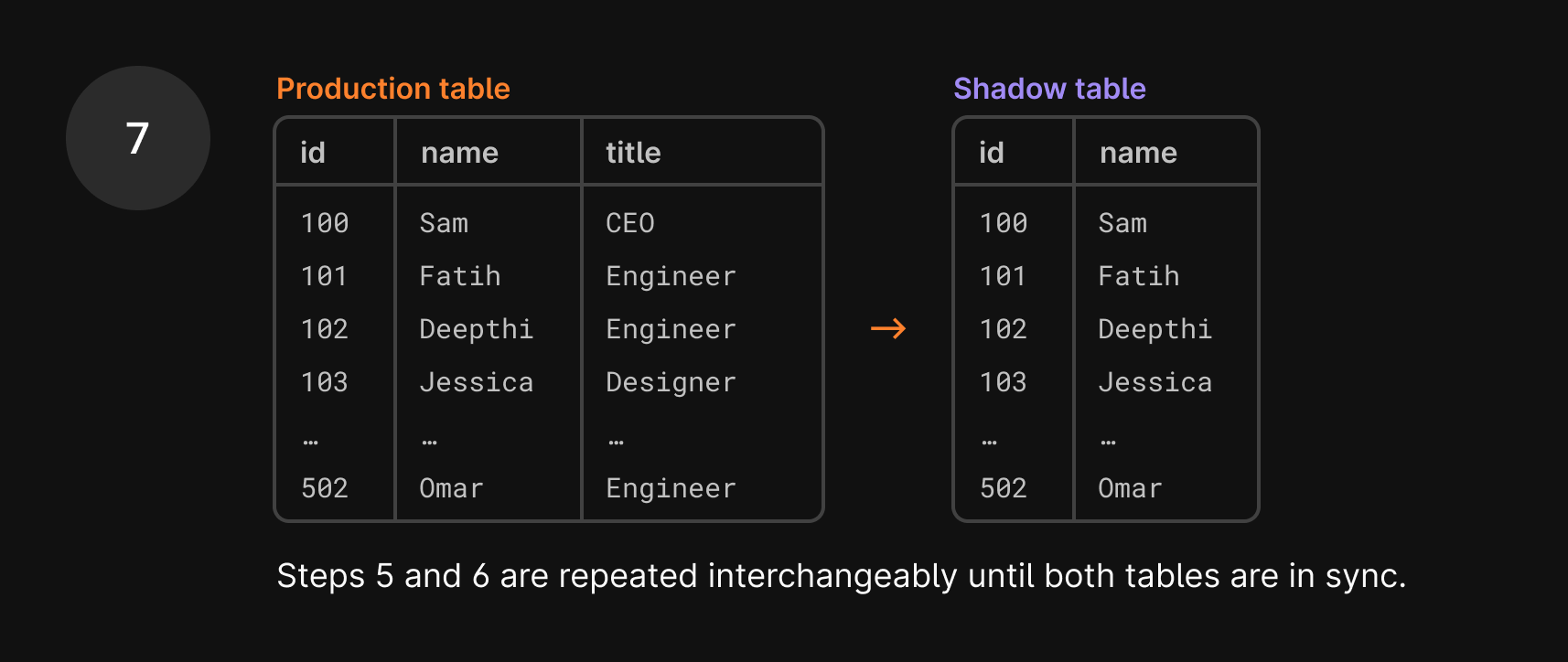
- Once the data is copied over, we issue a hard stop on the process, known as the cut-over period.
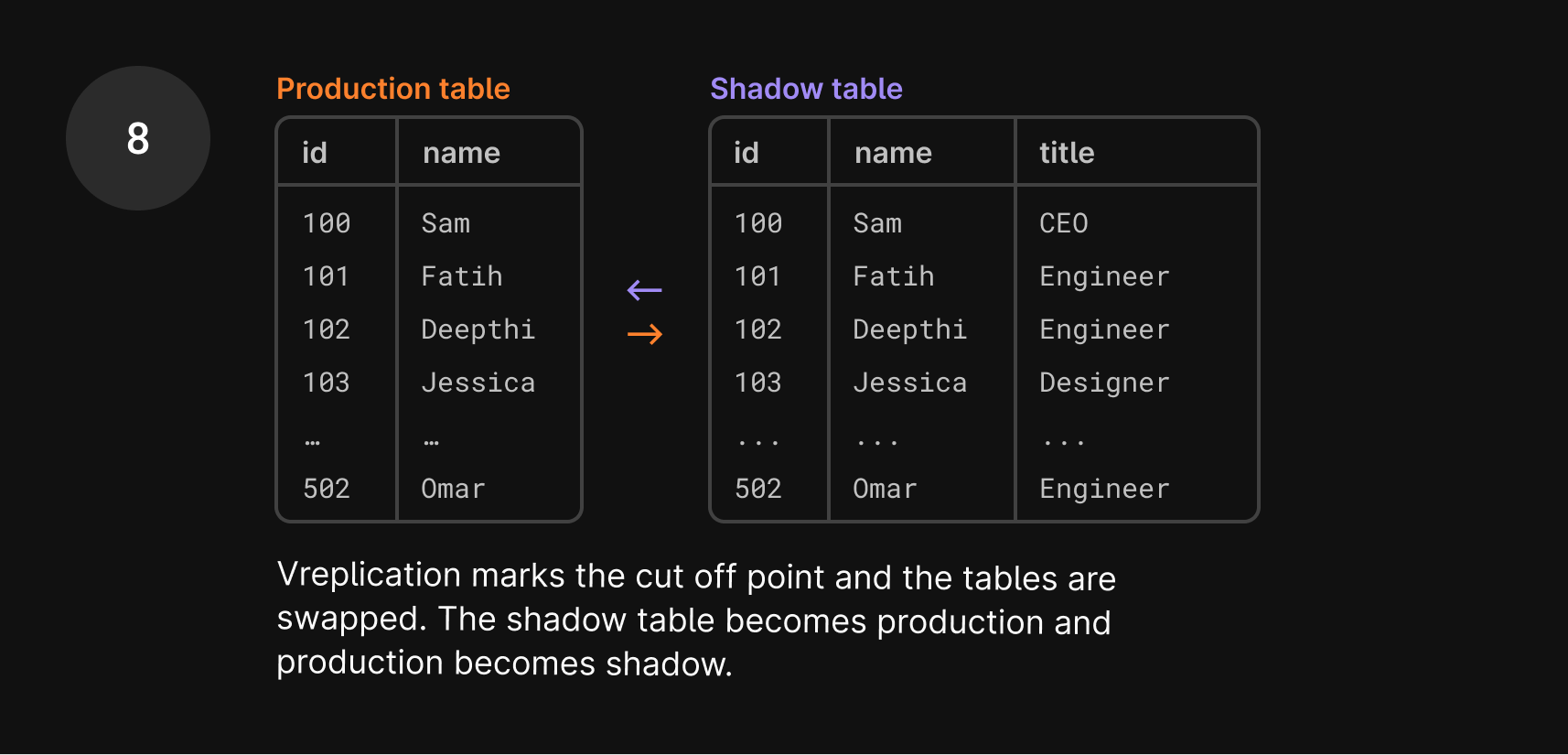
Cut-over period
The final and most critical step in the migration is the cut-over, where the original table is swapped away and replaced by the shadow table.
The cut-over is the single step where a write lock is explicitly imposed on the table. Until the swap is complete, no writes can take place. It’s the “freeze point”, where both tables are in perfect sync. However, since downtime is unacceptable during this process, writes will still be allowed from the application’s perspective. We’ll hold all new writes that come in and apply them once the swap has taken place.
The Vitess migration flow marks the database position at that freeze point. It then swaps the two tables: the shadow table replaces the original table, and the original table replaces the shadow table. Again, at this point, the tables are in sync.
The migration process completes and lets traffic access the new table. However, the story does not end here. We keep both the old table as well as the VReplication state. In fact, we use them right away.
Preparing for revert
Shortly after migration completion, PlanetScale prepares an open-ended revert. The revert process tracks ongoing changes to the table and applies them to a shadow table. That should sound familiar. Indeed, we already have a shadow table in place. It is already populated with data, and we know that it was in full sync with what we now call the new table at cut-over time.
So in the previous example, once the deployment is complete, you decide you need to revert it. Here’s what happens next:
- You click “Revert changes”.
- In the time between the tables being swapped and you clicking “Revert”, we already prepared for the revert process in the background. Remember how we swapped the production table with the shadow table? That old production table is now your shadow table.
- The important part to recognize is that this shadow table is already complete with data and the previous schema that you want to revert to. So we don’t need to go through that same lengthy data copy process again to swap these tables! We only need to track new changes, which this shadow table has been doing in the background, regardless of if you eventually click revert or not.
Since the swap, we’ve continued syncing the shadow table with the production table.
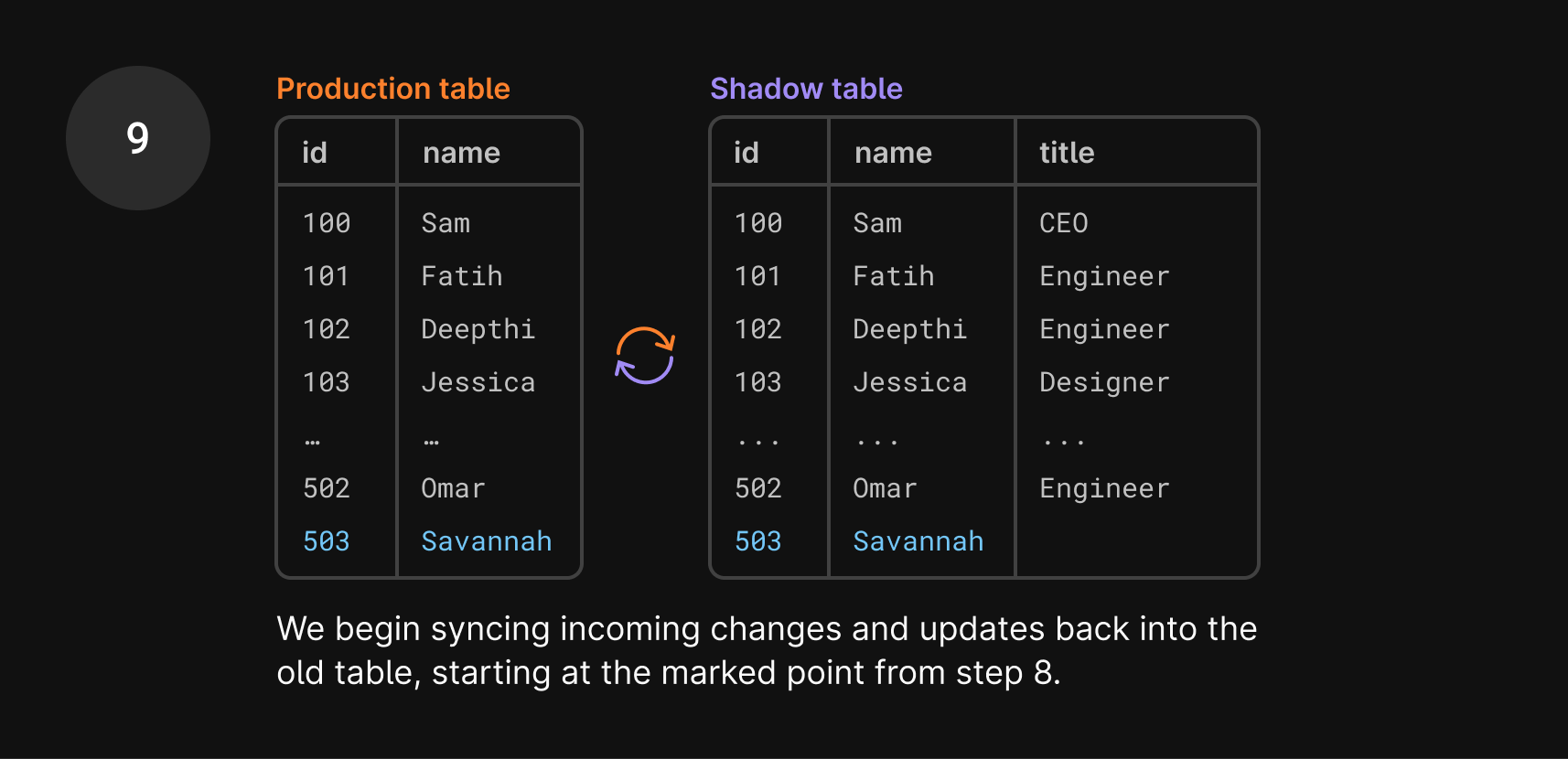
- So once you click revert, all we need to do is swap them again! It goes through the exact same cut-over process, and the shadow table becomes the production table again and vice versa.
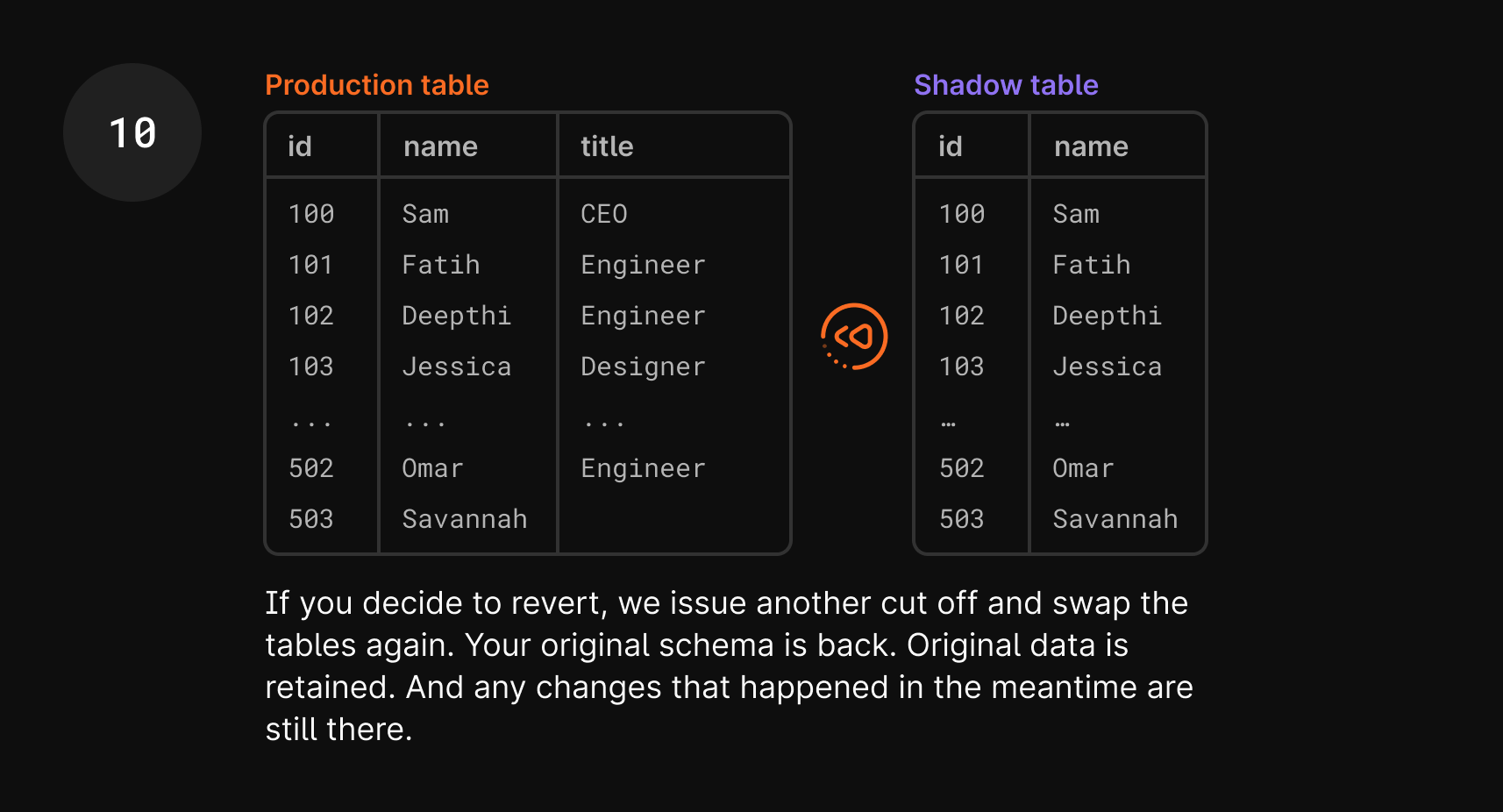
- You now have your original schema, your
userstable with thetitlecolumn, and your application should work again. With this process, you retained any new data that was added during that period, which would have been a huge hassle in traditional rollback and restore methods.
One more thing to note is that in step 10 of the diagram, Savannah doesn’t have a title. This is because that entry was added after the tables were swapped, so the title column didn’t exist in production. This is expected and something you can clean up after the revert, if necessary.
We explained this process in terms of issuing an ALTER statement, but there are even more nuances we had to consider to revert CREATEs and DROPs. Stay tuned for a future blog post on those topics, and a sneak peek at another feature that this underlying process brings to the table.
Wrap up
Hopefully, this article has shed some light on how our schema revert feature works.
Our goal at PlanetScale is to continuously improve the developer experience by providing a scalable and easy-to-use database solution. Keep in mind that all of this is done in seconds, behind the scenes, with just a click of a button.
If you’d like to see this in action, you can enroll your database in the limited beta today from your database Settings page. For more information, see the “Revert a schema change” section of our Deploy requests documentation.