









Blue/green deployments are Amazon's answer to performing maintenance tasks on its RDS and Aurora database offerings. Creating a blue/green deployment spins out a copy of your existing database environment to make changes to. This approach has some similarities with PlanetScale's approach, known as branching, but deep down, the solutions are very different.
This article will cover what Amazon Aurora blue/green deployments are and how they differ from PlanetScale branching.
What is a blue/green deployment?
Before we explore what blue/green deployments are in the context of Amazon Aurora, it's worth discussing what they are on their own. DevOps is traditionally an eight-step framework that allows organizations to quickly get new features into production. Step six of this process is the deployment process, where built artifacts are pushed into production and released for your users to take advantage of.
Blue/green is a deployment strategy used during the deploy phase of DevOps to get code to production seamlessly.
When new features are released as part of a blue/green strategy, you'd typically have two identical environments that can both act as production. As an example, "blue" is the current production environment, and "green" is used to identify the other environment that will become production once the new artifacts are released. When the artifacts are deployed to the green environment, you'd reroute traffic to it and make green your new production environment.
The traffic alternates back and forth between the two environments as they trade their production status based on the latest release of the code.
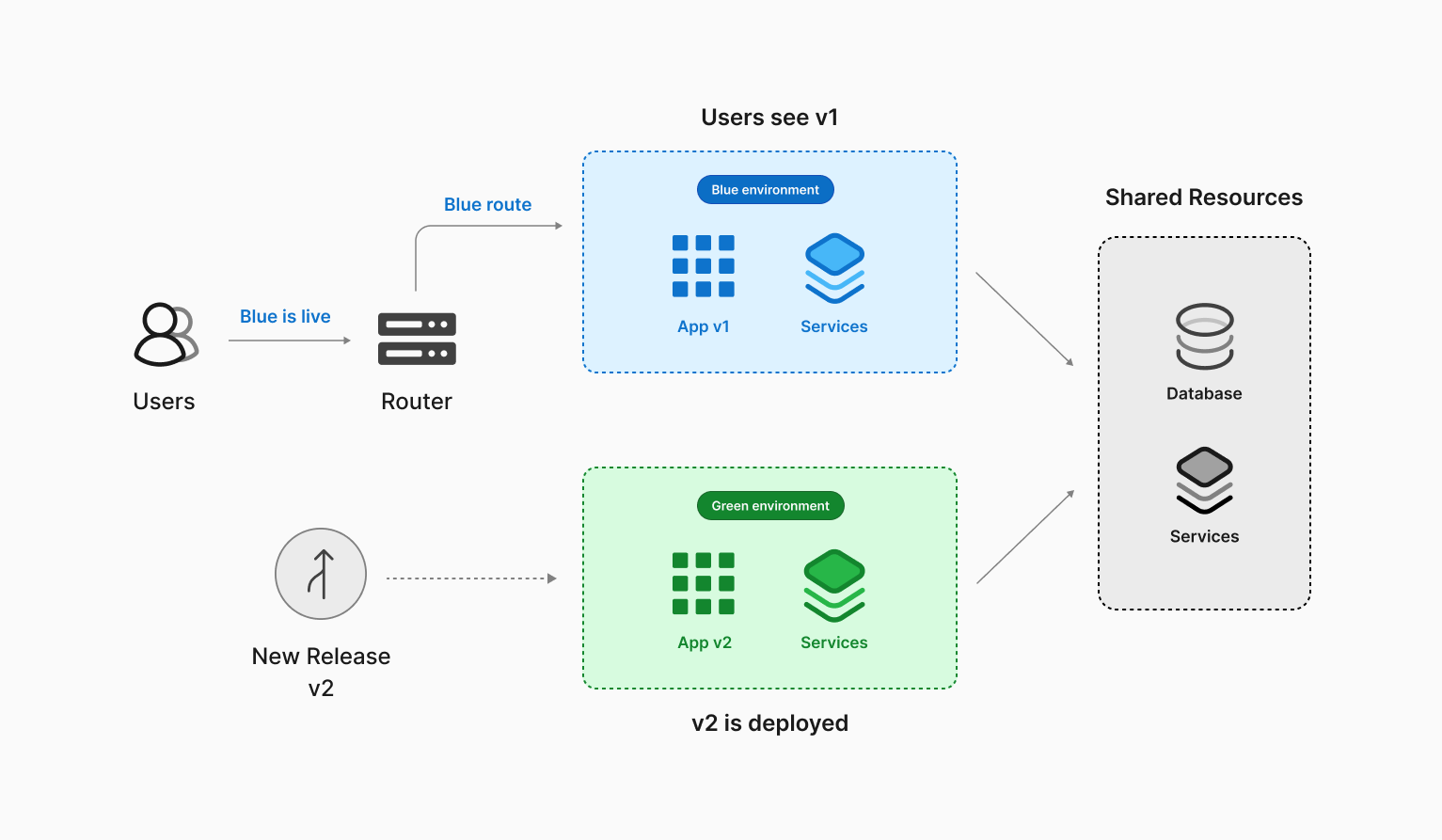
How do Amazon Aurora blue/green deployments work?
Aurora applies much of the same process outlined above to your database.
When you set up a blue/green deployment for a database hosted on Amazon Aurora, AWS will create a clone of your current Aurora cluster and spin up a brand new "green" environment. Once the new cluster is configured, AWS will configure binlog replication between the two clusters to keep changes synchronized between them. This new environment can then be used to change your database schema or configuration.
Once you have made the desired changes, you'd execute a switchover, promoting the "green" environment to production and route traffic to it.
When a switchover is triggered, several things happen before traffic is directed to the new production environment. Amazon will run the environments through a series of guardrails, which ensure that the changes made are compatible and that no long-running operations are being run against the blue environment. Once that's done, Amazon will perform the following actions:
- Stop new writes and drop all connections to the database.
- Wait for any final writes and replication operations to execute.
- Switch blue to read-only.
- Rename the resources in both environments so that the green environment's resources adopt the original names of the blue environment's resources.
From this point, all transactions are now processed in a green environment, and the resources in the blue environment are left online, but prefixed with "old."
Why use blue/green deployments on Amazon Aurora?
Amazon recommends using blue/green deployments to perform maintenance operations that Aurora clusters occasionally require. Here are a few common tasks where blue/green deployments can help reduce the downtime that is typically required.
Schema changes
Blue/green deployments are used to implement minor schema changes, such as adding new columns at the end of a table, creating indexes, or dropping indexes. However, blue/green deployment uses binlog replication to keep the two environments in sync. This means that schema changes should be limited to what is currently supported by binlog replication in MySQL.
Version upgrades
New versions of MySQL are released on a fairly regular basis. These can be major versions with new and improved features or minor versions with security and vulnerability patches. Either way, they should be installed promptly. Creating a blue/green deployment within Amazon lets you test the new version in an isolated environment that matches your current production environment.
Updating the compute instance types
If your selected Aurora instance type runs out of compute resources, you'll need to select a new instance type with more resources. This operation will typically shut down the old compute nodes and boot up new ones, causing the database to be unavailable during this operation. Blue/green deployments can also reduce downtime when scaling instances.
What is PlanetScale branching?
Each branch in PlanetScale's branching technology for Vitess constitutes its own Vitess cluster and includes several infrastructure pieces. For instance, the data resides on a tablet, a pod on the Kubernetes infrastructure that runs the MySQL process with a sidecar process called vttablet. This process enables the pod to communicate with the rest of the Vitess environment. Meanwhile, vtgate is a lightweight proxy routing service that routes MySQL traffic to the correct tablet in conjunction with our topology service. If a tablet goes down for any reason, our systems automatically reroute traffic to a functional tablet and allocate another tablet to replace the downed instance.
In production branches, at least one replica can always be used for read-only workloads or as a backup if the write node goes offline. Our paid tiers automatically have additional replicas, and the solution is fully customizable in Enterprise. On the other hand, development branches use a low-cost instance by default, but this is customizeable if you need more power.
Creating a new development branch spins up a new Vitess cluster entirely isolated from your production database branch. The schema from the upstream branch is copied into the new branch, providing you with the same database structure. As a result, development branches are ideal for building new features that require schema changes. Schema changes can be merged in a non-blocking manner with the upstream branch using deploy requests, which are similar to pull requests on GitHub. This feature allows your team to collaborate and review schema changes before safely merging them with no downtime.
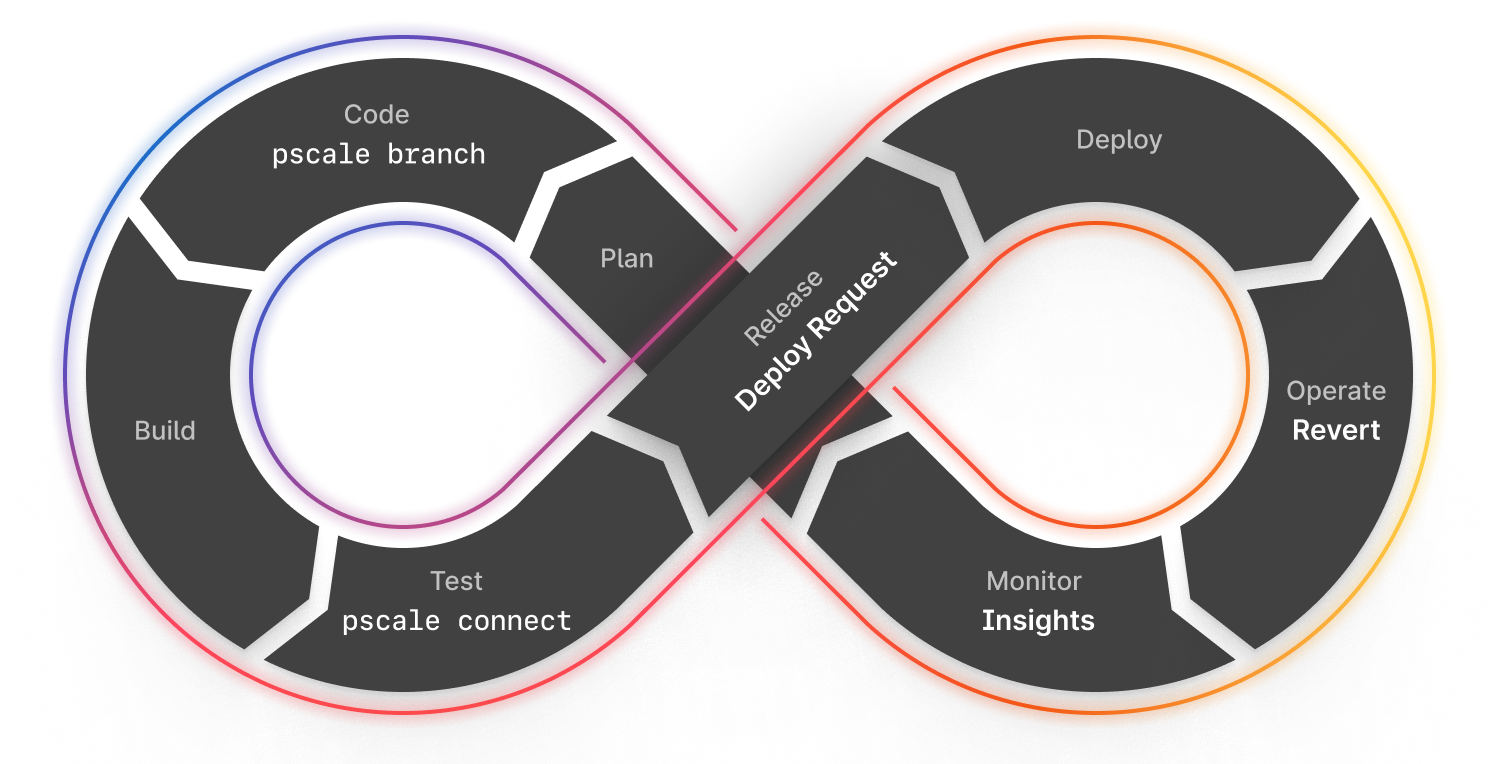
Data Branching®
In addition to branching, PlanetScale supports Data Branching®, allowing you to create a new branch with a copy of your production data by restoring the latest version of a production backup to the new branch. This enables developers to have an isolated environment to test new features or run analytics without affecting their production environment.
Note
Data Branching® is available on our Base plan and above.
Comparing PlanetScale with Aurora Blue/Green deployments use cases
Schema changes
Aurora blue/green deployments rely on binlog replication to sync data between the two clusters, so any schema changes performed on the green side must be compatible with binlog replication; otherwise, they will prevent the switchover operation.
PlanetScale approaches this differently by analyzing the delta between the two schemas and generating the DDL statements to execute on the upstream branch in the correct order. This operation is done using a deploy request. When the deploy request is merged, a "ghost" table is created on the upstream database to apply the new schema. The data is then synchronized between the old table and this new "ghost" table until you can put it into production.
Adjusting instance types
Blue/Green deployments can be used in Aurora to increase switchover success rates through its guardrails. Many instance modifications in Aurora commonly require downtime, such as changing the instance class to scale up or down. Switchover can reduce downtime for such operations, but it is still disruptive since all client connections will be dropped during the process.
Unlike Aurora, we can seamlessly perform rolling upgrades to the tablets without taking down your database. This is based on our use of Vitess on Kubernetes. To make instance type changes, you'd select the new instance type, and our backend systems will do the rest. This allows your applications to continue to operate without being taken offline.
Version upgrades
When you first create an Aurora cluster, you can opt to apply minor version upgrades automatically during a predefined maintenance window. However, this can be disruptive due to the downtime to apply the changes or due to undesired behavior changes in the database software. You can use blue/green deployments to have more control over the database version upgrade process, reducing downtime and associated risks. However, this is a labor-intensive task and requires significant planning.
PlanetScale engineers carefully verify that new versions are compatible with the system before they are applied. Once the changes are validated, they will be applied via rolling upgrades, taking advantage of the Vitess routing and Kubernetes technologies. This approach avoids the stress of having a disruptive maintenance window or further compatibility issues simply because Aurora is dropping support for version-specific features.
Other considerations when using Aurora Blue/Green deployments
Cost considerations
When creating an Aurora blue/green deployment, the new cluster is an exact copy of your existing cluster, including the associated costs for any configured read replicas. This means that if you have one write node and three reader nodes, there will be a point in time where you are effectively paying for eight total nodes (4 in blue and 4 in green) and only really using half of them. Once a switchover is performed, your blue environment is left running, which incurs additional costs.
In PlanetScale, we only initially spin up the resources you need to make schema changes. If you want more resources or want to use your production data, you can do so, but it is not a necessity. This keeps the costs down when needing to change your database.
Failing back
Even though the blue environment remains available for read-only operations, Amazon does not permit you to fail back in any way. This means that if you need to revert the changes made in the green environment, you will need to create a new blue/green deployment, undo any previously made changes, and perform a switchover to the blue environment.
PlanetScale databases support a feature called Schema revert, which will undo the changes made to the schema while still keeping any writes that occurred since the deploy request was merged. As mentioned, we use a ghost table to apply changes and sync the data between the live and ghost tables. With the Schema revert feature enabled, we retain the former production table for a period of time but continue to sync changes into it. When you revert the changes, our system will simply flip the statuses of the two tables, making the old production table active again, but it will contain the writes since the merge.
Potential for data inconsistency issues
Amazon's blue/green deployment initially duplicates only compute resources and clones data storage using a copy-on-write mechanism. This can help with storage costs when running parallel environments but introduces potential data inconsistencies across environments. Since writes are allowed in the green environment, the same data can technically be changed in both environments. If this happens, Amazon has no easy or automated way to reconcile which version is correct. Resolving conflicts is challenging, and the responsibility for data consistency falls on you.
As mentioned earlier, PlanetScale branches are isolated MySQL clusters. When you merge schema changes, the data in production is unaffected. Branches with safe migrations enabled (which is required to use deploy requests) are protected from DDL statements to avoid situations like this.
Planned downtime
Even though blue/green attempts to minimize downtime for operations performed using it, some downtime is still involved since performing a switchover will drop all active connections. Long-running operations still permitted by Amazon's guardrails will cause this downtime to last even longer than the marketted "less than a minute" since the process needs to wait for those to complete.
PlanetScale does not drop connections for common maintenance tasks, as mentioned in this article, so your applications can continue to operate without being taken offline.