

惯性聚合 高效追踪和阅读你感兴趣的博客、新闻、科技资讯
阅读原文 在惯性聚合中打开

推荐订阅源

H
Heimdal Security Blog
小众软件
小众软件
钛媒体:引领未来商业与生活新知
钛媒体:引领未来商业与生活新知
罗磊的独立博客
Google DeepMind News
大猫的无限游戏
大猫的无限游戏
奇客Solidot–传递最新科技情报
奇客Solidot–传递最新科技情报
Hugging Face - Blog
Hugging Face - Blog
阮一峰的网络日志
阮一峰的网络日志
A
About on SuperTechFans
宝玉的分享
宝玉的分享
博客园 - 聂微东
月光博客
月光博客
Cyberwarzone
Cyberwarzone
Microsoft Security Blog
V
Visual Studio Blog
Project Zero
Project Zero
T
Tor Project blog
freeCodeCamp Programming Tutorials: Python, JavaScript, Git & More
L
LINUX DO - 最新话题
博客园 - 叶小钗
Recent Commits to openclaw:main
Attack and Defense Labs
Spread Privacy
Spread Privacy
Forbes - Security
Forbes - Security
Simon Willison's Weblog
N
Netflix TechBlog - Medium
P
Proofpoint News Feed
Engineering at Meta
Engineering at Meta
Hacker News: Ask HN
Hacker News: Ask HN
I
InfoQ
M
MIT News - Artificial intelligence
AI
AI
博客园 - 三生石上(FineUI控件)
W
WeLiveSecurity
C
Check Point Blog
The Hacker News
The Hacker News
C
Cyber Attacks, Cyber Crime and Cyber Security
Application and Cybersecurity Blog
T
Tenable Blog
让小产品的独立变现更简单 - ezindie.com
Threat Intelligence Blog | Flashpoint
The Cloudflare Blog
Blog — PlanetScale
Blog — PlanetScale
美团技术团队
D
Darknet – Hacking Tools, Hacker News & Cyber Security
GbyAI
GbyAI
Hacker News - Newest:
Hacker News - Newest: "LLM"
腾讯CDC
K
Kaspersky official blog

Blog — PlanetScale

Keeping a Postgres queue healthy — PlanetScale Patterns for Postgres Traffic Control — PlanetScale Graceful degradation in Postgres — PlanetScale High memory usage in Postgres is good, actually — PlanetScale Stripe Projects partnership: Provision PlanetScale Postgres and MySQL databases from the Stripe CLI — PlanetScale Enhanced tagging in Postgres Query Insights — PlanetScale Behind the scenes: How Database Traffic Control works — PlanetScale Introducing Database Traffic Control — PlanetScale Scaling Postgres connections with PgBouncer — PlanetScale Drizzle joins PlanetScale — PlanetScale Video Conferencing with Postgres — PlanetScale Faster PlanetScale Postgres connections with Cloudflare Hyperdrive — PlanetScale Introducing the PlanetScale MCP server — PlanetScale Database Transactions — PlanetScale Automating our changelog with Cursor commands — PlanetScale Postgres 18 is now available — PlanetScale Using MotherDuck with PlanetScale — PlanetScale $50 PlanetScale Metal is GA for Postgres — PlanetScale AI-Powered Postgres index suggestions — PlanetScale $5 PlanetScale is live — PlanetScale Announcing Vitess 23 — PlanetScale $50 PlanetScale Metal — PlanetScale Report on our investigation of the 2025-10-20 incident in AWS us-east-1 — PlanetScale $5 PlanetScale — PlanetScale Benchmarking Postgres 17 vs 18 — PlanetScale Larger than RAM Vector Indexes for Relational Databases — PlanetScale Partnering with Cloudflare to bring you the fastest globally distributed applications — PlanetScale Processes and Threads — PlanetScale PlanetScale for Postgres is now GA — PlanetScale Postgres High Availability with CDC — PlanetScale Announcing Neki — PlanetScale Caching — PlanetScale The principles of extreme fault tolerance — PlanetScale Announcing PlanetScale for Postgres — PlanetScale Benchmarking Postgres — PlanetScale Announcing Vitess 22 — PlanetScale The Real Failure Rate of EBS — PlanetScale IO devices and latency — PlanetScale Announcing PlanetScale Metal — PlanetScale PlanetScale Metal: There’s no replacement for displacement — PlanetScale Upgrading Query Insights to Metal — PlanetScale Automating cherry-picks between OSS and private forks — PlanetScale Database Sharding — PlanetScale Anatomy of a Throttler, part 3 — PlanetScale Introducing sharding on PlanetScale with workflows — PlanetScale Announcing Vitess 21 — PlanetScale Announcing the PlanetScale vectors public beta — PlanetScale Anatomy of a Throttler, part 2 — PlanetScale Instant deploy requests — PlanetScale Anatomy of a Throttler, part 1 — PlanetScale Increase IOPS and throughput with sharding — PlanetScale Tracking index usage with Insights — PlanetScale Faster backups with sharding — PlanetScale Building data pipelines with Vitess — PlanetScale The State of Online Schema Migrations in MySQL — PlanetScale Optimizing aggregation in the Vitess query planner — PlanetScale Dealing with large tables — PlanetScale Announcing Vitess 20 — PlanetScale Self-managed Vitess vs Managed Vitess with PlanetScale — PlanetScale Achieving data consistency with the consistent lookup Vindex — PlanetScale The MySQL adaptive hash index — PlanetScale Introducing global replica credentials — PlanetScale Profiling memory usage in MySQL — PlanetScale Summer 2023: Fuzzing Vitess at PlanetScale — PlanetScale How PlanetScale makes schema changes — PlanetScale Identifying and profiling problematic MySQL queries — PlanetScale The Problem with Using a UUID Primary Key in MySQL — PlanetScale Announcing Vitess 19 — PlanetScale PlanetScale forever — PlanetScale Introducing schema recommendations — PlanetScale Amazon Aurora Pricing: The many surprising costs of running an Aurora database — PlanetScale Three common MySQL database design mistakes — PlanetScale OAuth applications are now available to everyone — PlanetScale Deprecating the Scaler plan — PlanetScale PlanetScale branching vs. Amazon Aurora blue/green deployments — PlanetScale Databases at scale — PlanetScale Considerations for building a database disaster recovery plan — PlanetScale Working with Geospatial Features in MySQL — PlanetScale PlanetScale vs Amazon Aurora replication — PlanetScale Introducing the Vantage and PlanetScale integration — PlanetScale MySQL isolation levels and how they work — PlanetScale Introducing the schemadiff command line tool — PlanetScale $ pscale ping — PlanetScale Announcing foreign key constraints support — PlanetScale The challenges of supporting foreign key constraints — PlanetScale What is HTAP? — PlanetScale Introducing Insights Anomalies — PlanetScale Webhook security: a hands-on guide — PlanetScale MySQL replication: Best practices and considerations — PlanetScale A guide to HTML email with Ruby on Rails and Tailwind CSS — PlanetScale Sharding for cost-effective database management — PlanetScale PlanetScale ranks 188th in Deloitte’s top 500 fastest-growing companies — PlanetScale Announcing the Fivetran integration — PlanetScale Introducing webhooks — PlanetScale What is MySQL replication and when should you use it? — PlanetScale Sync user data between Clerk and a PlanetScale MySQL database — PlanetScale Introducing database reports — PlanetScale Distributed caching systems and MySQL — PlanetScale What is MySQL partitioning? — PlanetScale MySQL High Availability: Connection handling and concurrency — PlanetScale
MySQL data types: VARCHAR and CHAR — PlanetScale
Brian Morrison II · 2022-09-30 · via Blog — PlanetScale

Brian Morrison II |

Overview

Ever find yourself building a database only to start questioning what data types you should use for a specific column? In this entry of the MySQL data types series, we’ll explore the various ways you can save strings and text to a database to help demystify the options you have as a developer, starting with VARCHAR and CHAR.

VARCHAR vs CHAR

VARCHAR is probably the most widely used data type for strings. It stores a string of variable length up to a maximum of 65,535 characters. When creating a VARCHAR field, you’ll be able to specify the maxmimum number of characters the field will accept using the VARCHAR(n) format, where n is the maximum number of characters to be stored. Due to the fact that is is variable length, it will only allocate enough disk space to store the contents of the string, not the full length of the contents passed in.

VARCHAR also allocates a little bit of extra space with each value stored. Depending on the space required to store the data, 1 or 2 bytes of overhead will be allocated. If the space required is less than 255 bytes, a 1 byte prefix will be added, otherwise a 2 byte prefix will be used. The exact space required to store a value depends on the character set used (more on that in a bit).

CHAR is another method to store strings, but it has a maximum length of 255 and is fixed length. As with VARCHAR, you may optionally set the maximum number of characters in a CHAR field with the CHAR(n) format. If not specified, n defaults to 1. The values stored in a CHAR column are right-padded with empty spaces, so it will always store n characters regardless of the string being saved. In certain circumstances, this can actually increase performance of the database.

Factoring in the charset

While most programming languages use characters from the English language, humans across the world write and read using different types of characters. This can be something simple like Ñ in Spanish, or something very different like データベース in Japanese. To address this, MySQL has different character sets (or charsets) to address the symbols used in different languages. Character sets affect the way text is stored in the database, but also affect the amount of storage space allocated when saving data.

For example, when using the default charset of utf8mb4, MySQL will allocate 4 bytes per character stored. Factoring this in, along with a maximum row size of 65,535 bytes across ALL columns, you'd realistically only be able to create a VARCHAR column with a maximum length 16,383 characters due to the storage requirements for each character.

Visualizing the differences

When saving data to a CHAR field, one side effect is that any trailing spaces in the string are effectively lost when the value is saved. In fact, MySQL will not even return trailing spaces when you query data from a CHAR column because it has to assume that the extra spaces are just padding.

To demonstrate this, let’s create a table with two columns, one VARCHAR(20) and one CHAR(20). We’ll then insert some data with five spaces at the end of it to see how it’s stored.

CREATE TABLE strings(
	id INT PRIMARY KEY AUTO_INCREMENT,
	variable VARCHAR(20),
	fixed CHAR(20)
);
INSERT INTO strings (variable, fixed) VALUES ("Drifter     ", "Drifter     ");

Now if I run the following SELECT statement, it appears that the returned data is the same.
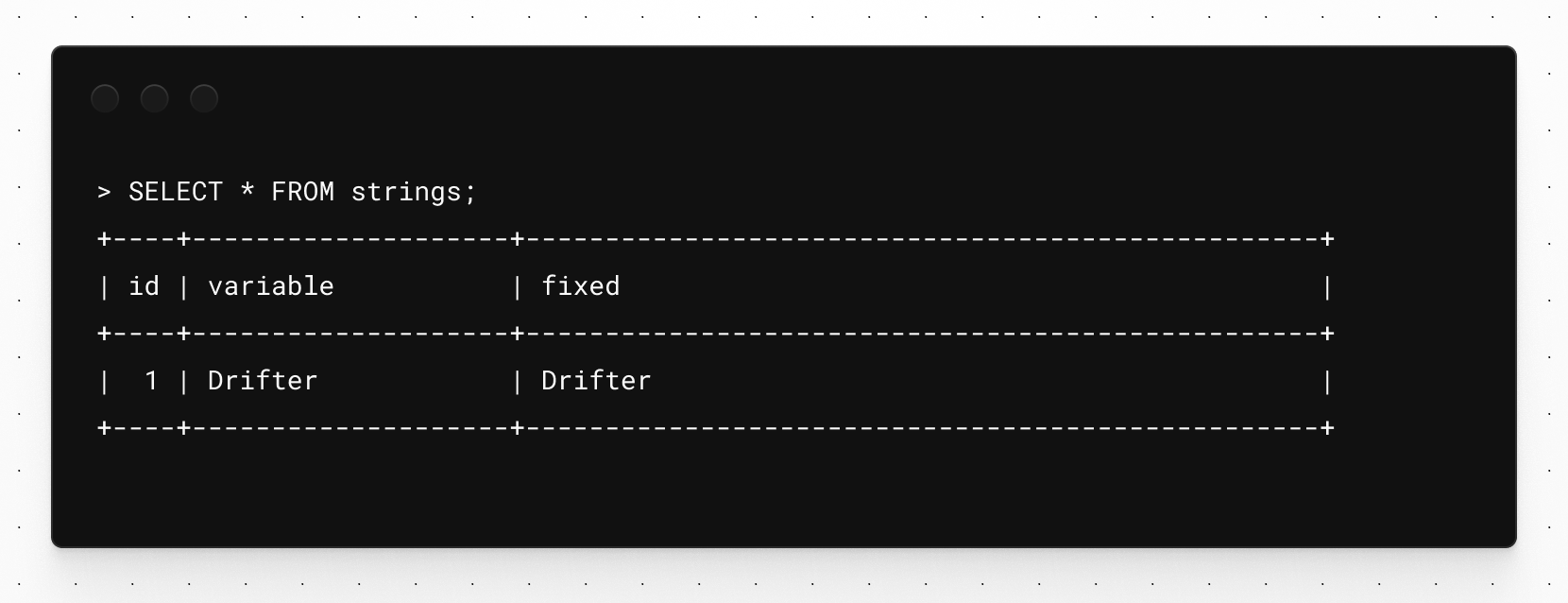
The output of the SELECT statement.

However, if I use the CHAR_LENGTH function to calculate the number of characters used in each field, you’ll notice the data stored in the VARCHAR field (respresented with varchar_data_length) is 12, which considers the 5 extra space characters at the end, whereas the CHAR field only shows 7. This is because MySQL is storing the whitespace at the end of the VARCHAR value, but it assumes the extra space at the end of the CHAR value is the padding that was appended based on the data type.

SELECT CHAR_LENGTH(variable) AS varchar_data_length, CHAR_LENGTH(fixed) AS char_data_length FROM strings;
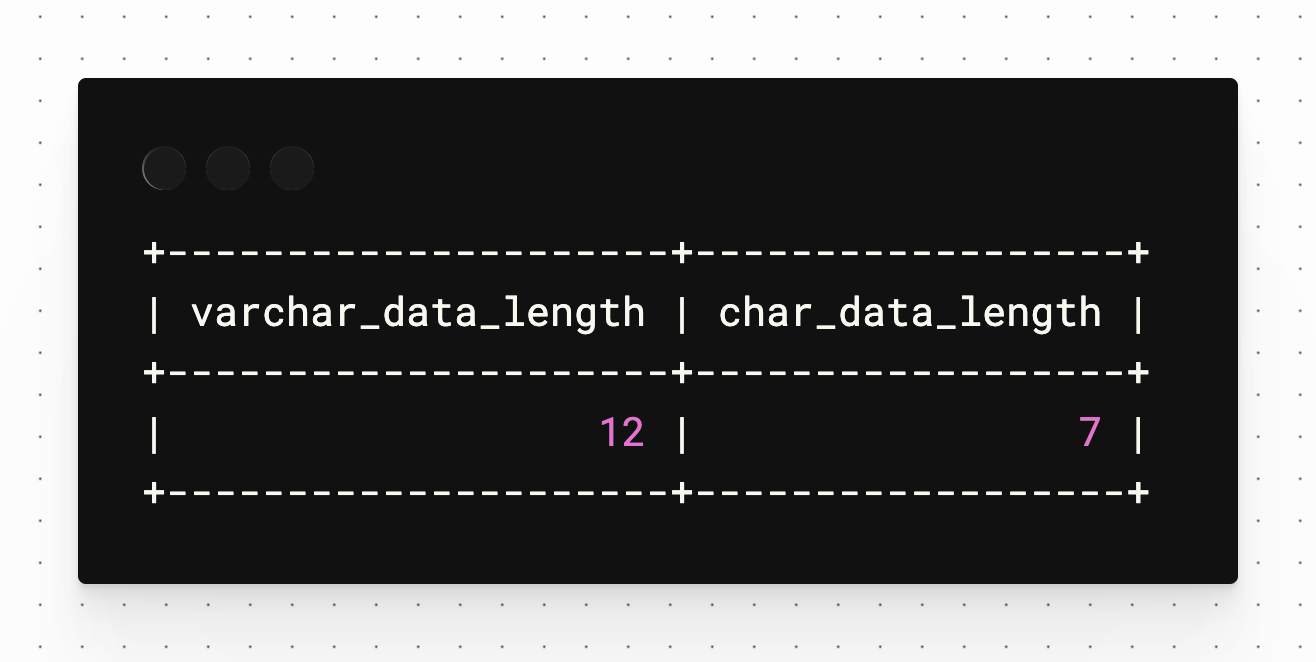
The output of the SELECT statement using CONCAT.

As stated earlier, VARCHAR values have an extra overhead when the data is written to disk as well. This means that if you are storing the string “Spider” which is 6 characters in length, and you are storing it in both a VARCHAR(6) and a CHAR(6) column, the VARCHAR value will use 25 bytes (4 bytes per character using the utf8mb4 character set plus 1 byte of overhead) of disk space, whereas the CHAR value will use 24 bytes.

However, if you store “Eido” in those same columns, the VARCHAR will only use 5 bytes and the CHAR will still use 6 bytes. Since the CHAR data type is fixed-length, it is right-padded with 2 empty spaces, for a total of 6.

ValueVARCHAR(6) Stored valueVARCHAR(6) Space usedCHAR(6) Stored valueCHAR(6) Space used
"Spider""Spider"25 bytes"Spider"24 bytes
"Eido""Eido"17 bytes"Eido  "24 bytes
"Eido  ""Eido  "25 bytes"Eido  "24 bytes

When to use VARCHAR vs CHAR

Now that you understand the differences between VARCHAR and CHAR, here are a few tips on deciding which data type fits your application best:

Use VARCHAR if:

  • You need to store a string with more than 255 characters.
  • You find yourself in a rare scenario where you do need to preserve trailing spaces.

Use CHAR if:

  • You are at or below 255 characters, and you always know the length of the string.

  • A fixed-length serial number would be a good example of when CHAR is useful.

Further learning

If you'd like to learn more about data types in MySQL, we have an article on the INT data type and one on the JSON data type that you may find useful.

We also have short videos on the following data types: