








In general, PHP-based applications, like Laravel, are deployed on servers. It is also possible to run them serverless — for example, on AWS Lambda.
This approach provides several benefits:
- Instant and effortless autoscaling to handle incoming traffic.
- Redundant and resilient infrastructure out of the box, without extra complexity.
- Pay-per-request billing.
PlanetScale is a great database to pair with serverless Laravel applications running on Lambda. In this article, we will create a new Laravel application, run it on AWS Lambda using Bref, connect to a PlanetScale MySQL database, and do a load test to look at the performance.
Creating a new Laravel application
Let's start from scratch and create a new Laravel project with Composer:
composer create-project laravel/laravel example-app

cd example-app
We can run our application locally with php artisan serve, but let's run it in the cloud on AWS Lambda instead.
Deploying Laravel to AWS Lambda
To deploy Laravel to AWS Lambda, we can use Bref. Bref is an open-source project that provides support for PHP on AWS Lambda. It also provides a Laravel integration that simplifies configuring Laravel for Lambda.
Prerequisites
Before deploying to AWS Lambda, you will need:
- An AWS account (to create one, go to aws.amazon.com and click "Sign up").
- The
serverlessCLI installed on your computer.
You can install the serverless CLI using NPM:
npm install -g serverless
If you don't have NPM or want to learn more, read the Serverless documentation.
Now, connect the serverless CLI to your AWS account via AWS access keys. Create AWS access keys by following the guide, and then set them up on your computer using the following command:
serverless config credentials --provider aws --key <key> --secret <secret>
Getting started with Bref and Laravel
Now that everything is ready, let's install Bref and its Laravel integration:
composer require bref/bref bref/laravel-bridge --update-with-dependencies
Then, let's create a serverless.yml configuration file:
php artisan vendor:publish --tag=serverless-config
This configuration file describes what will be deployed to AWS. Let's deploy now:
When finished, the deploy command will display the URL of our Laravel application.
Using PlanetScale as the database
Now that Laravel is running in the cloud, let's set it up with a PlanetScale database. Start in PlanetScale by creating a new database in the same region as the AWS application (us-east-1 by default).
Click the Connect button and select "Connect with: PHP (PDO)". That will let us retrieve the host, database name, user, and password.
Edit the .env configuration file to set up the database connection:
DB_CONNECTION=mysql
DB_HOST=<host url>
DB_PORT=3306
DB_DATABASE=<database_name>
DB_USERNAME=<user>
DB_PASSWORD=<password>
MYSQL_ATTR_SSL_CA=/opt/bref/ssl/cert.pem
For DB_DATABASE, you can use your PlanetScale database name directly if you have a single unsharded keyspace. If you have a sharded keyspace, you'll need to use @primary. This will automatically direct incoming queries to the correct keyspace/shard. For more information, see the Targeting the correct keyspace documentation.
Don't skip the MYSQL_ATTR_SSL_CA line: SSL certificates are required to secure the connection between Laravel and PlanetScale. Note that the path in AWS Lambda (/opt/bref/ssl/cert.pem) differs from the one on your machine (likely /etc/ssl/cert.pem). If you run the application locally, you will need to change this environment variable back and forth.
Next, redeploy the application:
Now that Laravel is configured, we can run database migrations to set up DB tables. To do so, we can run Laravel Artisan commands in AWS Lambda using the serverless bref:cli command:
serverless bref:cli --args="migrate --force"
That's it! Our database is ready to use.
Creating sample data
To test the database connection, let's create sample data in the users table created out of the box by Laravel.
Edit the database/seeders/DatabaseSeeder.php class and uncomment the following line so that we can seed our database with 10 fake users:
\App\Models\User::factory(10)->create();
Now, let's create a public API route that returns all the users from the database. Add the following code to routes/api.php:
Route::get('/users', function () {
    return \App\Models\User::all();
});
Let's deploy these changes:
Now, let's seed the database with 10 fake users:
serverless bref:cli --args="migrate:fresh --seed --force"
We can now retrieve our 10 users via the API route we created:
curl https://<application url>/api/users
Performance with a simple load test using PlanetScale
The execution model of AWS Lambda gives us instant autoscaling without any configuration. To illustrate that, I have performed a simple load test against the application we deployed above.
The only change I made is to disable Laravel's default rate limiting for API calls (ThrottleRequests middleware) in app/Http/Kernel.php because it would get in the way of my load test.
Furthermore, I did not ramp up traffic progressively because I wanted to show Lambda's instant scalability. I used ab (Apache's benchmarking tool) to request the /api/users endpoint with 50 threads (50 HTTP requests made in parallel continuously):
ab -c 50 -n 10000 https://<my-api-url>/api/users
When looking at the AWS Lambda and API Gateway metrics, we see the following numbers:
- Laravel scaled instantly from zero to 3,800 HTTP requests/minute.
- 100% of HTTP requests were handled successfully.
- The median PHP execution time (p50) for each HTTP request is 75ms.
- 95% of requests (p95) are processed in less than 130ms.
- PlanetScale processed up to 180 queries/s.
- The median PlanetScale query execution time is 0.3ms.
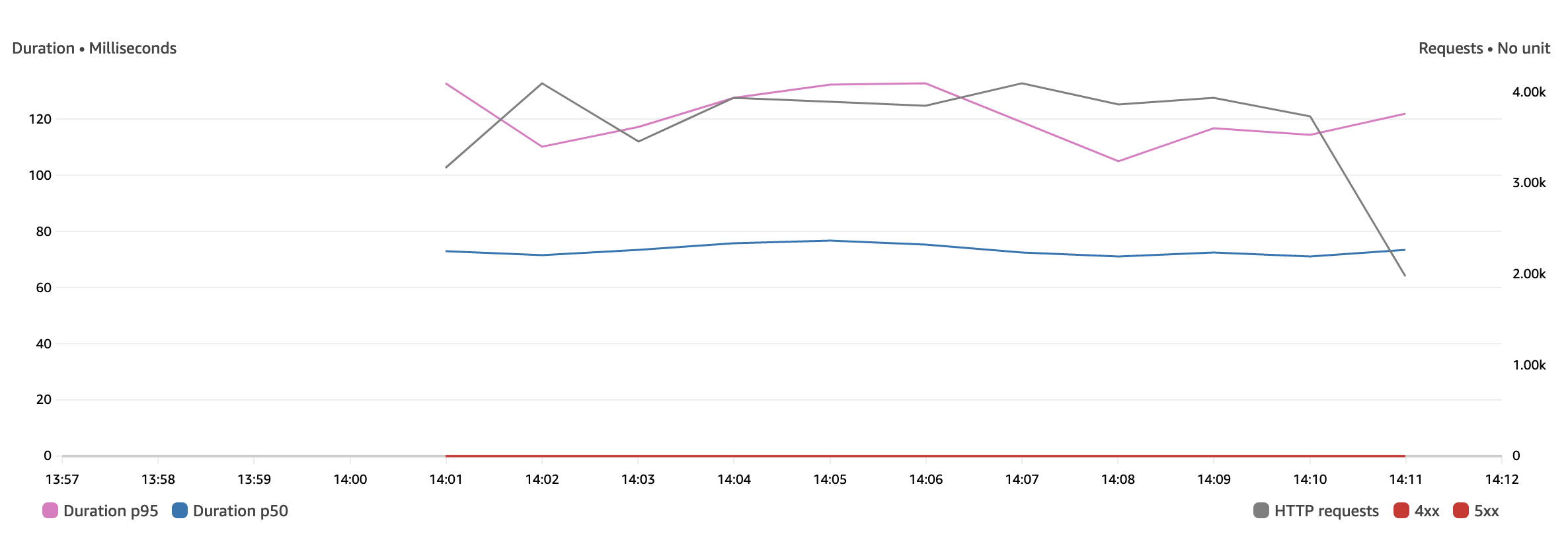
The load test was performed against a freshly deployed application. That means the first requests were cold starts: New AWS Lambda instances started and scaled up to handle the incoming traffic. The cold starts usually have a much slower execution time (one second instead of 75ms). However, we do not see them in the p50 or p95 metrics because they only impacted 1% of the requests in the first minute. After the first 50 requests (cold starts), all the other requests were warm invocations.
Note that we are looking at the AWS Lambda duration instead of HTTP response time: This is to exclude any latency related to networking (and thus have reproducible and comparable results). This is not the HTTP response time real users would see as, like on any server, the network adds latency to HTTP responses.
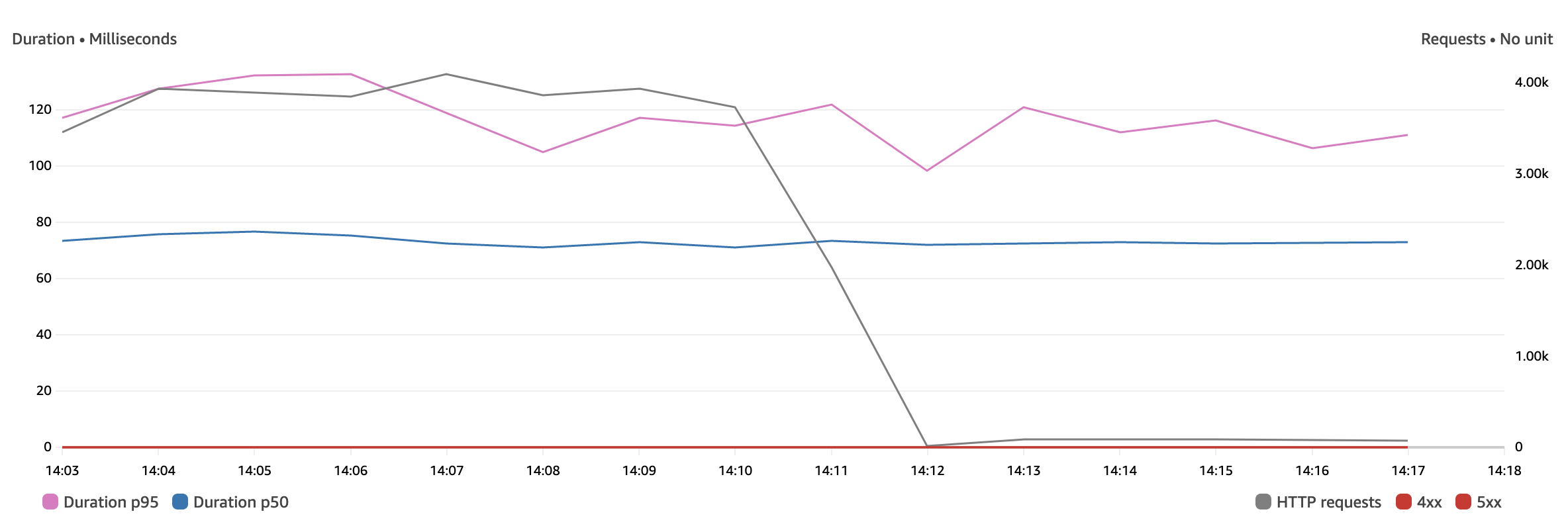
After a few minutes, I dropped the traffic from 50 requests in parallel to one. The PHP execution time stayed identical. This illustrates that the load did not impact the response time.
Improving performance to speed up the SSL connection
For many web applications, responding in about 100ms is more than satisfactory. However, some use cases may require lower latency.
Since Laravel connects to PlanetScale over SSL, creating the SSL connection can take longer than running the SQL query itself. PlanetScale itself can easily handle unlimited connections using built-in connection pooling, which massively improves performance by keeping those database connections open between requests.
However, PHP, by design, shares nothing across requests. This means at the end of every request, PHP will close the connection to the database.
To circumvent this problem, we can use Laravel Octane to gain performance in two ways:
- Keeping the Laravel application in memory across requests using Laravel Octane.
- Reusing SQL connections across requests (instead of reconnecting every time).
Bref supports Laravel Octane natively. We need to change the serverless.yml configuration to enable it. Change the web function configuration to this:
web:
  handler: Bref\LaravelBridge\Http\OctaneHandler
  runtime: php-81
  environment:
    BREF_LOOP_MAX: 250
    OCTANE_PERSIST_DATABASE_SESSIONS: 1
  events:
    - httpApi: '*'
Let's redeploy with serverless deploy and run the load test again:
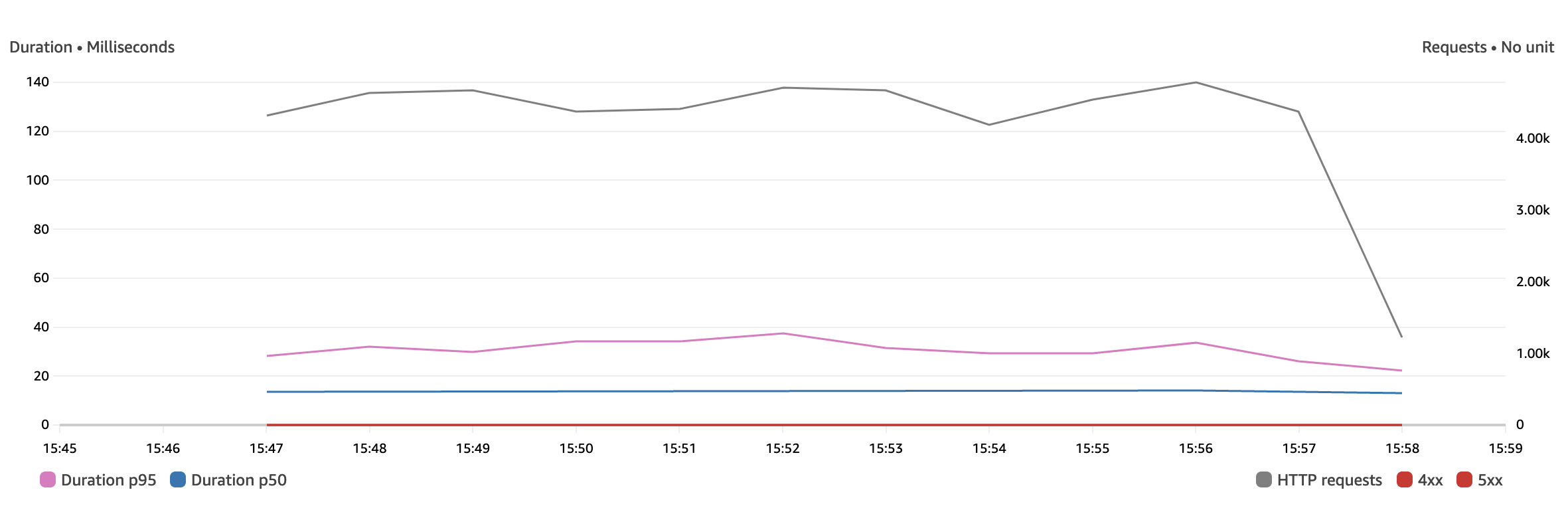
We notice the following improvements:
- The median PHP execution time (p50) went from 75ms to 14ms.
- 95% of requests (p95) are processed in less than 35ms.
- Laravel handled 1,000 more requests/minute, though this number is not important: We could simply send more requests in our load test to reach a higher number anytime.
Going further and next steps
Here are some next steps:
- Download and run the code used in this blog post.
- Learn more about using PlanetScale with Bref: MySQL compatibility, data imports, and schema changes workflow.
- Learn more about running Laravel on AWS Lambda: running Artisan commands, setting up assets, queues, and more.
You can also learn more about PlanetScale and AWS Lambda with Bref in the respective documentation.