





Note
PlanetScale now supports foreign key constraints. We still do not recommend using them for performance reasons, but you do not need to disable them to use Drizzle with PlanetScale.
This tutorial is still relevant if you'd like to use Drizzle without foreign key constraints.
Drizzle is a fantastic ORM that is quickly gaining popularity among TypeScript developers. It maintains type safety while striving to use a syntax very familiar to those already comfortable with writing SQL. The team has also built a CLI companion that can generate SQL migrations or apply schema change directly to a database based on the schema definition used by code within the project.
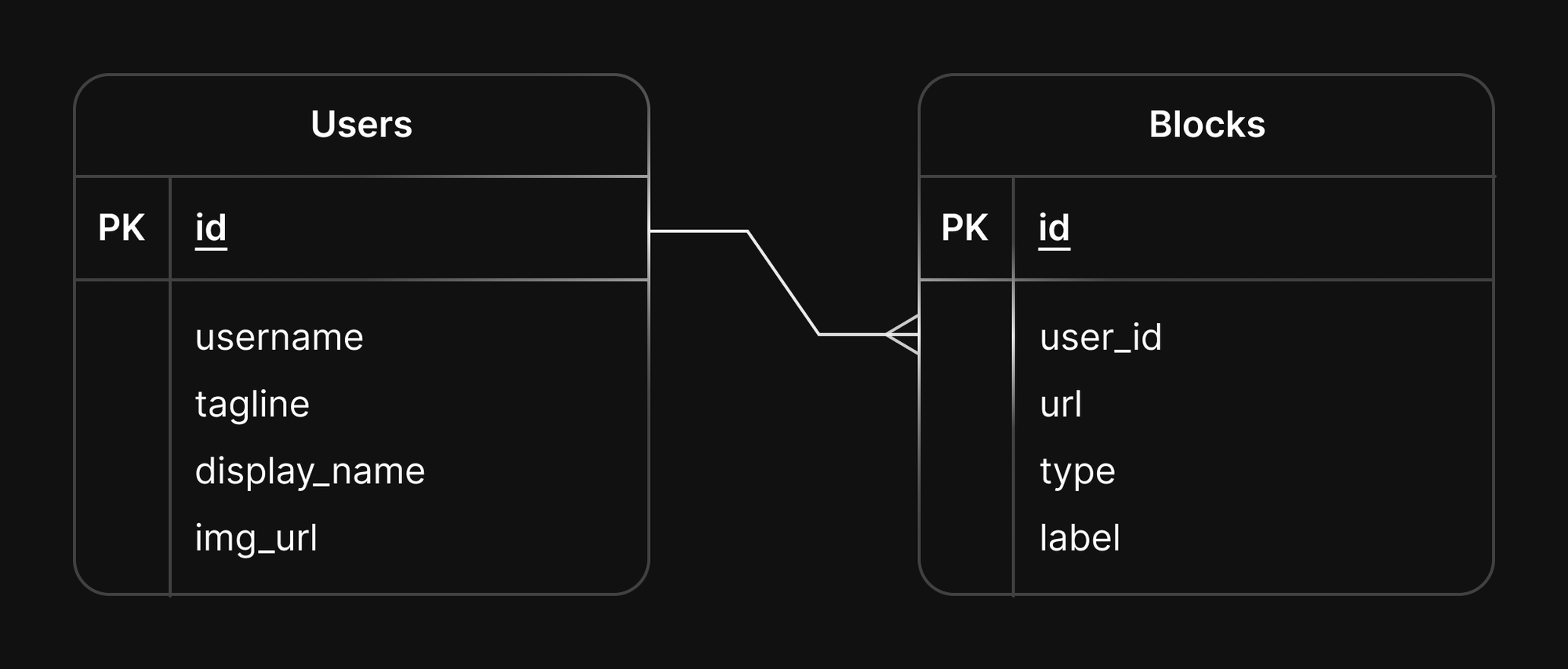
In this article, we will cover how to use virtual relationships in Drizzle and how to apply those changes to a PlanetScale database. We will use the following table diagram as a point of reference. It is for a simple “link in bio” service where users can create a profile containing links to their favorite websites or social media profiles:
Foreign keys and foreign key constraints
When designing your database, you’ll typically have one or more tables that contain data related to one another. Using the schema shown above, there is a one-to-many relationship between the users table and the blocks table, where a single user record will reference multiple blocks. This is done by linking the values between the users.id column and the blocks.user_id column. In this situation, blocks.user_id is a foreign key of users.id.
Foreign keys allow you to define logical relationships in the database. These relationships can be made more rigid by adding a constraint. When you define a foreign key constraint, you are telling the database that these two tables are related to the specified columns, AND you would like the database engine to maintain the integrity of the table by automatically performing operations on related data when specific actions are taken.
Using the same sample schema above, if we were to create a foreign key constraint between these two columns, we can ask the database to automatically delete any records in the blocks table when the associated users record is deleted.
ALTER TABLE blocks
	ADD CONSTRAINT fk_users_blocks
	FOREIGN KEY (user_id)
	REFERENCES users(id)
	ON DELETE CASCADE;
While foreign key constraints are the traditional way of maintaining integrity in a database, PlanetScale was built with a focus on scalability and zero-downtime schema updates, something that foreign key constraints interfere with. Fortunately, virtual relationships within ORMs build in similar logic but let the code handle the heavy lifting instead of the database engine.
Typically in Drizzle, you’d use the references method on a field, passing in the related entity and its field. This tells the ORM that entities are related based on specific columns:
export const users = mysqlTable('users', {
  id: serial('id').primaryKey(),
  username: varchar('username', { length: 120 }),
  tagline: varchar('tagline', { length: 250 }),
  display_name: varchar('display_name', { length: 250 }),
  img_url: varchar('img_url', { length: 500 })
})

export const blocks = mysqlTable('blocks', {
  id: serial('id').primaryKey(),
  url: varchar('url', { length: 200 }),
  block_type: int('type'),
  // 👇 The following line will create a foreign key constraint
  user_id: int('user_id').references(() => users.id),
  label: varchar('label', { length: 200 })
})
Since Drizzle works across a number of different relational databases, using this method will automatically attempt to add foreign key constraints in the schema. Running the following command to apply this schema to a PlanetScale database using drizzle-kit results in an error:
drizzle-kit push:mysql --schema functions/utils/db/schema.ts --connectionString='$DATABASE_URL' --driver mysql2

# Output:
# Error: VT10001: foreign key constraints are not allowed [...]
# {
#   code: 'ER_UNKNOWN_ERROR',
#   errno: 1105,
#   sql: 'ALTER TABLE `blocks` ADD CONSTRAINT `blocks_user_id_users_id_fk` FOREIGN KEY (`user_id`) REFERENCES `users`(`id`) ON DELETE no action ON UPDATE no action;',
#   sqlState: 'HY000',
#   sqlMessage: 'VT10001: foreign key constraints are not allowed'
# }
With just a bit more code, Drizzle can be configured to query the data in a child table using a virtual relationship instead of a foreign key constraint. The following code accomplishes the same results as above, allowing you to query a user and also get their associated blocks:
export const users = mysqlTable('users', {
  id: serial('id').primaryKey(),
  username: varchar('username', { length: 120 }),
  tagline: varchar('tagline', { length: 250 }),
  display_name: varchar('display_name', { length: 250 }),
  img_url: varchar('img_url', { length: 500 })
})

export const blocks = mysqlTable('blocks', {
  id: serial('id').primaryKey(),
  url: varchar('url', { length: 200 }),
  block_type: int('type'),
  user_id: int('user_id'),
  label: varchar('label', { length: 200 })
})

//👇 This code block will tell Drizzle that users & blocks are related!
export const usersRelations = relations(users, ({ many }) => ({
  blocks: many(blocks)
}))

//👇 This code block defines which columns in the two tables are related
export const blocksRelations = relations(blocks, ({ one }) => ({
  user: one(users, {
    fields: [blocks.user_id],
    references: [users.id]
  })
}))
Applying these changes using the same command as above will work as well.
drizzle-kit push:mysql --schema functions/utils/db/schema.ts --connectionString='$DATABASE_URL' --driver mysql2

# Output:
# drizzle-kit: v0.19.12
# drizzle-orm: v0.27.2
#
# Reading schema files: orbytal-ink/functions/utils/db/schema.ts
#
# [✓] Changes applied
Finally, when you want to return a user along with their associated blocks, you can use the following example:
const user = await db.query.users.findFirst({
  where: eq(users.username, username),
  // Providing `with` tells Drizzle you want to return related data
  with: {
    blocks: true
  }
})

// Contents of `user`:
// {
//     "id": 5,
//     "username": "brianmmdev",
//     "tagline": "Developer Educator @ PlanetScale",
//     "display_name": "Brian Morrison II",
//     "img_url": "https://img.clerk.com/eyJ0eXBlIjoicHJveHkiLCJzcmMiOiJodHRwczovL2ltYWdlcy5jbGVyay5kZXYvdXBsb2FkZWQvaW1nXzJUbzRXVjRkaFZRU0J2bTlxdnpsOXFiWWNyYS5qcGVnIn0",
//     "blocks": [
//         {
//             "id": 9,
//             "url": "brianmmdev",
//             "block_type": 2,
//             "user_id": 5,
//             "label": null
//         },
//         {
//             "id": 8,
//             "url": "brianmmdev",
//             "block_type": 4,
//             "user_id": 5,
//             "label": null
//         },
//         {
//             "id": 7,
//             "url": "brianmmdev",
//             "block_type": 1,
//             "user_id": 5,
//             "label": null
//         }
//     ]
// }
What about cascading actions?
One side effect available to foreign key constraints is cascading actions. Since PlanetScale does not support foreign key constraints, it’s not possible to specify these actions when designing your database schema.
Luckily the solution is relatively straightforward. The responsibility shifts to the part you, as a developer, are likely most familiar with: the code. Earlier in this article, I suggested that foreign key constraints can be used to delete blocks associated with a user when that user is deleted. Below is the code that would need to be used to accomplish essentially the same thing:
// This line will delete a user based on the passed in `userId`
await db.delete(users).where(eq(users.id, userId))

// And this line will delete the associated blocks
await db.delete(blocks).where(eq(blocks.user_id, userId))
As you can see, it’s only one more line of code that deletes the users’ blocks when that user is deleted. While this is definitely a simple example, you might ask “Doesn’t this require more work to accomplish the same thing?”
Yes and no. It does indeed require more code on the part of the developer to maintain the integrity of the data within the database, however in a more complicated schema, you’ll likely have nested parent/child table relationships that can go several layers deep. If a topmost record is deleted, there is no guarantee that every single nested record will be able to be deleted since ALL constraints on the nested tables will need to be considered by the database engine. In this situation, the database may return an error that the developer will have to handle anyway, or worse yet the application will error out resulting in a poor user experience. By surfacing the task of maintaining the integrity of the data, you’re less likely to encounter these issues over time.
Conclusion
After reading this, you should be well-equipped on how to establish relationships using Drizzle without foreign key constraints. What are your thoughts on using Drizzle with PlanetScale? Let us know on Twitter and tag @planetscale!