









We recently released a new feature that allows you to use granular roles for your database passwords. When you generate a new password, you have the option to select from the following roles: read-only, write-only, read/write, admin.
We implemented password roles using Vitess Access Control Lists and VTTablet, but we ran into a couple of roadblocks on the way. In this post, we look at some of the issues we faced while implementing this, and how we were able to get around them.
Vitess supports authorization via a static configuration file supplied to its vttablet.
You can see an example of what this file looks like below:
{
  "table_groups": [
    {
      "name": "planetscale user groups",
      "table_names_or_prefixes": ["%"],
      "readers": ["planetscale-reader", "planetscale-writer", "planetscale-admin"],
      "writers": ["planetscale-writer", "planetscale-writer-only", "planetscale-admin"],
      "admins": ["planetscale-admin"]
    }
  ]
}
Dissecting the ACL configuration file
table_names_or_prefixes— This is the list of tables that this policy applies to.%means all tables.readers— This set of users can read data and schema from tables and views in the database.writers— This set of users can write data to tables in the database.admins— This set of users can read, update data, and alter schema in the database.
Although this configuration is static, Vitess allows you to customize this list over the runtime of a vttablet by reloading this file from disk at a specific interval using the --table-acl-config-reload-interval argument.
This static file approach is great for customers who:
- Have a pre-defined set of users that can access the database. Managing the various access groups in the above file is easier if the entire set of users is well-known.
- Have a small set of ACL configuration files that are custom to each of their Vitess clusters.
- Can plan for a maintenance schedule when updating this file on the pod/shared volume for their Vitess deployments.
Why doesn’t this work for PlanetScale?
None of the qualifiers above apply to PlanetScale customers. As a design principle, we try to avoid keeping authentication and authorization state on the actual vttablet pods themselves.
We can run into all kinds of issues depending on a refresh interval for a file on the vttablet pod. Let’s look at some of them.
- Our user story of “Customers can create passwords with roles and they work immediately” prevents the dependence on a timed refresh loop on the vttablets. Since we don’t know when the file will be refreshed next, we can’t guarantee that your credentials will work immediately.
- The operator, responsible for managing the vttablet, will need to write to a file on the pod and might not be able to update all vttablet pods at once, leading to a race condition where a given credential might be
adminon one pod andreaderon another. - If a pod goes down and needs to be restarted, we don’t have an external ACL store to figure out what the ACL state for each database should be before bringing it up again.
- We’d need to maintain a separate set of state for each customer database that cannot be common to all PlanetScale databases.
With these issues in mind, we were able to come up with a solution that gave our customers a seamless experience they have come to expect from PlanetScale.
How we use the static ACL file to implement password roles
For every password created by a user, we store the following bits of information in the credential database:
| Display name | Role | password_sha1_hash | password_sha2_hash |
|---|
The Role property determines which of the three vttablet ACL roles (readers, writer, or admins) you’ll get mapped to.
If you create a write-only password and connect to your PlanetScale database, the query hits the user query frontend, which is a service responsible for all user-facing functionality for PlanetScale databases.
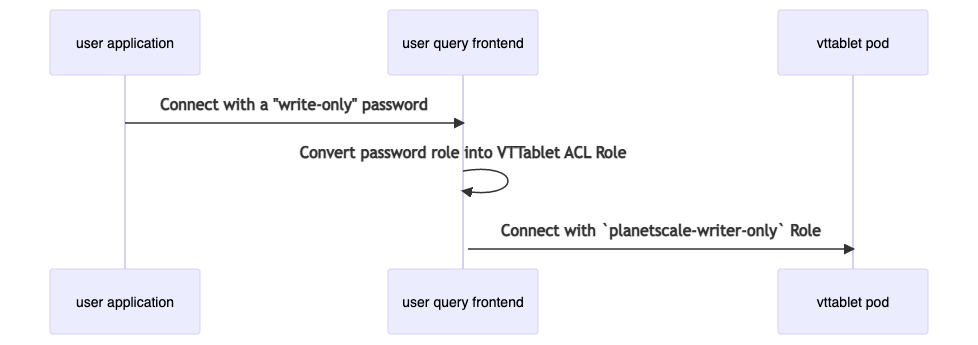
As shown in the diagram above, this approach lets us solve all of the issues we discussed in the previous section.
- Having a dynamic user credential store allows us to create/delete user mappings to roles instantly, without the need for a refresh interval.
- We have a predefined set of user names which describe the access grant for each of the roles we support, e.g.
planetscale-readercan only read data and schema. By mapping all PlanetScale users’ roles to the username from the Vitess ACL configuration, we can do an “on the fly” rewrite of the security principal so that connections to the database get the right access levels. - Since all authentication and authorization data is stored on an external data store, all pods that we create for a database will have the same ACL state.
- Since the base ACL configuration is the same across all PlanetScale databases, debugging and fixing any issues with ACL enforcement is simplified.
Wrap up
If you’d like to learn more about password roles, please check out our Password roles documentation. You can sign up for a PlanetScale account and try it out today.
If you have any questions, make sure to find us on Twitter.