
惯性聚合 高效追踪和阅读你感兴趣的博客、新闻、科技资讯
阅读原文 在惯性聚合中打开

推荐订阅源

H
Heimdal Security Blog
小众软件
小众软件
钛媒体:引领未来商业与生活新知
钛媒体:引领未来商业与生活新知
罗磊的独立博客
Google DeepMind News
大猫的无限游戏
大猫的无限游戏
奇客Solidot–传递最新科技情报
奇客Solidot–传递最新科技情报
Hugging Face - Blog
Hugging Face - Blog
阮一峰的网络日志
阮一峰的网络日志
A
About on SuperTechFans
宝玉的分享
宝玉的分享
博客园 - 聂微东
月光博客
月光博客
Cyberwarzone
Cyberwarzone
Microsoft Security Blog
V
Visual Studio Blog
Project Zero
Project Zero
T
Tor Project blog
freeCodeCamp Programming Tutorials: Python, JavaScript, Git & More
L
LINUX DO - 最新话题
博客园 - 叶小钗
Recent Commits to openclaw:main
Attack and Defense Labs
Spread Privacy
Spread Privacy
Forbes - Security
Forbes - Security
Simon Willison's Weblog
N
Netflix TechBlog - Medium
P
Proofpoint News Feed
Engineering at Meta
Engineering at Meta
Hacker News: Ask HN
Hacker News: Ask HN
I
InfoQ
M
MIT News - Artificial intelligence
AI
AI
博客园 - 三生石上(FineUI控件)
W
WeLiveSecurity
C
Check Point Blog
The Hacker News
The Hacker News
C
Cyber Attacks, Cyber Crime and Cyber Security
Application and Cybersecurity Blog
T
Tenable Blog
让小产品的独立变现更简单 - ezindie.com
Threat Intelligence Blog | Flashpoint
The Cloudflare Blog
Blog — PlanetScale
Blog — PlanetScale
美团技术团队
D
Darknet – Hacking Tools, Hacker News & Cyber Security
GbyAI
GbyAI
Hacker News - Newest:
Hacker News - Newest: "LLM"
腾讯CDC
K
Kaspersky official blog

Blog — PlanetScale

Keeping a Postgres queue healthy — PlanetScale Patterns for Postgres Traffic Control — PlanetScale Graceful degradation in Postgres — PlanetScale High memory usage in Postgres is good, actually — PlanetScale Stripe Projects partnership: Provision PlanetScale Postgres and MySQL databases from the Stripe CLI — PlanetScale Enhanced tagging in Postgres Query Insights — PlanetScale Behind the scenes: How Database Traffic Control works — PlanetScale Introducing Database Traffic Control — PlanetScale Scaling Postgres connections with PgBouncer — PlanetScale Drizzle joins PlanetScale — PlanetScale Video Conferencing with Postgres — PlanetScale Faster PlanetScale Postgres connections with Cloudflare Hyperdrive — PlanetScale Introducing the PlanetScale MCP server — PlanetScale Database Transactions — PlanetScale Automating our changelog with Cursor commands — PlanetScale Postgres 18 is now available — PlanetScale Using MotherDuck with PlanetScale — PlanetScale $50 PlanetScale Metal is GA for Postgres — PlanetScale AI-Powered Postgres index suggestions — PlanetScale $5 PlanetScale is live — PlanetScale Announcing Vitess 23 — PlanetScale $50 PlanetScale Metal — PlanetScale Report on our investigation of the 2025-10-20 incident in AWS us-east-1 — PlanetScale $5 PlanetScale — PlanetScale Benchmarking Postgres 17 vs 18 — PlanetScale Larger than RAM Vector Indexes for Relational Databases — PlanetScale Partnering with Cloudflare to bring you the fastest globally distributed applications — PlanetScale Processes and Threads — PlanetScale PlanetScale for Postgres is now GA — PlanetScale Postgres High Availability with CDC — PlanetScale Announcing Neki — PlanetScale Caching — PlanetScale The principles of extreme fault tolerance — PlanetScale Announcing PlanetScale for Postgres — PlanetScale Benchmarking Postgres — PlanetScale Announcing Vitess 22 — PlanetScale The Real Failure Rate of EBS — PlanetScale IO devices and latency — PlanetScale Announcing PlanetScale Metal — PlanetScale PlanetScale Metal: There’s no replacement for displacement — PlanetScale Upgrading Query Insights to Metal — PlanetScale Automating cherry-picks between OSS and private forks — PlanetScale Database Sharding — PlanetScale Anatomy of a Throttler, part 3 — PlanetScale Introducing sharding on PlanetScale with workflows — PlanetScale Announcing Vitess 21 — PlanetScale Announcing the PlanetScale vectors public beta — PlanetScale Anatomy of a Throttler, part 2 — PlanetScale Instant deploy requests — PlanetScale Anatomy of a Throttler, part 1 — PlanetScale Increase IOPS and throughput with sharding — PlanetScale Tracking index usage with Insights — PlanetScale Faster backups with sharding — PlanetScale Building data pipelines with Vitess — PlanetScale The State of Online Schema Migrations in MySQL — PlanetScale Optimizing aggregation in the Vitess query planner — PlanetScale Dealing with large tables — PlanetScale Announcing Vitess 20 — PlanetScale Self-managed Vitess vs Managed Vitess with PlanetScale — PlanetScale Achieving data consistency with the consistent lookup Vindex — PlanetScale The MySQL adaptive hash index — PlanetScale Introducing global replica credentials — PlanetScale Profiling memory usage in MySQL — PlanetScale Summer 2023: Fuzzing Vitess at PlanetScale — PlanetScale How PlanetScale makes schema changes — PlanetScale Identifying and profiling problematic MySQL queries — PlanetScale The Problem with Using a UUID Primary Key in MySQL — PlanetScale Announcing Vitess 19 — PlanetScale PlanetScale forever — PlanetScale Introducing schema recommendations — PlanetScale Amazon Aurora Pricing: The many surprising costs of running an Aurora database — PlanetScale Three common MySQL database design mistakes — PlanetScale OAuth applications are now available to everyone — PlanetScale Deprecating the Scaler plan — PlanetScale PlanetScale branching vs. Amazon Aurora blue/green deployments — PlanetScale Databases at scale — PlanetScale Considerations for building a database disaster recovery plan — PlanetScale Working with Geospatial Features in MySQL — PlanetScale PlanetScale vs Amazon Aurora replication — PlanetScale Introducing the Vantage and PlanetScale integration — PlanetScale MySQL isolation levels and how they work — PlanetScale Introducing the schemadiff command line tool — PlanetScale $ pscale ping — PlanetScale Announcing foreign key constraints support — PlanetScale The challenges of supporting foreign key constraints — PlanetScale What is HTAP? — PlanetScale Introducing Insights Anomalies — PlanetScale Webhook security: a hands-on guide — PlanetScale MySQL replication: Best practices and considerations — PlanetScale A guide to HTML email with Ruby on Rails and Tailwind CSS — PlanetScale Sharding for cost-effective database management — PlanetScale PlanetScale ranks 188th in Deloitte’s top 500 fastest-growing companies — PlanetScale Announcing the Fivetran integration — PlanetScale Introducing webhooks — PlanetScale What is MySQL replication and when should you use it? — PlanetScale Sync user data between Clerk and a PlanetScale MySQL database — PlanetScale Introducing database reports — PlanetScale Distributed caching systems and MySQL — PlanetScale What is MySQL partitioning? — PlanetScale MySQL High Availability: Connection handling and concurrency — PlanetScale
Declarative MySQL schemas with Atlas CLI — PlanetScale
Brian Morrison II · 2022-09-16 · via Blog — PlanetScale

Brian Morrison II |

Overview

One of the best things the DevOps movement has ushered in is the concept of Infrastructure as Code. IaC lets you define your infrastructure in specially formatted files, and allows you to use automation tools to create or modify your infrastructure based on those files. But did you know that you can also manage your database schemas in a similar approach?

Atlas CLI is a command line tool that helps manage the structure of your database by keeping a representation of the schema in a file. It can be used by itself to manage your schema changes, or as part of a CI/CD pipeline to automate the process of updating your schema based on the definition file. In this article, we’ll cover the basics of using Atlas CLI to generate a schema definition file, as well as updating the schema of a PlanetScale database using the tool.

To follow along, you should have the following:

Set up the database

Start by creating a new database in PlanetScale using the CLI.

pscale database create hotels_db

Now create a password to use to connect to the new database.

pscale password create hotels_db main <YOUR_PASSWORD_NAME>

Note

Giving your password a name lets you identify the credential set in the PlanetScale dashboard.

Take note of the USERNAME, ACCESS HOST URL, and PASSWORD values as you’ll need them in the following section. Next, you’ll need to enter into a shell session with the database to create a table. Run the following command to enter the shell:

pscale shell hotels_db main

Run the following SQL script to create a table called hotels:

CREATE TABLE hotels(
  id INT UNSIGNED PRIMARY KEY AUTO_INCREMENT,
  name VARCHAR(50) NOT NULL,
  address VARCHAR(50) NOT NULL,
  stars FLOAT(2) UNSIGNED
);

Generate the schema definition file

Atlas makes it easy to apply a "Database as Code" approach to an existing database by generating a file representing the schema of that database. Before you can do so, you’ll need to craft a connection string so the CLI can properly connect to the PlanetScale database created in the previous section. Use the following format to create your own connection string:

"mysql://<USERNAME>:<PASSWORD>@<ACCESS HOST URL>/hotels_db?tls=true"

Going forward, this article will use <CONNECTION_STRING> as a reference to the connection string above. To generate a schema file based on the database above, run the following command:

atlas schema inspect -u <CONNECTION_STRING> > schema.hcl

You should now have a file named schema.hcl in the working directory. If you inspect it, it should look like the following. Note how the outer table node contains a reference to the hotels_db schema, as well as a definition for each column created in the previous section.

table "hotels" {
  schema = schema.hotels_db
  column "id" {
    null           = false
    type           = int
    unsigned       = true
    auto_increment = true
  }
  column "name" {
    null = false
    type = varchar(50)
  }
  column "address" {
    null = false
    type = varchar(50)
  }
  column "stars" {
    null     = true
    type     = float
    unsigned = true
  }
  primary_key {
    columns = [column.id]
  }
}
schema "hotels_db" {
  charset = "utf8mb4"
  collate = "utf8mb4_0900_ai_ci"
}

Modify the schema

Modifying the schema simply involves making a change to the schema definition file and applying it with the atlas schema apply command. Let’s add a description column to the hotels table by adding the following snippet between the stars column and the primary_key node:

column "description" {
  null = false
  type = varchar(100)
}

Run the apply command using the connection string and a reference to the schema.hcl file.

atlas schema apply -u <CONNECTION_STRING> -f schema.hcl

Atlas will show you the changes it is about to make to the database upon applying the updated schema. Hit enter on your keyboard to confirm the changes.

-- Planned Changes:
-- Modify "hotels" table
ALTER TABLE `hotels_db`.`hotels` ADD COLUMN `description` varchar(100) NOT NULL
Use the arrow keys to navigate:
? Are you sure?:
 Apply
    Abort

Once changes have been applied, you can inspect the table by using the pscale shell, as described above, and running the following DESCRIBE command:

Notice how the table contains the description column now. That column was added by Atlas when the schema was applied.
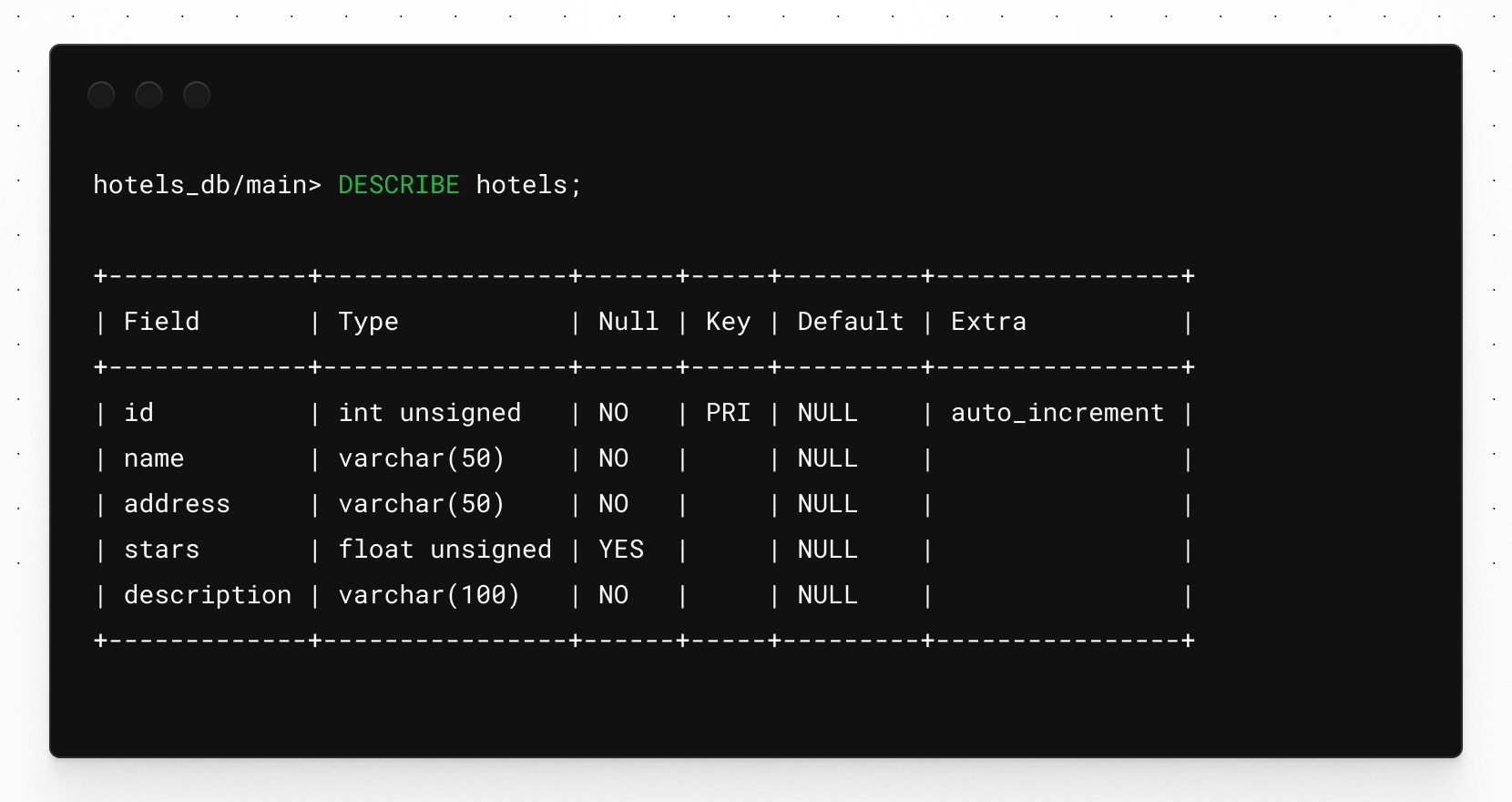
Output of the DESCRIBE command.

Atlas can be an incredible utility to add to your DevOps tool kit. It helps you manage your database as code instead of managing your schema manually with SQL commands. Keeping your database schema under version allows it to have accountability (by configuring Atlas to apply changes on git operations) as well as provides a historical reference to see how your database structure changes over time. One thing to note is that when using Atlas with PlanetScale, you’ll need to make sure you don’t turn on safe migrations, as that will prohibit you from running DDL on production.