




A common question I often hear is, “Should I make my application code changes before, after, or at the same time as my database schema changes?”
The reality is that neither our application nor database live in a bubble. In almost every case, you should never couple your database schema and application code changes together. While shipping them simultaneously might seem like a great idea, it often leads to pain for you and your users. There are five main reasons for this:
- Risk: By deploying changes to two critical systems at once, such as your database and application, you double the risk of something going wrong.
- Deployments: It’s impossible for application code and database schema changes to deploy together atomically. If they are ever dependent on each other going out simultaneously, the application will error briefly until the other catches up.
- Migration time: As data size grows, migrations can take longer. It can go from 30 seconds to a few hours to even more than a day! You don’t want the app deployment blocked for this.
- Blocking the development pipeline: If something goes wrong with the database schema change when coupled together, the deployment of the application is now blocked. A single change can stop the pipeline from going into production until it’s fixed.
- Best practices: Having them separate forces database best practices for ensuring backward compatible changes, which we will discuss in this blog post.
So how should you change your application code when it also requires changes in the database schema?
This blog post will answer this question and break down the steps you need to follow to ensure you are safely making changes to your database and ensuring no downtime or disruptions for your users. A word of advice: This process can feel complex the first time you do it, but after some practice, it gets easy and you’ll be able to move quickly and confidently.
Note
While PlanetScale can help make safe schema changes alongside the pattern, the pattern can apply to any relational database schema changes.
Different types of database schema changes
Some of the common types of database schema changes are:
- Adding a table or view
- Adding a column
- Changing an existing column, table, or view
- Removing an existing column, table, or view
Generally, adding a table, column, or view is low-risk and doesn't require much, other than deploying the schema change before your application code that might use the change. You can read more in the schema change documentation about handling each type of change.
Things are riskier when changing or removing a column or table. This is where backward compatible changes are essential. The most commonly used pattern is expand, migrate, and contract. You might see this pattern under similar names, like parallel or backward compatible changes. I like the “expand, migrate, and contract” name because it visually describes what it is doing. Let’s break that down.
The expand, migrate, and contract pattern
Backward compatible changes should be used for any operation that touches schema your production application is already using. This ensures that at any step of the process, you can rollback without data loss or significant disruptions to users. This greatly reduces the risk and allows you to move faster and with confidence.
For example, this applies when you are:
- Renaming an existing column or table
- Changing the data type of an existing column
- Splitting and other modifications to the data of an existing column or table
If you only add a column or table that does not affect the existing schema, you do not need to follow this pattern.
Here’s a helpful diagram to help you think about the pattern and where the changes are occurring through the steps:
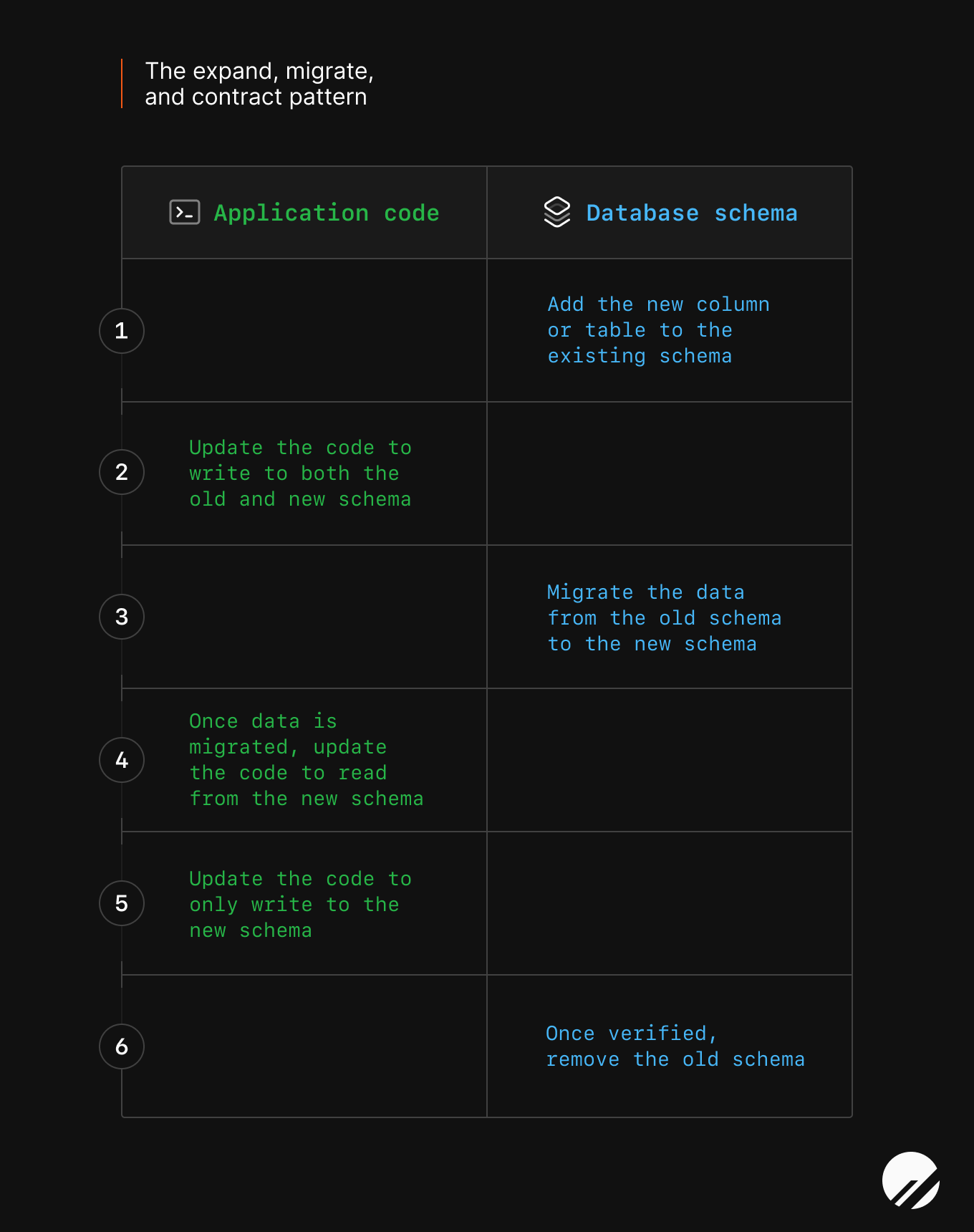
Let’s break down the pattern.
Expand
Step 1 - Expand the existing schema
The first step in the pattern is to add to the schema. You will create a new column or table, depending on the change needed in the application.
As I describe in my previous blog post about safely making schema changes, you should consider making smaller, incremental changes to your database schema to ensure your changes are safe. Big changes are riskier.
In most cases, adding a new column will not affect your existing application if you make the column nullable and/or provide default values. If you don’t do this, when the application creates a new row, you could potentially cause a database error.
You can test locally or with a database branch alongside your application and then deploy the changes.
Note
If you are using PlanetScale branching, you can make the change in a development branch, open a deploy request, and deploy it to your production database, which will increase the safety of each step.
Step 2 - Expand the application code
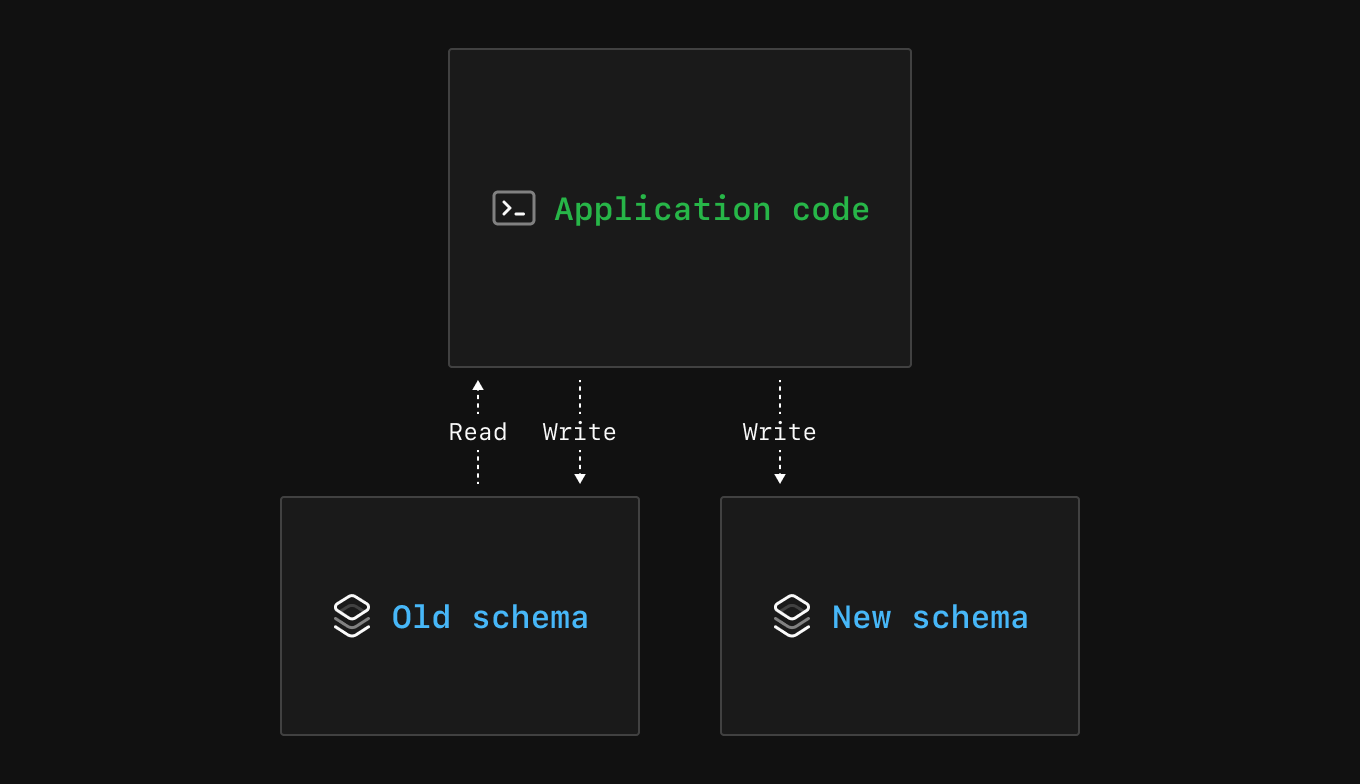
The second step in the pattern is to update the application code to write to both the old and new schema. Before this step, your application only wrote to the old column or table.
You want it to write to both the old and new schema because you want to make sure it can safely write to the new schema without error. If you plan on changing how the data is stored — e.g., if you want to store the user ID instead of the username — you will write the new form of the data to the new column or table while continuing to write the old form of the data to the old column or table. If there are issues, the application can continue to write and read from the old column without any user impact.
After you deploy this change, the application should continue to behave as before.
Migrate
Step 3 - Migrate the data
The third step in the pattern is data migration. At this step, you know that your new schema is successfully writing data to it, but what about the data that came before you started writing to both the old and new schema?
You will need to run a data migration script that migrates the data from before the double writes started to backfill the data from the old schema to the new schema. There are two ways you might have to handle this situation:
- If you are making any changes to the data, you must include this in the script. For example, if you are splitting up a string based on a product requirement, this is when you would do it before storing it in the new column.
- If you are only moving existing data and making no changes, then you can have the script insert the exact data with no mutations.
Also, if there is a lot of data to move, consider spreading it over an extended period using background jobs. This will prevent it from affecting your production database performance and users.
If it isn’t clear what changes are needed to the data, this is when it would be a good idea to think it through. It can be a pain to go back and change the data again in your new schema.
Step 4 - Migrate the application code
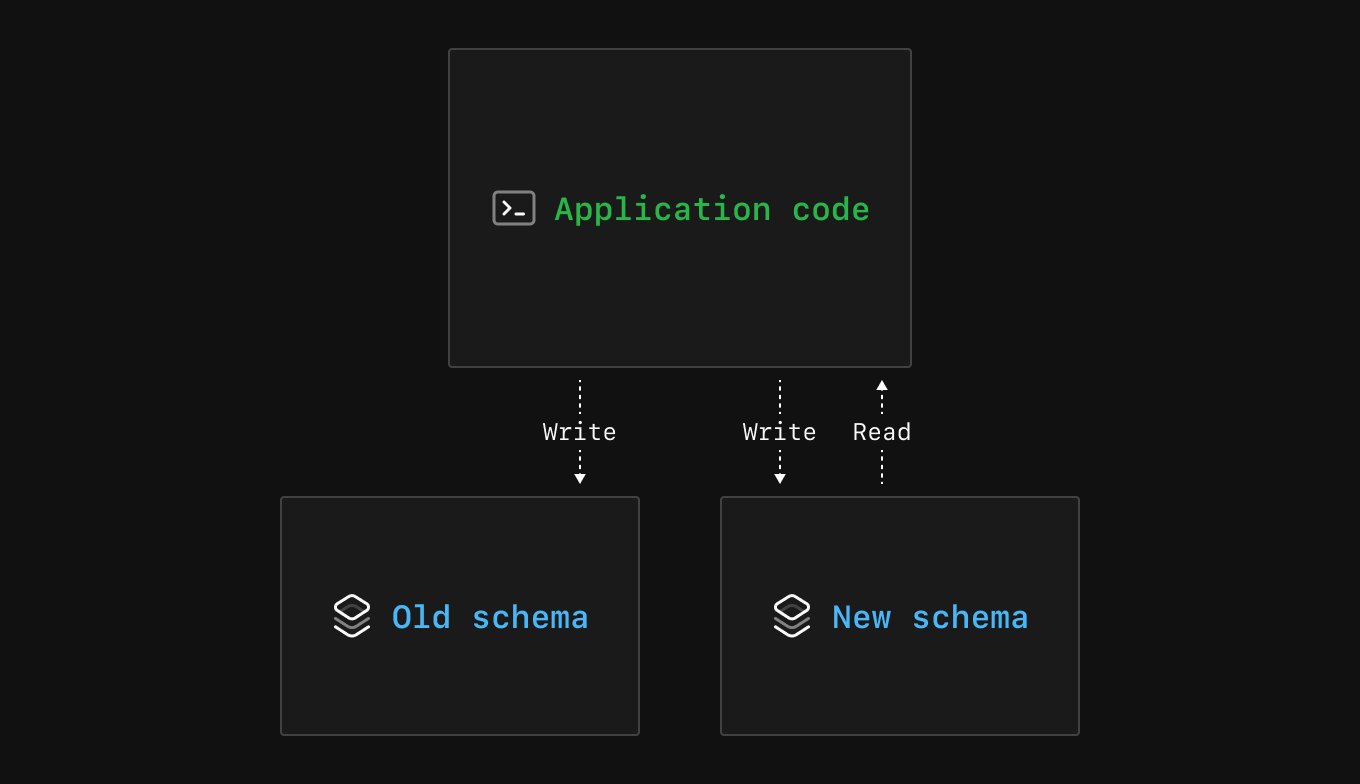
The fourth step is to update the application code to read from the new schema. Before this step, your application was reading from only the old schema.
Before you deploy the application code changes in this step, it is the last time you can confirm that the data migration and new schema are accurate, not missing data, and ready for production read traffic. Once you deploy this change, if you notice serious production issues, it could have some user impact depending on the issue. For this reason, consider testing the performance at this step.
A nice benefit of this approach is that you can always rollback the application code after it is deployed since the schema is still in a backward compatible state.
Note
For performance monitoring, you can use Insights or another application performance monitoring tool to make sure everything is working as expected.
Contract
Step 5 - Contract the application
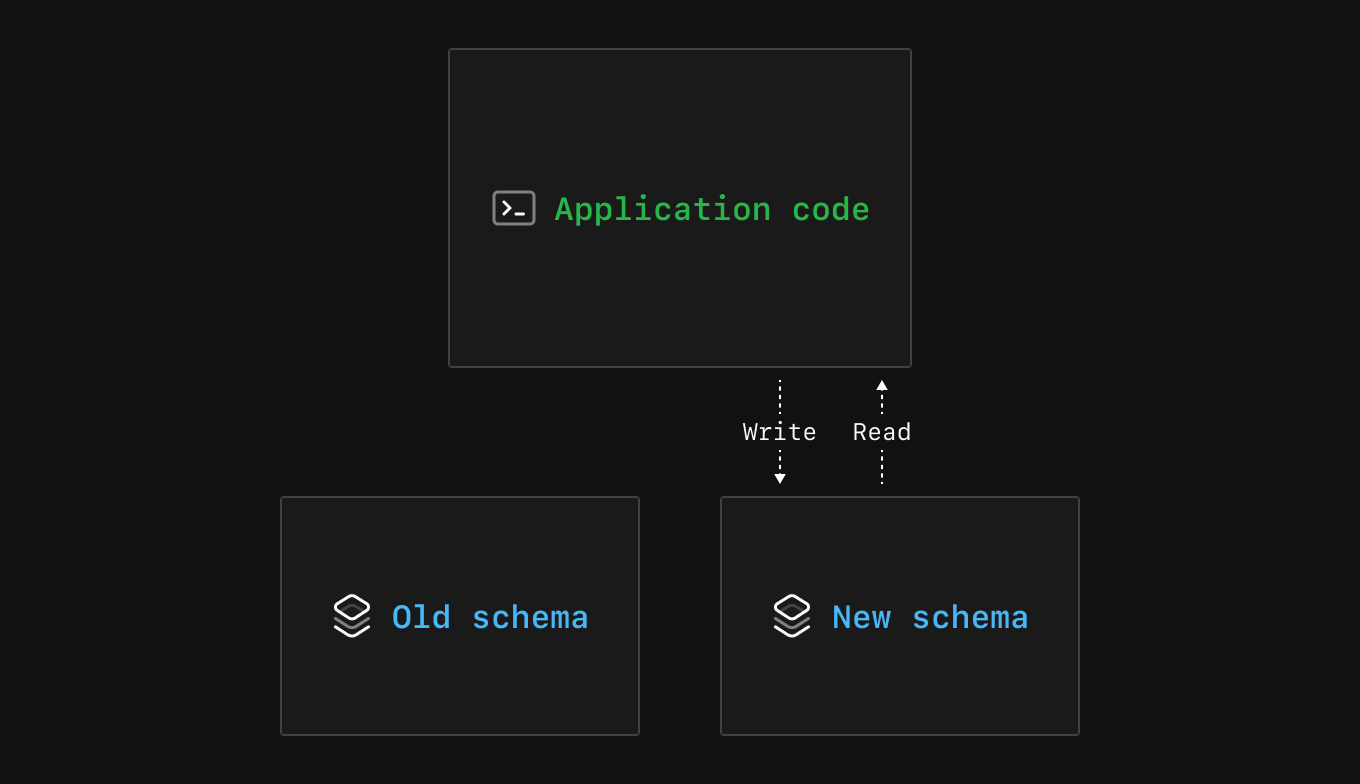
In the fifth step, you will start contracting your changes and update the application to only write to the new schema.
You are ready to deploy this step when you have confirmed that everything is working as expected in the production application, and you are ready to stop writing data to the old schema.
Step 6 - Contract the schema
In the sixth step, it is finally time to delete the old column or table. Your application should work as expected for both write and read traffic, and you feel confident in safely deleting the data without permanent data loss.
This is optional, but if you do have concerns about another team or application that might be using this column, you have two options:
- If it is a column you are changing, make the column invisible in MySQL from select * queries.
- If it is a column or table, you can change the name of the column or table so if it is used, there is an error but no data loss. (Note: You cannot do a rename without creating a new column in PlanetScale, but PlanetScale does warn you if a table has been recently queried in a deploy request.)
You’ve reached the end of the pattern. Congrats! You made a much safer schema change than trying to deploy it simultaneously with your code.
Example walkthrough
Let’s see the expand, migrate, and contract pattern in action with the following example:
I have an application that keeps track of GitHub stars across repositories, a nice vanity metric that can be useful for different signals. Before I make any changes, I have a repo table with information about different GitHub repos with columns such as:
idrepo_nameorganization- And others
I also have a star table with information about stars for GitHub repos:
idrepo_nameorganizationstar_count
When I first created the application, I made these separate tables, but now I want to combine them so I only have to maintain one table. It can make queries easier to write and store less data. All of the data in the star table is also in the repo table, except star_count.
So, I need to do two things:
- Create a new
star_countcolumn in myrepotable and migrate the data. - Delete the
startable without any data loss or disruption to my users.
Step 1 - Expand the existing schema
The first step will be to expand the schema and add a star_count column to the repo table of the production database.
ALTER TABLE repo
ADD COLUMN star_count INT;
After the first step, the repo table looks like:
| id | repo_name   | organization | ... | star_count |
|----|-------------|--------------| ... | ---------- |
|  1 | vtprotobuf  | planetscale  | ... |            |
|  2 | beam        | planetscale  | ... |            |
|  3 | database-js | planetscale  | ... |            |
And the star table remains unchanged:
| id | repo_name   | organization | star_count |
|----|-------------|--------------| ---------- |
|  1 | vtprotobuf  | planetscale  | 637        |
|  2 | beam        | planetscale  | 1837       |
|  3 | database-js | planetscale  | 854        |
Step 2 - Expand the application code
Since the star_count column now exists in the repo table, I can update my application code to write to star_count in both the repo and star tables whenever I’m writing to the database in my application code. The application code for this depends on your database client or ORM. Once this is tested locally or in a database branch to confirm that writes are successfully working, you can deploy the code to production.
Step 3 - Migrate the data
Since I am moving the data from the old star_count column in the star table to the new star_count column in the repo table, I need to write a script to backfill the column.
There’s not much data, so it is safe not to use background jobs for the inserts. Once it is done running, I will run some test queries against the database and spot-check the data to ensure nothing looks wrong that I might need to fix.
After the migration script is done, the repo table looks like:
| id | repo_name   | organization | ... | star_count |
|----|-------------|--------------| ... | ---------- |
|  1 | vtprotobuf  | planetscale  | ... | 637        |
|  2 | beam        | planetscale  | ... | 1837       |
|  3 | database-js | planetscale  | ... | 854        |
Step 4 - Migrate the application code
Now that all the data is in the new column, I can update my application code to read only from the new column in the repo table. I will make sure I have tests to ensure the behavior is as expected because once I deploy, users using the production application will get data from the new column.
After I deploy, I will check out my database performance metrics to ensure everything is working as expected.
Step 5 - Contract the application
If everything looks good, I can now remove the double write to the old and new columns and only write to the new column. Again, I will test everything out and deploy it. Since I used the expand, migrate, and contract pattern, users have fully migrated to the new column and never experienced downtime or failed queries during the switch.
Step 6 - Contract the schema
Lastly, after a few days of no issues with the change, I will delete the star table since I no longer have any reads or writes going to it.
Safely making database schema changes
This pattern is part of a few techniques for safely making database schema changes. In my previous blog post, you can read more about other techniques and some PlanetScale features to ensure you safely but quickly ship needed database changes. In the PlanetScale docs, you can also see how to make other database changes and the associated risks.