









JD Lien |
Relational databases, such as MySQL, give you the ability to organize data into separate tables, but link the tables together to form relationships when necessary.
MySQL joins give you the ability to link data together in a MySQL database. A join is a way to get columns from more than one table into a single set of results. This is usually much more efficient than trying to perform multiple queries and combining them later.
This article looks at the different types of joins that can be performed in MySQL and goes over the different options you have to combine data from multiple tables: inner joins, left and right joins, and full outer joins.
A base example of MySQL joins
To further our understanding of joins, we’ll create a simple database of grocery items, each item having a category. Categories are stored in the categories table and items are stored in a separate items table.
CREATE TABLE categories (
  id int PRIMARY KEY AUTO_INCREMENT,
  name varchar(250) NOT NULL
);
Example categories table populated with data:
CREATE TABLE items (
  id int PRIMARY KEY AUTO_INCREMENT,
  name varchar(512),
  category_id int NULL
);
Example items table populated with data:
| id | name | category_id |
|---|---|---|
| 1 | Apples | 1 |
| 2 | Cheese | 2 |
We’ll build on this example throughout the tutorial to explore the different types of joins and how to use them.
Inner joins
Now that we have items and categories stored, we may want to display the items along with the category name instead of just the category_id, since “Deli” is more meaningful to a human than “2”.
To do this, we can use an INNER JOIN, which selects matching records between tables. This is the default behavior for JOIN, so INNER JOIN is the same as JOIN.
A common mistake with inner joins
Warning
If you do a join without an ON clause, you will do what is sometimes called a CROSS JOIN, which will show each row in the left table once for every row in the right table. This is not usually what we want — and it produces a lot more results.
Let’s look at an example of a cross join in MySQL:
-- Don’t do this unless you know what you are doing:
SELECT * FROM items
JOIN categories; -- No ON columns specified!
We end up with way more results than we bargained for! With lots of data, this would be a big mess.
| id | name | category_id | id | name |
|---|---|---|---|---|
| 1 | Apples | 1 | 1 | Produce |
| 1 | Apples | 1 | 2 | Deli |
| 2 | Cheese | 2 | 1 | Produce |
| 2 | Cheese | 2 | 2 | Deli |
Specifying the columns to JOIN categories ON
To get the results we want, we must say which columns are related.
In other words, we have to say that the primary key (id) of categories relates to the foreign key (category_id) of items. This is what it looks like in MySQL:
SELECT * FROM items
-- JOIN is the same as INNER JOIN
JOIN categories ON items.category_id = categories.id;
| id | name | category_id | id | name |
|---|---|---|---|---|
| 1 | Apples | 1 | 1 | Produce |
| 2 | Cheese | 2 | 2 | Deli |
Now, we have conveniently returned the category name along with each item!
Giving columns unique names
You may notice in the table above that there are now two name fields since both tables had their own name column. To make the query more usable, we can use MySQL aliases to output the columns AS something else.
For this example, we’ll use c for categories and i for items.
SELECT * FROM items AS i -- we now refer to items as i
JOIN categories AS c -- we now refer to categories as c
    ON i.category_id = c.id;
Note
Using AS is optional, so we will often see it left out.
It is also a good idea to specify all the columns we want to return instead of requesting all of them with *, especially when using tables with many columns, as this can make queries run faster. In this example, let’s omit the category id column.
Because the same column names are selected more than once, we should also specify which tables these columns come from. We can use the i and c aliases for that.
SELECT
    i.id,
    i.name,
    i.category_id,
    c.name AS category_name -- now refer to categories.name AS category_name
FROM items i
JOIN categories c ON i.category_id = c.id;
| id | name | category_id | category_name |
|---|---|---|---|
| 1 | Apples | 1 | Produce |
| 2 | Cheese | 2 | Deli |
Now a useful result is returned that we can display to a user!
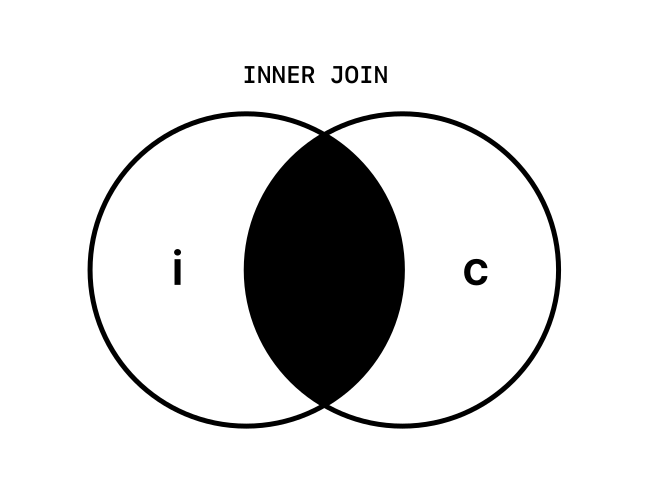
To recap, we use MySQL inner joins to combine the data from two tables by a relationship. There is a left table — the first table specified after FROM (in this case, items), and a right table, specified after the JOIN (categories) in our example.
The inner join can be represented by this Venn diagram showing that the only data returned is the data where items and categories are related.
Left and right joins in MySQL
Let’s say we add more data to our tables:
- an item without a category
- a new category (but no items that use it yet).
categories
| id | name |
|---|---|
| 1 | Produce |
| 2 | Deli |
| 3 | Dairy |
items
| id | name | category_id |
|---|---|---|
| 1 | Apples | 1 |
| 2 | Cheese | 2 |
| 3 | Bread | NULL |
If we do an INNER JOIN on this data, it looks like this in MySQL:
SELECT
    i.id,
    i.name,
    i.category_id,
    c.name AS category_name
FROM items i
JOIN categories c ON i.category_id = c.id;
| id | name | category_id | category_name |
|---|---|---|---|
| 1 | Apples | 1 | Produce |
| 2 | Cheese | 2 | Deli |
Notice anything missing?
Bread isn’t there! Why not?
When we do an inner join on i.category_id = c.id, we are telling MySQL to return only the records with a category. Since "Bread" has a category_id that is NULL, it doesn’t match anything and therefore isn’t returned.
Similarly, since no items have our new “Dairy” category, this will not be present in the results either.
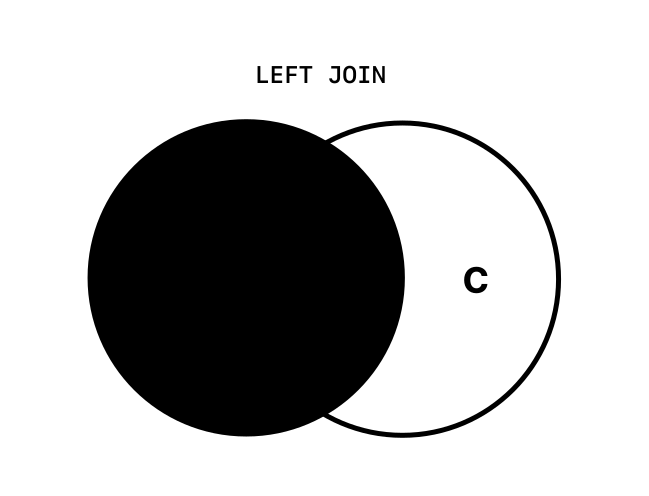
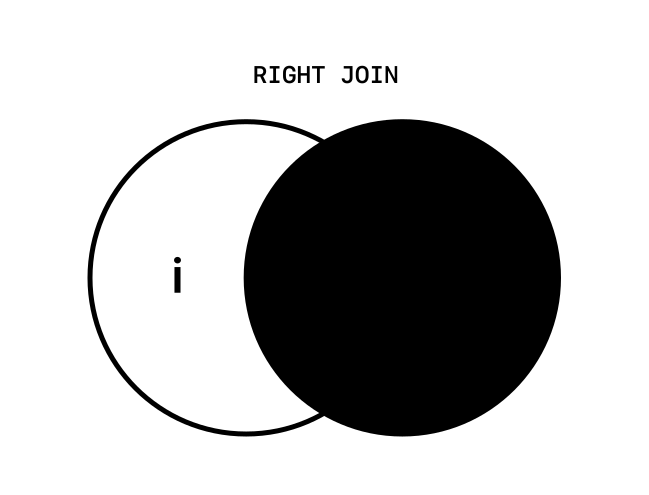
Often, you will still want to return all the items, even those that don’t have a matching foreign key in the table it is joined to. To achieve this, we can use LEFT JOIN to ensure all the item records in the first (left) table are returned. RIGHT JOIN works almost exactly the same way, except it returns all the records in the right table — in this case, categories.
If we do a LEFT JOIN on this data, we will get the following:
SELECT
    i.id,
    i.name,
    i.category_id,
    c.name AS category_name
FROM items i
LEFT JOIN categories c ON i.category_id = c.id;
| id | name | category_id | category_name |
|---|---|---|---|
| 1 | Apples | 1 | Produce |
| 2 | Cheese | 2 | Deli |
| 3 | Bread | NULL | NULL |
Now we have all the items thanks to using a LEFT JOIN instead of INNER JOIN!
Similarly, we can use a RIGHT JOIN to return all the categories (but not necessarily all the items).
SELECT
    i.id,
    i.name,
    i.category_id,
    c.name AS category_name
FROM items i
RIGHT JOIN categories c ON i.category_id = c.id;
| id | name | category_id | category_name |
|---|---|---|---|
| 1 | Apples | 1 | Produce |
| 2 | Cheese | 2 | Deli |
| NULL | NULL | NULL | Dairy |
Left and right joins can be represented by these Venn diagrams.
Full outer joins
If we want to show all the items and all the categories, we must do a special join that is sometimes called a FULL OUTER JOIN, although this type of join is not supported in MySQL. We can, however, simulate this by doing both a LEFT JOIN and RIGHT JOIN, and combining them with a UNION.
To accomplish this, we have to add a WHERE clause that only includes the records with a NULL item id from the second part of the query. Otherwise, those items with categories will all show twice.
SELECT
    i.id,
    i.name,
    i.category_id,
    c.name AS category_name
FROM items i
LEFT JOIN categories c ON i.category_id = c.id
UNION ALL
SELECT
    i.id,
    i.name,
    i.category_id,
    c.name AS category_name
FROM items i
RIGHT JOIN categories c ON i.category_id = c.id
-- This prevents duplicate items from showing
-- as we only want categories with no items.
WHERE i.id IS NULL;
| id | name | category_id | category_name |
|---|---|---|---|
| 1 | Apples | 1 | Produce |
| 2 | Cheese | 2 | Deli |
| 3 | Bread | NULL | NULL |
| NULL | NULL | NULL | Dairy |
This type of OUTER JOIN is represented by this diagram. 
It is sometimes helpful to query for only the records that aren’t related. We may want to find only the items that aren’t categorized — perhaps so we can find them to clean them up.
To do this, we can add an additional WHERE clause to a LEFT and RIGHT JOIN.
SELECT
    i.id,
    i.name,
    i.category_id,
    c.name AS category_name
FROM items i
LEFT JOIN categories c ON i.category_id = c.id
WHERE c.id IS NULL;
| id | name | category_id | category_name |
|---|---|---|---|
| 3 | Bread | NULL | NULL |
This JOIN is represented here. 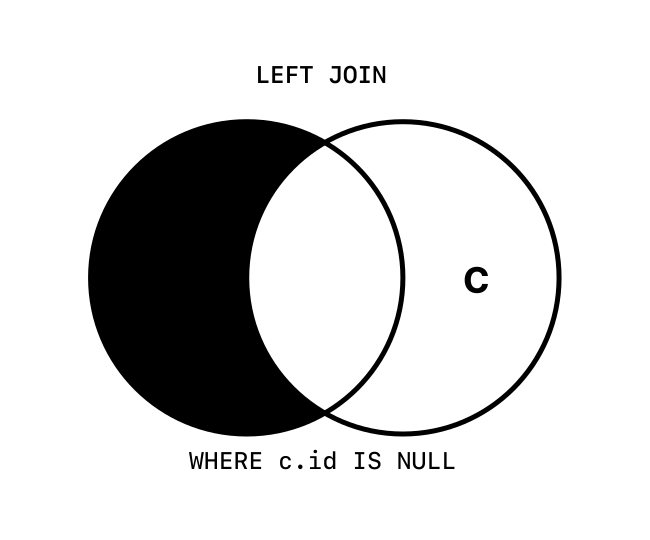
To show only the categories without items, we can use a similar RIGHT JOIN with a WHERE clause that only shows records with a NULL item id.
SELECT
    i.id,
    i.name,
    i.category_id,
    c.name AS category_name
FROM items i
RIGHT JOIN categories c ON i.category_id = c.id
WHERE i.id IS NULL;
| id | name | category_id | category_name |
|---|---|---|---|
| NULL | NULL | NULL | Dairy |
This JOIN is represented here.
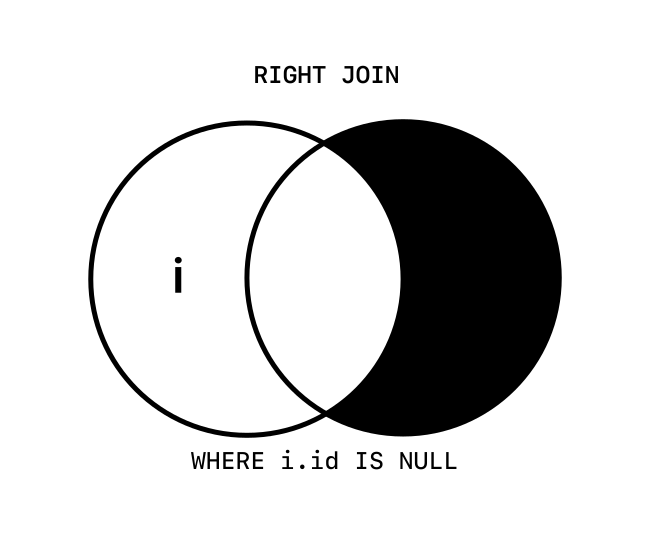
Finally, if we want to show both the unrelated items and categories, we can use the OUTER JOIN type of query, but look for either the items or categories keys being NULL.
To make this query work, it helps to enclose the bulk of it in parentheses and apply the WHERE clause to the outer query.
SELECT * FROM (
SELECT i.id,
          i.name,
          i.category_id,
          c.name AS category_name
   FROM items i
         LEFT JOIN categories c ON i.category_id = c.id
   UNION ALL
   SELECT i.id,
          i.name,
          i.category_id,
          c.name AS category_name
   FROM items i
         RIGHT JOIN categories c ON i.category_id = c.id
   WHERE i.id IS NULL
) AS all_items_all_categories
WHERE id IS NULL OR category_id IS NULL;
| id | name | category_id | category_name |
|---|---|---|---|
| 3 | Bread | NULL | NULL |
| NULL | NULL | NULL | Dairy |
This JOIN of unrelated items is represented here. 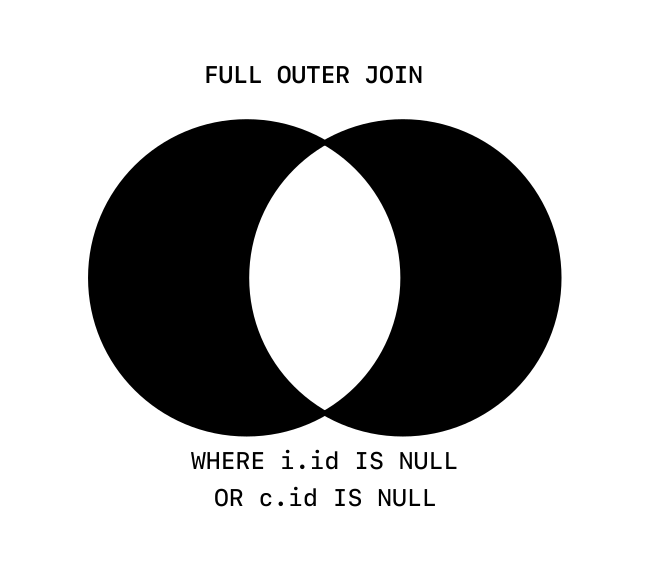
Summary
You should now understand how to use MySQL joins to combine data from multiple tables and how each type of join differs. To summarize:
INNER JOINorJOINreturns only records with matching keys in both tables.LEFT JOINreturns records from the first table only if they also are referenced by the second table.RIGHT JOINreturns records from the second table only if they also are referenced by the first table.FULL OUTER JOINreturns all records from both tables, even if they don’t have a match in the other table.WHEREcan filter results of a join to only show records withNULLkeys.UNIONcan combine results of two queries into one result set.
With a good understanding of joins, you are on your way to doing powerful and efficient queries in MySQL. To learn even more about joins, you can check out our overview of MySQL joins video as well as our video on indexing joins in MySQL.