





As the usage of your app grows, performance can steadily decline.
There’s nothing necessarily surprising by that statement, but what is surprising is the number of bottlenecks that can surface and the options available to you to fix them. One such bottleneck can be directly related to the time it takes to read from and write to your database. After all, behind the complexities of a relational database, you’re still working with storage systems that have inherent IO latency.
This is where a well-architected caching system can help.
A good caching system can reduce the load on your database and increase the general performance of your application. A faster application results in happier users and potentially more revenue, which is always a good thing! However, caching systems have their own setup complexities, along with a number of gotchas that might creep up unexpectedly.
In this article, we’ll explore backend caching, how to implement it, how caching works with MySQL, and potential issues to watch out for.
What is a cache?
At its very core, a cache is a component that stores data so that the data may be accessed more quickly.
Caches can be either hardware or software-based. Oftentimes, caching systems store data in memory, which allows accessing and manipulating that data to be much faster since it’s not working with traditional storage systems like solid state or spinning hard drives. These caching systems can be run locally on a server but can also be configured to work independently on their own system.
Caches that run independently of other services are known as distributed caches.
Redis and memcache are two very popular distributed caching systems that can be accessed by external systems. These systems will leverage the memory of the system they are running on to store data in a key/value setup, allowing developers to quickly call back data based on a specific key. They can even be configured on multiple servers as a cluster, adding to their distributed nature.
So how can caching and MySQL work together for a faster application?
Note
Want to learn about how Instagram scaled performance in the early days? Check out this Database Caching Tech talk from Rick Branson, Instagram's first full-time backend engineer, where he spills it all.
Implement caching into a MySQL environment
While MySQL does some minimal caching in the form of query caching, it leaves much to be desired.
So in order to properly utilize a caching system, it needs data. MySQL does not have any built-in mechanisms to hydrate (or fill) a cache, so the responsibility for this task will lie in the application code. Ultimately, you’ll need to build a system that will return data from a cache if it exists there, or return it from the database and hydrate the cache if it’s not.
There are two common patterns that can be used when designing a caching system: look-aside and look-through.
Example: retrieving follower count for a user
For the examples that follow, we’ll be using the following database diagram. It mimics a social media platform with two tables: users and followers.
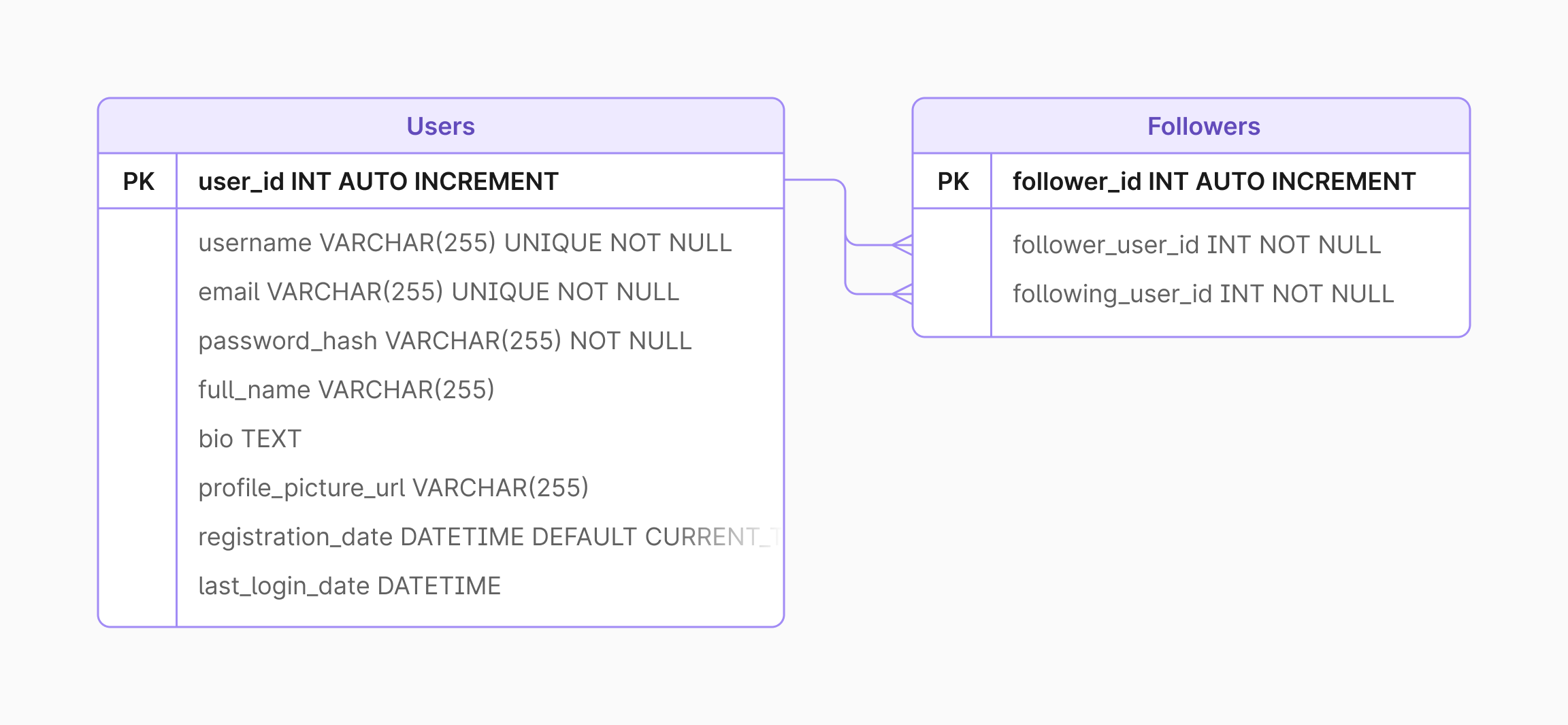
Each example will show how caching can increase load times for viewing the number of followers a given user has. This may sound like a relatively simple problem, but consider the load that would be placed on a database if a user has a particularly high number of followers. Every time the user’s profile is viewed, a SELECT COUNT query would have to be run against a table to simply return a number.
The query to look up the number of followers would be this:
SELECT COUNT(*) FROM followers WHERE follower_id = ?
Look-aside cache
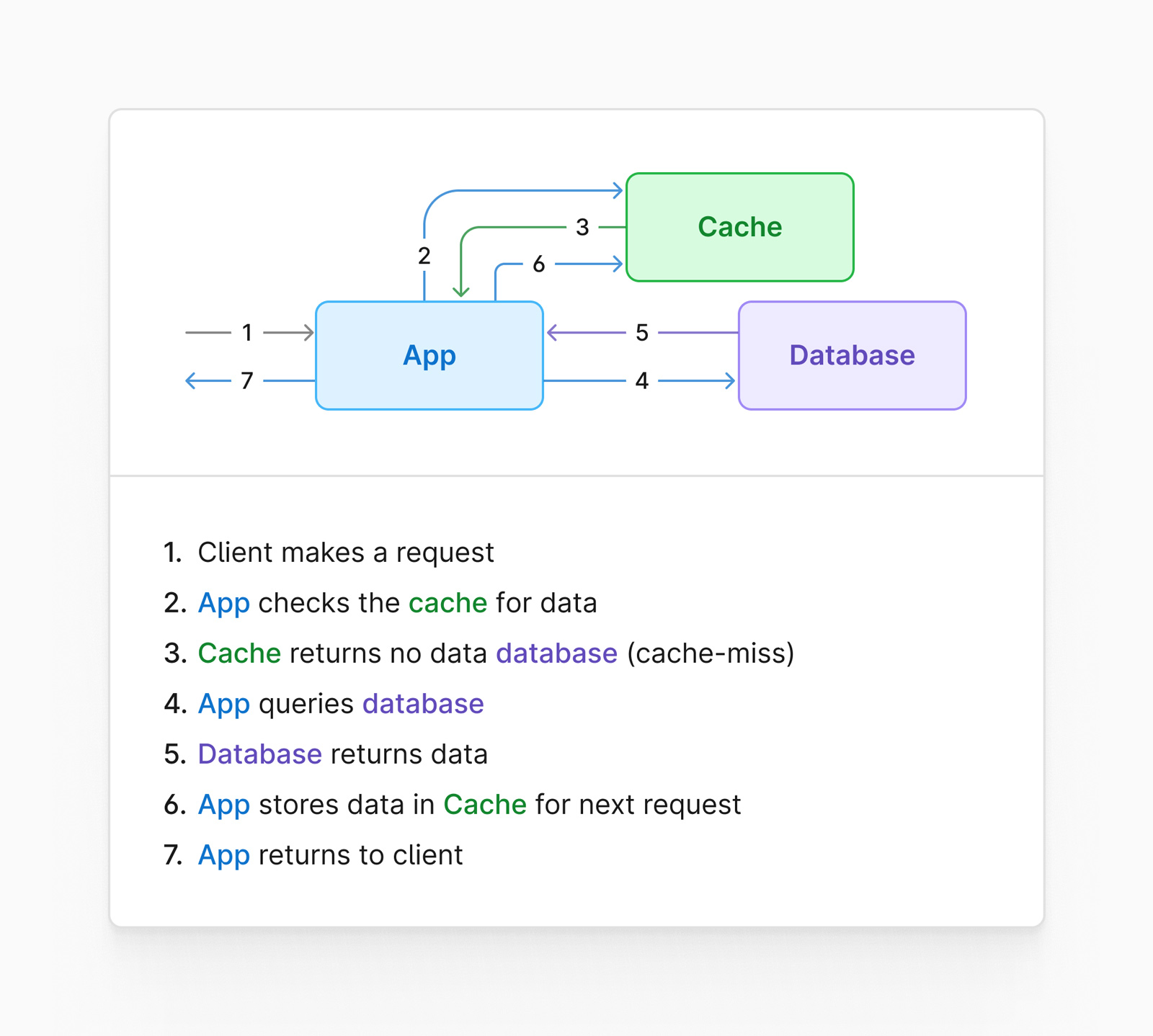
A look-aside cache is a system that sides outside of the data access path of your database.
Typically this setup has two distinct steps in its workflow. Using our example of retrieving follower count, the application would first check to see if the cache contains the follower count for the requested user. If the cache does not contain that information (this is known as a cache miss), the code would grab the value directly from the database, populate the cache for future requests, and finally, return it to the caller.
Here is what that flow might look like visually:
Look-through cache
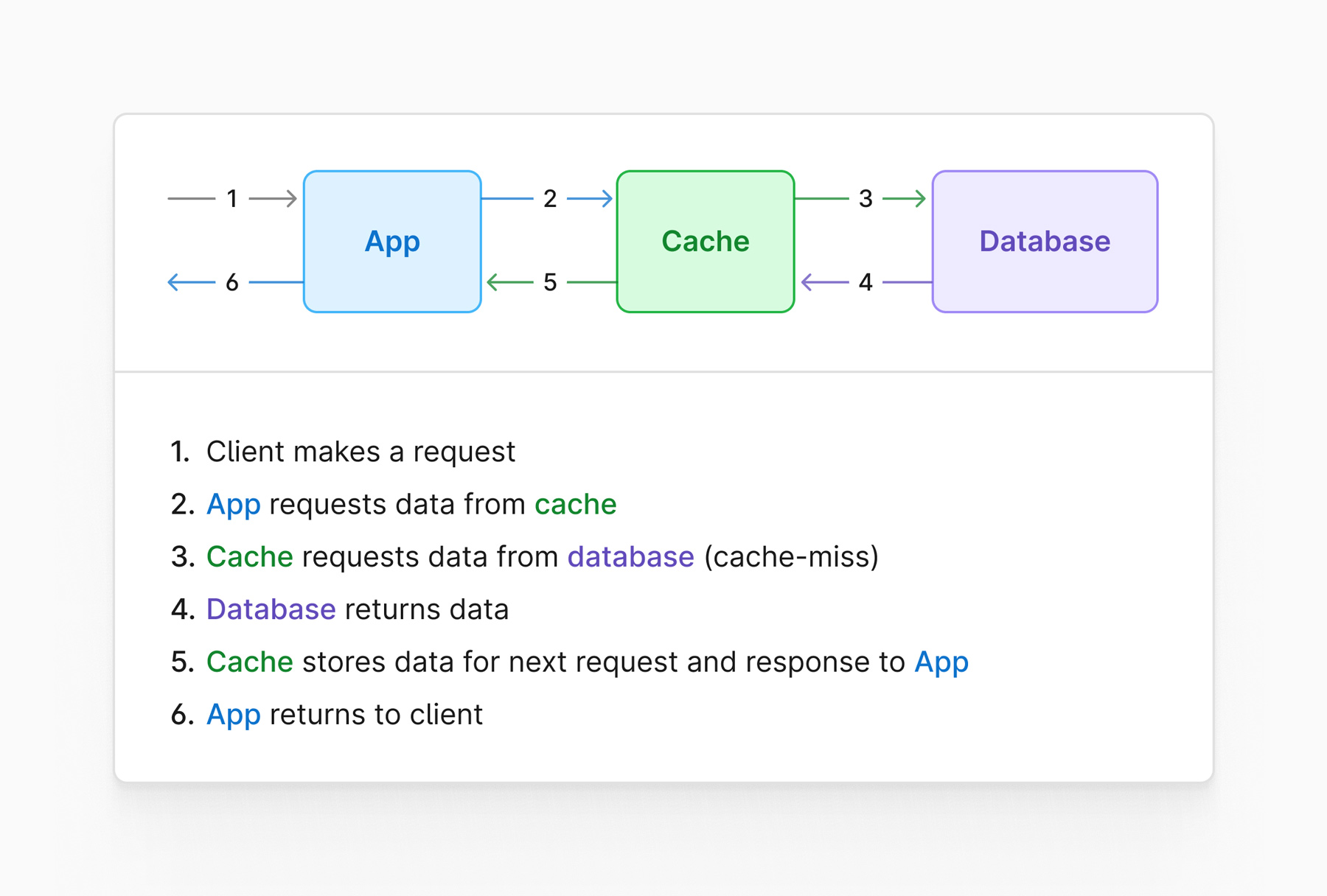
A look-through cache is a system that sits in line with the data access path, in front of the database.
This scenario would have the code hit the cache directly. If a cache miss is experienced, it would be up to the cache software to request the data from the database and populate itself. During this time, the caller would wait for that part of the process to complete before returning to the user.
This is a diagram that demonstrates how a look-through cache setup might look like:
Potential issues with caching
In the following sections, we’ll explore some potential issues with caching systems, along with ways that these problems can be mitigated.
Inconsistent data
One issue is that data within the cache is not accurate or up to date.
Let's say our caller requests the follower count at 9:00 am and a value of 1,120 is returned. Then at 9:15 am, that user gains an extra 1,500 followers because a post went viral. You’ll need to consider a method by which the cache is updated.
The first potential solution is to simply update the cache whenever a new follower is added.
The benefit of this approach is that it is relatively straightforward. Instead of just issuing an UPDATE statement to the database, you’d also increment the value currently stored in the cache. Where this becomes problematic is that for each of those 1,500 new followers, you’re also updating your cache (and your database) 1,500 times.
The second solution is to store a cache expiration with each value.
In this scenario, you could have a cache expiration value of 20 minutes. When the cache is populated at 9:00 am, that value will stay in the cache until 9:20 am. When the users’ follower count increases by 1500, any callers between 9:15 am and 9:20 am will receive the old count, but it's a short enough window that it may be acceptable to prevent systematic issues with your architecture.
Each solution has its tradeoffs, which is something to consider for your environment when configuring a cache.
Thundering herd
The thundering herd problem refers to a time in which too many callers are trying to update the cache at the same time, causing performance issues.
Using the same example from the previous section, let's assume you had 3,000 clients attempt to request data from the cache at exactly 9:20 am. All 3,000 processes would determine that the cache is expired and they’d attempt to rehydrate the cache simultaneously. Not only could this cause issues, but it's entirely unnecessary.
A solution to this issue would be to configure what's called a “cache lease.”
Essentially, each client would have a unique identifier. When the first caller attempts to rehydrate the cache, the system will note its unique ID as the process responsible for updating that specific value. All other clients would receive the old value while the cache is being updated.
Once the value is updated, the lease is released until the value in the cache expires again, and future requests will receive the most up-to-date value.