


When the performance of your database server starts to decline from general usage, you have several options for optimizing it.
One common method for optimizing your MySQL database is through partitioning. In this article, we’ll cover the basics of MySQL partitioning, how to apply partitioning to your database, and we'll discuss how it’s related to sharding.
The basics of MySQL partitioning
Partitioning is the idea of splitting something large into smaller chunks. In MySQL, the term “partitioning” means splitting up individual tables of a database.
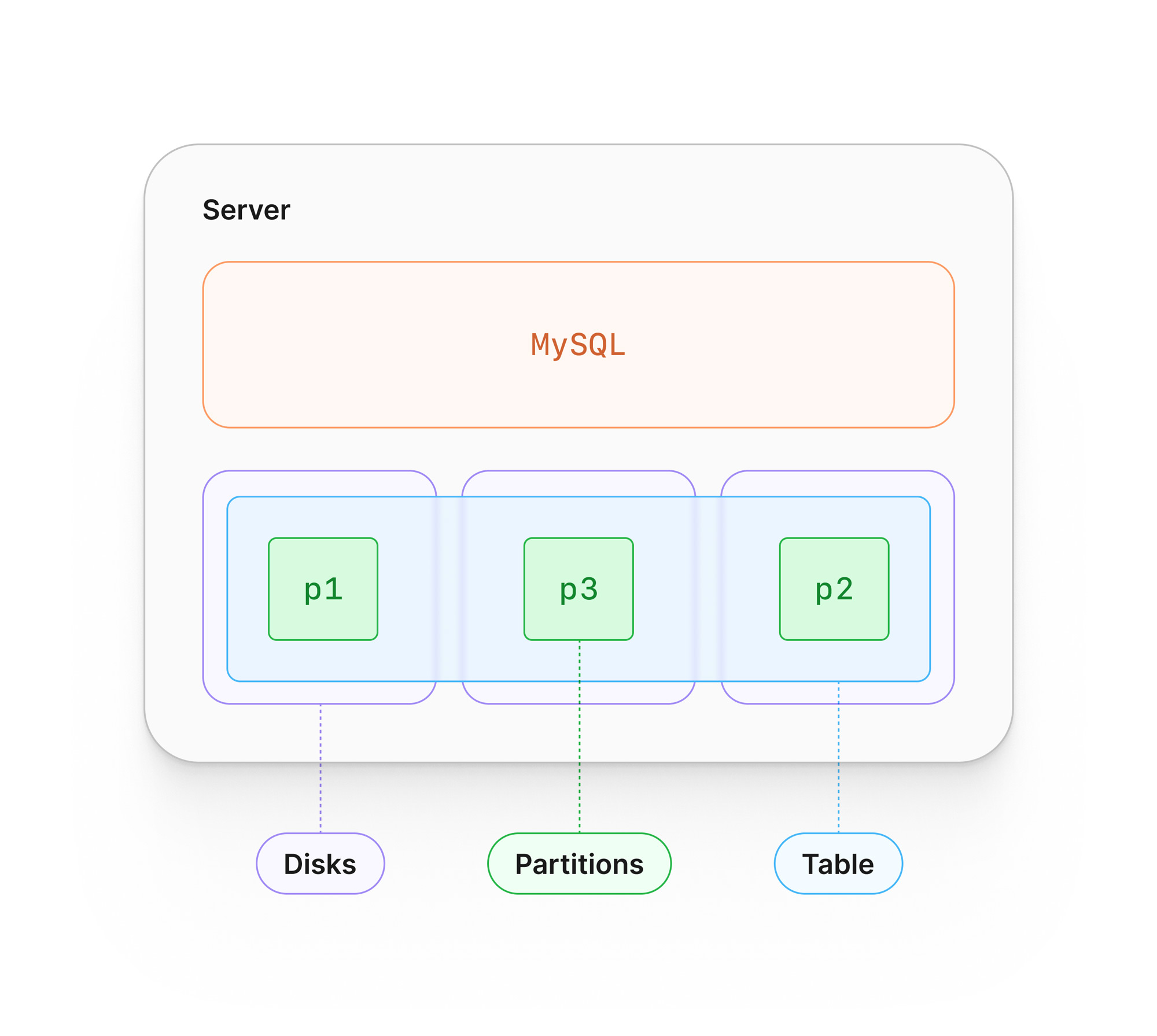
When you partition a table in MySQL, the table is split up into several logical units known as partitions, which are stored separately on disk. When data is written to the table, a partitioning function will be used by MySQL to decide which partition to store the data in. The value for one or more columns in a given row is used for this sorting process.
MySQL provides several partitioning functions out of the box, a few of which we’ll explore in the next section.
How to partition your tables in MySQL
There are a variety of methods available to database developers to partition their data based on the needs of the application.
Partitioning with RANGE
One of the simplest examples is the RANGE partitioning strategy. By using RANGE, you provide a set of numerical ranges that MySQL will use to place the data. This will be used for each partition you wish to create, although MINVALUE and MAXVALUE can be used to set the outermost ends of the ranges.
The following CREATE TABLE sample uses the concept of a library, where books are sorted into separate partitions based on their publication_year:
CREATE TABLE library_books (
    book_id INT AUTO_INCREMENT PRIMARY KEY,
    title VARCHAR(255) NOT NULL,
    author VARCHAR(255),
    publication_year INT,
    isbn VARCHAR(13),
    genre VARCHAR(50),
    checked_out BOOLEAN DEFAULT FALSE,
    checked_out_date DATE,
    due_date DATE,
    shelf_location VARCHAR(50)
)
PARTITION BY RANGE (publication_year) (
    PARTITION p0 VALUES LESS THAN (2001),
    PARTITION p1 VALUES LESS THAN (2011),
    PARTITION p2 VALUES LESS THAN (2021),
    PARTITION p3 VALUES LESS THAN MAXVALUE
);
Partitioning with LIST
Another relatively simple example is the LIST strategy.
When using LIST, you’d provide a fixed set of values along with each partition to inform MySQL how to store the data. This strategy works well in situations where you know exactly what values your columns should contain. One of the downsides, however, is that attempting to insert a row with an invalid value will cause an error.
The following statement shows the same example as above but partitioned based on a set of known author values.
CREATE TABLE library_books (
    book_id INT AUTO_INCREMENT PRIMARY KEY,
    title VARCHAR(255) NOT NULL,
    author VARCHAR(255),
    publication_year INT,
    isbn VARCHAR(13),
    genre VARCHAR(50),
    checked_out BOOLEAN DEFAULT FALSE,
    checked_out_date DATE,
    due_date DATE,
    shelf_location VARCHAR(50)
)
PARTITION BY LIST (author) (
    PARTITION p0 VALUES IN ('William Shakespeare', 'Jane Austen', 'George Orwell'),
    PARTITION p1 VALUES IN ('J.K. Rowling', 'Agatha Christie', 'Stephen King'),
    PARTITION p2 VALUES IN ('J.R.R. Tolkien', 'Gabriel García Márquez', 'Toni Morrison'),
    PARTITION p3 VALUES IN ('Haruki Murakami', 'Neil Gaiman', 'Chimamanda Ngozi Adichie')
);
Partitioning with KEY
So what happens if you want to take advantage of partitioning but just want to let MySQL figure it out?
This is where the KEY partitioning strategy works well. By using KEY, you are letting MySQL use the primary key (or a unique key) of a table to determine how to sort the data. An internal algorithm will be used to determine how to best sort the data evenly across a specified number of partitions.
The following example uses KEY on the same library_books table from the previous examples:
CREATE TABLE library_books (
    book_id INT AUTO_INCREMENT PRIMARY KEY,
    title VARCHAR(255) NOT NULL,
    author VARCHAR(255),
    publication_year INT,
    isbn VARCHAR(13),
    genre VARCHAR(50),
    checked_out BOOLEAN DEFAULT FALSE,
    checked_out_date DATE,
    due_date DATE,
    shelf_location VARCHAR(50)
)
PARTITION BY KEY()
PARTITIONS 4;
Note
These are only a few select types that can be used in partitioning. To explore all possible strategies, please refer to the MySQL docs.
Benefits and drawbacks of MySQL partitioning
Partitioning provides several benefits when applied correctly.
One of these benefits is helping MySQL query data in large tables. Using the RANGE example from above, if you wanted to query all books published in 2007, MySQL would only need to scan p1 and not the entire table to find the requested data. If you need to query across partitions, these operations can be performed in parallel, which can be even faster if the partitions are stored across multiple storage devices.
Another potential benefit of MySQL partitioning can be seen with select maintenance operations.
For example, truncating all of the data in a partition is faster than performing a DELETE ... WHERE statement on the same data. Backup operations can also be performed on individual partitions, which can reduce the load on the overall server. Rebuilding indexes or reclaiming unused space can also be done per partition instead of on the entire table.
Partitioning is no silver bullet when it comes to improving performance as there are several drawbacks.
Depending on the partitioning strategy you want to use, you may be limited on the available data types for columns you want to partition on. For instance, ENUMs are not permitted on most strategies. Additionally, you need to properly understand your access patterns as unbalanced partitions can limit the performance gains you’d get from partitioning in the first place.
If you are in the process of deciding whether to partition your data in MySQL or not, it’s worth performing the work on a test system to ensure it will provide a tangible benefit to your environment.
Note
Sign up for our free Database scaling course to learn more about scaling strategies like partitioning, replication, sharding, and more!
Partitioning vs. sharding
It’s no secret that PlanetScale has a focus on the ability to shard databases, but how does that differ from partitioning?
The concepts behind partitioning and sharding are very similar. The key differences are that partitioning occurs on the same server and is supported by MySQL natively, whereas sharding a database splits tables across different servers and requires external mechanisms to achieve this. Since partitioning involves one server, it is considered scaling vertically, whereas sharding is scaling horizontally.
PlanetScale offers full-managed Vitess clusters with explicit horizontal sharding.
Each production database branch has at least one primary MySQL node along with one failover node. While sharding is not configured out of the box, it’s something that Vitess handles very well using a combination of a stateless proxy which routes queries to the proper MySQL node, and a topology server to keep the entire system aware of any changes to individual nodes.
Because we’re built with a focus on sharding and horizontal scalability, partitioning is not supported in PlanetScale.
Partitioning, in reality, is a stepping stone to greater performance. Since the focus is put on a single server, it still creates a single point of failure should something catastrophic happen to your MySQL server. Because of our expertise in sharding, partitioning adds little value to what we already do.
Combined with resource-based pricing, you get the best of both horizontal and vertical scaling with your PlanetScale database.