





Signup forms with specific and archaic password rules can be incredibly frustrating for anyone using a password manager. "Must have one special character, but only from !@#$ these allowed characters." It attempts to help users be more secure but causes more frustration than security.
When building PlanetScale’s signup form, we wanted to enforce strong passwords while also working well with password managers. After researching the problem, we found the best method for doing this is using an entropy-based password strength calculation.
Entropy-based password strength
A password’s strength can be defined by how many attempts it would take for a computer to successfully guess it.
2^(entropy) = number of attempts needed to crack the password
If you have a computer that makes 1000 attempts per second, you can get an estimate of how long your password would stand up to an attack.
Weak password example
Password: mike1
This simple password has an entropy of ~16. With 1000 attempts per second, it could be cracked in just 60 seconds.
2^16 / 1000 = ~60 seconds
Strong password example
Password: cTzk9*R6-uf9
This password would generally satisfy most websites' password rules. It has numbers, special characters, upper and lower case.
2^61 / 1000 = 36.5 million years
Long and strong password example
Password: mikemikemikemikem
This password has similar entropy to the above password but would fail most common password requirements.
2^61 / 1000 = 36.5 million years
Entropy is better than specific rules
The two last examples highlight the frustration of having specific password rules. Both cTzk9*R6-uf9 and mikemikemikemikem have ~61 bits of entropy, making them very difficult to guess.
The mikemikemikemikem example would never satisfy most password strength rules.
We still consider the first password stronger because it does not contain dictionary words (and more importantly, my own name!). But this does not mean the second password isn’t secure enough for most applications.
Slowing down attempts
A clear lesson we can learn from these examples is that the more attempts an attacker can make, the faster they can crack a password. There are a couple of steps you can take to improve your applications' defense against these attacks.
- Add rate limits to your login form. This is a simple way to protect against a program using your password form to check password validity.
- Use a password hashing algorithm for storing your passwords. These algorithms are purposefully slow to reduce how quickly attempts can be made. We chose to use Argon2.
Dictionary words and past breaches
Beyond an entropy check, there are other methods you should also consider when designing strong password validation.
Dictionary words
Password crackers will often use a prepared list of actual words to increase the speed they can crack a password. The strong_passwords gem includes a dictionary word list and adjusts the password strength rating when actual words are used.
Breached passwords
A strong password is useless if previously released as part of a password breach. Integrating the haveibeenpwned API with your password validation is an additional way to protect your users from this.
Better signup forms
Now that we know about password strength and entropy, we can use this knowledge to improve our applications’ signup experience.
Instead of showing a list of rules and validating against them, you can instead implement a password meter that measures the password’s entropy and provides feedback to the user as they type it in. It plays nicely with password managers and also gives users quick feedback if they manually type in a password.
Here is how we implemented this for PlanetScale’s signup form:
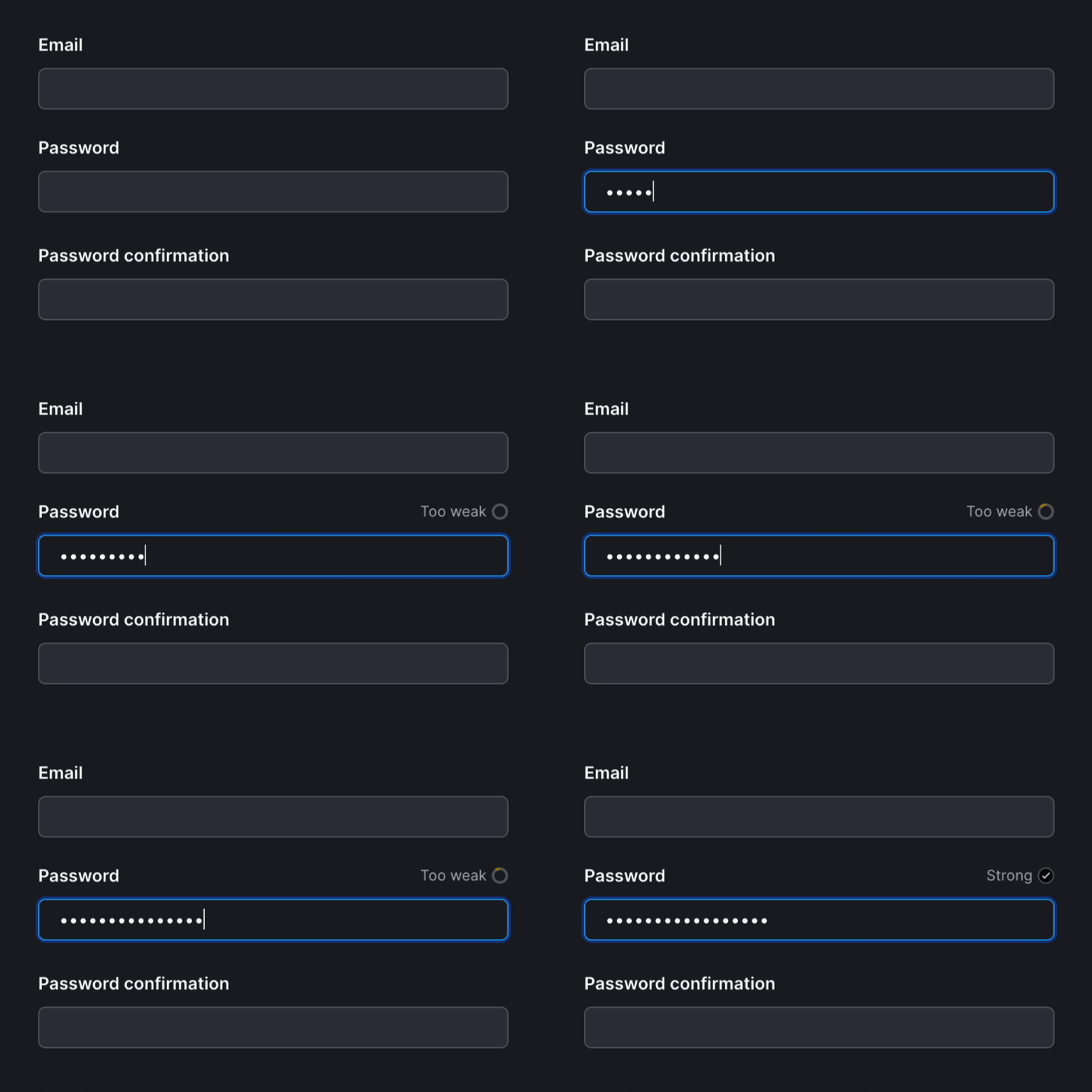
How we built it
Our authorization pages are in a Ruby on Rails application. We used the strong_password gem + the auto-check-element web component to quickly give users feedback on their password strength as they type it.
The password form UI
We wrapped our existing password form with auto-check-element. This web component posts the value of the password to our backend as the user types. Our backend then calculates the password’s entropy and returns the rendered meter SVG to show the user their progress.
<auto-check csrf="<%= form_authenticity_token %>" src="/users/password-strength" required="">
  <div class="mb-1.5 flex items-center justify-between leading-none">
    <%= f.label(:password, "New password", class: "mb-0") %>
    <div class="js-password-strength-container" aria-live="polite"></div>
  </div>
  <%= f.password_field(:password, class: "js-password-strength", autofocus: true, autocomplete: "new-password",
  required: true) %>
</auto-check>
This form element also has a tiny bit of extra JavaScript added to update the meter after each check.
<% # Make 10% the min so _some_ red appears. # For values > 90, keep arc slight unclosed. strength = 10 if strength < 10
strength = 90 if (strength > 90) && (strength < 100) radius = 40 perimeter = Math::PI * radius * 2 stroke_dashoffset =
(perimeter - (perimeter * strength)) / 100 arc_color = case strength when 0..33 "rgba(var(--red-500))" when 33..66
"var(--orange-500)" when 66..100 "var(--yellow-500)" end %>

<span class="flex items-center text-sm">
  <span class="mr-sm text-secondary"><%= strength == 100 ? "Strong" : "Too weak" %></span>
  <svg width="14" height="14" viewBox="0 0 100 100">
    <circle cx="50" cy="50" r="<%= radius %>" stroke="var(--border-action)" stroke-width="15" fill="transparent" />
    <% if strength == 100 %>
    <circle
      cx="50"
      cy="50"
      r="<%= radius %>"
      stroke="rgba(var(--green-600)"
      stroke-width="15"
      fill="rgba(var(--green-600))"
    />
    <path
      fill-rule="evenodd"
      clip-rule="evenodd"
      d="M72.3156 38.0312C73.6824 36.6644 73.6824 34.4483 72.3156 33.0815C70.9488 31.7146 68.7327 31.7146 67.3659 33.0815L41.5565 58.8909L33.4247 50.7591C32.0579 49.3923 29.8418 49.3923 28.475 50.7591C27.1082 52.126 27.1082 54.3421 28.475 55.7089L39.0816 66.3155C40.4484 67.6823 42.6645 67.6823 44.0313 66.3155C44.1514 66.1955 44.2609 66.0689 44.3598 65.9369C44.4918 65.8379 44.6184 65.7284 44.7384 65.6084L72.3156 38.0312Z"
      fill="white"
    />
    <% else %>
    <circle
      cx="50"
      cy="50"
      r="<%= radius %>"
      stroke="<%= arc_color %>"
      stroke-width="15"
      fill="transparent"
      stroke-dasharray="<%= perimeter %>"
      stroke-dashoffset="<%= stroke_dashoffset %>"
      transform="rotate(-90 50 50)"
    />
    <% end %>
  </svg>
</span>
Password strength calculation
The controller code determines the password strength percentage and then renders the meter.
def create
  checker = User.password_checker
  entropy = checker.calculate_entropy(params[:value] || "")
  percentage = (entropy / STRONG_ENTROPY) * 100

  percentage = 100 if percentage > 100

  render(partial: "users/shared/password_strength_meter", locals: { strength: percentage.to_i })
end
Learn more on how to implement entropy-based password forms
Give it a try yourself by playing around with our sign up form: https://auth.planetscale.com/sign-up
We found these resources useful when implementing our password strength meter: