


Universally Unique Identifiers, also known as UUIDs, are designed to allow developers to generate unique IDs in a way that guarantees uniqueness without knowledge of other systems. These are especially useful in a distributed architecture, where you have a number of systems and databases responsible for creating records. You might think that using UUIDs as a primary key in a database is a great idea, but when used incorrectly, they can drastically hurt database performance.
In this article, you'll learn about the downsides of using UUIDs as a primary key in your MySQL database.
The many versions of UUIDs
At the time of this writing, there are five official versions of UUIDs and three proposed versions. Let's take a look at each version to better understand how they work.
UUIDv1
A UUID version 1 is known as a time-based UUID and can be broken down as follows:
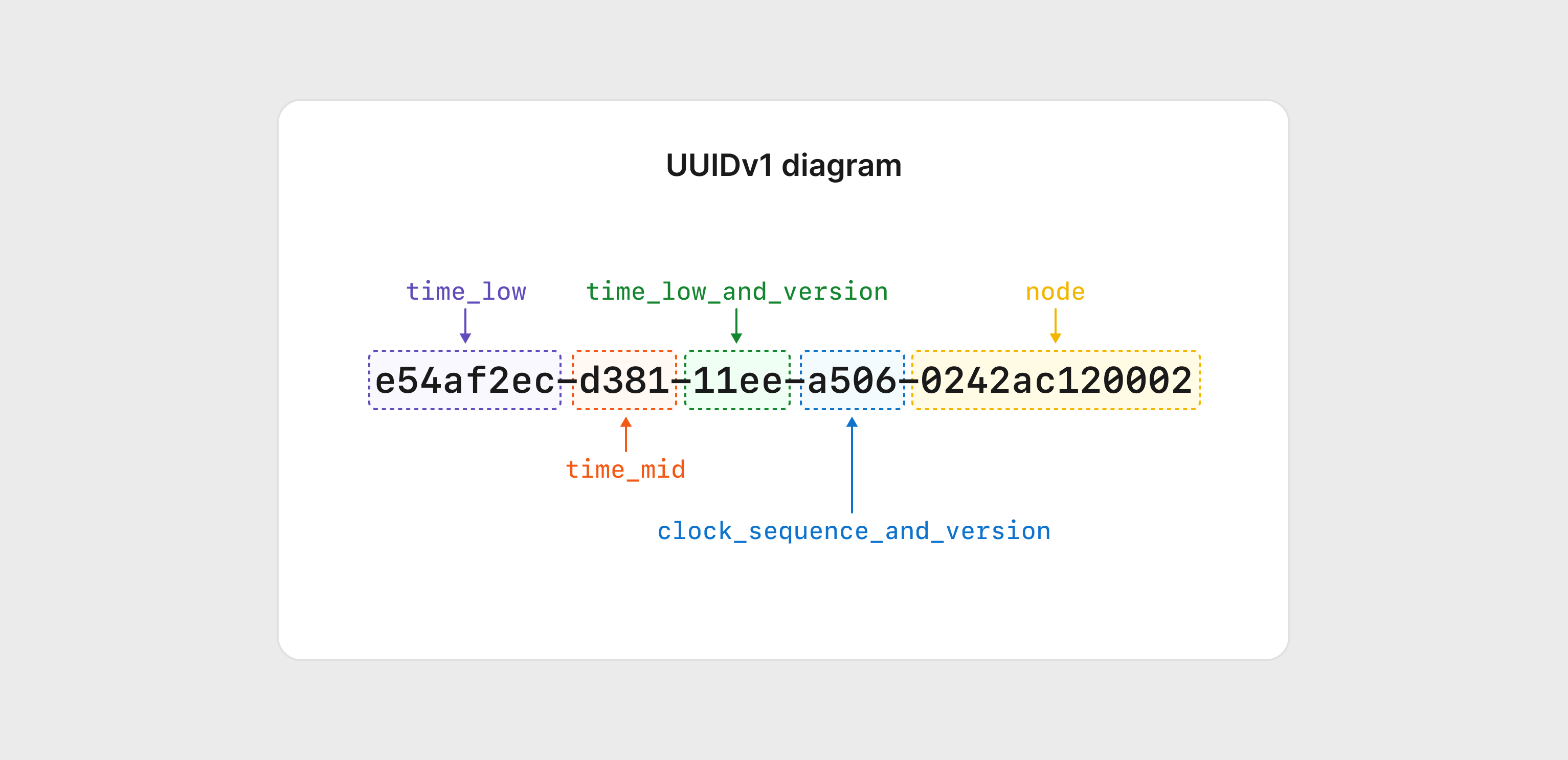
While much of modern computing uses the UNIX epoch time (Jan 1, 1970) as its base, UUIDs actually use a different date of Oct 10, 1568, which is the date that the Gregorian calendar started to be more widely used. The embedded timestamp within a UUID grows in 100 nanoseconds increments from this date, which is then used to set the time_low, time_mid, and time_hi segments of the UUID.
The third segment of the UUID contains the version as well as time_hi and occupies the first character of that segment. This is true for all versions of UUIDs as shown in subsequent examples. The reserved portion is also known as the variant of the UUID, which determines how the bits within the UUID are used. Finally, the last segment of the UUID is the node, which is the unique address of the system generating the UUID.
UUIDv2
Version 2 of the UUID implemented a change compared to version 1, where the low_time segment of the structure was replaced with a POSIX user ID. The theory was that these UUIDs could be traced back to the user account that generated them. Since the low_time segment is where much of the variability of UUIDs reside, replacing this segment increases the chance of collision. As a result, this version of the UUID is rarely used.
UUIDv3 and v5
Versions 3 and 5 of UUIDs are very similar. The goal of these versions is to allow UUIDs to be generated in a deterministic way so that, given the same information, the same UUID can be generated. These implementations use two pieces of information: a namespace (which itself is a UUID) and a name. These values are run through a hashing algorithm to generate a 128-bit value that can be represented as a UUID.
The key difference between these versions is that version 3 uses an MD5 hashing algorithm, and version 5 uses SHA1.
UUIDv4
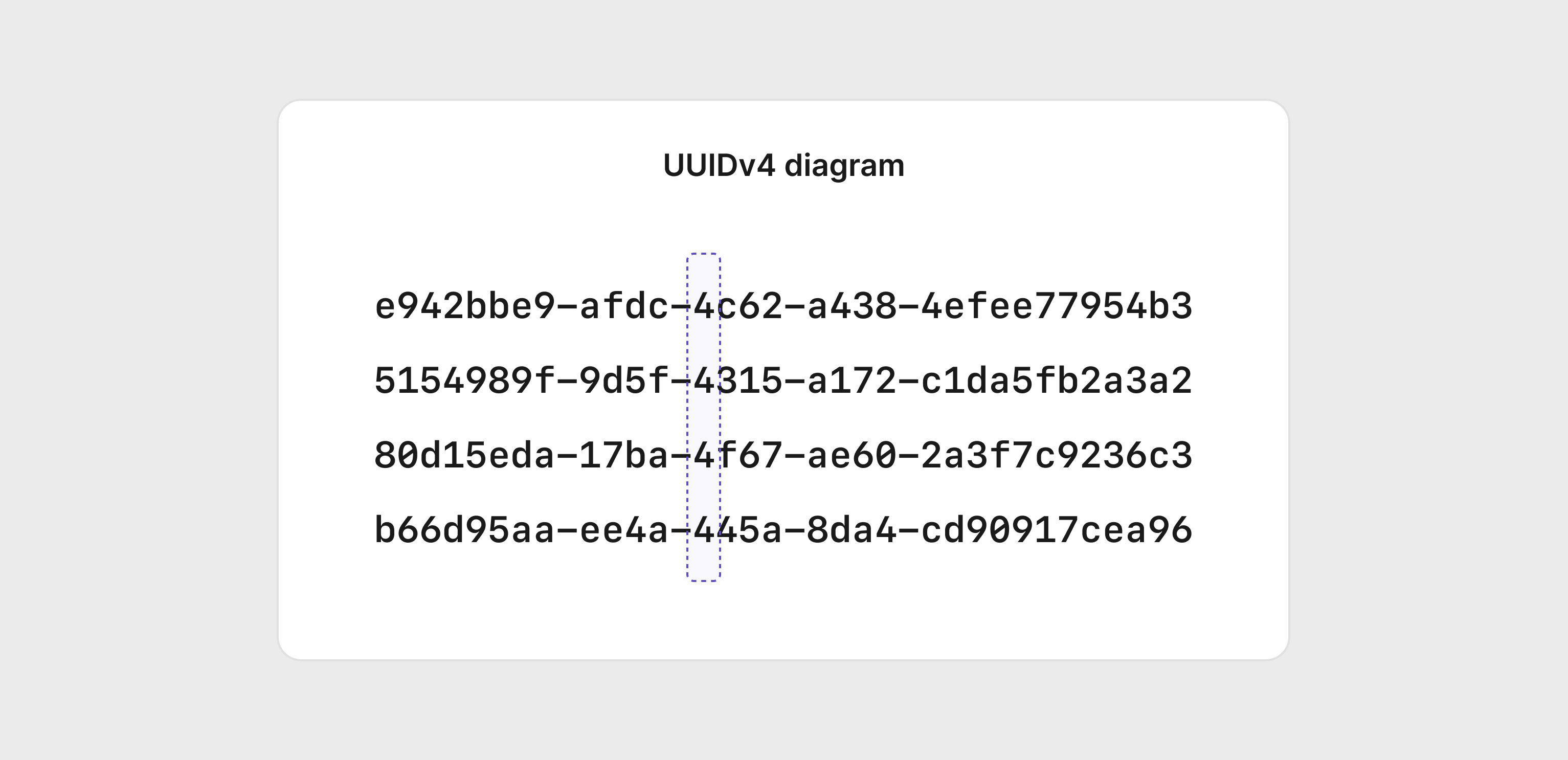
Version 4 is known as the random variant because, as the name implies, the value of the UUID is almost entirely random. The exception to this is the first position in the third segment of the UUID, which will always be 4 to signify the version used.
UUIDv6
Version 6 is nearly identical to Version 1. The only difference is that the bits used to capture the timestamp are flipped, meaning the most significant portions of the timestamp are stored first. The graphic below demonstrates these differences.
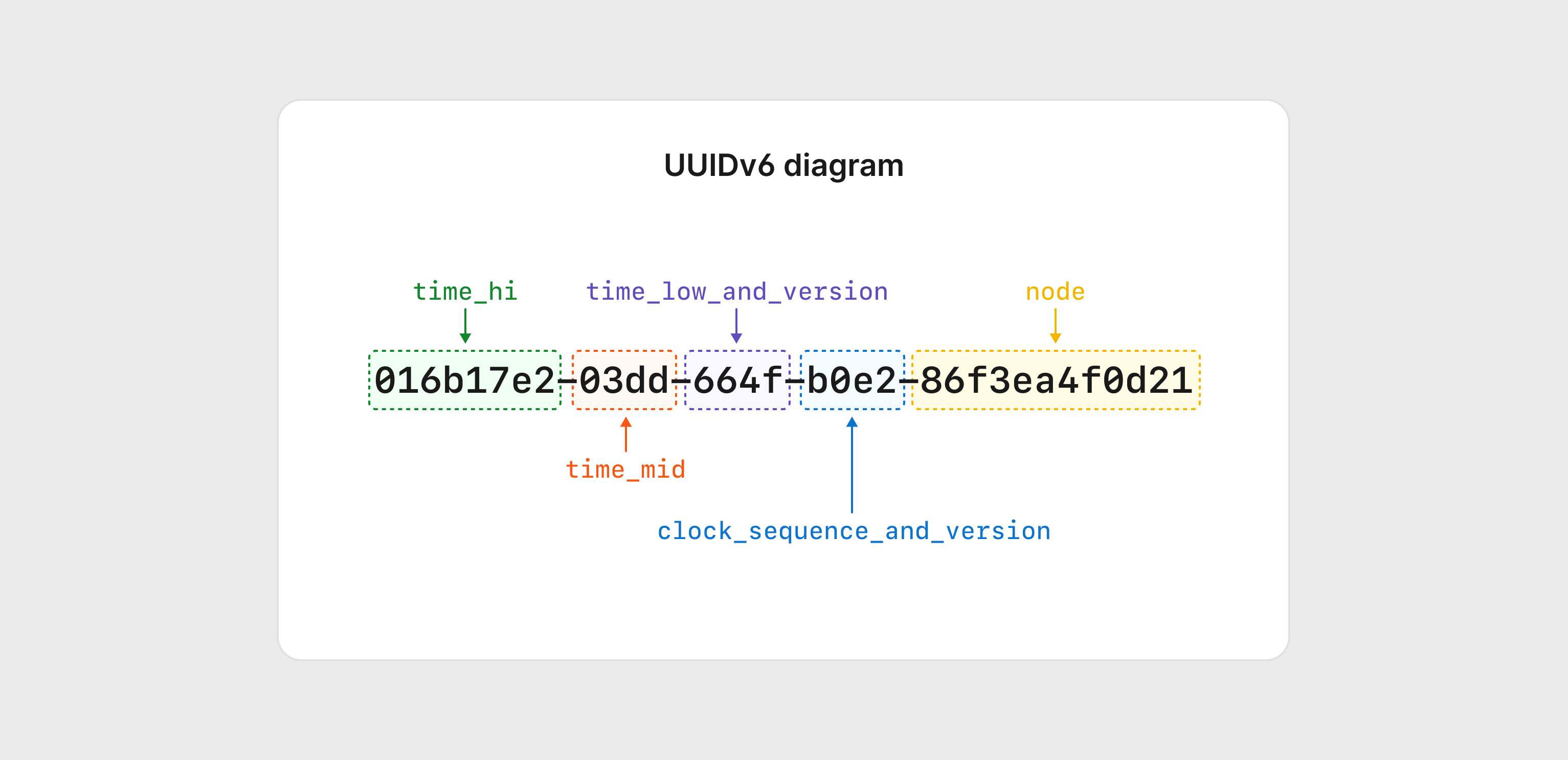
The main reason for this is to create a value that is compatible with Version 1 while allowing these values to be more sortable since the most significant portion of the timestamp is upfront.
UUIDv7
Version 7 is also a time-based UUID variant, but it integrates the more commonly used Unix Epoch timestamp instead of the Gregorian calendar date used by Version 1. The other key difference is that the node (the value based on the system generating the UUID) is replaced with randomness, making these UUIDs less trackable back to their source.
UUIDv8
Version 8 is the latest version that permits vendor-specific implementations while adhering to RFC standards. The only requirement for UUIDv8 is that the version be specified in the first position of the third segment as all other versions.
UUIDs and MySQL
Using UUIDs (mostly) guarantees uniqueness across all systems in your architecture, so you might be inclined to use them as primary keys for your records. Be aware that there are several tradeoffs to doing so when compared to an auto-incrementing integer.
Insert performance
Whenever a new record is inserted into a table in MySQL, the index associated with the primary key needs to be updated so querying the table is performant. Indexes in MySQL take the form of a B+ Tree, which is a multi-layered data structure that allows queries to quickly find the data they need.
The following diagram demonstrates what a relatively simple version of this structure looks like with six entries with values from 1 to 6. If a query comes asking for 5, MySQL will start at the root node and know from there that it has to traverse down the right side of the tree to find what it's looking for.
Note
For simplicity, these diagrams display a B-Tree instead of a B+ Tree. The key difference is that in a B+Tree, the leaf nodes contain a reference to the actual data, while in a B-Tree, the leaf nodes do not.
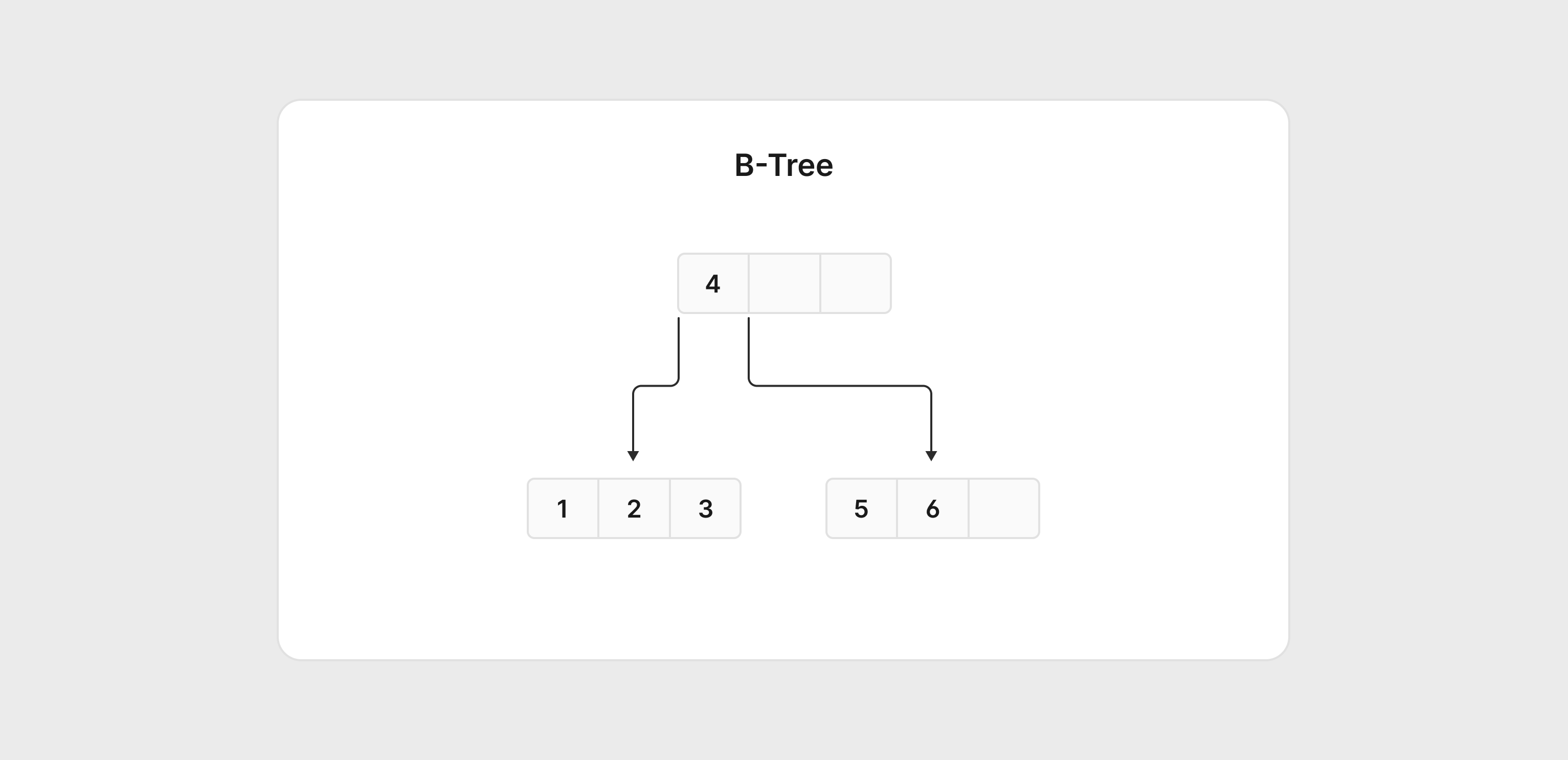
If values 7-9 are added, MySQL will split the right node and rebalance the tree.
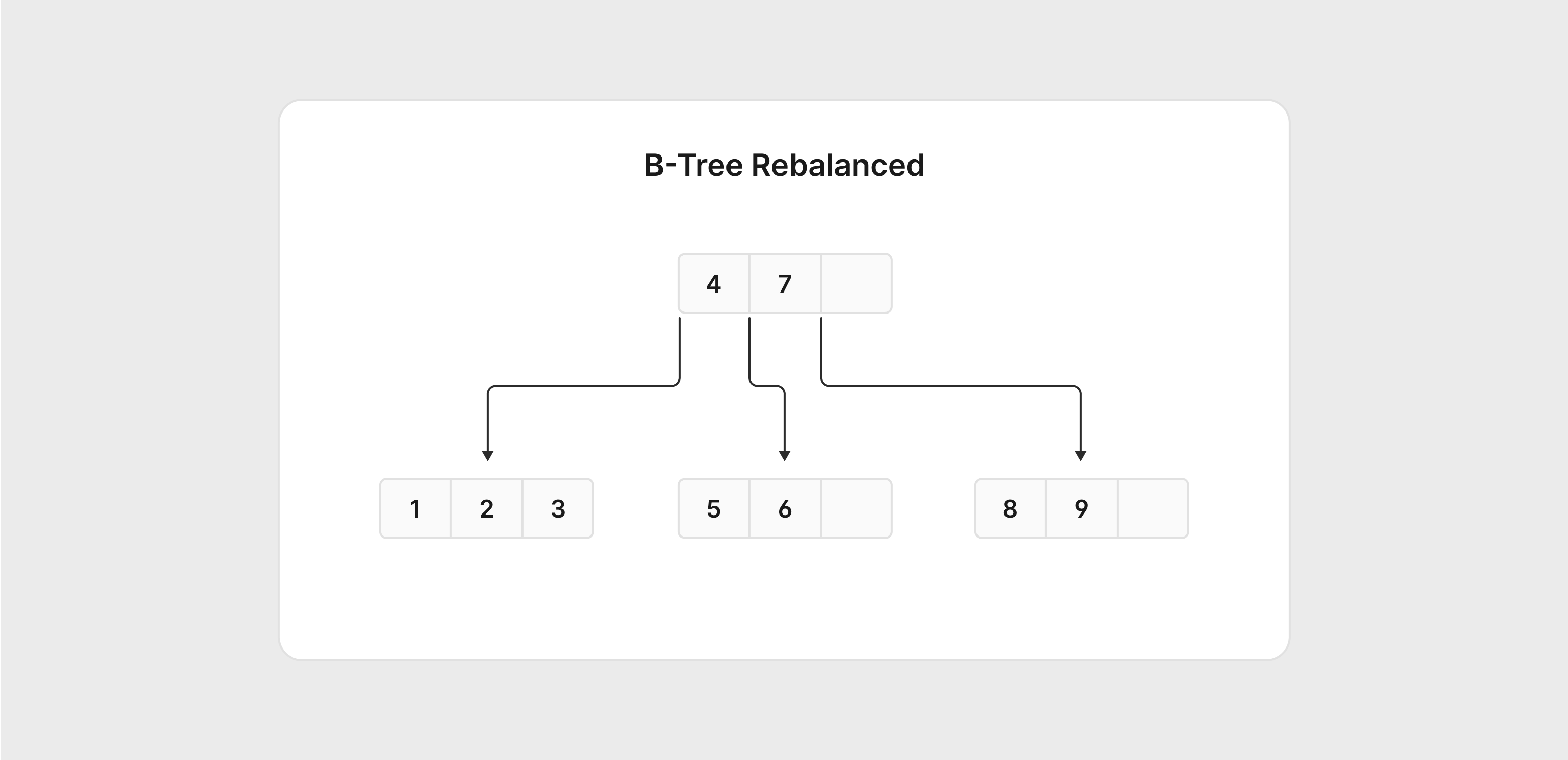
This process is known as page splitting, and the goal is to keep the B+ Tree structure balanced so that MySQL can quickly find the data it's looking for. With sequential values, this process is relatively straightforward; however, when randomness is introduced into the algorithm, it can take significantly longer for MySQL to rebalance the tree. On a high-volume database, this can hurt user experience as MySQL tries to keep the tree in balance.
Higher storage utilization
All primary keys in MySQL are indexed. By default, an auto-incrementing integer will consume 32 bits of storage per value. Compare this with UUIDs. If stored in a compact binary form, a single UUID would consume 128 bits on disk. Already, that is 4x the consumption of a 32-bit integer. If instead you choose to use a more human readable string-based representation, each UUID could be stored as a CHAR(36), consuming a whopping 288 bits per UUID. This means that each record would store 9 times more data than the 32-bit integer.
In addition to the default index created on the primary key, secondary indexes will also consume more space. This is because secondary indexes use the primary key as a pointer to the actual row, meaning they need to be stored with the index. This can lead to a significant increase in storage requirements for your database depending on how many indexes are created on tables using UUIDs as the primary key.
Finally, page splitting (as described in the previous section) can also negatively impact storage utilization as well as performance. InnoDB assumes that the primary key will increment predictably, either numerically or lexicographically. If true, InnoDB will fill the pages to about 94% of the page size before creating a new page. When the primary key is random, the amount of space utilized from each page can be as low as 50%. Due to this, using UUIDs that incorporate randomness can lead to excessive use of pages to store the index.
Best ways to use a UUID primary key with MySQL
If you absolutely need to use UUIDs as the unique identifier for records in your table, there are a few best practices you can follow to minimize the negative side effects of doing so.
Use the binary data type
While UUIDs are often sometimes as 36-character strings, they can also be represented in their native binary format as well. If converted to a binary value, you can store it in a BINARY(16) column, which reduces the storage requirements per value down to 16 bytes. This is still quite a bit larger than a 32-bit integer, but is certainly better than storing the UUID as a CHAR(36).
create table uuids(
  UUIDAsChar char(36) not null,
  UUIDAsBinary binary(16) not null
);

insert into uuids set
  UUIDAsChar = 'd211ca18-d389-11ee-a506-0242ac120002',
  UUIDAsBinary = UUID_TO_BIN('d211ca18-d389-11ee-a506-0242ac120002');

select * from uuids;
-- +--------------------------------------+------------------------------------+
-- | UUIDAsChar                           | UUIDAsBinary                       |
-- +--------------------------------------+------------------------------------+
-- | d211ca18-d389-11ee-a506-0242ac120002 | 0xD211CA18D38911EEA5060242AC120002 |
-- +--------------------------------------+------------------------------------+
Use an ordered UUID variant
Using a UUID version that supports ordering can mitigate some of the performance and storage impacts of using UUIDs by making the generated values more sequential which avoids some of the page splitting issues described earlier. Even when they are being generated on multiple systems, time-based UUIDs such as version 6 or 7 can guarantee uniqueness while keeping values as close to sequential as possible. The exception to this is UUIDv1, which has the least significant portion of the timestamp first.
Use the built-in MySQL UUID functions
MySQL supports generating UUIDs directly within SQL; however, it only supports UUIDv1 values. While it is not a great practice to use them by themselves, there is a helper function in MySQL called uuid_to_bin. Not only does this function convert the string value to binary, but you can use the option 'swap flag', which will reorder the timestamp portion to make the resulting binary more sequential.
set @uuidvar = 'd211ca18-d389-11ee-a506-0242ac120002';
-- Without swap flag
SELECT HEX(UUID_TO_BIN(@uuidvar)) as UUIDAsHex;
-- +----------------------------------+
-- | UUIDAsHex                        |
-- +----------------------------------+
-- | D211CA18D38911EEA5060242AC120002 |
-- +----------------------------------+

-- With swap flag
SELECT HEX(UUID_TO_BIN(@uuidvar,1)) as UUIDAsHex;
-- +----------------------------------+
-- | UUIDAsHex                        |
-- +----------------------------------+
-- | 11EED389D211CA18A5060242AC120002 |
-- +----------------------------------+
Use an alternate ID type
UUIDs are not the only type of identifier that provides uniqueness within a distributed architecture. Considering they were first created in 1987, there has been plenty of time for other professionals to propose different formats such as Snowflake IDs, ULIDs, or even NanoIDs (which we use at PlanetScale).
# Snowflake ID
7167350074945572864

# ULID
01HQF2QXSW5EFKRC2YYCEXZK0N

# NanoID
kw2c0khavhql
Conclusion
Using a UUID primary key in MySQL can (nearly) guarantee uniqueness in a distributed system; however, it comes with several tradeoffs. Luckily, with the many versions available and several alternatives, you have options that can better address some of these tradeoffs. After reading this article, you should be in a better position to make an informed decision about the ID type you choose when architecting your next database.