









Amazon Aurora is Amazon's solution for simplifying the process of scaling up RDS databases by allowing you to implement read-only replicas to offload some of the workloads from your primary read/write node. PlanetScale also allows our users to do the same, however, the strategy in which Amazon replicates databases is drastically different from traditional MySQL replication.
In this article, we're going to cover how PlanetScale implements replication compared to Aurora, all while touching on various similarities and differences between the services.
How does MySQL replication work?
Before we compare and contrast the differences between PlanetScale and Aurora's replication strategies, it's worth exploring how MySQL replication works at a basic level.
Replication works when data is, well, replicated from one MySQL server to another. The collection of servers within a replicated environment is known as a cluster. Within most clusters, one server acts as a read/write server known as the source. All other servers in the environment, known as replicas, can be used for read-only workloads such as backups or analytical processes.
Each source contains a log of all transactions it processes in a file known as the binary log, or binlog for short.
As data is written to the binlog on the source, each replica has a process that can read those log entries so they can be replayed. As transactions are replayed, each replica is eventually brought up to date with the source to contain the same data the source has. Depending on the replication mode used, there is often a small delay between the time the data is written on the source and the time replicas are brought up to date. We call that the replication lag.
PlanetScale database clusters follow this traditional style of replication, meaning each MySQL node contains a copy of the data it needs to operate properly.
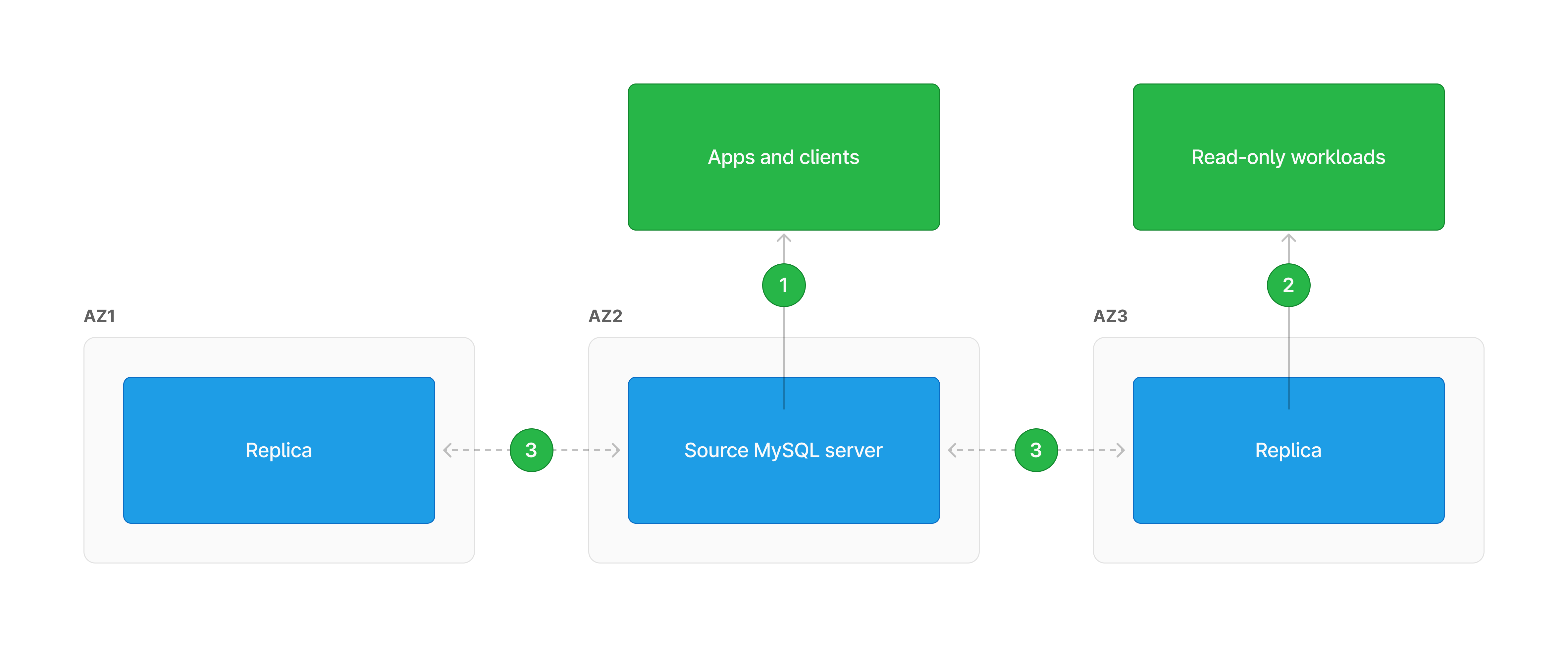
| Step | Description |
|---|---|
| 1 | Clients that need to write data connect to the source MySQL server. |
| 2 | Clients with read-only workloads can connect to one of the replicas. |
| 3 | On writes to source, transactions are relayed to replicas which will apply them locally. In semi-synchronous mode, the source can be configured to wait for one or more acknowledgments from replicas before responding to the client to ensure durability. |
If you want to learn more, we also have an article that dives deeper into MySQL replication.
How does Aurora replication work?
While Aurora does use the binary log for external replication, AWS has built a closed and proprietary replication system that deviates from the traditional MySQL replication configuration for replicating within an Aurora cluster.
Instead of storing the redo log entries directly on the attached volumes, they are forwarded to dedicated Aurora storage appliances in the same availability zone as the source compute node. Data on this appliance is stored within 10 GiB segments spread across three availability zones in a given region. Before the compute node responds to the application, Aurora will ensure that at least four of the six default segments have a replicated copy of the data to ensure durability should a data center be taken offline.
Since data is replicated on the storage level, read-only compute nodes can be started at any time in an availability zone containing a copy of the data for that node to read.
For any pages that have been read to memory, the source node will directly notify any read-only nodes of updates. This causes the read-only nodes to accommodate the changed data. As a result, the risk of reading stale data is reduced, however, replication lag still needs to be considered.
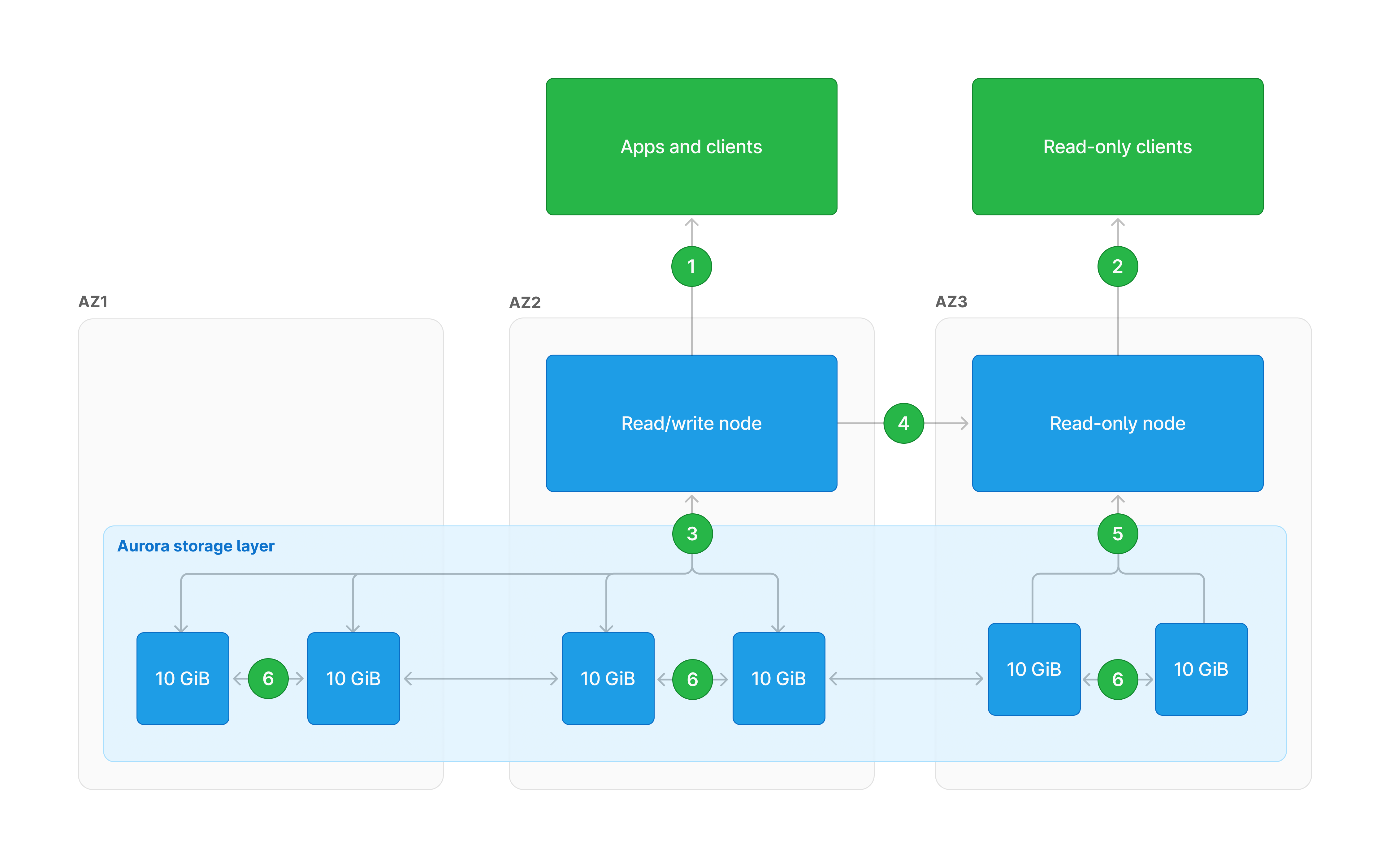
| Step | Description |
|---|---|
| 1 | Clients that need to write data connect to the read/write compute node. |
| 2 | Clients with read-only workloads can connect to one of the read-only nodes. |
| 3 | Read/write nodes can read from and write to storage segments. The R/W node will ensure four segments have acknowledged writes before responding. |
| 4 | Read-only nodes are notified of data changes so in-memory pages can be updated. |
| 5 | Read-only nodes have read-only connections to storage segments. |
| 6 | Storage segments replicate to each other. |
Similarities between PlanetScale and Aurora replication
Automatic node failover
Whenever a new database is created in PlanetScale, we automatically spin up a MySQL cluster containing a source and at least one replica for our production database branches, regardless of the plan you've selected. These nodes are part of a Kubernetes cluster that our backend systems use to ensure that the database cluster is online and healthy. If a replica goes offline for whatever reason, a new one will be automatically created to replace it. If a source goes offline, one of the replicas will be elected to become a source, and a new replica will created to replace it.
Aurora handles this process in a very similar approach, where it will automatically replace nodes that crash or go offline for whatever reason.
Query proxying
In the same light, PlanetScale and Aurora have dedicated query proxy services that automatically reroute traffic trying to access a node. This minimizes any downtime clients may experience based on the failure, making them more transparent.
Storage autoscaling
Aurora's storage appliance will automatically allocate new storage segments as needed. PlanetScale does this as well by monitoring the underlying volumes that contain data for your database and expanding or adding volumes when required. Both platforms provide a solution that essentially prevents your database from ever running out of space.
Cross-region replication
Deploying replicas across different regions can help speed up data access for users in that locale. Both platforms allow you to create read-only regions (named Global Database in Aurora) to do exactly this. When a read-only region is create, replicas will be created in the region of your choice and asyncronous replication will be configured between the home region (where the production database currently resides) and the selected region.
Run them in your own AWS account
While not strictly about replication, both platforms can be run within your own AWS account. PlanetScale's enterprise plan allows you to run the PlanetScale stack directly in your account, all while allowing you to use our beloved UI.
Where PlanetScale excels
PlanetScale is based on proven, open-source software
PlanetScale's Vitess offering is built on top of Vitess, a MySQL-compatible and horizontally scalable project that is completely open source. Vitess was built in 2010 by the engineering team at YouTube to address scaling issues based on their incredible growth at the time. This predates AWS Aurora by four years and is used by some of the largest companies in the world, like Slack, GitHub, and Pinterest, just to name a few.
Because it is open-source, you can install and test it yourself as well. To learn more about Vitess, check out the documentation portal available on their website or browse our blog for more info on how PlanetScale uses Vitess.
Version upgrades
Because we use a traditional replication setup for MySQL, we can perform rolling MySQL upgrades without taking your database offline. This contrasts Aurora's approach, which requires upgrades to be performed within a maintenance window, which can lead to downtime for your database.
Sharding
Sharding is the practice of splitting up large datasets across multiple MySQL servers or clusters to balance the load, which leads to higher data throughput at a lower price point. Currently, Amazon Aurora does not support this capability for MySQL workloads, so you'd be required to increase the cost of your compute nodes should you start hitting performance bottlenecks.
On top of that, our query proxy service known as VTGate is built with sharding in mind so it can intelligently route queries to the correct MySQL servers (or shards) even if a query needs to access the data stored on multiple shards.
Automatically validated backups
Backups are extremely critical to a disaster recovery strategy, and we take them very seriously. While both PlanetScale and Aurora support automated backups, we also validate the backups of our databases automatically every single time a new backup is created. This is only possible because we use the traditional approach for MySQL replication.
Instead of creating a fresh snapshot of your database every time a backup is performed, we restore the most recent backup of your database to a special MySQL node in the cluster that's dedicated to this process. Once the backup is restored, we use the built-in MySQL replication to copy the latest changes into this node before creating a new backup. If a backup is unhealthy, this process will fail and a fresh backup will be triggered to take its place.
By following this process, you can always be confident that backups on our platform are validated and healthy to restore from.