


Note
PlanetScale allows you to branch your database in the same way you branch your code. Throughout this article, we discuss both database branches and application code branches. For clarity, we’ll refer to PlanetScale database branches as "PlanetScale branches" and branches for your application code as "code branches".
The problem with running migrations at deployment
In many Laravel workflows, your deployment script includes php artisan migrate, which runs your new migrations on your production database every time you deploy. As an example, let’s look at the default quick deploy sequence that Forge runs when you push to production:
- Navigate into the site’s directory
- Run
git pull - Run
composer install - Run
php artisan migrate
Making schema changes, such as ALTER, CREATE, etc, directly on your production database is known as Direct DDL (Data Definition Language). Direct DDL can be dangerous, as it can lead to locking in your tables, which may leave your tables completely inaccessible, even for reads. Direct DDL is also not rate-limited or isolated and does not have a rollback strategy that doesn’t include more locks, or worse, data loss.
Warning
Running php artisan migrate on your production database at deployment can be dangerous, as this can lock your database, preventing reads and writes.
To give a little more context, let’s briefly look at how locking in MySQL works.
Locking in MySQL
For MySQL to execute a transaction, such as an ALTER TABLE statement, it sometimes has to lock the table to guarantee Isolation.
For example, if you deploy a schema change that increases the size of a varchar column, a lock may be temporarily placed on that entire table so that the transaction can be completed. This means that nobody will be able to access the table (read or write) while the operation is occurring.
There are different types of locks and a lot of different scenarios that affect when and what type of lock is used.
So if you want to avoid downtime or "maintenance mode" due to locking, what do you do instead?
How PlanetScale enables non-blocking schema changes
Online schema change tools allow you to avoid locking. Instead of applying changes directly to a table, we follow this process:
- Create a copy of the table (known as a shadow table)
- Apply the schema changes
- Get the data in sync between both tables
- Swap the tables atomically
- Drop the old table
PlanetScale handles all of this for you with our branching workflow.
PlanetScale workflow
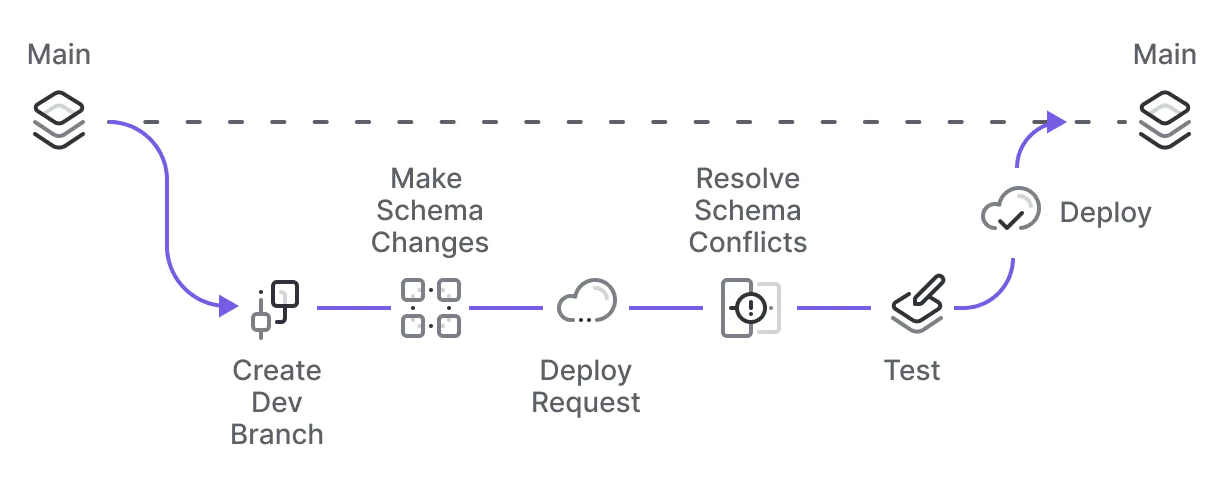
Whenever you need to make a schema change, you’ll:
- Create a PlanetScale development branch (an isolated copy of your database) off of your production schema.
- Introduce the changes on the PlanetScale development branch.
- When you're finished making schema changes, create a deploy request.
- Your team can review and approve it.
- Click "Deploy", and your schema changes will be added to the deployment queue.
This is where the online schema change magic happens.
Consider you add a migration to your Laravel app that runs this SQL to increase the size of a description column:
ALTER TABLE posts ALTER COLUMN description VARCHAR (300);
When PlanetScale applies that migration via deploy requests, we copy the existing posts table to a new shadow table, update the description column, make sure both are in sync, and initiate the cutover where we swap the two tables.
This way, the original table never has to get locked.
This may not seem like a huge deal if you don’t have a lot of traffic, and the chances of someone trying to access a table during a schema change are small. However, as your application grows and migrations take longer to run, you may need to eventually solve this.
Fortunately, deploying schema changes with PlanetScale doesn’t require much extra effort, and, most importantly, will be a lot less stressful for you in the long run knowing that you will never have to deal with blocking schema changes.
When to run migrations
Now that you know why you shouldn’t run php artisan migrate during deployment, the next natural question is:
When do I run my migrations?
The short answer is: it depends. Let’s look at two examples:
- Example 1: You're adding a field to an input form in your application code, which also requires adding a column to one of your tables. In this case, you have to make sure your schema has been updated in production before that application code goes live.
- Example 2: You're getting rid of an existing column on one of your tables. In this case, you need to make sure you stop allowing writes to it from the application code before the schema goes live.
As you can see, the type of schema change you're making affects whether you run migrations before or after your application code ships.
To simplify this, the next section includes a blueprint for each scenario. You can follow these steps for each case as they come up for your application. You’ll notice that the first few steps are always the same, with variation in the last few steps.
A note on Laravel migrations
Just to recap, you can still use Laravel migrations to modify your schema, but you should only run them on your application's dev environment. Your dev environment will be connected to your PlanetScale development branch, so the migrations will run on your PlanetScale development database and can be safely merged into production when ready.
Do not run them on your production server. Your production server is connected to your main production PlanetScale database, so PlanetScale is already handling it for you when you deploy your PS dev branch to production.
It’s also worth mentioning, if you do try to run migrations on production, it will fail because, in order to protect your production environment, PlanetScale does not support direct DDL on production branches, unless you disable safe migrations. We ultimately leave that decision up to you, but turning off safe migrations means you run the risk of locking tables, which can lead to downtime.
Overall workflow
The following section covers the schema change blueprint that was discussed above. We cover how to add a column/table, drop a column/table, and change a column/table name.
Add a column or table
In this scenario, you want to make sure your schema change is live in production before you start writing to it from your application code.
To add a new column or a new a table:
- Create a development code branch off of your Laravel application.
- Create the Laravel migrations in your application to modify the schema.
- Create a PlanetScale development branch.
- Connect the code dev branch of your Laravel application to your PlanetScale dev branch.
- Run the Laravel migrations to make the schema change on the PlanetScale dev branch.
- Deploy your PlanetScale schema change deploy request. This is where the non-blocking schema change workflow happens that was discussed earlier. Once the deployment is complete, your production database will have the new schema.
- Once the schema is live, deploy the code to write to the new column.
Drop a column or table
In this scenario, you want the schema change to go live after you update your application code to ensure that your application is no longer using the column or table that you're dropping.
To drop a column or table:
- Create a development code branch off of your Laravel application.
- Create the Laravel migrations in your application to modify the schema.
- Create a PlanetScale development branch.
- Connect the code dev branch of your Laravel application to your PlanetScale dev branch.
- Run the Laravel migrations to make the schema change on the PlanetScale dev branch.
- Deploy the code updates so that you're no longer writing to the column or table.
- Once the code is live, deploy your PlanetScale deploy request to drop the column or table.
Change a column name or table name
Changing the name of a column or table is a little more tricky and requires a multi-step process. To avoid downtime, you don’t want to change the name directly, but rather clone the column and rename it there.
Let’s look at the process in the context of changing a table name:
- Create a development code branch off of your Laravel application.
- Create the Laravel migrations in your application to modify the schema.
- Create a PlanetScale development branch.
- Connect the code dev branch of your Laravel application to your PlanetScale dev branch.
- Run the Laravel migrations to make the schema change on the PlanetScale dev branch.
- Deploy the PlanetScale migration that adds a new table with the new name to your production database.
- Once that’s live, deploy a code update to begin writing to new table AND old table. Continue reading from the old table, as the existing data won’t be copied over yet.
- Run a script to copy over the existing data from the old table to the new table.
- The tables should now be in sync.
- You can now deploy a code update to also read from the new table. At this point, you should not be using the old table at all anymore, making it safe to drop.
- Once you confirm you're no longer using the old table, deploy your PlanetScale deploy request to drop the table.
Bonus: Revert schema changes in Laravel
Another cool benefit that comes from this online schema change method is the ability to instantly revert a schema change. If you deploy a bad schema change, you have 30 minutes to undo it by clicking a revert button in our dashboard.
How do schema reverts work
We mentioned earlier that instead of directly applying schema changes, we make a copy of the table (shadow table) and apply them to that. Once the tables are in sync, we swap them, making the shadow table the new production table.
After we swap the original table and the shadow table, instead of just dropping the original table, we actually keep it around for 30 minutes. During those 30 minutes, we continue syncing the two tables. Any changes to the production table data are copied back to the original table.
You may have guessed what comes next. With this original table still hanging out, you have the ability to swap them back again, thus undoing the schema change! You can revert a schema change with just a click of a button without losing the data that was written in the meantime.¹
You can learn more about this full process in our How schema reverts work blog post.
¹ There are some scenarios where a revert may not work. In fact, the ALTER TABLE example we used earlier where we increase the varchar size is one of these scenarios. If any data was written to the table that was larger than the original varchar size, it won’t fit once you revert. In those situations, we will attempt to revert, but if the integrity of your data would be affected we will not proceed.