






In the MySQL world, EXPLAIN is a keyword used to gain information about query execution. This blog post will demonstrate how to utilize MySQL EXPLAIN to remedy problematic queries.
On the Technical Solutions team here at PlanetScale, we frequently talk with users who seek advice regarding query performance. Although creating an EXPLAIN plan is relatively simple, the output isn’t exactly intuitive. It’s essential to understand its features and how to leverage it best to achieve performance goals.
EXPLAIN vs. EXPLAIN ANALYZE
When you prepend the EXPLAIN keyword to the beginning of a query, it explains how the database executes that query and the estimated costs. By leveraging this internal MySQL tool, you can observe the following:
- The ID of the query — The column always contains a number, which identifies the
SELECTto which the row belongs. - The
SELECT_TYPE— If you are running aSELECT, MySQL dividesSELECTqueries into simple and primary (complex) types, as described in the table below.
SELECT_TYPE VALUE | Definition |
|---|---|
SIMPLE | The query contains no subqueries or UNIONs |
PRIMARY (complex) | Complex types can be grouped into three broad classes: simple subqueries, derived tables (subqueries in the FROM clause), and UNIONs. |
DELETE | If you are explaining a DELETE, the select_type will be DELETE |
- The table on which your query was running
- Partitions accessed by your query
- Types of JOINs used (if any) — Please keep in mind that this column gets populated even on queries that don’t have joins.
- Indexes from which MySQL could choose
- Indexes MySQL actually used
- The length of the index chosen by MySQL — When MySQL chooses a composite index, the length field is the only way you can determine how many columns from that composite index are in use.
- The number of rows accessed by the query — When designing indexes inside of your database instances, keep an eye on the rows column too. This column displays how many rows MySQL accessed to complete a request, which can be useful when designing indexes. The fewer rows your query accesses, the faster your queries will be.
- Columns compared to the index
- The percentage of rows filtered by a specified condition — This column shows a pessimistic estimate of the percentage of rows that will satisfy some condition on the table, such as a
WHEREclause or a join condition. If you multiply the rows column by this percentage, you will see the number of rows MySQL estimates it will join with the previous tables in the query plan. - Any extra information relevant to the query
To recap, by using EXPLAIN, you get the list of things expected to happen.
What is EXPLAIN ANALYZE
In MySQL 8.0.18, EXPLAIN ANALYZE was introduced, a new concept built on top of the regular EXPLAIN query plan inspection tool. In addition to the query plan and estimated costs, which a normal EXPLAIN will print, EXPLAIN ANALYZE also prints the actual costs of individual iterators in the execution plan.
Warning
EXPLAIN ANALYZE actually runs the query, so if you don’t want to run the query against your live database, do not use EXPLAIN ANALYZE.
For each iterator, the following information is provided:
- Estimated execution cost (the cost model does not account for some iterators, so they aren’t included in the estimate)
- Estimated number of returned rows
- Time to return first row
- Time spent executing this iterator (including child iterators, but not parent iterators), in milliseconds. When there are multiple loops, this figure shows the average time per loop.
- Number of rows returned by the iterator
- Number of loops
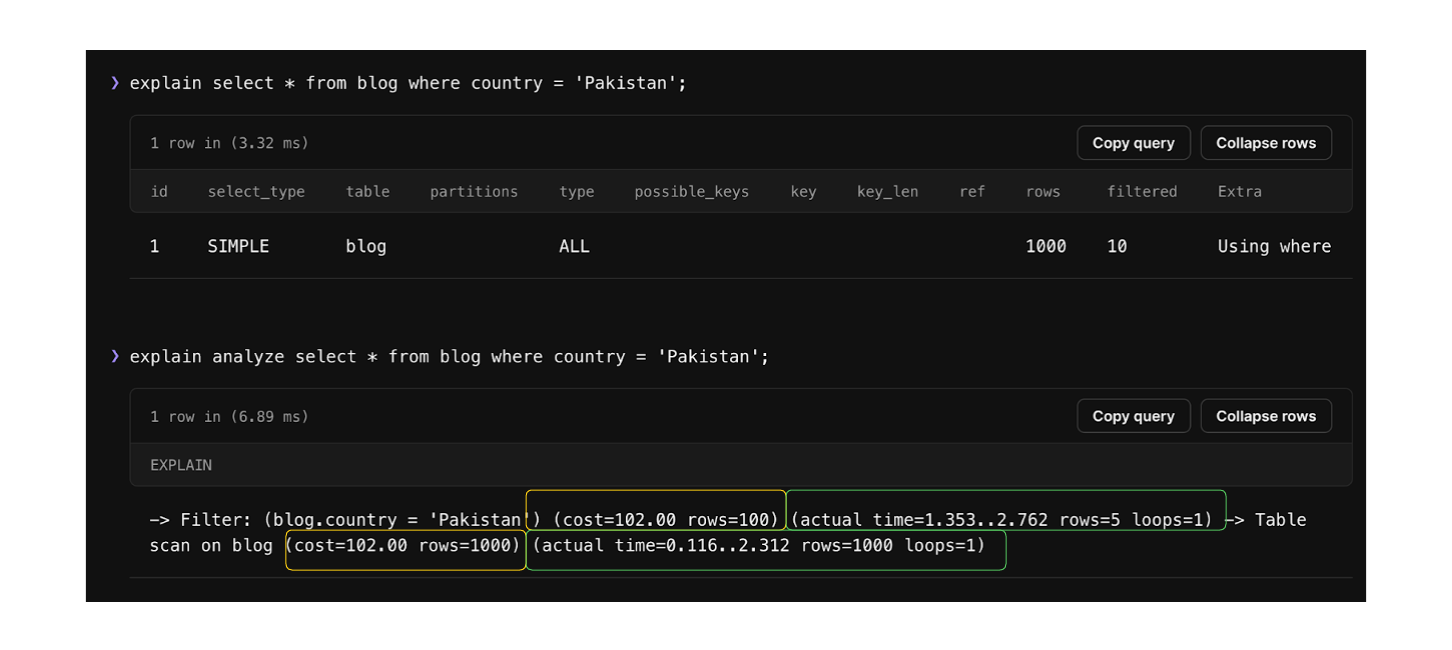
If you use EXPLAIN ANALYZE before a statement, you get both the estimation of what the planner expected (highlighted in yellow above) and what actually happened when the query was run (highlighted in green above).
EXPLAIN ANALYZE formats
EXPLAIN ANALYZE can be used with SELECT statements, multi-table UPDATE statements, DELETE statements, and TABLE statements.
It automatically selects FORMAT=tree and executes the query (with no output to the user). It focuses on how the query is executed in terms of the relationship between parts of the query and the order in which the parts are executed.
In this case, EXPLAIN output is organized into a series of nodes. At the lowest level, the nodes scan the tables or search indexes. Higher-level nodes take the operations from the lower-level nodes and operate on them.
Although the MySQL CLI can print EXPLAIN results in table, tabbed, vertical format, or as pretty or raw JSON output, raw JSON format is not supported for EXPLAIN ANALYZE today.
When to use MySQL EXPLAIN or EXPLAIN ANALYZE
EXPLAIN queries can (and should) be used when you are unsure whether your query is performing efficiently. So, if you think you have indexed and partitioned your tables properly, but your queries still refuse to run as fast as you want them to, it might be time to tell them to EXPLAIN themselves. Once you tell your queries to EXPLAIN themselves, the output you should keep an eye on will depend on what you want to optimize.
Keys, possible keys, and key lengths: When working with indexes in MySQL, keep an eye on the
possible_keys,key, andkey_lencolumns. Thepossible_keyscolumn tells us what indexes MySQL could potentially use. Thekeycolumn tells us what index was chosen. And thekey_lencolumn tells us the length of the selected key (index). This information can be handy for designing our indexes, deciding what index to use on a specific workload, and dealing with index-related challenges like choosing an appropriate length for a covering index.Fulltext index +
JOIN: If you want to ensure that your queries are participating inJOINoperations when using aFULLTEXTindex, keep an eye out for theselect_typecolumn — the value of this column should be fulltext.Partitions: If you have added partitions to your table and want to ensure that partitions are used by the query, observe the partition column. If your MySQL instance is using partitions, in most cases, MySQL deals with all of the queries itself, and you do not have to take any further action, but if you want your queries to use specific partitions, you could use queries like
SELECT \* FROM TABLE_NAME PARTITION(p1,p2).
We already have some great resources about indexing best practices:
- Indexing JSON in MySQL
- What are the disadvantages of database indexes?
- MySQL for Developers video course: Indexes
- How do database indexes work
EXPLAIN limitations
EXPLAIN is an approximation. Sometimes it’s a good approximation, but at other times, it can be very far from the truth. Let's look at some of the limitations:
EXPLAINdoesn’t tell you anything about how triggers, stored functions, or UDFs will affect your query.- It doesn’t work for stored procedures.
- It doesn’t tell you about the optimization MySQL does during query execution.
- Some of the statistics it shows are estimates and can be very inaccurate.
- It doesn’t distinguish between some things with the same name. For example, it uses “filesort” for in-memory sorts and on-disk sorts, and it displays “Using temporary” for temporary tables on disk and in memory.
Note
PlanetScale does not support Triggers, Stored Procedures, and UDFs. More information can be found in the MySQL compatibility docs.
SHOW Warnings statement
One thing worth noting: If the query you used with EXPLAIN does not parse correctly, you can type SHOW WARNINGS; into your MySQL query editor to show information about the last statement that was run and was not diagnostic. While it cannot give a proper query execution plan like EXPLAIN, it might give hints about the query fragments it could process.
SHOW WARNINGS; includes special markers which can deliver useful information, such as:
<index_lookup>(query fragment): An index lookup would happen if the query had been properly parsed.<if>(condition, expr1, expr2): An if condition is occurring in this specific part of the query.<primary_index_lookup>(query fragment): An index lookup would be happening via primary key.<temporary table>: An internal table would be created here for saving temporary results — for example, in subqueries prior to joins.
MySQL EXPLAIN join types
The MySQL manual says this column shows the “join type”, which explains how tables are joined, but it’s really more accurate to say the "access type". In other words, this “type” column lets us know how MySQL has decided to find rows in the table. Below are the most important access methods, from best to worst, in terms of performance:
| Type value | Definition | |
|---|---|---|
| 🟢 | NULL | This access method means MySQL can resolve the query during the optimization phase and will not even access the table or index during the execution stage. |
| 🟢 | system | The table is empty or has one row. |
| 🟢 | const | The value of the column can be treated as a constant (there is one row matching the query) Note: Primary Key Lookup, Unique Index Lookup |
| 🟢 | eq_ref | The index is clustered and is being used by the operation (either the index is a PRIMARY KEY or UNIQUE INDEX with all key columns defined as NOT NULL) |
| 🟢 | ref | The indexed column was accessed using an equality operator Note: The ref_or_null access type is a variation on ref. It means MySQL must do a second lookup to find NULL entries after doing the initial lookup. |
| 🟡 | fulltext | Operation (JOIN) is using the table’s fulltext index |
| 🟡 | index | The entire index is scanned to find a match for the query Note: The main advantage is that this avoids sorting. The biggest disadvantage is the cost of reading an entire table in index order. This usually means accessing the rows in random order, which is very expensive. |
| 🟡 | range | A range scan is a limited index scan. It begins at some point in the index and returns rows that match a range of values. Note: This is better than a full index scan because it doesn’t go through the entire index |
| 🔴 | all | MySQL scans the entire table to satisfy the query |
Note
Green indicates better performance, yellow indicates okay performance, and red indicates bad performance.
There are also a few other types that you might want to be aware of:
index_merge: This join type indicates that the Index Merge optimization is used. In this case, the key column in the output row contains a list of indexes used. It indicates a query can make limited use of multiple indexes on a single table.
unique_subquery: This type replaces
eq_reffor someINsubqueries of the following form:value IN (SELECT primary_key FROM single_table WHERE some_expr)index_subquery: This join type is similar to unique_subquery. It replaces
INsubqueries, but it works for nonunique indexes in subqueries.
The EXTRA column in MySQL EXPLAIN
The EXTRA column in a MySQL EXPLAIN output contains extra information that doesn’t fit into other columns. The most important values you might frequently run into are as follows:
EXTRA column value | Definition |
|---|---|
| Using index | Indicates that MySQL will use a covering index to avoid accessing the table. |
| Using where | The MySQL server will post-filter rows after the storage engine retrieves them. |
| Using temporary | MySQL will use a temporary table while sorting the query’s result |
| Using filesort | MySQL will use an external sort to order the results, instead of reading the rows from the table in index order. MySQL has two filesort algorithms. Either type can be done in memory or on disk. EXPLAIN doesn’t tell you which type of filesort MySQL will use, and it doesn’t tell you whether the sort will be done in memory or on disk. |
| “Range checked for each record” | (index map:N). This value means there’s no good index, and the indexes will be reevaluated for each row in a join. N is a bitmap of the indexes shown in possible_keys and is redundant. |
| Using index condition | Tables are read by accessing index tuples and testing them first to determine whether to read full table rows. |
| Backward index scan | MySQL uses a descending index to complete the query |
| const row not found | The queried table was empty |
| Distinct | MySQL is scouring the database for any distinct values that might appear in the column |
| No tables used | The query has no FROM clause |
| Using index for group-by | MySQL was able to use a certain index to optimize GROUP BY operations |
Hands-on example of how to use MySQL EXPLAIN
In this section, we will explore one way you can utilize MySQL EXPLAIN for query optimizations. To start, I created a database in PlanetScale and seeded it using the MySQL Employees Sample Database.
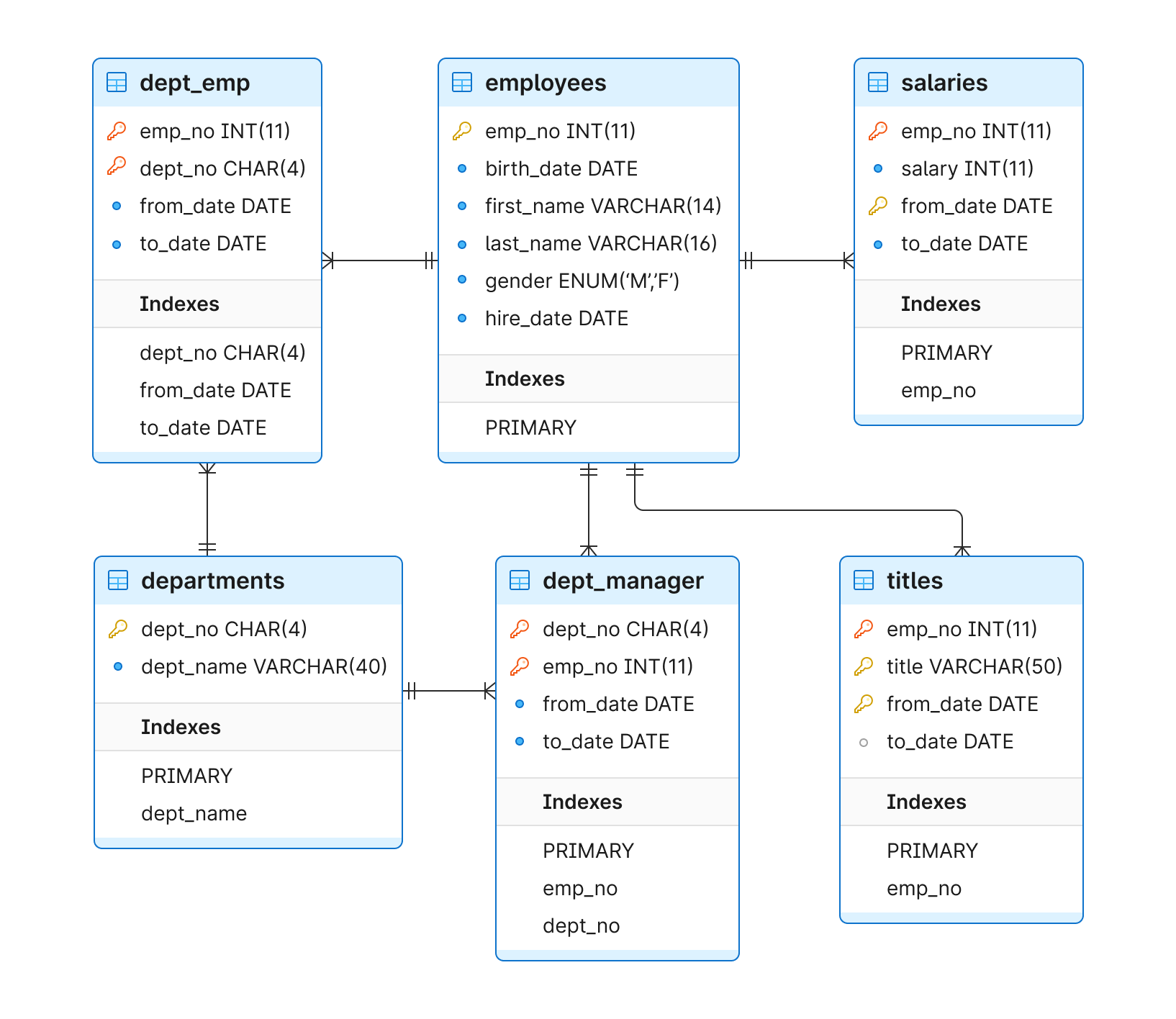
Confirm that the database is created and seeded
Now that we have our database let’s run some queries.
First, we’ll want to confirm that our tables are in PlanetScale. We can do this by running SHOW TABLES; in the PlanetScale CLI or web UI. For this example, I will be utilizing our web UI.

Run the initial query
Using a multi-column index coupled with MySQL EXPLAIN, we will provide a way to store values for multiple columns in a single index, allowing the database engine to more quickly and efficiently execute queries using the set of columns together.
Queries that are great candidates for performance optimization often use multiple conditions in the WHERE filtering clause. An example of this kind of query is asking the database to find a person by both their first and last name:
SELECT * FROM employees WHERE last_name = 'Puppo' AND first_name = 'Kendra';
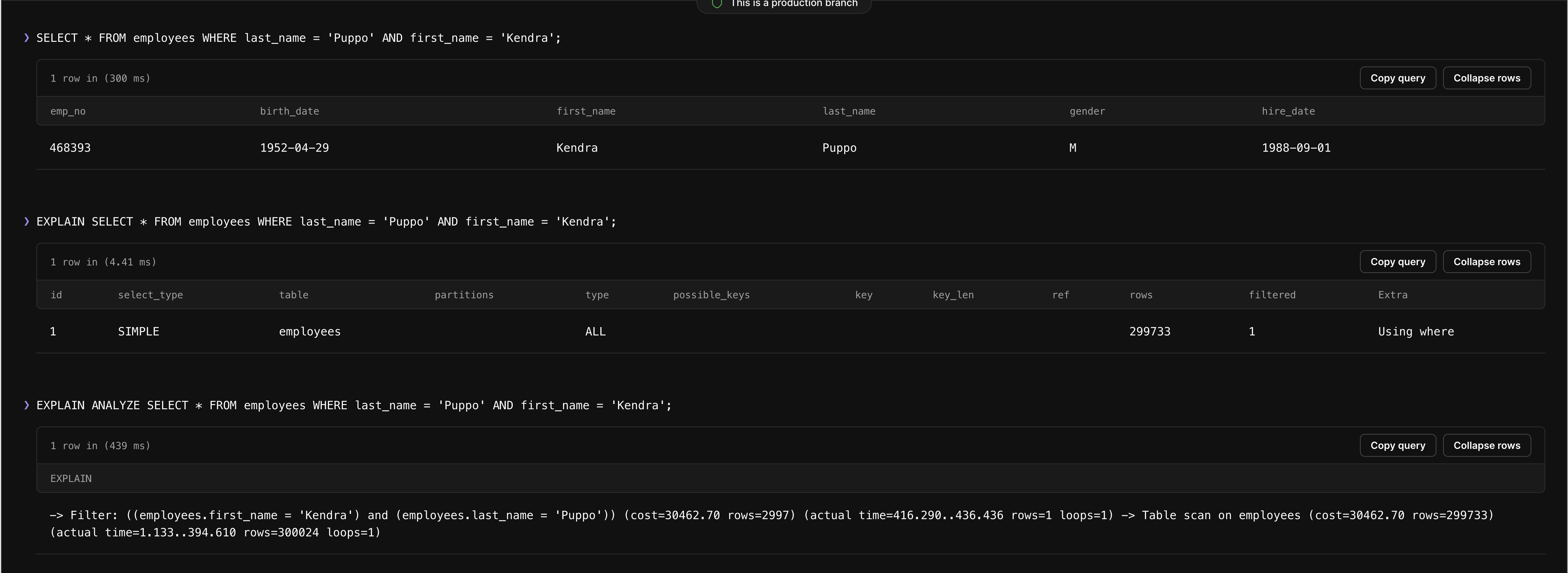
Okay, so we know that this result isn’t ideal because it’s scanning 299,202 rows to complete the request, as shown under rows in the screenshot above. How do we go about optimizing it? We have a few different routes we can take, but only one is ideal for cost and performance.
Optimization approach 1: Create two individual indexes
For our first approach, let's create two individual indexes — one on the last_name column and another on the first_name column.
This may seem like an ideal route at first, but there's a problem.
If you create two separate indexes in this way, MySQL knows how to find all employees named Puppo. It also knows how to find all employees named Kendra. However, it doesn't know how to find people named Kendra Puppo.
Some other things to keep in mind:
- MySQL has choices available when dealing with multiple disjointed indexes and a query asking for more than one filtering condition.
- MySQL supports Index Merge optimizations to use multiple indexes jointly when running a query. However, this limitation is a good rule of thumb when building indexes. MySQL may decide not to use multiple indexes; even if it does, in many scenarios, they won’t serve the purpose as well as a dedicated index.
Optimization approach 2: Use a multi-column index
Because of the issues with the first approach, we know we need to find a way to use indexes that consider many columns in this second approach. We can do this with a multi-column index.
You can imagine this as a phone book placed inside another. First, you look up the last name Puppo, leading you to the second catalog for all the people named Kendra, organized alphabetically by first names, which you can use to find Kendra quickly.
In MySQL, to create a multi-column index for last names and first names in the employees table, execute the following:
CREATE INDEX fullnames ON employees(last_name, first_name);

Now that we have successfully created an index, we will issue the SELECT query to find rows with the first name matching Kendra and the last name matching Puppo. The result is a single row with an employee named Kendra Puppo.
Now, use the EXPLAIN query to check whether the index was used:
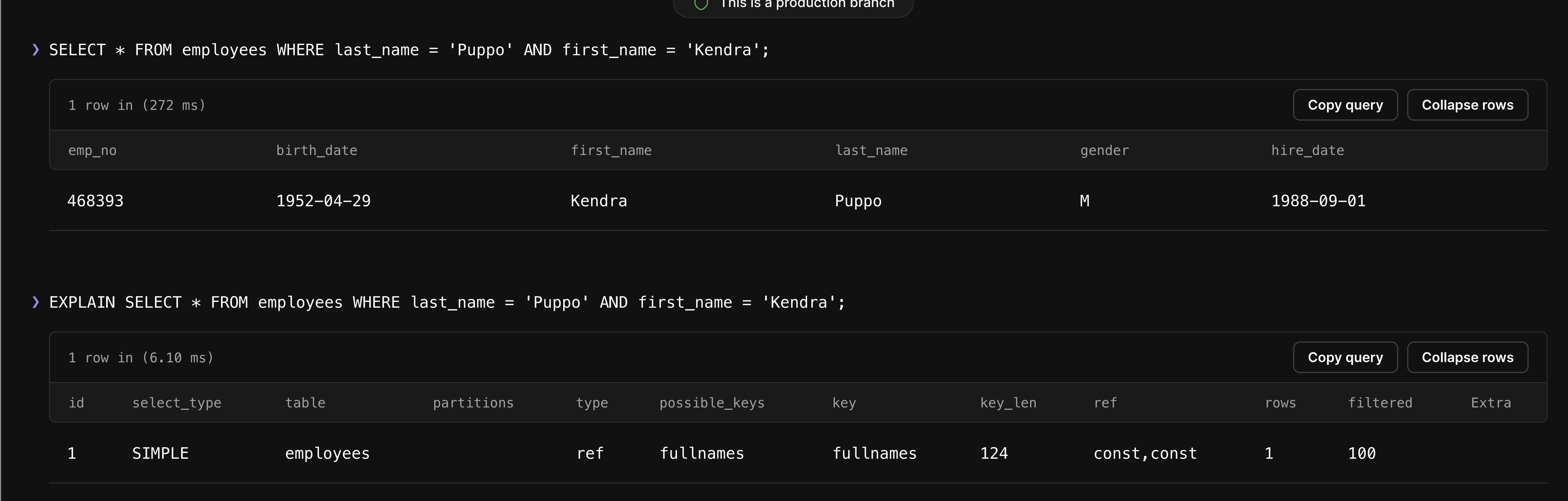
These results show that the index was used, and only one row was accessed to fulfill this request. This is much better than the 299,202 rows we needed to access before the index.
Conclusion
The EXPLAIN statement in MySQL can be used to obtain information about query execution. It is valuable when designing schemas or indexes and ensuring that our database can use the features provided by MySQL to the greatest extent possible.
In PlanetScale, our Insights feature + EXPLAIN statement in MySQL can be of massive assistance when you need to optimize the performance of your queries.