



惯性聚合 高效追踪和阅读你感兴趣的博客、新闻、科技资讯
阅读原文 在惯性聚合中打开

推荐订阅源

酷 壳 – CoolShell
酷 壳 – CoolShell
H
Hacker News: Front Page
P
Palo Alto Networks Blog
T
ThreatConnect
Apple Machine Learning Research
博客园_首页
T
True Tiger Recordings
P
Privacy & Cybersecurity Law Blog
B
Blog
IT之家
IT之家
Last Week in AI
Last Week in AI
F
Full Disclosure
Hacker News: Ask HN
Hacker News: Ask HN
C
Comments on: Blog
Microsoft Azure Blog
C
Cybersecurity and Infrastructure Security Agency CISA
Microsoft Security Blog
博客园 - 【当耐特】
N
News and Events Feed by Topic
NISL@THU
NISL@THU
腾讯CDC
雷峰网
雷峰网
Security Latest
Security Latest
李成银的技术随笔
M
Microsoft Research Blog - Microsoft Research
L
LangChain Blog
L
Lohrmann on Cybersecurity
cs.CL updates on arXiv.org
C
Check Point Blog
Y
Y Combinator Blog
Recent Announcements
博客园 - Franky
N
News | PayPal Newsroom
V
V2EX
A
About on SuperTechFans
The Register - Security
月光博客
月光博客
奇客Solidot–传递最新科技情报
奇客Solidot–传递最新科技情报
Google Online Security Blog
MyScale Blog
MyScale Blog
Cisco Talos Blog
Cisco Talos Blog
Vercel News
Vercel News
WordPress大学
WordPress大学
C
Cyber Attacks, Cyber Crime and Cyber Security
The Hacker News
The Hacker News
IntelliJ IDEA : IntelliJ IDEA – the Leading IDE for Professional Development in Java and Kotlin | The JetBrains Blog
爱范儿
爱范儿
A
Arctic Wolf
L
LINUX DO - 最新话题
freeCodeCamp Programming Tutorials: Python, JavaScript, Git & More

博客园 - pmh905001

爬虫-今日头条我的收藏-反爬虫分析(六) pycharm的没落,vs code的兴起 爬虫-今日头条我的收藏-增量式下载网页内容(五) 爬虫-今日头条我的收藏-增量式导入到Elastic Search(四) 今日头条源代块一行代码很长情况下的拖动问题 爬虫-今日头条我的收藏-增量式导入到mongodb(三) 爬虫-今日头条我的收藏-增量式(二) openpyxl一个bug 爬虫-今日头条我的收藏(一) pystray被隐藏菜单项显示出来的问题 pyinstaller生成的exe程序使用使用默认程序打开execel文件 pyinstaller生成的exe文件的所在的工作目录问题 windows下python的keyboard库在锁屏之后再次登陆快捷键(热键)失效问题 pyinstaller 报错ImportError: No module named _bootlocale windows下gitbash 鼠标左键选中文字自动自行终止命令 ctrl+c ^C spring-security 如何使用用户名或邮箱登录 struts2的优缺点以及如何改造 jetty-maven-plugin 版本导致jetty启动失败问题 Eclipse下pom.xml的提示 Cannot access defaults field of Properties
tomcat jndi context.xml的特殊字符转义问题
pmh905001 · 2023-05-23 · via 博客园 - pmh905001

在tomcat中配置名为jdbc/moikiitos的jndi (例如:$TOMCAT_HOME/conf/context.xml)数据连接配置成如下:

<?xml version="1.0" encoding="UTF-8"?>
<Context>
    <Resource 
        name="jdbc/moikiitos"
        auth="Container"
        type="javax.sql.DataSource"
        username="root"
        password="root"
        driverClassName="com.mysql.cj.jdbc.Driver"
        url="jdbc:mysql://localhost:3306/db_name?useUnicode=true&characterEncoding=utf8"
        maxActive="8"
        maxIdle="4"
    />
</Context>

启动应用报错

org.xml.sax.SAXParseException; systemId: file:$TOMCAT_HOME/conf/context.xml; lineNumber: 12; columnNumber: 79; 对实体 "characterEncoding" 的引用必须以 ';' 分隔符结尾。

改成这样依然报错:

<?xml version="1.0" encoding="UTF-8"?>
<Context>

    <!-- These are the settings for Tomcat -->
    <Resource 
        name="jdbc/moikiitos"
        auth="Container"
        type="javax.sql.DataSource"
        username="root"
        password="root"
        driverClassName="com.mysql.cj.jdbc.Driver"
        url="jdbc:mysql://localhost:3306/db_name?useUnicode=true&;characterEncoding=utf8"
        maxActive="8"
        maxIdle="4"
    />

</Context>
严重: Parse error in context.xml for /test
org.xml.sax.SAXParseException; systemId: file:$TOMCAT_HOME/conf/context.xml; lineNumber: 12; columnNumber: 62; 在实体引用中, 实体名称必须紧跟在 '&' 后面。

正常的数据库连接本应该是这样:

jdbc:mysql://localhost:3306/moikiitos?useUnicode=true&characterEncoding=utf8

为何在context.xml就解析失败呢? 后来查了一下,原来需要对5中特殊字符进行转移分别是&, <, >, “, ‘,参考这篇文章  Mybatis的XML文件sql特殊字符转义  
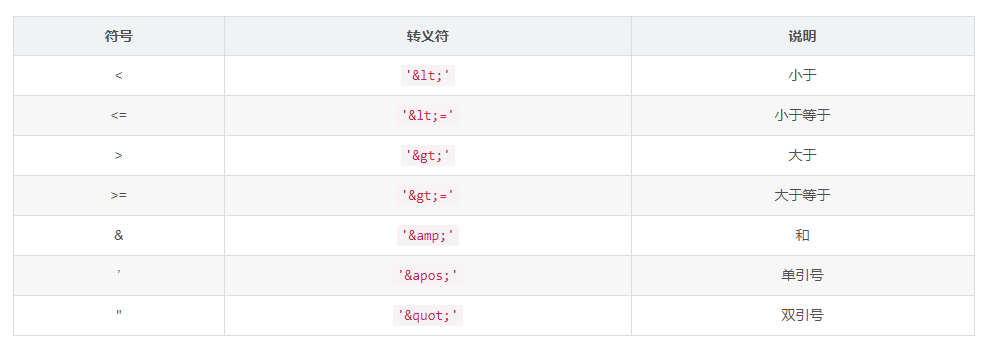
所以应该配置成如下(注意我多传递了另外一个参数serverTimezone=CTT),tomcat jndi启动便成功。

<?xml version="1.0" encoding="UTF-8"?>
<Context>

    <!-- These are the settings for Tomcat -->
    <Resource 
        name="jdbc/moikiitos"
        auth="Container"
        type="javax.sql.DataSource"
        username="root"
        password="root"
        driverClassName="com.mysql.cj.jdbc.Driver"
        url="jdbc:mysql://localhost:3306/db_name?serverTimezone=CTT&amp;useUnicode=true&amp;characterEncoding=utf8"
        maxActive="8"
        maxIdle="4"
    />

</Context>