


最近学习态度比较积极,打算用react做一个小个人应用网站...所以从阿里云上买了些免费的接口,什么QQ音乐排行查询接口、IP地址查询、天气预报等等。调用时,发现身份校验可以通过简单修改头部信息的方式,即向头部加入APPCODE的key,以及相应的值。
但是之前没有用过请求头添加  so 记录学习下...
一、首先直接放demo
1、jQuery
var requestUrl = "http://ali-qqmusic.showapi.com/top?topid=6";
$.ajax({
    type : "get",
    url : requestUrl ,
    dataType : "json" ,
    success: function(data) {
        console.log(data);
    }.bind(this),
    beforeSend: function(xhr) {
        xhr.setRequestHeader("Authorization", "APPCODE .....................");
    }
});
使用ajax的beforeSend方法向头部添加信息
2、fetch
let requestUrl = "http://ali-qqmusic.showapi.com/top?topid=6";
fetch(requestUrl, {
    method: "get",
    headers: {
        Authorization: "APPCODE ......................"
    }
}).then(response => response.json()).then(data => console.log(data)).catch(e => console.log(e));
哈哈哈哈,其实有点宠fetch,这个时用ES6来写。接下来来整理下相关API,以及简单介绍下fetch
二、记录jQuery ajax 时不时使用,但是快遗忘的API方法
ajax 常用的方法,什么url、type、dataType、success之类的就不提了
1、async 默认是true表示请求为异步请求,如果设置为false表示同步,ajax下面的方法要等请求结束后才会调用
2、beforeSend(xhr) 用于发送请求前修改XMLHttpRequest对象的函数,主要用作修改http头部,就像上面的demo
3、context 用于绑定回调函数的上下文,即this,设置了它就相当于在回调函数上加入了bind(context)一样
4、jsonp 用于跨域操作,重写回调函数的名字
5、timeout 请求超时时间
6、complete(xhr , ts) 无论请求成功or失败的回调函数
三、fetch
之前一直没用用过这种请求方式,现在看来这种请求方式代码显得十分的优美,毕竟Fetch API是基于Promises设计的。fetch是浏览器提供的原生网络请求接口,但是它的兼容性还是有所欠缺的,具体兼容情况如下图
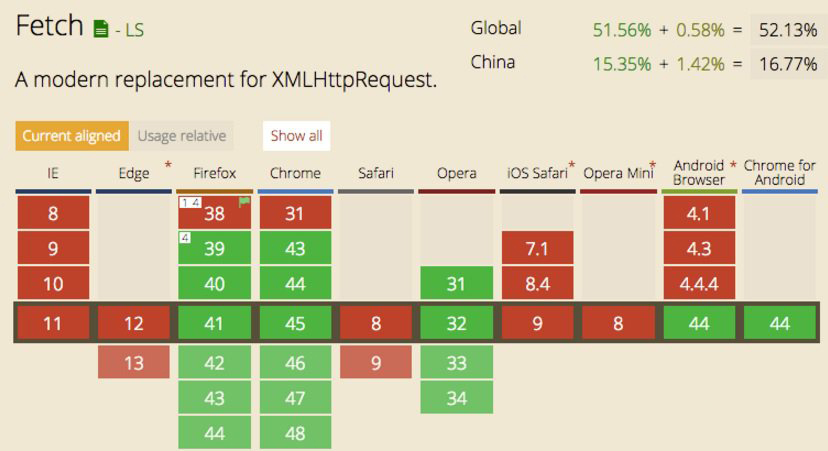
常用的写法有两种
//方式一
fetch('./api/XXX.json')
.then(
    function(response) {
        if(response.status !== 200) {
            console.log('Status Code: ' + response.status);
            return;
        }
        response.json().then(function(data) {
            console.log(data);
        });
    }
)
.catch(function(err) {
    console.log(err);
});
//方式二
function status(response) {
  if (response.status == 200) {
    return Promise.resolve(response)
  } else {
    return Promise.reject(new Error(response.statusText))
  }
}
function json(response) {
  return response.json()
}
fetch('./api/XXX.json').then(status).then(json)
.then(function(data) {
    console.log(data);
}).catch(function(err) {
    console.log('err);
});
在fetch方法中,首先返回的response对象,so 第一个then中的函数参数为res,然后通过响应的状态码判断请求是否成功,成功后调用response的json()方法,这个也是返回一个Promise对象,所以可以连续then,最后的catch可以抓取代码执行时的异常信息。
然后就是fetch第一个参数为URL,第二个参数可以加入请求方式、头信息、表单信息等
fetch(url, {
    method: 'post',
    headers: {
      "Content-type": "application/x-www-form-urlencoded; charset=UTF-8"
    },
    body: 'foo=bar&lorem=ipsum'
})
最后就是fetch中的一些坑,没遇到过,先记录下。
1、Fetch 请求默认是不带 cookie 的,需要设置 fetch(url, {credentials: 'include'})
2、服务器返回 400,500 错误码时并不会 reject,只有网络错误这些导致请求不能完成时,fetch 才会被 reject。
搞定!!!
此内容由惯性聚合(RSS阅读器)自动聚合整理,仅供阅读参考。 原文来自 — 版权归原作者所有。