惯性聚合 高效追踪和阅读你感兴趣的博客、新闻、科技资讯
阅读原文 在惯性聚合中打开

推荐订阅源

K
Kaspersky official blog
Threat Intelligence Blog | Flashpoint
AI
AI
SecWiki News
SecWiki News
宝玉的分享
宝玉的分享
Scott Helme
Scott Helme
D
Darknet – Hacking Tools, Hacker News & Cyber Security
Exploit-DB.com RSS Feed
Engineering at Meta
Engineering at Meta
博客园 - 叶小钗
The GitHub Blog
The GitHub Blog
Microsoft Azure Blog
N
News and Events Feed by Topic
Cloudbric
Cloudbric
B
Blog
Cisco Talos Blog
Cisco Talos Blog
V
Vulnerabilities – Threatpost
N
News and Events Feed by Topic
V
Visual Studio Blog
A
Arctic Wolf
奇客Solidot–传递最新科技情报
奇客Solidot–传递最新科技情报
U
Unit 42
S
Security @ Cisco Blogs
博客园 - 聂微东
T
Threat Research - Cisco Blogs
OSCHINA 社区最新新闻
OSCHINA 社区最新新闻
Apple Machine Learning Research
Y
Y Combinator Blog
G
GRAHAM CLULEY
L
LINUX DO - 热门话题
量子位
NISL@THU
NISL@THU
Webroot Blog
Webroot Blog
让小产品的独立变现更简单 - ezindie.com
T
Troy Hunt's Blog
Application and Cybersecurity Blog
T
Tenable Blog
月光博客
月光博客
S
Security Affairs
K
KPMG report finds enterprise disconnect between AI and its ROI | CIO
The Hacker News
The Hacker News
Spread Privacy
Spread Privacy
D
Docker
www.infosecurity-magazine.com
雷峰网
雷峰网
博客园 - 司徒正美
T
The Exploit Database - CXSecurity.com
Hugging Face - Blog
Hugging Face - Blog
Help Net Security
Help Net Security
D
DataBreaches.Net

博客园 - 取经路上

IIS 下发布SignalR 访问接口进不去处理 Linux下部署.Net 应用程序和Web应用程序 CentOS 7 配置启动 手动编译的 nginx CentOS 7 nginx 安装 sticky模块 关于SignalR并发量测试 C# 调用迅雷aplayer播放器的遇到的问题总结 C# 采用HttpWebRequest 、WebClient和HttpClient下载https的文件异常问题 MVC ActionResult 视图模型 MVC 前后台传值 MVC基础关键点 sqlserver 数据库、日志文件收缩 笔记 vue-cli启动报错问题: IE6无法获取class属性 windows server 2008 r2 datacenter 共享服务找不到网络路径解决办法 在Visual Studio 中的监视窗口中监视Com对象变量 删除GitHub上项目中的某个文件 转 WPF MVVM 循序渐进 (从基础到高级) 服务器未能识别 HTTP 头 SOAPAction 的值: http://tempuri.org/QueryUserName。
C# 判别系统版本以及Win10的识别办法
取经路上 · 2023-05-18 · via 博客园 - 取经路上

我们都知道在C#中可以通过Environment.OSVersion来判断当前操作系统,下面是操作系统和主次版本的对应关系:

操作系统

主版本.次版本

Windows 10 10.0*
Windows Server 2016 Technical Preview 10.0*
Windows 8.1 6.3*
Windows Server 2012 R2 6.3*
Windows 8 6.2
Windows Server 2012 6.2
Windows 7 6.1
Windows Server 2008 R2 6.1
Windows Server 2008 6
Windows Vista 6
Windows Server 2003 R2 5.2
Windows Server 2003 5.2
Windows XP 64-Bit Edition 5.2
Windows XP 5.1
Windows 2000 5

我们可以用Environment.OSVersion来判断当前操作系统

public static bool IsWin7 => Environment.OSVersion.Version.Major == 6
                       && Environment.OSVersion.Version.Minor == 1;
public static bool IsWin10 => Environment.OSVersion.Version.Major == 10;
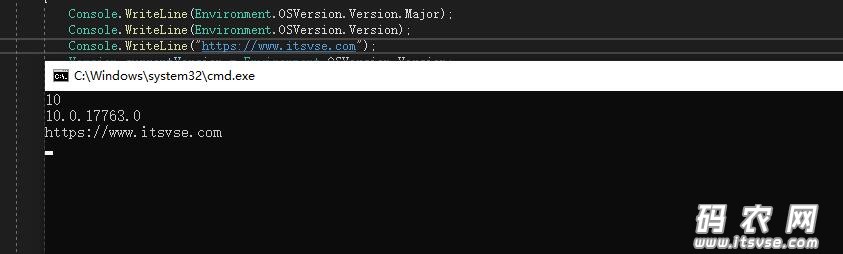
For applications that have been manifested for Windows 8.1 or Windows 10. Applications not manifested for Windows 8.1 or Windows 10 will return the Windows 8 OS version value (6.2). To manifest your applications for Windows 8.1 or Windows 10, refer to Targeting your application for Windows.

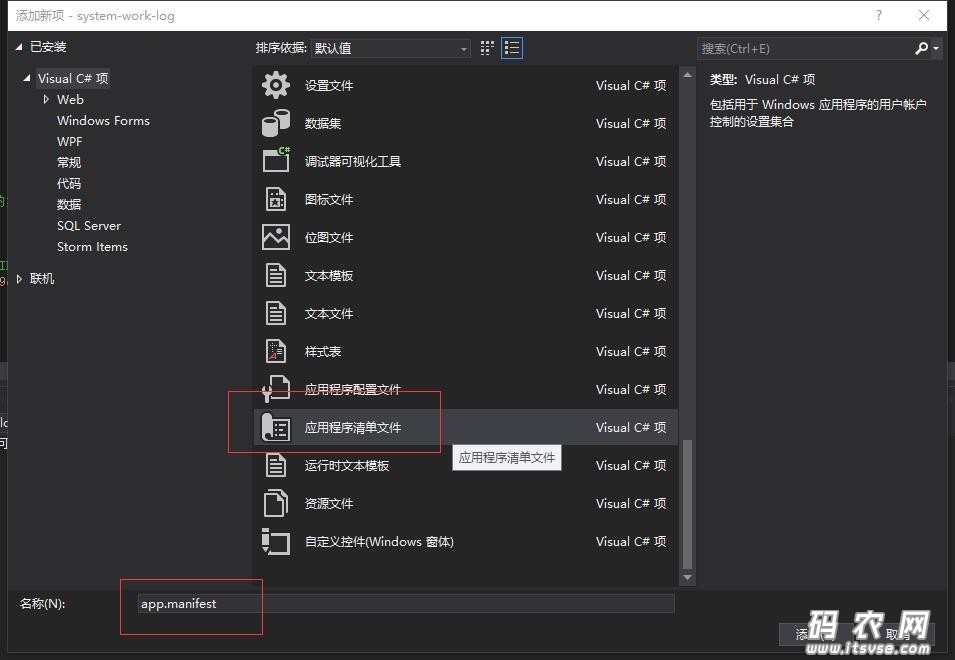
现在需要一个程序清单文件
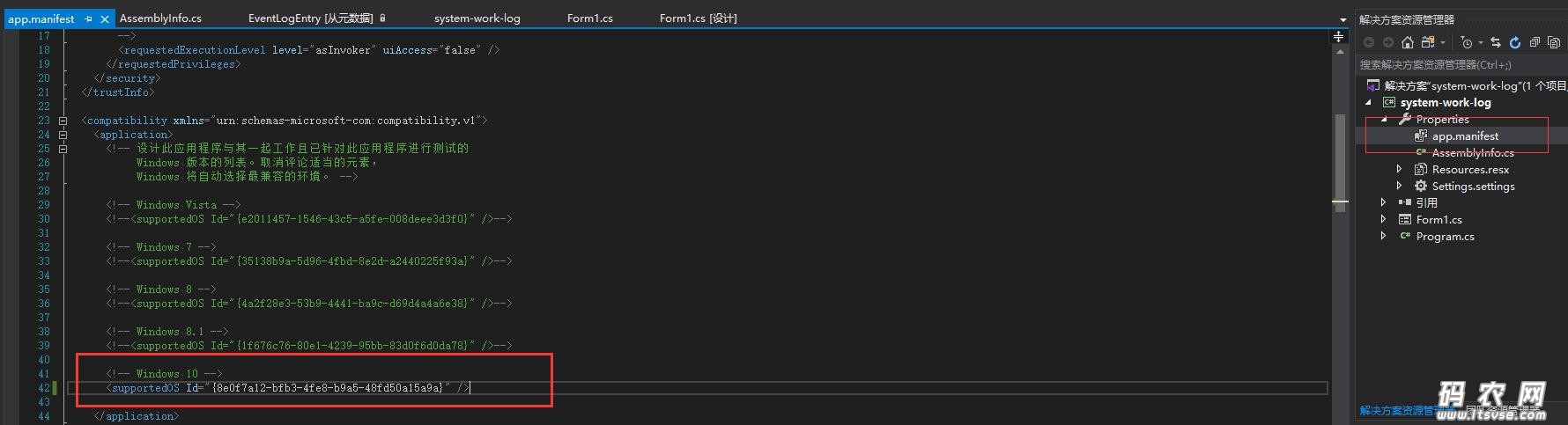
然后把下面的注释去掉,就可以返回10.0.***了
还有另外一种方法如下。

利用C#判断当前操作系统是否为Win8系统(此方法不需要添加程序清单文件)

代码:

using System;
  
namespace GetOSVersionExp
{
  class Program
  {
    static void Main(string[] args)
    {
      Version currentVersion = Environment.OSVersion.Version;
      Version compareToVersion = new Version("6.2");
      if (currentVersion.CompareTo(compareToVersion) >= 0)
      {//win8及其以上版本的系统
        Console.WriteLine("当前系统是WIN8及以上版本系统。");
      }
      else
      {
        Console.WriteLine("当前系统不是WIN8及以上版本系统。");
      }
    }
  }
}