




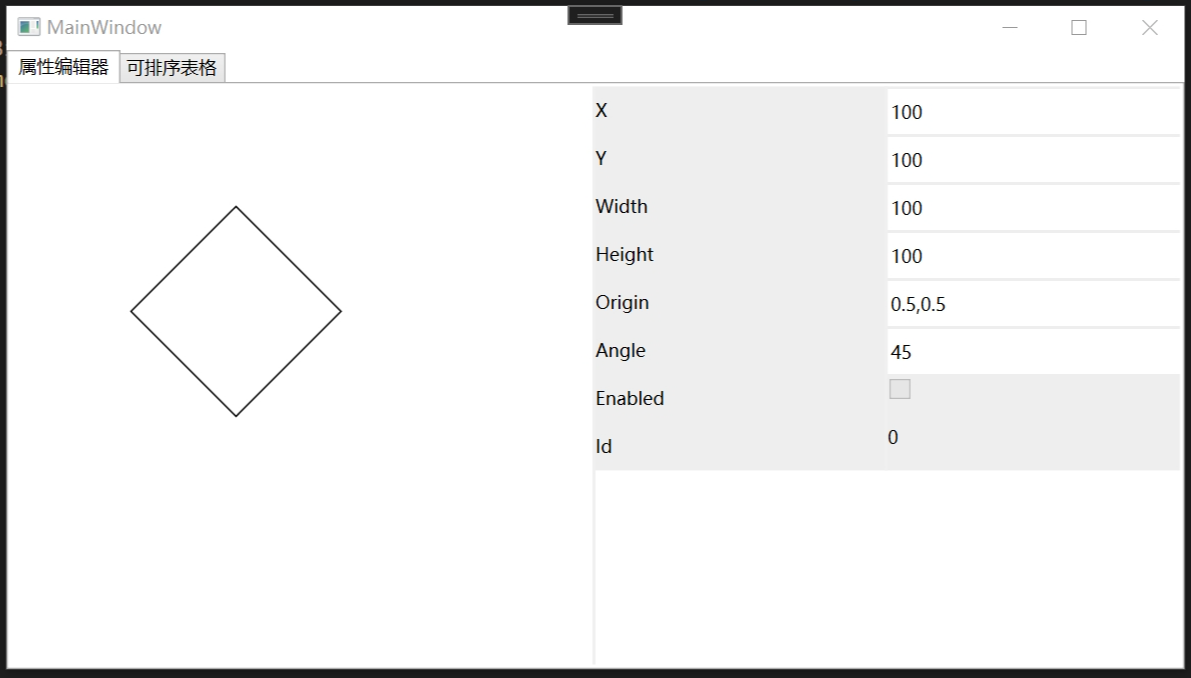
代码:

    public class PropertiesControl : Grid
    {

        [TypeConverter(typeof(LengthConverter))]
        public double RowHeight
        {
            get { return (double)GetValue(RowHeightProperty); }
            set { SetValue(RowHeightProperty, value); }
        }

        public static readonly DependencyProperty RowHeightProperty =
            DependencyProperty.Register("RowHeight", typeof(double), typeof(PropertiesControl), new PropertyMetadata(0d));

        public object Source
        {
            get { return (object)GetValue(SourceProperty); }
            set { SetValue(SourceProperty, value); }
        }

        public static readonly DependencyProperty SourceProperty =
            DependencyProperty.Register("Source", typeof(object), typeof(PropertiesControl), new PropertyMetadata(SourceChangedCallBack));

        private static void SourceChangedCallBack(DependencyObject d, DependencyPropertyChangedEventArgs e)
        {
            PropertiesControl control = (PropertiesControl)d;
            if (e.OldValue == e.NewValue) return;
            control.Load();
        }

        GridSplitter splitter = new GridSplitter { Width = 2, HorizontalAlignment = HorizontalAlignment.Right };

        public override void OnApplyTemplate()
        {
            base.OnApplyTemplate();
            splitter.SetBinding(BackgroundProperty, new Binding { Source = this, Path = new PropertyPath(BackgroundProperty) });
        }

        void Load()
        {
            Children.Clear();
            RowDefinitions.Clear();
            ColumnDefinitions.Clear();
            ColumnDefinitions.Add(new ColumnDefinition());
            ColumnDefinitions.Add(new ColumnDefinition());
            if (Source == null) return;
            PropertyDocument doc = PropertyDocument.Load(Source);
            if (doc.Children != null)
                Load(doc.Children);
            SetRowSpan(splitter, RowDefinitions.Count);
            Children.Add(splitter);
        }

        void Load(List<Property> properties)
        {
            if (properties == null) return;
            foreach (var child in properties)
            {
                RowDefinitions.Add(new RowDefinition());
                if (child.Children != null && child.Children.Count > 0)
                {
                    TextBlock group = new TextBlock { Text = child.PropertyInfo.Name, };
                    SetColumn(group, 0);
                    SetRow(group, RowDefinitions.Count - 1);
                    Children.Add(group);
                    Load(child.Children);
                    continue;
                }
                TextBlock text = new TextBlock { Text = child.PropertyInfo.Name, VerticalAlignment = VerticalAlignment.Center };
                SetColumn(text, 0);
                SetRow(text, RowDefinitions.Count - 1);
                LoadValueControl(child);
                Children.Add(text);
            }
        }

        void LoadValueControl(Property child)
        {
            FrameworkElement element;
            Binding binding = new Binding(child.Path) { Source = Source, UpdateSourceTrigger = UpdateSourceTrigger.PropertyChanged };
            if (child.PropertyInfo.PropertyType.IsEnum)
            {
                Array enmus = Enum.GetValues(child.PropertyInfo.PropertyType);
                ComboBox comboBox = new ComboBox { ItemsSource = enmus, VerticalContentAlignment = VerticalAlignment.Center, BorderThickness = new Thickness(0), IsEnabled = !child.CanSet() };
                comboBox.SetBinding(Selector.SelectedItemProperty, binding);
                element = comboBox;
            }
            else if (child.PropertyInfo.PropertyType == typeof(bool))
            {
                CheckBox cb = new CheckBox { VerticalAlignment = VerticalAlignment.Center, IsEnabled = !child.CanSet() };
                cb.SetBinding(CheckBox.IsCheckedProperty, binding);
                element = cb;
            }
            else if (!child.CanSet())
            {
                TextBlock control = new TextBlock { VerticalAlignment = VerticalAlignment.Center };
                control.SetBinding(TextBlock.TextProperty, binding);
                element = control;
            }
            else
            {
                TextBox textBox = new TextBox { VerticalContentAlignment = VerticalAlignment.Center, BorderThickness = new Thickness(0) };
                textBox.SetBinding(TextBox.TextProperty, binding);
                element = textBox;
            }
            SetColumn(element, 1);
            SetRow(element, RowDefinitions.Count - 1);
            if (RowHeight > 0d)
                element.Height = RowHeight;
            element.Margin = new Thickness(0, 2, 0, 0);
            Children.Add(element);
        }
    }

    public class PropertyDocument
    {
        public object Value { get; set; }
        public List<Property>? Children { get; private set; }

        private PropertyDocument(object instance)
        {
            Value = instance;
        }

        public static PropertyDocument? Load(object instance)
        {
            if (instance == null) return null;
            var doc = new PropertyDocument(instance);
            if (instance != null)
                doc.Children = Property.LoadProperties(instance, null, doc);
            return doc;
        }
    }

    public class Property
    {
        public PropertyInfo PropertyInfo { get; set; }
        public Property? Parent { get; set; }
        public List<Property>? Children { get; private set; }
        public PropertyDocument Document { get; set; }
        public string Path
        {
            get
            {
                if (Parent != null)
                    return $"{Parent.Path}.{PropertyInfo.Name}";
                else
                    return $"{PropertyInfo.Name}";
            }
        }

        public Property(PropertyInfo propertyInfo, Property? parent, PropertyDocument doc)
        {
            PropertyInfo = propertyInfo;
            Parent = parent;
            Document = doc;
            Children = LoadProperties(GetValue(), this, Document);
        }

        public object? GetValue()
        {
            return PropertyInfo.GetValue(Parent == null ? Document.Value : Parent.GetValue());
        }

        public bool CanSet()
        {
            return CanSet(PropertyInfo);
        }

        public static bool CanSet(PropertyInfo propertyInfo)
        {
            return propertyInfo.CanWrite && propertyInfo.SetMethod != null && (propertyInfo.SetMethod.Attributes & MethodAttributes.Public) > 0;
        }

        public static bool CanGet(PropertyInfo propertyInfo)
        {
            return propertyInfo.CanRead && propertyInfo.GetMethod != null && (propertyInfo.GetMethod.Attributes & MethodAttributes.Public) > 0;
        }

        public static List<Property>? LoadProperties(object? instance, Property? parent, PropertyDocument doc)
        {
            if(instance == null) return null;
            Type type = instance.GetType();
            object? value;
            List<Property> properties = new List<Property>();
            var ps = type.GetProperties(System.Reflection.BindingFlags.Instance | System.Reflection.BindingFlags.Public);
            if (ps.Length <= 0 || type.IsValueType) return null;
            foreach (var p in ps)
            {
                if (!CanGet(p)) continue;
                value = p.GetValue(instance);
                Property property = new Property(p, parent, doc);
                properties.Add(property);
            }
            return properties;
        }
    }
View Code
使用方式:
<controls:PropertiesControl DockPanel.Dock="Right" Grid.Column="1" Source="{Binding Box}" RowHeight="30" Background="#FFEEEEEE" VerticalAlignment="Top"/>
    public class Box
    {
        public double X { get; set; }
        public double Y { get; set; }
        public double Width { get; set; }
        public double Height { get; set; }
        public Point Origin { get; set; }
        public bool Enabled { get; set; }
        public int Id { get; private set; }
    }
    public class TestVM : NotifyProperty, ITemplateView
    {
        public Box Box { get; set; }

        public TestVM()
        {
            Box = new Box { X = 100, Y = 100, Width = 100, Height = 100 };
        }
    }
直接绑定对象即可。
此内容由惯性聚合(RSS阅读器)自动聚合整理,仅供阅读参考。 原文来自 — 版权归原作者所有。