




惯性聚合 高效追踪和阅读你感兴趣的博客、新闻、科技资讯
阅读原文 在惯性聚合中打开

推荐订阅源

罗磊的独立博客
SecWiki News
SecWiki News
酷 壳 – CoolShell
酷 壳 – CoolShell
爱范儿
爱范儿
量子位
M
MIT News - Artificial intelligence
GbyAI
GbyAI
cs.AI updates on arXiv.org
K
KPMG report finds enterprise disconnect between AI and its ROI | CIO
TaoSecurity Blog
TaoSecurity Blog
博客园 - 【当耐特】
H
Heimdal Security Blog
腾讯CDC
The Last Watchdog
The Last Watchdog
Security Archives - TechRepublic
Hacker News: Ask HN
Hacker News: Ask HN
S
Schneier on Security
Microsoft Security Blog
WordPress大学
WordPress大学
博客园 - 司徒正美
Recent Commits to openclaw:main
C
Cybersecurity and Infrastructure Security Agency CISA
S
SegmentFault 最新的问题
大猫的无限游戏
大猫的无限游戏
Application and Cybersecurity Blog
F
Full Disclosure
有赞技术团队
有赞技术团队
T
Tailwind CSS Blog
Engineering at Meta
Engineering at Meta
cs.CV updates on arXiv.org
T
Threatpost
月光博客
月光博客
A
Arctic Wolf
OSCHINA 社区最新新闻
OSCHINA 社区最新新闻
雷峰网
雷峰网
T
Troy Hunt's Blog
freeCodeCamp Programming Tutorials: Python, JavaScript, Git & More
The Cloudflare Blog
D
DataBreaches.Net
O
OpenAI News
L
LINUX DO - 最新话题
宝玉的分享
宝玉的分享
小众软件
小众软件
V
Vulnerabilities – Threatpost
A
About on SuperTechFans
人人都是产品经理
人人都是产品经理
T
The Exploit Database - CXSecurity.com
Martin Fowler
Martin Fowler
美团技术团队
P
Privacy International News Feed

博客园 - 松山居士

部署Hermes-Agent和SenseNova-Skills ubuntu用root账户启动服务指定脚本 WSL迁移OpenEuler虚拟机 采用Ollama本地布署DeepSeekCoderV2 Loongnix Server 23.2安装Docker及常用镜像 Win10上模拟LoongArch虚拟机安装Deepin系统 查看exe启动命令和参数 Visual Studio C++设置EXE和DLL在不同路径 JMeter做WEB和API自动化测试 PG数据库常用DDL VSCode+XMake开发环境搭建备忘 C++库管理Conan使用备忘 Python多版本管理Anaconda备忘 Win10上模拟LoongArch虚拟机并搭建Qt5开发环境 解决向日葵无人值守自启动的权限问题 强制去掉Qt的运行环境信息 QGIS插件开发备忘 Linux shell 实用命令备忘 WIN10配置FX DocuCentre-IV C2260 PCL6打印机 VMWare虚拟磁盘整理与收缩 解决启用C++17后byte重定义的问题(byte ambiguous ) 解决Deepin安装Flatpak程序时不能创建临时文件的错误
Ollama导出和导入DeepSeek预训练大模型
松山居士 · 2025-03-11 · via 博客园 - 松山居士

为了离线部署大模型,需要从互联网导出模型文件,并拷贝到内网离线布署,本文以Docker布署的大模型为例。

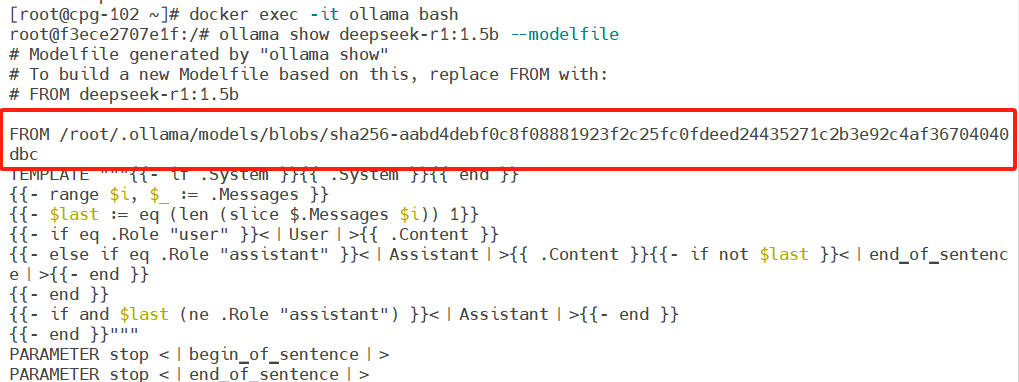
一、从互联网的Ollama中导出大模型

1 docker exec -it ollama bash             #前提是ollama已在docker中布署好
2 cd /root
3 ollama pull deepseek-r1:1.5b
4 ollama show deepseek-r1:1.5b --modelfile >> Modelfile
5 cat Modelfile #从Modelfile中找到模型文件所在地址
6 docker cp ollama:/root/.ollama/models/blobs/sha256-aabd4debf0c8f08881923f2c25fcfdeed24435271c2b3e92c4af36704040dbc /root/deepseek-r1:1.5b.gguf
7 docker cp ollama:/root/Modelfile /root
 二、在内网中导入并应用大模型

1 cd /root
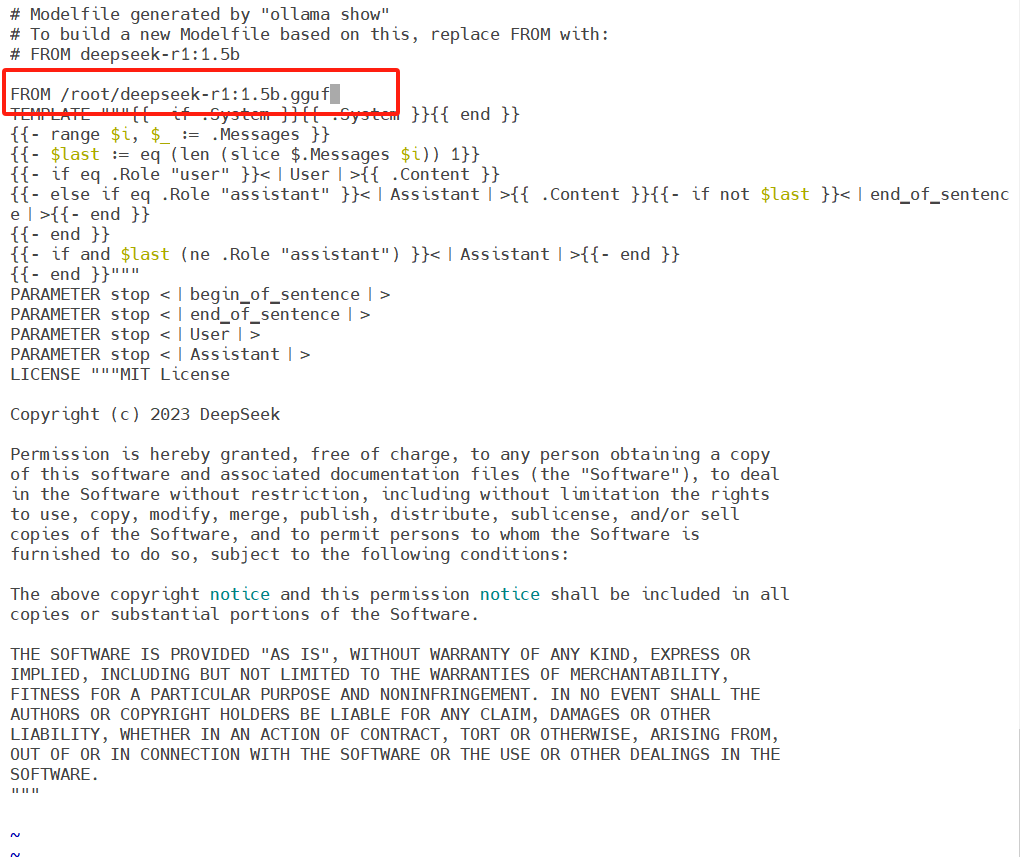
2 vi Modelfile        #将FROM的内容改为如下图所示路径
 将模型文件拷贝到容器中,使用ollama create命令离线导入模型。

1 docker cp /root/deepseek-r1:1.5b.gguf ollama:/root/
2 docker cp /root/Modelfile ollama:/root/
3 docker exec -it ollama bash
4 ollama create deepseek-r1:1.5b -f Modelfile
5 ollama run deepseek-r1:1.5b
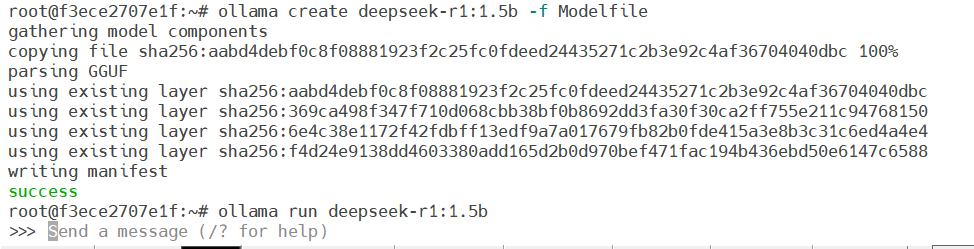
 这样一个离线大模型就布署好了。