




Serilog 日志同步到redis队列中 后续可以通过队列同步到数据库、腾讯阿里等日志组件中,这里redis库用的新生命团队的NewLife.Redis组件 可以实现轻量级消息队列(轻量级消息队列RedisQueue (newlifex.com)),也可以自行替换熟悉的组件
类库目录 该类库需添加 Microsoft.AspNetCore.Http.Abstractions、NewLife.Redis、Newtonsoft.Json、Serilog包
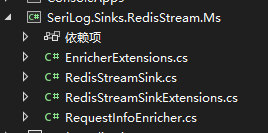
RedisStreamSink.cs 中的代码 定义RedisSink 将日志记录到redis队列中
using Microsoft.AspNetCore.Http;
using NewLife.Caching;
using NewLife.Reflection;
using Newtonsoft.Json;
using Serilog.Core;
using Serilog.Events;
using Serilog.Formatting;
using Serilog.Parsing;
using System;
using System.Collections;
using System.Collections.Generic;
using System.Globalization;
using System.Linq;
using System.Text;
using System.Text.Json.Serialization;
using System.Threading.Tasks;
using static System.Runtime.InteropServices.JavaScript.JSType;

namespace SeriLog.Sinks.RedisStream.Ms
{

    /// <summary>
    /// 用于序列化数据
    /// </summary>
    public class LogData
    {

        public DateTimeOffset Timestamp { get; set; }

        public LogEventLevel Level { get; set; }
        public string Message { get; set; }
        public string RequestIP { get; set; }
        public string HostName { get; set; }
        public string Referer { get; set; }
        public static LogData LogEventToLogData(LogEvent logEvent)
        {
            var data = new LogData();
            data.Timestamp = logEvent.Timestamp;
            data.Level = logEvent.Level;
            return data;

        }
    }
    public class RedisStreamSink : ILogEventSink
    {
        private readonly ITextFormatter _formatter;
        private readonly FullRedis _redis;
        private readonly string _redisStreamName;
        public RedisStreamSink(FullRedis fullRedis, string redisStreamName, ITextFormatter textFormatter)
        {
            _redis = fullRedis;
            _redisStreamName = redisStreamName;
            _formatter = textFormatter;
        }

        public void Emit(LogEvent logEvent)
        {
            string message =string.Empty;
            using (var writer = new StringWriter())
            {
                _formatter.Format(logEvent, writer);
                message = writer.ToString();
            }
            var data = LogData.LogEventToLogData(logEvent);
            data.Message = message.Replace("\r\n","");
            //获取自定义需要记录的信息例如客户端ip地址和主机名
            data.RequestIP = logEvent.Properties.TryGetValue("RequestIP", out LogEventPropertyValue? propertyIpValue) ? propertyIpValue.ToString().Trim('"') : string.Empty;
            data.HostName = logEvent.Properties.TryGetValue("HostName", out LogEventPropertyValue? propertyHostNameValue) ? propertyHostNameValue.ToString().Trim('"') : string.Empty;
            data.Referer= logEvent.Properties.TryGetValue("Referer", out LogEventPropertyValue? propertyRefererValue) ? propertyRefererValue.ToString().Trim('"') : string.Empty;
            Console.WriteLine("===================================\r\n" + JsonConvert.SerializeObject(data));
            //添加到redis 队列中
            var queue = _redis.GetQueue<string>(_redisStreamName);
            queue.Add(JsonConvert.SerializeObject(data));

        }


    }
}
RedisStreamSinkExtensions.cs 中的代码
using Serilog.Configuration;
using Serilog;
using System;
using System.Collections.Generic;
using System.Linq;
using System.Text;
using System.Threading.Tasks;
using NewLife.Caching;
using Serilog.Formatting;

namespace SeriLog.Sinks.RedisStream.Ms
{
    public static class RedisStreamSinkExtensions
    {
        //序列化时message中显示的内容 简化输出
        private const string DefaultOutputTemplate = "(RequestId:{RequestId}){Message:j}{Exception}";
        public static LoggerConfiguration RedisStreamSink(
            this LoggerSinkConfiguration loggerConfiguration,
            FullRedis redis,
            string redisStreamName,
            string outputTemplate = DefaultOutputTemplate,
            IFormatProvider formatProvider = null
           )
        {
            var formatter = new Serilog.Formatting.Display.MessageTemplateTextFormatter(outputTemplate, formatProvider);
            return loggerConfiguration.Sink(new RedisStreamSink(redis, redisStreamName, formatter));
        }
    }
}
RequestInfoEnricher.cs 中的代码 自定义添加RequestIP和Referer信息
using Microsoft.AspNetCore.Http;
using Microsoft.Extensions.Primitives;
using NewLife.Model;
using Serilog.Core;
using Serilog.Events;
using System;
using System.Collections.Generic;
using System.Linq;
using System.Text;
using System.Threading.Tasks;

namespace SeriLog.Sinks.RedisStream.Ms
{
    public class RequestInfoEnricher : ILogEventEnricher
    {
        private readonly IServiceProvider _serviceProvider;
        public RequestInfoEnricher(IServiceProvider serviceProvider)
        {
            _serviceProvider = serviceProvider;
        }

        public void Enrich(LogEvent logEvent, ILogEventPropertyFactory propertyFactory)
        {
            var httpContext = _serviceProvider.GetService<IHttpContextAccessor>()?.HttpContext;
            if (null != httpContext)
            {
                //这里添加自定义需记录的信息
                logEvent.AddPropertyIfAbsent(propertyFactory.CreateProperty("RequestIP", httpContext.Connection.RemoteIpAddress.ToString()));
                logEvent.AddPropertyIfAbsent(propertyFactory.CreateProperty("Referer", httpContext.Request.Headers.TryGetValue("Referer",out StringValues refererString)? refererString.ToString():string.Empty));
            }
        }
    }
}
EnricherExtensions.cs 中的代码
using Serilog.Configuration;
using Serilog;
using System;
using System.Collections.Generic;
using System.Linq;
using System.Text;
using System.Threading.Tasks;

namespace SeriLog.Sinks.RedisStream.Ms
{
    public static class EnricherExtensions
    {
        public static LoggerConfiguration WithRequestInfo(this LoggerEnrichmentConfiguration enrich, IServiceProvider serviceProvider)
        {

            if (enrich == null)
                throw new ArgumentNullException(nameof(enrich));

            return enrich.With(new  RequestInfoEnricher(serviceProvider));
        }
    }
}
在需要用到的项目中添加 SeriLog.Sinks.RedisStream.Ms 项目引用
public static void Main(string[] args) { var fullRedis = FullRedis.Create($"server=127.0.0.1:6379,db=1"); var builder = WebApplication.CreateBuilder(args); //这一步必须放在CreateLogger之前否则 RequestInfoEnricher中获取不到HttpContextAccessor builder.Services.AddSingleton<IHttpContextAccessor, HttpContextAccessor>();
Log.Logger = new LoggerConfiguration() .MinimumLevel.Information() .Enrich.WithProperty("HostName", Dns.GetHostName()) .WriteTo.RedisStreamSink(fullRedis, "logger") //logger 为队列的名称 .Enrich.WithRequestInfo(builder.Services.BuildServiceProvider()) .CreateLogger(); builder.Host.UseSerilog();.......后续忽略自行修改
}
效果:

此内容由惯性聚合(RSS阅读器)自动聚合整理,仅供阅读参考。 原文来自 — 版权归原作者所有。