



惯性聚合 高效追踪和阅读你感兴趣的博客、新闻、科技资讯
阅读原文 在惯性聚合中打开

推荐订阅源

B
Blog RSS Feed
P
Proofpoint News Feed
The GitHub Blog
The GitHub Blog
The Register - Security
Recorded Future
Recorded Future
D
Docker
I
InfoQ
Recent Announcements
MongoDB | Blog
MongoDB | Blog
Microsoft Azure Blog
A
About on SuperTechFans
N
Netflix TechBlog - Medium
H
Hackread – Cybersecurity News, Data Breaches, AI and More
云风的 BLOG
云风的 BLOG
Spread Privacy
Spread Privacy
AWS News Blog
AWS News Blog
F
Full Disclosure
Threat Intelligence Blog | Flashpoint
T
Threatpost
C
Cisco Blogs
P
Proofpoint News Feed
Google DeepMind News
Security Latest
Security Latest
The Hacker News
The Hacker News
Microsoft Security Blog
B
Blog
IT之家
IT之家
Latest news
Latest news
D
DataBreaches.Net
T
Tor Project blog
Scott Helme
Scott Helme
钛媒体:引领未来商业与生活新知
钛媒体:引领未来商业与生活新知
T
Threat Research - Cisco Blogs
博客园 - 司徒正美
S
SegmentFault 最新的问题
宝玉的分享
宝玉的分享
Project Zero
Project Zero
T
The Exploit Database - CXSecurity.com
P
Privacy International News Feed
Last Week in AI
Last Week in AI
C
CERT Recently Published Vulnerability Notes
WordPress大学
WordPress大学
博客园 - 【当耐特】
C
Cybersecurity and Infrastructure Security Agency CISA
G
GRAHAM CLULEY
小众软件
小众软件
让小产品的独立变现更简单 - ezindie.com
博客园 - 聂微东
酷 壳 – CoolShell
酷 壳 – CoolShell
freeCodeCamp Programming Tutorials: Python, JavaScript, Git & More

博客园 - dalgleish

C# Avalonia 22- SoundAndVideo- SpeechVoiceTest C# Avalonia 22- SoundAndVideo- SpeechRecognition C# Avalonia 22- SoundAndVideo- SpeechSynthesis C# Avalonia 22- SoundAndVideo- CodePlayback C# Avalonia 22- SoundAndVideo- SoundPlayerTest C# Avalonia 21- MenusAndToolbars- RibbonTest C# Avalonia 21- MenusAndToolbars- ProportionalStatusBar C# Avalonia 21- MenusAndToolbars- BasicToolbar C# Avalonia 21- MenusAndToolbars- ToolBar/Ribbon开源项目介绍和修复 C# Avalonia 21- MenusAndToolbars- SidebarMenu C# Avalonia 21- MenusAndToolbars- MixedMenus C# Avalonia 20 - WindowsMenu- 魔改Hyperlink - 使用例子 C# Avalonia 20 - WindowsMenu- 魔改Hyperlink C# Avalonia 20 - WindowsMenu- WebViewTest C# Avalonia 20 - WindowsMenu- WebView C# Avalonia 20 - WindowsMenu- ModernWindowTest C# Avalonia 20 - WindowsMenu- ModernWindow C# Avalonia 20 - WindowsMenu- TransparentWithShapes C# Avalonia 20 - WindowsMenu- TransparentBackground C# Avalonia 20 - WindowsMenu- OpenFileTest C# Avalonia 20 - WindowsMenu- SavePostion C# Avalonia 20 - WindowsMenu- CenterScreen C# Avalonia 19- DataBinding- DataGridGrouping C# Avalonia 19- DataBinding- DirectoryTreeView C# Avalonia 19- DataBinding- CustomListViewTest
C# Avalonia 19- DataBinding- BoundTreeView
dalgleish · 2026-02-16 · via 博客园 - dalgleish

BoundTreeView.axaml代码

<Window xmlns="https://github.com/avaloniaui"
        xmlns:x="http://schemas.microsoft.com/winfx/2006/xaml"
        xmlns:d="http://schemas.microsoft.com/expression/blend/2008"
        xmlns:mc="http://schemas.openxmlformats.org/markup-compatibility/2006"
        Height="300" Width="300"
        xmlns:local="using:AvaloniaUI"
        xmlns:data="using:AvaloniaUI.Demos.Book._19.StoreDatabase"
        x:Class="AvaloniaUI.BoundTreeView"
        Title="BoundTreeView">

    <TreeView Name="treeCategories" x:DataType="local:BoundTreeView"
              Margin="5"
              ItemsSource="{Binding Categories}">
        
        <TreeView.DataTemplates>

            <TreeDataTemplate x:DataType="data:Category"
                              ItemsSource="{Binding Products}">
                <TextBlock Text="{Binding CategoryName}" />
            </TreeDataTemplate>

            <TreeDataTemplate x:DataType="data:Product">
                <TextBlock Text="{Binding ModelName}" />
            </TreeDataTemplate>

        </TreeView.DataTemplates>
    </TreeView>
</Window>

BoundTreeView.axaml.cs代码

using Avalonia;
using Avalonia.Controls;
using Avalonia.Markup.Xaml;
using AvaloniaUI.Demos.Book._19.StoreDatabase;
using System.Collections.ObjectModel;

namespace AvaloniaUI;

public partial class BoundTreeView : Window
{
    private StoreDb1 db = new StoreDb1();
    public ObservableCollection<Category> Categories { get; }
    public BoundTreeView()
    {
        InitializeComponent();
        Categories = db.GetCategoriesAndProducts();
        this.DataContext = this;
    }
}

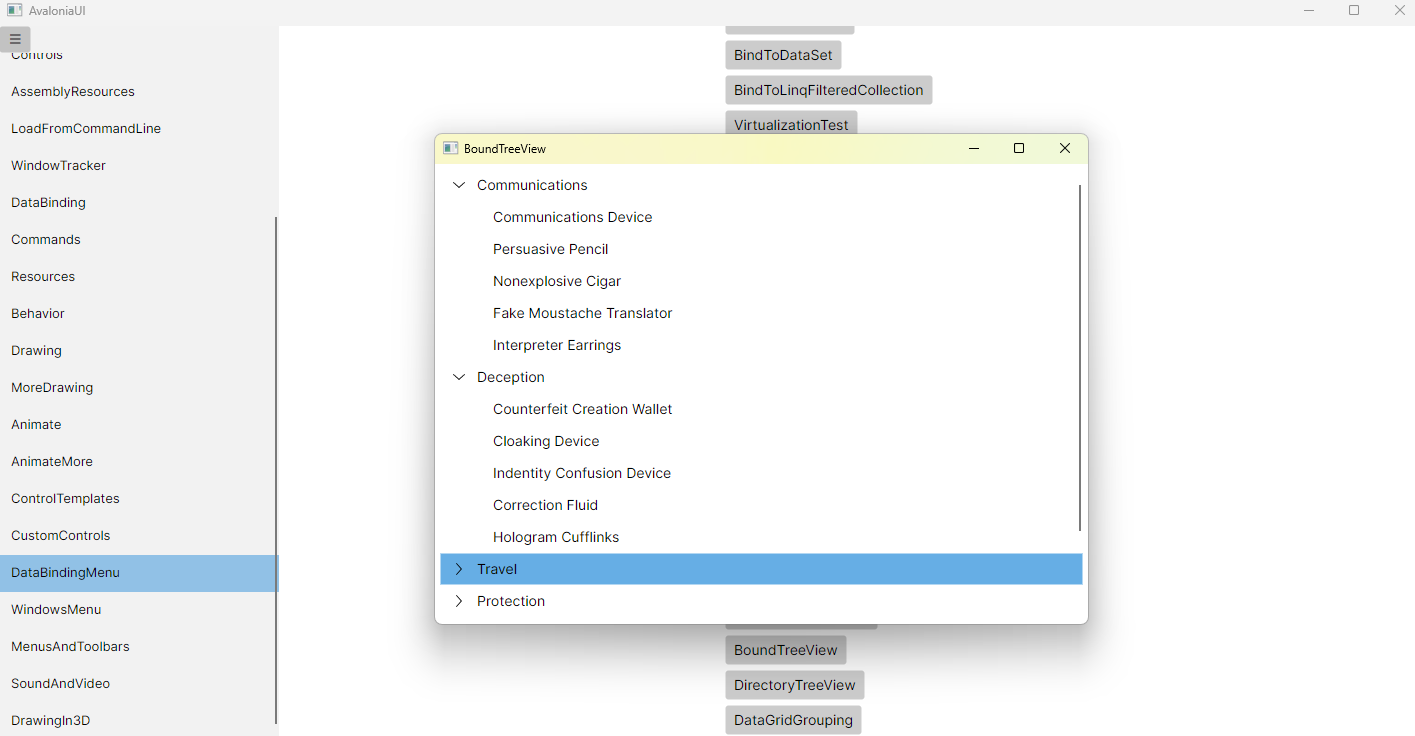
运行效果
image