


惯性聚合 高效追踪和阅读你感兴趣的博客、新闻、科技资讯
阅读原文 在惯性聚合中打开

推荐订阅源

酷 壳 – CoolShell
酷 壳 – CoolShell
aimingoo的专栏
aimingoo的专栏
P
Proofpoint News Feed
宝玉的分享
宝玉的分享
MyScale Blog
MyScale Blog
The GitHub Blog
The GitHub Blog
钛媒体:引领未来商业与生活新知
钛媒体:引领未来商业与生活新知
月光博客
月光博客
量子位
博客园 - 司徒正美
V
V2EX
I
InfoQ
奇客Solidot–传递最新科技情报
奇客Solidot–传递最新科技情报
Vercel News
Vercel News
H
Hackread – Cybersecurity News, Data Breaches, AI and More
美团技术团队
N
Netflix TechBlog - Medium
L
LangChain Blog
IT之家
IT之家
Blog — PlanetScale
Blog — PlanetScale
Cyber Security Advisories - MS-ISAC
Stack Overflow Blog
Stack Overflow Blog
A
About on SuperTechFans
Microsoft Azure Blog

博客园 - digdeep

javax.imageio.IIOException: Invalid icc profile: duplicate sequence numbers Tomcat配置支持软连接 记一例DNS解析导致的系统卡顿问题 nginx配置透传自定义文件头 访问RustFS中的图片时,浏览器报错 (failed)net::ERR_BLOCKED_BY_ORB mysql主从复制报错:Last_Errno: 1872 Last_Error: Slave failed to initialize relay log info structure from the repository 华为云平台的操作系统因为OOM而重启的解决方法 mysql主从复制报错:Last_SQL_Errno: 1114 Last_SQL_Error: Coordinator stopped because there were error(s) in the worker(s) 解决Linux下生成PDF中文乱码的问题 mysql主从复制从库报错:Last_Errno: 1594 centos编译安装opencv mysql搭建主从复制时一直报错 Last_IO_Errno: 2026 kswapd0进程占用cpu非常高 ./configure: error: SSL modules require the OpenSSL library. maven mvn install 报错: unable to find valid certification path to requested target 错误 升级Nginx,--with-openssl踩坑记录 Name or service not known Kernel panic - not syncing: Out of memory: system-wide panic_on_oom is enabled ERROR 2059 (HY000): Plugin caching_sha2_password could not be loaded gh-ost 报错 ERROR 1236 (HY000): A slave with the same server_uuid/server_id as this slave
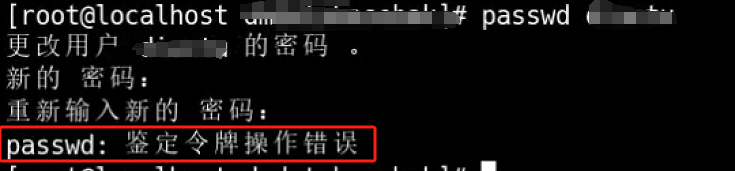
passwd 修改密码报错“passwd: 鉴定令牌操作错误”
digdeep · 2025-08-13 · via 博客园 - digdeep

Centos 7的系统,root用户passwd xx 重置密码时报错:
image

于是在网上找了好多解决方案,主要是:
/etc/group /etc/passwd /etc/shadow这几个文件,存在 i 属性,需要去掉后再进行修改。
命令:lsattr /etc/group /etc/passwd /etc/shadow 查看这几个文件是否含有属性 i
chattr -i /etc/group /etc/passwd /etc/shadow 如果含有,则去掉属性 i

但是试了大部分解决方案后,通过cat /etc/passwd 查看对应用户的密码密文,也都是没有改变的。

这时候看到有一个方案,很实用:
命令:echo ‘用户:密码’ | chpasswd
输入自己的用户名和密码,执行后。查看/etc/passwd ,发现密文变了。经过ssh 测试,发现修改成功。