







需求:
其实这个需求还是挺常见的,经常会看到一些app或网页拍一张图片或者上传一张图片则需要提取图片中的数字或文字,这里我采用了 tesseract.js 实现。这个前端插件的好处是字母和数字的识别率挺高,但对中文的识别略差,根据需求可进行取舍。
物料:
一张带有数字的图片。

效果:
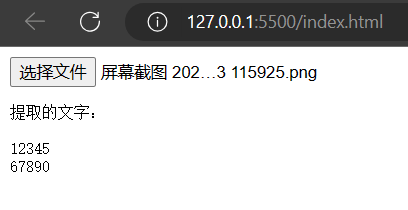
代码:
index.html
<!DOCTYPE html>
<html lang="en">
<head>
  <meta charset="UTF-8">
  <meta name="viewport" content="width=device-width, initial-scale=1.0">
  <title>Tesseract.js 示例</title>
</head>
<body>
  <input type="file" id="imageInput" accept="image/*">
  <pre id="outputText"></pre>

  <script src="https://cdn.jsdelivr.net/npm/tesseract.js"></script>
  <script src="./index.js"></script>
</body>
</html>
index.js
// 获取元素
const imageInput = document.getElementById('imageInput');
const outputText = document.getElementById('outputText');

// 当选择图片时
imageInput.addEventListener('change', handleImageUpload);

function handleImageUpload(event) {
  const file = event.target.files[0];

  if (file) {
    const reader = new FileReader();
    reader.onload = function(e) {
      const img = new Image();
      img.src = e.target.result;
      img.onload = function() {
        extractTextFromImage(img);
      };
    };
    reader.readAsDataURL(file);
  }
}

function extractTextFromImage(image) {
  Tesseract.recognize(
    image,
    'chi_sim', // 设置语言为中文
    { logger: info => console.log(info) } // 日志输出,可选
  ).then(({ data: { text } }) => {
    console.log(text);
    outputText.textContent = '提取的文字:\n\n' + text;
  }).catch(error => {
    console.error('发生错误:', error);
  });
}
此内容由惯性聚合(RSS阅读器)自动聚合整理,仅供阅读参考。 原文来自 — 版权归原作者所有。