








绘制条形码需要根据不同的应用场景选择适当的条形码标准,如常见的 codabar 、CODE30、CODE128等,每一种条形码标准都有它特定的数据编码规则,调用这些编码规则进行数据编码时会将数据字符按照所选编码规则转换成条和空的组合(一组二进制数据)。不同的条形码标准使用不同的编码规则来表示0到9的数字或26个英文字母。
其中,为了确保扫描的准确性,条形码中还包括一个校验字符。这个字符通过特定的算法计算得出,用于检验整个条形码的准确性。在生成目标条形码时需对目标内容进行校验,若目标内容符合条形码的编码要求则再进行下一步的绘制。
根据上述条形码绘制原理可知,只要我们能够知道条形码的编码规则将条形码内容转换为一串二进制数据并根据二进制数据的具体值确定条形码条、空的组合,我们就可以在 mxcad 中通过[填充实体McDbHatch]绘制出条形码。为方便后续对条形码的管理和扩展,我们可以将其绘制为[自定义实体McDbCustomEntity]并为其添加自定义属性。
1)条形码编码规则编写,下面以 CODE39 为例:
class Barcode{
    constructor(data, options){
        this.data = data;
        this.text = options.text || data;
        this.options = options;
    }
}
class CODE39 extends Barcode {
    constructor(data, options){
        data = data.toUpperCase();
        // Calculate mod43 checksum if enabled
        if(options.mod43){
            data += getCharacter(mod43checksum(data));
        }
        super(data, options);
    }
    encode(){
        // First character is always a *
        var result = getEncoding("*");
        // Take every character and add the binary representation to the result
        for(let i = 0; i < this.data.length; i++){
            result += getEncoding(this.data[i]) + "0";
        }
        // Last character is always a *
        result += getEncoding("*");
        return {
            data: result,
            text: this.text
        };
    }
    valid(){
        return this.data.search(/^[0-9A-Z\-\.\ \$\/\+\%]+$/) !== -1;
    }
}
// All characters. The position in the array is the (checksum) value
var characters = [
    "0", "1", "2", "3",
    "4", "5", "6", "7",
    "8", "9", "A", "B",
    "C", "D", "E", "F",
    "G", "H", "I", "J",
    "K", "L", "M", "N",
    "O", "P", "Q", "R",
    "S", "T", "U", "V",
    "W", "X", "Y", "Z",
    "-", ".", " ", "$",
    "/", "+", "%", "*"
];
// The decimal representation of the characters, is converted to the
// corresponding binary with the getEncoding function
var encodings = [
    20957, 29783, 23639, 30485,
    20951, 29813, 23669, 20855,
    29789, 23645, 29975, 23831,
    30533, 22295, 30149, 24005,
    21623, 29981, 23837, 22301,
    30023, 23879, 30545, 22343,
    30161, 24017, 21959, 30065,
    23921, 22385, 29015, 18263,
    29141, 17879, 29045, 18293,
    17783, 29021, 18269, 17477,
    17489, 17681, 20753, 35770
];
// Get the binary representation of a character by converting the encodings
// from decimal to binary
function getEncoding(character){
    return getBinary(characterValue(character));
}
function getBinary(characterValue){
    return encodings[characterValue].toString(2);
}
function getCharacter(characterValue){
    return characters[characterValue];
}
function characterValue(character){
    return characters.indexOf(character);
}
function mod43checksum(data){
    var checksum = 0;
    for(let i = 0; i < data.length; i++){
        checksum += characterValue(data[i]);
    }
    checksum = checksum % 43;
    return checksum;
}
export {CODE39};
2) 实现自定义实体
import { McGeVector3d, McDbHatch, McGePoint3d, McGePoint3dArray, McDbCustomEntity, IMcDbDwgFiler, MxCADWorldDraw, McDbEntity, McDbText, McDb, MxCpp, McGeMatrix3d } from 'mxcad';
import Barcode from './';// 引入条形码类型
// 自定义条形码
class McDbTestBarCode extends McDbCustomEntity {
    /** 条形码位置 */
    private position: McGePoint3d = new McGePoint3d();
    /** 字高  */
    private textHeight: number = 120;
    /** 条形码信息文字 */
    private text: string = '';
    // 条形码高度
    private codeHeight: number = 300;
    // 条形码宽度
    private codeWidth: number = 10;
    // 条形码类型
    private codeType: string = 'CODE39';
    // 条形码内容设置
    private codeContent: string = 'ABCDEFG';
    // 是否显示条形码文字内容
    private showText: boolean = false;
    constructor(imp?: any) {
        super(imp);
    }
    public create(imp: any) {
        return new McDbTestBarCode(imp)
    }
    /** 获取类名 */
    public getTypeName(): string {
        return "McDbTestBarCode";
    }
    //设置或获取基点
    public set barCodePos(val: McGePoint3d) {
        this.position = val.clone();
    }
    public get barCodePos(): McGePoint3d {
        return this.position;
    }
    //设置或获取条形码文字
    public set barCodeText(val: string) {
        this.text = val;
    }
    public get barCodeText(): string {
        return this.text;
    }
    //设置或获取条形码高度
    public set barCodeHeight(val: number) {
        this.codeHeight = val;
    }
    public get barCodeHeight(): number {
        return this.codeHeight;
    }
    //设置或获取条形码类型
    public set barCodeType(val: string) {
        this.codeType = val;
    }
    public get barCodeType(): string {
        return this.codeType;
    }
    //设置或获取条形码宽度
    public set barCodeWidth(val: number) {
        this.codeWidth = val;
    }
    public get barCodeWidth(): number {
        return this.codeWidth;
    }
    // 设置或获取条形码文字高度
    public set barCodeTextHeight(val: number) {
        this.textHeight = val;
    }
    public get barCodeHeigth(): number {
        return this.textHeight;
    }
    // 设置或获取是否显示条形码文字内容
    public set barCodeShowText(val: boolean) {
        this.showText = val;
    }
    public get barCodeShowText(): boolean {
        return this.showText;
    }
    // 设置或获取条形码文字内容
    public set barCodeContent(val: string) {
        this.codeContent = val;
    }
    public get barCodeContent(): string {
        return this.codeContent;
    }
    /** 读取数据 */
    public dwgInFields(filter: IMcDbDwgFiler): boolean {
        this.position = filter.readPoint("position").val;
        this.codeWidth = filter.readDouble("codeWidth").val;
        this.codeHeight = filter.readDouble("codeHeight").val;
        this.textHeight = filter.readDouble("textHeight").val;
        this.text = filter.readString("text").val;
        this.codeType = filter.readString("codeType").val;
        this.codeContent = filter.readString("codeContent").val;
        const isShowText = filter.readLong("showText").val;
        this.showText = isShowText ? true : false;
        return true;
    }
    /** 写入数据 */
    public dwgOutFields(filter: IMcDbDwgFiler): boolean {
        filter.writePoint("position", this.position);
        filter.writeDouble("codeWidth", this.codeWidth);
        filter.writeDouble("codeHeight", this.codeHeight);
        filter.writeString("text", this.text);
        filter.writeDouble("textHeight", this.textHeight);
        filter.writeString("codeType", this.codeType);
        filter.writeString("codeContent", this.codeContent);
        const isShowText = this.showText ? 1 : 0;
        filter.writeLong("showText", isShowText);
        return true;
    }
    /** 移动夹点 */
    public moveGripPointsAt(iIndex: number, dXOffset: number, dYOffset: number, dZOffset: number) {
        this.assertWrite();
        if (iIndex === 0) {
            this.position.x += dXOffset;
            this.position.y += dYOffset;
            this.position.z += dZOffset;
        }
    };
    /** 获取夹点 */
    public getGripPoints(): McGePoint3dArray {
        let ret = new McGePoint3dArray();
        ret.append(this.position);
        return ret;
    };
    /** 动态绘制 */
    public worldDraw(draw: MxCADWorldDraw): void {
        const code = new Barcode[this.codeType](this.codeContent, {flat: true});
        if (!code.valid()) return alert('条形码类型与内容不匹配!请重新设置!');
        let encoded = code.encode();
        const v = McGeVector3d.kYAxis.clone().mult(this.codeHeight);
        const _v = McGeVector3d.kXAxis.clone().mult(this.codeWidth);
        encoded.data.split('').forEach((val, index) => {
            const solid = new McDbHatch();
            const point1 = new McGePoint3d(this.position.x + index * this.codeWidth, this.position.y, this.position.z);
            const point2 = point1.clone().addvec(v);
            const point3 = point2.clone().addvec(_v);
            const point4 = point1.clone().addvec(_v);
            const points = new McGePoint3dArray([point1, point2, point3, point4]);
            solid.appendLoop(points);
            if (val == '1') {
                draw.drawEntity(solid);
            }
        })
        if (this.showText) {
            const text = this.getCodeText();
            draw.drawEntity(text);
        }
    };
    // 设置条形码文字实体
    private getCodeText(): McDbEntity {
        if (!this.text) this.text = this.codeContent;
        const text = new McDbText();
        text.textString = this.text;
        text.height = this.textHeight;
        const v = McGeVector3d.kYAxis.clone().negate().mult(this.textHeight * (4 / 3));
        text.position = text.alignmentPoint = this.position.clone().addvec(v);
        text.horizontalMode = McDb.TextHorzMode.kTextLeft;
        return text
    }
    // 编辑变换
    public transformBy(_mat: McGeMatrix3d): boolean {
        this.position.transformBy(_mat);
        return true;
    }
}
3)调用条形码自定义实体McDbTestBarCode绘制条形码
async function Mx_drawBarCode() {
    const mxcad = MxCpp.getCurrentMxCAD();
    mxcad.newFile();
    mxcad.setViewBackgroundColor(255, 255, 255);
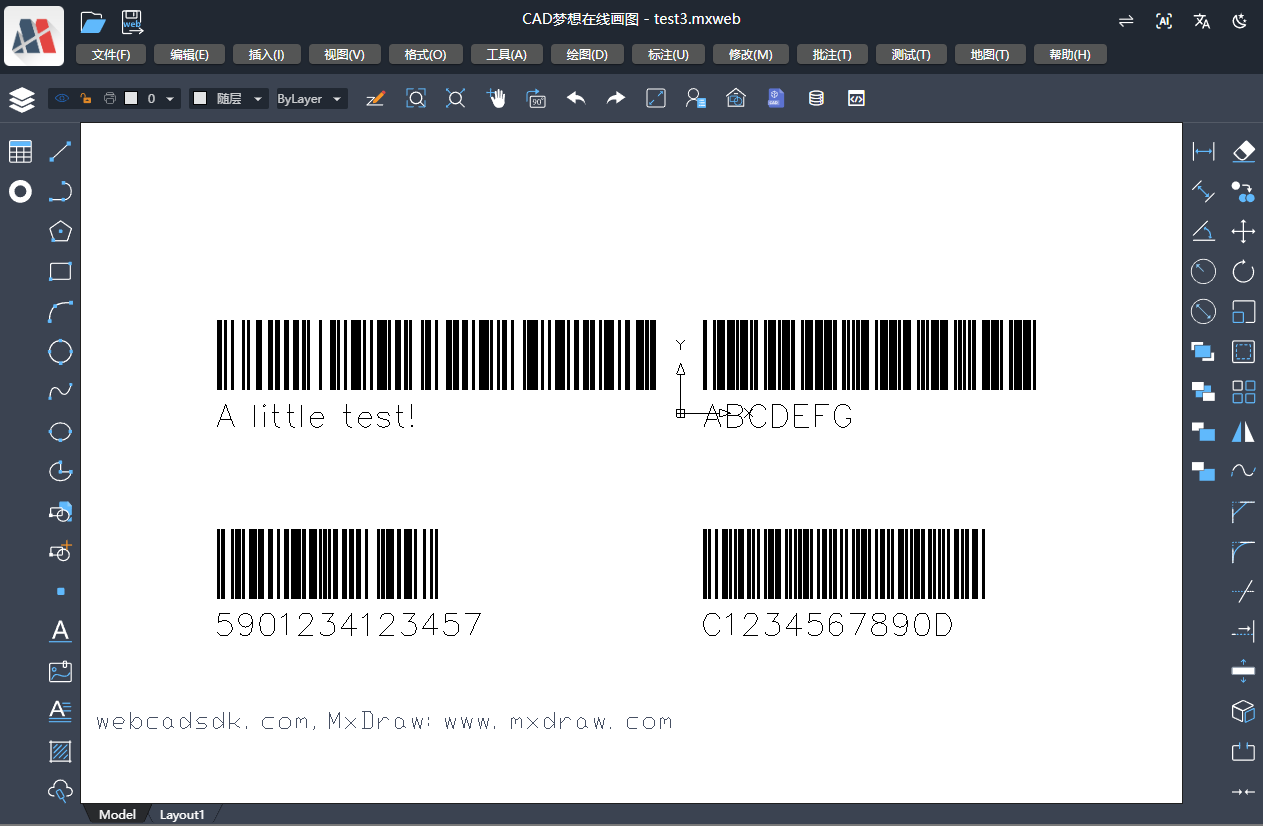
    // CODE39 类型条形码
    const barCode = new McDbTestBarCode();
    barCode.barCodePos = new McGePoint3d(100, 100, 0);
    barCode.barCodeShowText = true;
    mxcad.drawEntity(barCode);
    // CODE128 类型条形码
    const barCode2 = new McDbTestBarCode();
    barCode2.barCodeContent = 'A little test!';
    barCode2.barCodeType = 'CODE128';
    barCode2.barCodePos = new McGePoint3d(-2000, 100, 0);
    barCode2.barCodeShowText = true;
    mxcad.drawEntity(barCode2);
    // EAN13 类型条形码
    const barCode3 = new McDbTestBarCode();
    barCode3.barCodeContent = '5901234123457';
    barCode3.barCodeType = 'EAN13';
    barCode3.barCodePos = new McGePoint3d(-2000, -800, 0);
    barCode3.barCodeShowText = true;
    mxcad.drawEntity(barCode3);
    // codabar 类型条形码
    const barCode4 = new McDbTestBarCode();
    barCode4.barCodeContent = 'C1234567890D';
    barCode4.barCodeType = 'codabar';
    barCode4.barCodePos = new McGePoint3d(100, -800, 0);
    barCode4.barCodeShowText = true;
    mxcad.drawEntity(barCode4);
    mxcad.zoomAll();
    mxcad.zoomScale(4);
}
4) 绘制效果演示:
二维码是一种矩阵式二维条码,它能在水平和垂直两个方向上存储信息。二维码中的原始数据可以是数字、字母、二进制数据或其他字符,根据原始数据的类型,选择合适的编码模式。例如,数字数据使用数字模式,字母和数字混合使用alphanumeric模式,其他类型的数据则使用字节模式。
原始数据经过编码后的数据将放入一个二维矩阵中。这个过程可能需要使用掩模技术,通过应用特定的掩模图案来优化二维码中的黑白点的分布,避免出现与定位标记相似的模式,其中, 需要在矩阵的特定区域添加格式化和版本信息,以及必要时添加校正标记。
二维码的编码规则我们可以直接借助二维码开源js库QRCode.js ,更多详细内容看参考:https://github.com/davidshimjs/qrcodejs。
结合QRcode.js ,我们可以在mxcad中通过[填充实体McDbHatch]绘制出二维矩阵中的黑白块。为方便后续对二维码的管理和扩展,我们可以将其绘制为[自定义实体McDbCustomEntity]并为其添加自定义属性。
1)QRcode.js扩写:
// 增加 QRCode类的 makeMxcadCode 方法
QRCode.prototype.makeMxcadCode = function (sText) {
        this._oQRCode = new QRCodeModel(_getTypeNumber(sText, this._htOption.correctLevel), this._htOption.correctLevel);
        this._oQRCode.addData(sText);
        this._oQRCode.make();
        return this._oDrawing.drawMxcadHatch(this._oQRCode);
    };
绘制mxcad填充代码:
// 绘制mxcad填充代码(扩写Drawing类)
Drawing.prototype.drawMxcadHatch = function (oQRCode): McDbEntity[] {
    const entityArr = [];
    var _htOption = this._htOption;
    var nCount = oQRCode.getModuleCount();
    var nWidth = _htOption.width / nCount;
    var nHeight = _htOption.height / nCount;
    for (var row = 0; row < nCount; row++) {
        for (var col = 0; col < nCount; col++) {
            var bIsDark = oQRCode.isDark(row, col);
            var nLeft = col * nWidth;
            var nTop = row * nHeight;
            if (bIsDark) {
                // 矩形填充
                const pos = new McGePoint3d(nLeft, nTop, 0);
                const v_y = McGeVector3d.kYAxis.clone().negate().mult(nHeight);
                const v_x = McGeVector3d.kXAxis.clone().mult(nWidth);
                const pos1 = pos.clone().addvec(v_y);
                const pos2 = pos.clone().addvec(v_x);
                const pos3 = pos.clone().addvec(v_x).addvec(v_y);
                const solid = new McDbHatch();
                const ptArr = new McGePoint3dArray([pos, pos1, pos3, pos2]);
                solid.appendLoop(ptArr);
                entityArr.push(solid);
            }
        }
    }
    return entityArr;
};
2)实现自定义实体
import { MxCpp, McDbCustomEntity, McGePoint3d, IMcDbDwgFiler, McGePoint3dArray, MxCADWorldDraw, McGeMatrix3d, McDbEntity } from "mxcad";
import { QRCode } from './qrCode'
// 自定义二维码实体
class McDbTestQrCode extends McDbCustomEntity {
    /** 二维码的位置 */
    private position: McGePoint3d = new McGePoint3d();
    // 二维码高度
    private codeHeight: number = 300;
    // 二维码宽度
    private codeWidth: number = 10;
    // 二维码内容设置
    private codeContent: string = 'https://demo.mxdraw3d.com:3000/mxcad/';
    constructor(imp?: any) {
        super(imp);
    }
    public create(imp: any) {
        return new McDbTestQrCode(imp)
    }
    /** 获取类名 */
    public getTypeName(): string {
        return "McDbTestQrCode";
    }
    //设置或获取基点
    public set qrCodePos(val: McGePoint3d) {
        this.position = val.clone();
    }
    public get qrCodePos(): McGePoint3d {
        return this.position;
    }
    //设置或获取码高度
    public set qrCodeHeight(val: number) {
        this.codeHeight = val;
    }
    public get qarCodeHeight(): number {
        return this.codeHeight;
    }
    //设置或获取码宽度
    public set qrCodeWidth(val: number) {
        this.codeWidth = val;
    }
    public get qrCodeWidth(): number {
        return this.codeWidth;
    }
    // 设置或获取二维码内容
    public set qrCodeContent(val: string) {
        this.codeContent = val;
    }
    public get qrCodeContent(): string {
        return this.codeContent;
    }
    /** 读取数据 */
    public dwgInFields(filter: IMcDbDwgFiler): boolean {
        this.position = filter.readPoint("position").val;
        this.codeWidth = filter.readDouble("codeWidth").val;
        this.codeHeight = filter.readDouble("codeHeight").val;
        this.codeContent = filter.readString("codeContent").val;
        return true;
    }
    /** 写入数据 */
    public dwgOutFields(filter: IMcDbDwgFiler): boolean {
        filter.writePoint("position", this.position);
        filter.writeDouble("codeWidth", this.codeWidth);
        filter.writeDouble("codeHeight", this.codeHeight);
        filter.writeString("codeContent", this.codeContent);
        return true;
    }
    /** 移动夹点 */
    public moveGripPointsAt(iIndex: number, dXOffset: number, dYOffset: number, dZOffset: number) {
        this.assertWrite();
        if (iIndex === 0) {
            this.position.x += dXOffset;
            this.position.y += dYOffset;
            this.position.z += dZOffset;
        }
    };
    /** 获取夹点 */
    public getGripPoints(): McGePoint3dArray {
        let ret = new McGePoint3dArray();
        ret.append(this.position);
        return ret;
    };
    /** 动态绘制 */
    public worldDraw(draw: MxCADWorldDraw): void {
        const qrcode = new QRCode('', {
            width: this.codeWidth,
            height: this.codeHeight
        });
        const objArr = qrcode.makeMxcadCode(this.codeContent);
        objArr.forEach((obj: McDbEntity) => {
            const entity = obj.clone() as McDbEntity;
            entity.move(new McGePoint3d(0, 0, 0), this.position);
            draw.drawEntity(entity);
        })
    };
    // 编辑变换
    public transformBy(_mat: McGeMatrix3d): boolean {
        this.position.transformBy(_mat);
        return true;
    }
}
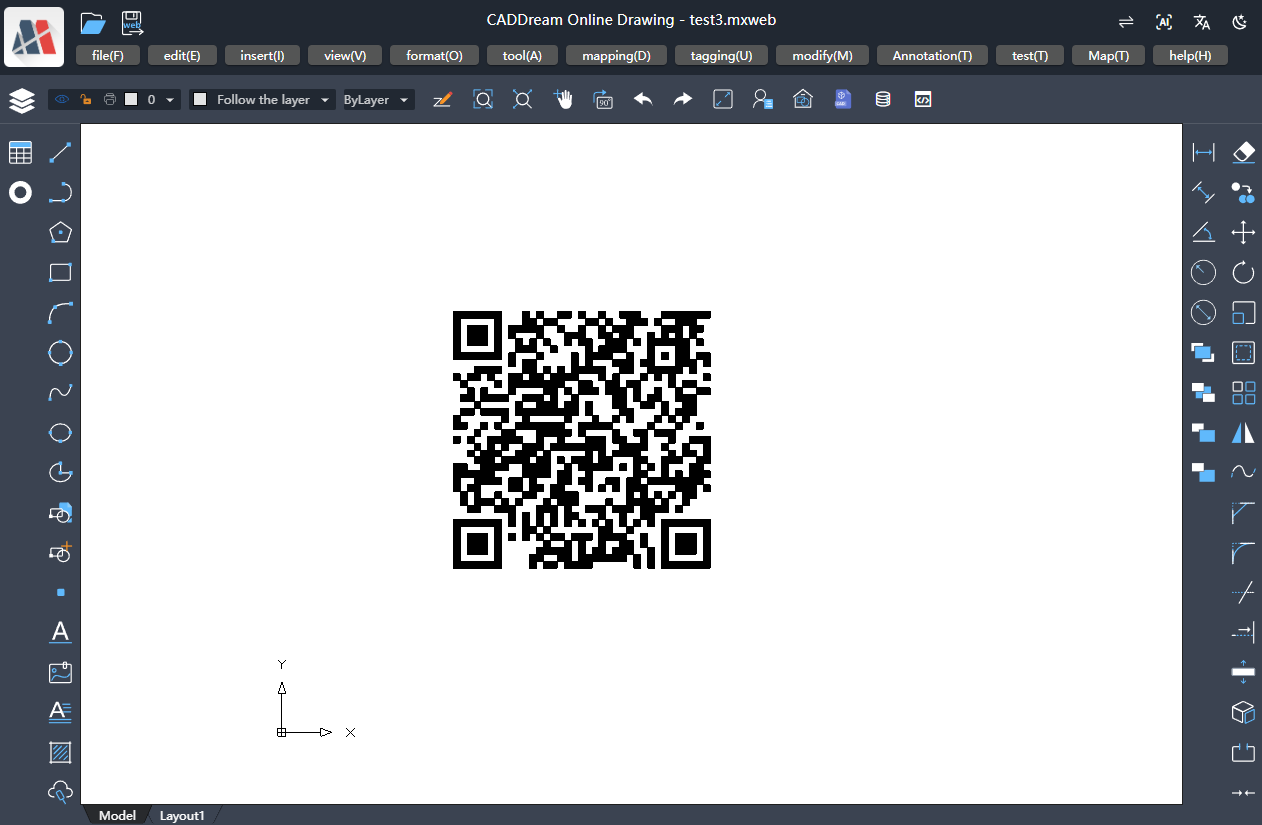
3)调用二维码自定义实体McDbTestQrCode绘制二维码:
//画二维码
async function Mx_drawQrCode() {
    const mxcad = MxCpp.getCurrentMxCAD();
    mxcad.newFile();
    const qrcode = new McDbTestQrCode();
    qrcode.qrCodePos = new McGePoint3d(1000, 1000, 0);
    qrcode.qrCodeContent = 'https://demo.mxdraw3d.com:3000/mxcad/';
    qrcode.qrCodeWidth = 1500;
    qrcode.qrCodeHeight = 1500;
    mxcad.drawEntity(qrcode);
    mxcad.zoomAll();
};
4) 绘制效果演示:
此内容由惯性聚合(RSS阅读器)自动聚合整理,仅供阅读参考。 原文来自 — 版权归原作者所有。