









形位公差是指对零件几何要素的形状误差和位置误差所允许的最大变动量,它与传统的尺寸公差不同,不仅关注长度或直径等线性尺寸的变化,还关注零件的几何特性是否符合设计意图。在本篇文章中我们将介绍如何通过mxcad插件根据形位公差的特性来实现形位公差标注功能。
形位公差的所有公差代号如下图所示:
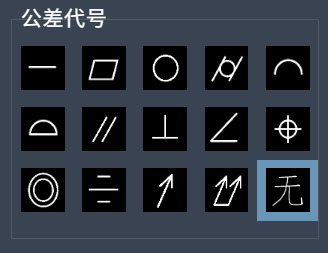
根据国家标准 **GB/T 1182-2018**(等同于 ISO 1101),形位公差主要分为以下几类:
1. 形状公差(Form Tolerance)
2. 方向公差(Orientation Tolerance)
3. 位置公差(Location Tolerance)
4. 跳动公差(Runout Tolerance)
1. 被测要素:需要控制其形状或位置的几何要素。
2. 基准要素:作为参照的标准几何要素,通常用大写字母 A、B、C 表示。
3. 公差带:允许误差存在的区域范围,通常是二维或三维的空间区域。
4. 公差框格:标注形位公差信息的图形符号,包含:
- 公差类型符号
- 公差值
- 基准字母(如果有)
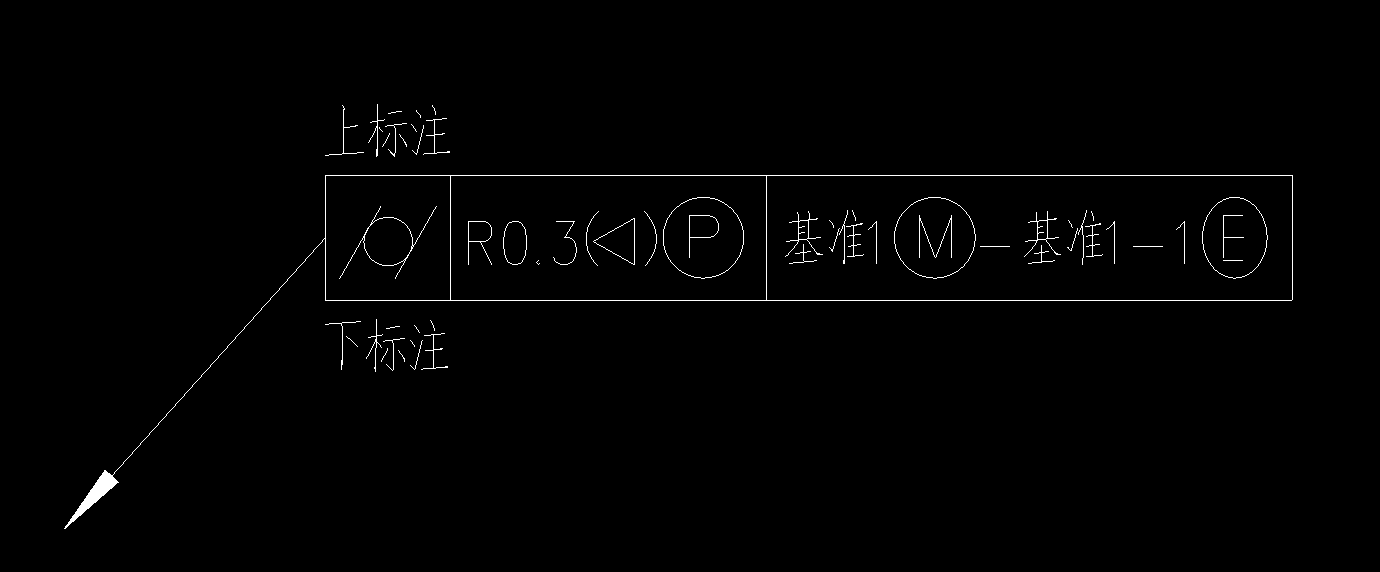
四、mxcad实现形位公差类
根据上面的介绍,我们可以根据形位公差的“特征控制框”来构建我们的形位公差自定义实体,结构如下:
[公差符号]
[公差值]
[基准A]
[基准B]
4.1. 类定义与继承
export class MxDbGeometricTolerances extends McDbCustomEntity {
    // 类实现
}
4.2. 核心属性
// 标注起点
private startPoint: McGePoint3d = new McGePoint3d();
// 标注转折点
private turningPoint: McGePoint3d = new McGePoint3d();
// 标注点
private dimPoint: McGePoint3d = new McGePoint3d();
// 标注终点
private endPoint: McGePoint3d = new McGePoint3d();
// 标注大小
private size: number = 4;
// 是否显示全周符号
private isShowFull: boolean = false;
// 公差内容
private toleranceContents: toleranceContent[] = [];
// 附注上
private notesUp: string = '';
// 附注下
private notesDown: string = '';
4.3. 公差代号枚举
export enum symbolName {
    Straightness = 'u',        // 直线度
    Flatness = 'c',           // 平面度
    Roundness = 'e',          // 圆度
    Cylindricity = 'g',       // 圆柱度
    LineContourdegree = 'k',  // 线轮廓度
    SurfaceContourDegree = 'd',// 面轮廓度
    Parallelism = 'f',        // 平行度
    Perpendicularity = 'b',   // 垂直度
    TiltDegree = 'a',         // 倾斜度
    PositionalDegree = 'j',   // 位置度
    Coaxiality = 'r',         // 同轴度
    SymmetryDegree = 'i',     // 对称度
    CircleJumping = 'h',      // 圆跳动
    FullBeat = 't',           // 全跳动
    None = ''                 // 无
}
5.1.1 箭头和引线绘制
private drawArrow(): McDbEntity[] {
    // 绘制箭头
    const pt1 = this.startPoint;
    const pt2 = this.turningPoint;
    const arrowLength = this.size;
    const vec = pt2.sub(pt1).normalize().mult(arrowLength);
    const pt = pt1.clone().addvec(vec);
    const _vec = vec.clone().rotateBy(Math.PI / 2).normalize().mult(arrowLength / 8);
    const pt3 = pt.clone().addvec(_vec);
    const pt4 = pt.clone().subvec(_vec);
    const solid = new McDbHatch();
    solid.appendLoop(new McGePoint3dArray([pt1, pt3, pt4]));
    // 绘制引线
    const points = [this.startPoint, this.turningPoint, this.dimPoint, this.endPoint];
    const pl = new McDbPolyline();
    points.forEach(pt => pl.addVertexAt(pt));
    return [solid, pl];
}
5.1.2 公差代号绘制
    // 绘制公差代号
    private drawCode(topPt: McGePoint3d, endPt: McGePoint3d, boxHeight: number): McDbEntity[] {
        const entityArr: McDbEntity[] = [];
        // 首先绘制整体code边框
        const pl = new McDbPolyline();
        pl.isClosed = true;
        const v = McGeVector3d.kXAxis.clone().mult(boxHeight);
        const ptArr = [endPt, topPt, topPt.clone().addvec(v), endPt.clone().addvec(v)];
        ptArr.forEach(pt => pl.addVertexAt(pt));
        entityArr.push(pl);
        // 合并相邻公差代号
        const mergeAdjacent = (arr) => {
            const result = [];
            let i = 0;
            while (i < arr.length) {
                let j = i + 1;
                // 找到连续相同的元素
                while (j < arr.length && arr[j] === arr[i]) {
                    j++;
                }
                // 推入当前值和个数
                result.push({
                    value: arr[i],
                    count: j - i
                });
                // 移动指针到下一个不同的位置
                i = j;
            }
            return result;
        }
        const arr = this.toleranceContents.map(item => item.toleranceCode);
        const res = mergeAdjacent(arr);
        const vec_x = McGeVector3d.kXAxis.clone().mult(boxHeight);
        res.forEach(item => {
            // 绘制公差代号
            const text = new McDbMText();
            text.textHeight = this.size * (3 / 4);
            text.contents = item.value;
            text.attachment = McDb.AttachmentPoint.kBottomMid;
            const v = endPt.sub(topPt).normalize().mult(boxHeight * item.count);
            const center = topPt.clone().addvec(v.clone().mult(1 / 2)).addvec(vec_x.clone().mult(1 / 2));
            text.location = center;
            text.textStyle = 'cxgdt';
            topPt.addvec(v);
            entityArr.push(text);
            text.reCompute();
            const { maxPt, minPt } = MxCADUtility.getTextEntityBox(text, false);
            if(minPt.distanceTo(maxPt) > text.textHeight*3){
                maxPt.addvec(McGeVector3d.kXAxis.clone().negate().mult(text.textHeight*(7/4)));
            }
            const midPt = minPt.clone().addvec(maxPt.sub(minPt).mult(1 / 2));
            text.move(midPt, center);
            const line = new McDbLine(topPt, topPt.clone().addvec(vec_x));
            entityArr.push(line)
        });
        return entityArr
    }
5.1.3 公差内容绘制
 // 绘制公差内容
    private drawToleranceContents(topPt: McGePoint3d, endPt: McGePoint3d, boxHeight: number): { MText: MxCADMText[], entityArr: McDbEntity[], max_x: number } {
        const entityArr: McDbEntity[] = [];
        const MText: MxCADMText[] = [];
        const mxcad = MxCpp.getCurrentMxCAD();
        /**
         * 公差1标注:3个标注中记录出X最大值
         */
        let max_x = topPt.x;
        const v_spacing = McGeVector3d.kXAxis.clone().mult(this.size / 4);
        const vec_y = McGeVector3d.kYAxis.clone().mult(boxHeight).negate();
        this.toleranceContents.forEach((item, ind) => {
            const _topPt = topPt.clone();
            const _endPt = endPt.clone();
            if (item.tolerance.length) {
                _topPt.addvec(v_spacing).addvec(vec_y.clone().mult(ind));
                const _v = McGeVector3d.kYAxis.clone().mult(boxHeight / 2 - this.size * (3 / 8)).negate();
                item.tolerance.forEach((str, index) => {
                    if (index === 4 || (index === 3 && (str === '{' || str === '@'))) {
                        const mText = new MxCADMText()
                        mText.data = [{
                            type: 'paragraph',
                            children: [
                                { text: str, font: 'cxgdtshp.shx' },
                            ]
                        }];
                        mText.position = _topPt.clone().addvec(_v);
                        mText.textBaseHeight = this.size * (3 / 4);
                        MText.push(mText);
                        const v = McGeVector3d.kXAxis.clone().mult(this.size);
                        const pt = mText.position.clone().addvec(v);
                        _topPt.x = _endPt.x = pt.x;
                    } else {
                        const text = new McDbMText();
                        text.contents = str;
                        text.location = _topPt.clone().addvec(_v);
                        text.textHeight = this.size * (3 / 4);
                        if (index == 2 || index == 4) {
                            text.textStyle = 'cxgdtshp';
                        } else if (index == 3 && str !== '{') {
                            text.textStyle = 'cxgdt'
                        } else {
                            text.textStyleId = mxcad.getDatabase().getCurrentlyTextStyleId()
                        }
                        text.reCompute();
                        const { maxPt, minPt } = MxCADUtility.getTextEntityBox(text, false);
                        _topPt.x = _endPt.x = maxPt.x;
                        entityArr.push(text);
                    }
                });
            };
            if (_topPt.x > max_x) max_x = _topPt.x;
        });
        if (max_x > topPt.x) {
            this.toleranceContents.forEach((item, index) => {
                const pl = new McDbPolyline();
                const topPt_max = new McGePoint3d(max_x, topPt.y);
                const endPt_max = new McGePoint3d(max_x, endPt.y);
                const points = [topPt, topPt_max.clone().addvec(v_spacing), endPt_max.clone().addvec(v_spacing)];
                points.forEach(pt => pl.addVertexAt(pt));
                entityArr.push(pl);
                topPt.addvec(vec_y);
                if (index === this.toleranceContents.length - 1) {
                    const line = new McDbLine(endPt_max.clone().addvec(v_spacing), endPt);
                    entityArr.push(line);
                }
            });
            max_x = new McGePoint3d(max_x, topPt.y).addvec(v_spacing).x;
        };
        return { entityArr, MText, max_x }
    }
5.1.4 绘制基准内容
// 绘制基准内容
    private drawBenchmark(topPt: McGePoint3d, endPt: McGePoint3d, boxHeight: number): { entityArr: McDbEntity[], MText } {
        const mxcad = MxCpp.getCurrentMxCAD();
        const _v = McGeVector3d.kYAxis.clone().mult(boxHeight / 2 - this.size * (3 / 8)).negate();
        const vec_y = McGeVector3d.kYAxis.clone().mult(boxHeight).negate();
        const v_spacing = McGeVector3d.kXAxis.clone().mult(this.size / 4);
        let max_x = topPt.x;
        const lineX = [];
        const MText: MxCADMText[] = []
        const getTextEnts = (contents: Array<string[]>, _topPt: McGePoint3d): McDbEntity[] => {
            const entity = [];
            let endPt = _topPt.clone();
            _topPt.addvec(v_spacing)
            if (contents.length === 2 && contents.filter(item => item.length != 0).length === 2) contents.splice(1, 0, ['-']);
            contents.forEach((arr, index) => {
                if (arr.length) {
                    arr.forEach((str, ind) => {
                        if (ind === 1 && str === '{') {
                            const mText = new MxCADMText()
                            mText.data = [{
                                type: 'paragraph',
                                children: [
                                    { text: str, font: 'cxgdtshp.shx' },
                                ]
                            }];
                            mText.position = _topPt.clone().addvec(_v);
                            mText.textBaseHeight = this.size * (3 / 4);
                            MText.push(mText);
                            const v = McGeVector3d.kXAxis.clone().mult(this.size);
                            const pt = mText.position.clone().addvec(v);
                            _topPt.x = endPt.x = pt.x;
                        } else {
                            const text = new McDbMText();
                            text.contents = str;
                            text.location = _topPt.clone().addvec(_v);
                            text.textHeight = this.size * (3 / 4);
                            if (ind == 1) {
                                text.textStyle = 'CXGDT';
                            } else {
                                text.textStyleId = mxcad.getDatabase().getCurrentlyTextStyleId()
                            }
                            text.reCompute();
                            const { maxPt, minPt } = MxCADUtility.getTextEntityBox(text, false);
                            if (max_x < maxPt.x) max_x = maxPt.x;
                            endPt.x = maxPt.x;
                            entity.push(text);
                            _topPt.x = maxPt.x;
                        }
                    })
                }
            });
            if (max_x < endPt.x) max_x = endPt.x;
            return entity;
        }
        const entityArr: McDbEntity[] = [];
        const maxXArr: number[] = [];
        //先统一绘制基准1、2、3
        const bNames = ['b1', 'b2', 'b3'];
        let textEnd_x = topPt.x;
        bNames.forEach((name, index) => {
            if (index != 0 && lineX.length) {
                textEnd_x = Math.max(...lineX)
                maxXArr.push(textEnd_x)
            };
            lineX.length = 0;
            this.toleranceContents.forEach((item, ind) => {
                if (item.Benchmark[name]?.length && item.Benchmark[name].filter(i => i.length).length > 0) {
                    const _topPt = new McGePoint3d(textEnd_x, topPt.clone().addvec(vec_y.clone().mult(ind)).y);
                    entityArr.push(...getTextEnts(item.Benchmark[name], _topPt));
                    const pt = new McGePoint3d(max_x, topPt.y);
                    pt.addvec(v_spacing);
                    max_x = pt.x;
                    lineX.push(max_x)
                }
            })
        })
        if (entityArr.length > 0) {
            maxXArr.forEach(x => {
                const line = new McDbLine(new McGePoint3d(x, topPt.y), new McGePoint3d(x, endPt.y));
                entityArr.push(line)
            })
            const line = new McDbLine(new McGePoint3d(max_x, topPt.y), new McGePoint3d(max_x, endPt.y));
            const _line = new McDbLine(endPt, new McGePoint3d(max_x, endPt.y));
            entityArr.push(line, _line);
            this.toleranceContents.forEach((item, index) => {
                if (index != 0) topPt.addvec(vec_y.clone());
                const line = new McDbLine(topPt, new McGePoint3d(max_x, topPt.y));
                entityArr.push(line)
            });
        }
        return { entityArr, MText }
    }
5.1.5 动态绘制
 // 绘制实体
    public worldDraw(draw: MxCADWorldDraw): void {
        const mxcad = MxCpp.getCurrentMxCAD();
        const textStyle = ['cxgdtshp', 'cxgdt'];
        textStyle.forEach(name => {
            if (!mxcad.getDatabase().getTextStyleTable().has(name)) {
                MxCpp.App.loadFonts([`${name}.shx`], [], [`${name}.shx`], () => {
                    mxcad.addTextStyle(name, `${name}.shx`, `${name}.shx`);
                });
            }
        })
        const { MText, allEntityArr } = this.getAllEnitty();
        MText.forEach((ent: MxCADMText) => {
            ent.worldDraw(draw);
        });
        allEntityArr.forEach((ent: McDbEntity) => {
            draw.drawEntity(ent);
        })
    }
    // 获取所有实体
    private getAllEnitty(): { allEntityArr: McDbEntity[], MText: MxCADMText[] } {
        const allEntityArr = [];
        // 绘制箭头
        const entity = this.drawArrow();
        allEntityArr.push(...entity);
        //  绘制全周符号
        const types = [symbolName.LineContourdegree, symbolName.SurfaceContourDegree];
        if (this.toleranceContents.length === 1 && types.includes(this.toleranceContents[0].toleranceCode) && this.isShowFull) {
            const circle = new McDbCircle(this.dimPoint.x, this.dimPoint.y, 0, this.size * (7 / 16));
            allEntityArr.push(circle);
        }
        // 绘制公差标注
        const boxHeight = this.size * (7 / 4);
        const vec = McGeVector3d.kYAxis.clone().mult(boxHeight * (this.toleranceContents.length / 2))
        const topPt = this.endPoint.clone().addvec(vec);
        const endPt = this.endPoint.clone().addvec(vec.clone().negate());
        // 绘制公差代号
        allEntityArr.push(...this.drawCode(topPt.clone(), endPt.clone(), boxHeight));
        // 绘制公差内容
        const vec_x = McGeVector3d.kXAxis.clone().mult(boxHeight);
        const { MText, entityArr, max_x } = this.drawToleranceContents(topPt.clone().addvec(vec_x), endPt.clone().addvec(vec_x), boxHeight);
        allEntityArr.push(...entityArr);
        // 绘制基准一二三
        const { MText: _MText, entityArr: _entityArr } = this.drawBenchmark(new McGePoint3d(max_x, topPt.y), new McGePoint3d(max_x, endPt.y), boxHeight)
        allEntityArr.push(..._entityArr);
        MText.push(..._MText);
        // 绘制上下附注
        const arr = [this.notesUp, this.notesDown];
        arr.forEach((item, index) => {
            const text = new McDbMText();
            text.contents = item;
            text.textHeight = this.size * (3 / 4)
            text.location = index == 0 ? topPt.clone().addvec(McGeVector3d.kYAxis.clone().mult(this.size)) : endPt.clone().addvec(McGeVector3d.kYAxis.clone().mult(this.size / 4).negate());
            allEntityArr.push(text);
        })
        return { allEntityArr, MText }
    }
// 读取自定义实体数据
    public dwgInFields(filter: IMcDbDwgFiler): boolean {
        this.startPoint = filter.readPoint("startPoint").val;
        this.turningPoint = filter.readPoint("turningPoint").val;
        this.dimPoint = filter.readPoint("dimPoint").val;
        this.endPoint = filter.readPoint("endPoint").val;
        this.size = filter.readDouble("size").val;
        this.isShowFull = filter.readLong("isShowFull").val ? true : false;
        this.notesUp = filter.readString('notesUp').val;
        this.notesDown = filter.readString('notesDown').val;
        this.minPt = filter.readPoint("minPt").val;
        this.maxPt = filter.readPoint("maxPt").val;
        this.toleranceContents = JSON.parse(filter.readString('toleranceContents').val);
        return true;
    }
    // 写入自定义实体数据
    public dwgOutFields(filter: IMcDbDwgFiler): boolean {
        filter.writePoint("startPoint", this.startPoint);
        filter.writePoint("turningPoint", this.turningPoint);
        filter.writePoint("dimPoint", this.dimPoint);
        filter.writePoint("endPoint", this.endPoint);
        filter.writeDouble("size", this.size);
        filter.writeLong("isShowFull", this.isShowFull ? 1 : 0);
        filter.writeString("notesUp", this.notesUp);
        filter.writeString("notesDown", this.notesDown);
        filter.writePoint("minPt", this.minPt);
        filter.writePoint("maxPt", this.maxPt);
        filter.writeString('toleranceContents', JSON.stringify(this.toleranceContents));
        return true;
    }
5.3. 夹点编辑功能
 // 移动自定义对象的夹点
    public moveGripPointsAt(iIndex: number, dXOffset: number, dYOffset: number, dZOffset: number) {
        this.assertWrite();
        if (iIndex === 0) {
            this.startPoint.x += dXOffset;
            this.startPoint.y += dYOffset;
            this.startPoint.z += dZOffset;
        } else if (iIndex === 1) {
            this.turningPoint.x += dXOffset;
            this.turningPoint.y += dYOffset;
            this.turningPoint.z += dZOffset;
        } else if (iIndex === 2) {
            this.dimPoint.x += dXOffset;
            this.dimPoint.y += dYOffset;
            this.dimPoint.z += dZOffset;
            this.endPoint.x += dXOffset;
            this.endPoint.y += dYOffset;
            this.endPoint.z += dZOffset;
        } else if (iIndex === 3) {
            this.endPoint.x += dXOffset;
            this.endPoint.y += dYOffset;
            this.endPoint.z += dZOffset;
        }
    };
    // 获取自定义对象的夹点
    public getGripPoints(): McGePoint3dArray {
        let ret = new McGePoint3dArray()
        ret.append(this.startPoint);
        ret.append(this.turningPoint);
        ret.append(this.dimPoint);
        ret.append(this.endPoint);
        return ret;
    };
5.4. 暴露内部属性方法
 //设置或获取标注大小
    public set dimSize(val: number) {
        this.size = val;
    }
    public get dimSize(): number {
        return this.size;
    }
    //设置或获取是否显示全周符号
    public set isShowFullWeekSymbol(val: boolean) {
        this.isShowFull = val;
    }
    public get isShowFullWeekSymbol(): boolean {
        return this.isShowFull;
    }
    //设置或获取公差标注内容
    public set dimToleranceContents(val: toleranceContent[]) {
        this.toleranceContents = val;
    }
    public get dimToleranceContents(): toleranceContent[] {
        return this.toleranceContents;
    }
    //设置或获取附注上
    public set dimNotesUp(val: string) {
        this.notesUp = val;
    }
    public get dimNotesUp(): string {
        return this.notesUp;
    }
    //设置或获取附注下
    public set dimNotesDown(val: string) {
        this.notesDown = val;
    }
    public get dimNotesDown(): string {
        return this.notesDown;
    }
    private getBox(entityArr: McDbEntity[]) {
        const mxcad = MxCpp.getCurrentMxCAD();
        let _minPt, _maxPt = null;
        let result;
        entityArr.forEach(entity => {
            if (entity instanceof McDbMText) {
                // 将ent的文字样式设置为当前文字样式
                const textStyleId = mxcad.getDatabase().getCurrentlyTextStyleId();
                entity.textStyleId = textStyleId;
                entity.reCompute();
                result = MxCADUtility.getTextEntityBox(entity, false);
            } else if (entity instanceof McDbMText) {
                entity.reCompute();
                result = MxCADUtility.getTextEntityBox(entity, false);
            } else {
                result = entity.getBoundingBox();
            }
            const { minPt, maxPt, ret } = result;
            if (!_minPt) _minPt = minPt.clone();
            if (!_maxPt) _maxPt = maxPt.clone();
            if (minPt.x < _minPt.x) _minPt.x = minPt.x;
            if (minPt.y < _minPt.y) _minPt.y = minPt.y;
            if (maxPt.x > _maxPt.x) _maxPt.x = maxPt.x;
            if (maxPt.y > _maxPt.y) _maxPt.y = maxPt.y;
        });
        if (_minPt && _maxPt) {
            this.maxPt = _maxPt;
            this.minPt = _minPt;
        }
    }
    // 设置标注起点
    public setStartPoint(pt: McGePoint3d) {
        this.startPoint = this.turningPoint = this.endPoint = this.dimPoint = pt.clone();
    }
    // 获取标注起点
    public getStartPoint() {
        return this.startPoint;
    }
    // 设置标注转折点
    public setTurningPoint(pt: McGePoint3d) {
        this.turningPoint = this.endPoint = this.dimPoint = pt.clone();
    }
    // 获取标注转折点
    public getTurningPoint() {
        return this.turningPoint;
    }
    // 设置标注终点
    public setEndPoint(pt: McGePoint3d) {
        this.endPoint = pt.clone();
    }
    // 获取标注终点
    public getEndPoint() {
        return this.endPoint;
    }
    // 获取标注转折点
    public getDimPoint() {
        return this.dimPoint;
    }
    // 设置标注终点
    public setDimPoint(pt: McGePoint3d) {
        this.dimPoint = this.endPoint = pt.clone();
    }
    // 获取包围盒
    public getBoundingBox(): { minPt: McGePoint3d; maxPt: McGePoint3d; ret: boolean; } {
        const { allEntityArr } = this.getAllEnitty();
        this.getBox(allEntityArr);
        return { minPt: this.minPt, maxPt: this.maxPt, ret: true }
    }
6.1. 注册MxDbGeometricTolerances实体类
new MxDbGeometricTolerances().rxInit();
6.2. 绘制形位公差
async function Mx_drawGeometricTolerance() {
             // 创建形位公差实体
            const dim = new MxDbGeometricTolerances();
            // 设置公差内容
            dim.dimToleranceContents = [{
                "toleranceCode": "b", "tolerance": ["φ","we","<","@"],
                "Benchmark": {"b1": [[],[]],"b1": [[],[]],"b1": [[],[]]}
            }];
            dim.isShowFullWeekSymbol = false;
            dim.dimNotesDown = '下标注';
            dim.dimNotesUp = '上标注';
            // 设置标注点
            const getStartPt = new MxCADUiPrPoint();
            getStartPt.setMessage('请设置定位点或直线或圆弧或圆');
            const startPt = await getStartPt.go();
            if (!startPt) return;
            dim.setStartPoint(startPt);
            // 设置转折点
            const getTurningPt = new MxCADUiPrPoint();
            getTurningPt.setMessage('请设置转折点');
            getTurningPt.setUserDraw((pt, pw) => {
                dim.setTurningPoint(pt);
                pw.drawMcDbEntity(dim);
            });
            const turnPt = await getTurningPt.go();
            if (!turnPt) return;
            dim.setTurningPoint(turnPt);
            // 设置标注位置
            const getDimPt = new MxCADUiPrPoint();
            getDimPt.setMessage('拖动确定标注位置');
            getDimPt.setUserDraw((pt, pw) => {
                dim.setDimPoint(pt);
                pw.drawMcDbEntity(dim);
            });
            const dimPt = await getDimPt.go();
            if (!dimPt) return;
            dim.setDimPoint(dimPt);
            // 设置终点
            const getEndPt = new MxCADUiPrPoint();
            getEndPt.setMessage('拖动确定标注位置');
            getEndPt.setUserDraw((pt, pw) => {
                dim.setEndPoint(pt);
                pw.drawMcDbEntity(dim);
            });
            const endPt = await getEndPt.go();
            if (!endPt) return;
            dim.setEndPoint(endPt);
            // 绘制实体
            const mxcad = MxCpp.getCurrentMxCAD();
            mxcad.drawEntity(dim);
}
1. 使用前需要确保已正确加载字体文件(cxgdtshp.shx 和 cxgdt.shx)
2. 形位公差的绘制需要按照正确的顺序设置各个点(起点、转折点、标注点、终点)
3. 公差内容的设置需要符合规范,包括公差代号、公差值和基准等
4. 在绘制过程中需要注意坐标系统的正确使用
在上述介绍中,我们已经实现了形位公差的自定义实体,通过该实体与我们的mxcad项目结合,我们就能够实现更完善的形位公差标注功能。
在线demo查看地址:https://demo2.mxdraw3d.com:3000/mxcad/。
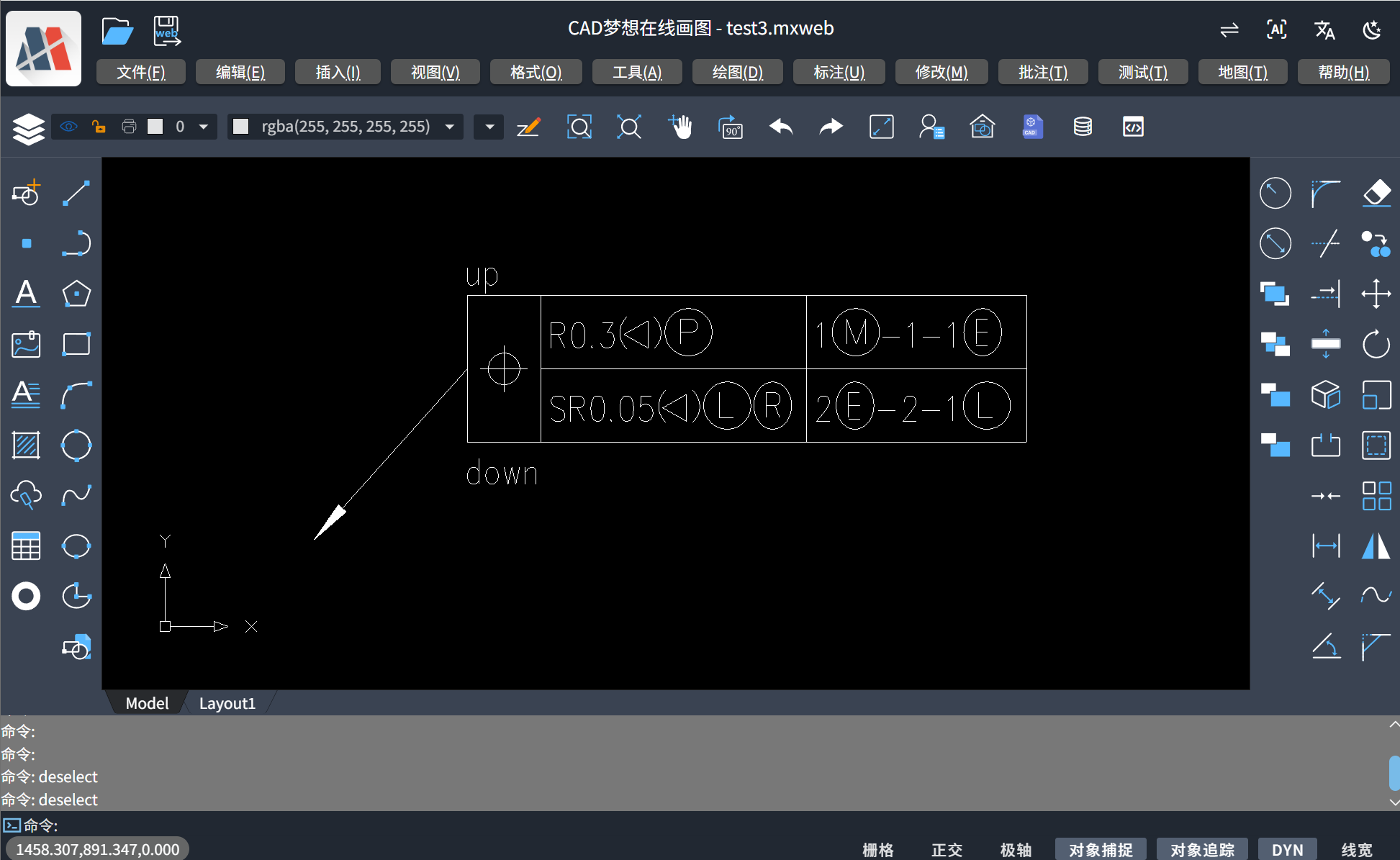
基础效果演示:
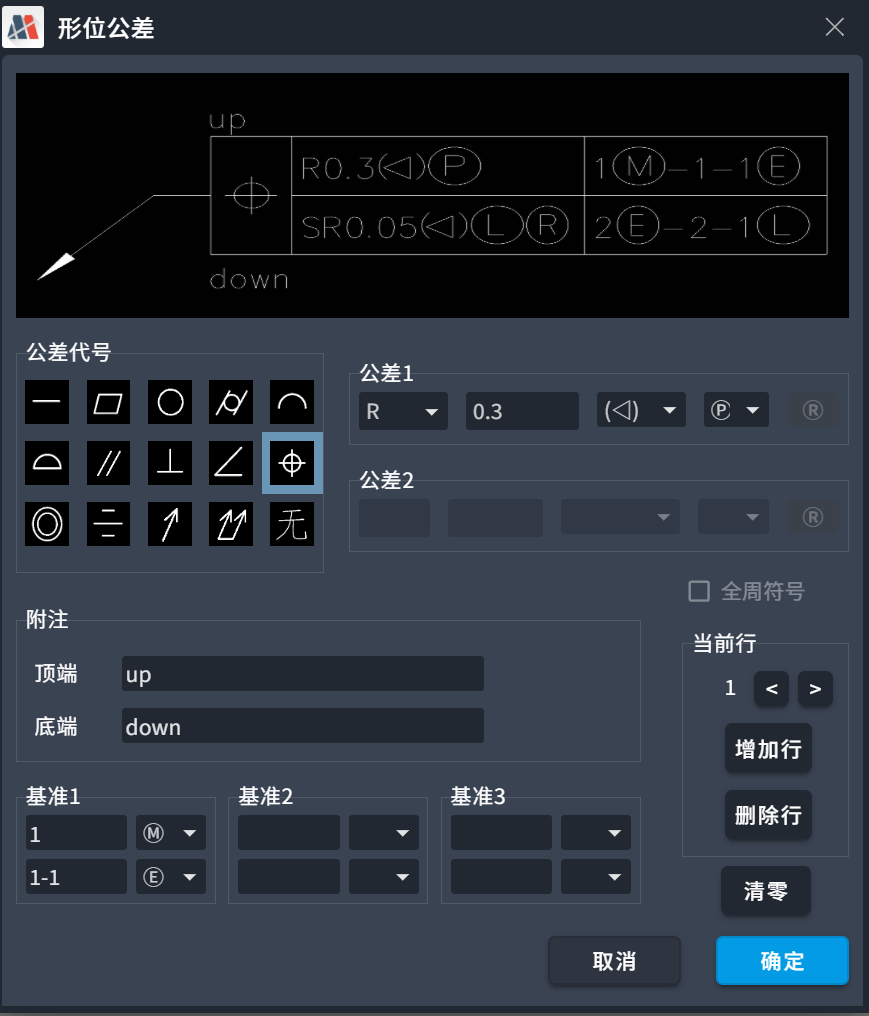
根据上述内容可做扩展开发,根据焊接符号特性设置对应的弹框,其示例效果如下:
此内容由惯性聚合(RSS阅读器)自动聚合整理,仅供阅读参考。 原文来自 — 版权归原作者所有。