


Before the widespread adoption of AI coding assistants (such as GitHub Copilot, Claude Code, Cursor), software development followed a "code-first, documentation-second" model, facing three core pain points:
| Pain Point | Specific Manifestation | Impact |
|---|---|---|
| Gap Between Intent and Implementation | Vague requirement documents, frequent changes, long-term disconnect between code and documentation | High communication costs, high refactoring risks, difficult maintenance |
| Low Collaboration Efficiency | Inconsistent understanding of requirements among team members, lack of a unified "source of truth" | Frequent repetitive work, frequent conflicts, long delivery cycles |
| Quality assurance lagging | Testing done after coding, defects discovered late, high repair costs | Poor product stability, damaged user experience |
With the popularity of AI coding tools, these problems are further magnified: AI can quickly generate code but lacks an understanding of the overall system architecture and business logic, easily producing code that is "locally correct but globally wrong"; at the same time, developers over-rely on AI prompts, leading to inconsistent code quality and a sharp decline in maintainability.
Specification-driven development (Specification-Driven Development, SDD) is a new software development methodology adapted for the era of generative AI, with the core being that technical personnel first define concise, testable, and formal system specifications (Spec), using them as the "dynamic contract" between humans, teams, and AI, and the sole source of truth for the development process.
SDD brings about three revolutionary transformations:
SDD is not a completely new concept but rather an evolution based on the theoretical foundations of traditional software engineering:
| Comparison Dimensions | Spec-Kit (GitHub) | OpenSpec | Superpowers |
|---|---|---|---|
| Core Positioning | "Blueprint School": Complete planning from scratch, suitable for 0-1 projects | "Gardener School": Incremental transformation of existing systems, suitable for 1-n projects | "Full-Process Butler": Complete development process management from requirements to delivery |
| Design Philosophy | "Specifications are Law" (fixed rule system), emphasizing gatekeeping processes and detailed documentation | "OPSX Flexible Workflow" (actions, not stages), centered around change proposals, with streamlined processes | "Test-First, Evidence-Driven," systematic complexity reduction |
| philosophy foundation | deep specification-driven, pursuing process completeness and controllability | lightweight specification-driven, pursuing rapid iteration and minimalism | methodology-driven (skill system), emphasizing psychological guidance of AI behavior |
| applicable teams | large, well-organized teams with strict process compliance | agile teams, startups, projects requiring rapid iteration | independent developers, quality-oriented teams, AI agent-intensive projects |
| Comparison Dimension | Spec-Kit (GitHub) | OpenSpec | Superpowers |
|---|---|---|---|
| Tech Stack | Python (uv package manager), CLI-driven, multi-platform support | TypeScript (npm), dual-mode Web UI+CLI, lightweight | Markdown+JavaScript plugins, editor integration, cross-platform |
| Core Workflow | 7-step linear process: spec→plan→tasks→implement→verify→document→evolve | 3-step incremental process: propose→apply→archive, managing incremental compliance | 5 Step closed-loop process: brainstorm→isolate→plan→TDD→review |
| Standardized format | Structured Markdown, supports complex scenarios and constraints | Minimal YAML, focuses on change points, minimizes documentation | Natural language + test cases, emphasizes executability and evidence validation |
| AI integration | Built-in support for 15+ AI coding assistants, unified interface management | Focus on Claude and Copilot, emphasizes lightweight integration | Deep integration with GitHub Copilot, supports Socratic dialogue |
| Change management | Dynamic constitution mechanism, standardized versioning, complete audit tracking | Change isolation, consensus-driven, risk control prioritized | Micro-task isolation, automatic conflict resolution, rapid rollback mechanism |
| Learning curve | Steep, suitable for teams with process awareness | Gentle, suitable for quick adoption scenarios | Moderate, requires understanding of test-driven development concepts |
For different scenarios, it is recommended to comprehensively evaluate and select the most suitable SDD tool by considering multiple dimensions such as project type, team size, and specification complexity:
| Decision Factors | Choose Spec-Kit | Choose OpenSpec | Choose Superpowers |
|---|---|---|---|
| Project Type | New Projects, Enterprise Projects | Incremental Changes, Legacy Systems | Prototype Development, AI-Intensive |
| Team Size | 10 or More People, Cross-Team | 3-10 People, Agile teams | 1-3 Independent developers |
| Complexity | High (Requires detailed constraints) | Low (Focus on change points) | Medium (Emphasize test cases) |
| Process requirements | Strict (Gating mechanism) | Flexible (Incremental process) | Automation (Full process) |
| Learning cost | High (Requires training) | Low (Quick start) | Medium (Understand test-driven) |
The core innovation of Spec-Kit lies in transforming specifications from static documents into executable development instructions:
The core of Spec-Kit isSeven-Stage Gate Development Process, each stage corresponds to verifiable engineering outputs, forming a strong constraint chain from requirements to implementation. Each step is executed in strict order, and no stage can proceed without passing the acceptance of the previous one.
| Stage Number | Stage Name | Core Objective | Output File | Key Constraints |
|---|---|---|---|---|
| 1 | Constitution | Establish Project Constitution and Technical Red Lines | constitution.md | Define prohibited items, approval items, and allowed scope; requires team consensus and signature |
| 2 | Specify | Translate natural language requirements into formal specifications | spec.md | Must use structured semantic templates, prohibit vague expressions |
| 3 | Clarify | Eliminate ambiguity, confirm boundaries and exceptions | clarification.md | All ambiguities must be confirmed by product/architect signatures |
| 4 | Plan | Design technical implementation paths and architecture selection | plan.md | must include technology stack, data flow, dependency graph, risk assessment |
| 5 | Tasks | Break down into executable and traceable development tasks | tasks.md | Each task must be assigned a person in charge, estimated working hours, and acceptance criteria |
| 6 | Analyze | Verify consistency of specifications and change impacts | Automated analysis report | Formal verification pass rate ≥95%, impact scope must be visualized |
| 7 | Implement | Code generated by AI and submitted for review | Generate code + test cases | The code must maintain bidirectional traceability with spec.md; manual overrides are prohibited |
All stages are driven by the specify CLI tool, with each deliverable automatically incorporated into version control, forming an auditable, traceable, and verifiable engineering contract chain.
If any stage fails the gatekeeping check, the system will block subsequent processes, ensuring "regulations are authority."
Spec-Kit introduces the concept of Project Constitution as the project's "supreme law":
The core philosophy of Spec-Kit is that specifications are the sole source of truth, and all development activities revolve around specifications:
Spec-Kit emphasizes defining intent before considering implementation, forming a stark contrast with the traditional "implementation-first" model:
Spec-Kit redefines the collaboration model between developers and AI, upgrading from "AI-assisted coding" to "specification-driven AI development":
Spec-Kit employs a modular and extensible architecture design, with four core layers arranged from bottom to top as follows:
Spec-Kit is an official open-source specification-driven development (Spec-Driven Development, SDD) toolkit from GitHub. It helps developers build high-quality software using AI coding assistants (such as claude, opencode, etc.) through a standardized workflow (Specify → Plan → Tasks → Implement), addressing issues like inconsistent code quality and missing processes caused by "vibe coding."
Spec-Kit is developed based on Python, depending on uv as a package manager and tool runner, because it is faster and easier to manage than traditional pip/venv.
# 安装 uv
curl -LsSf https://astral.sh/uv/install.sh | sh

# 验证安装
uv --version
# 使用 uv 安装 Spec-Kit
uv tool install specify-cli --from git+https://github.com/github/spec-kit.git

# 验证安装
specify --version
Initialize existing project:
# 在当前目录初始化
specify init .

# 指定特定的 AI 助手
specify init . --ai opencode
Create and initialize a new project:
# 基本初始化
specify init project01

# 指定特定的 AI 助手
specify init project01 --ai claude

# 指定脚本类型 (Mac/Linux默认sh,Windows默认ps,也可强制指定)
specify init project01 --script sh
Interaction prompts during initialization:
# 编辑 .gitignore 文件,添加以下内容(根据你使用的 AI 工具调整)
.opencode
.omo
.claude
.specify
specs
After initialization, open your AI coding assistant (e.g., start the corresponding programming tool by entering opencode, claude in the terminal, or open the project in VS Code/Cursor).
Check if the following Slash Commands (slash commands) are available:
| command | function description | phase |
|---|---|---|
| /speckit.constitution [required] | establish project principles and non-negotiable criteria | 0. Preparation |
| /speckit.specify [required] | define "what" and "why," generate specification documents | 1. Specification |
| /speckit.clarify | clarify ambiguous requirements through questioning before planning | 1.5 Clarification |
| /speckit.plan [required] | Generate technical implementation plan based on specifications and technology stack | 2. Planning |
| /speckit.tasks [required] | Break down the plan into an executable, ordered list of tasks | 3. Task Decomposition |
| /speckit.analyze | Analyze task consistency and coverage | 3.5 Analysis |
| /speckit.implement [required] | Execute tasks, generate code and tests | 4. Implementation |
Typical workflow example:
Question: How to specify the language and style of the Spec document?
## Communication Guidelines
- **Language**: All specifications, plans, tasks, code comments, and commit messages MUST be written in **Simplified Chinese (zh-CN); unless explicitly requested otherwise.
- **Tone**: Professional, concise, and direct.
We take the "XXL-API" project code refactoring as an example to demonstrate the complete practice process of Spec-Kit.
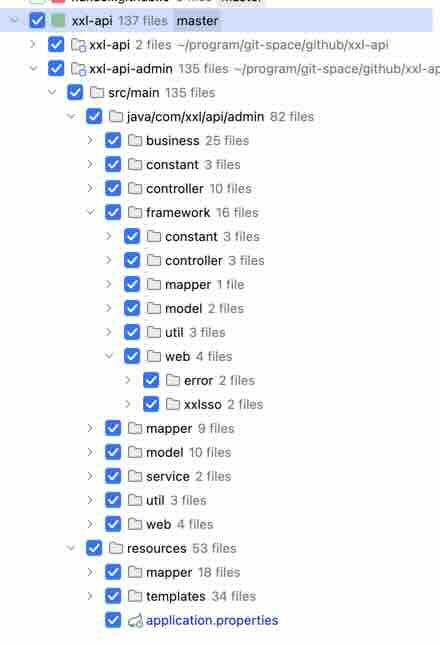
This refactoring project is an official open-source project, with requirements for code standards and quality; additionally, the refactoring requirement involves "9 functional modules" and "front-end and back-end code logic modifications," totaling the modification of over 130 project files, making it a medium-granularity requirement. This refactoring requirement has a certain level of complexity.
Navigate to the project root directory and execute the following command to generate the Spec-Kit engineering contract chain:
specify init .
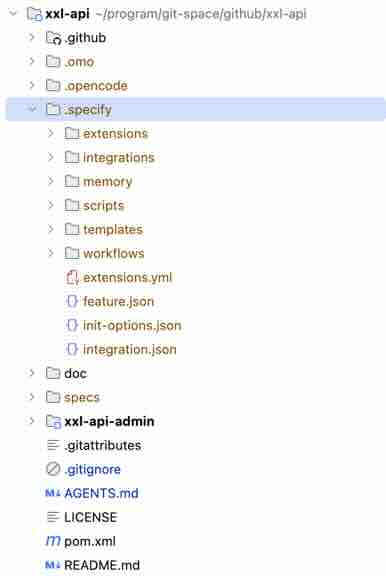
After execution, the .specify contract chain file directory will be generated:
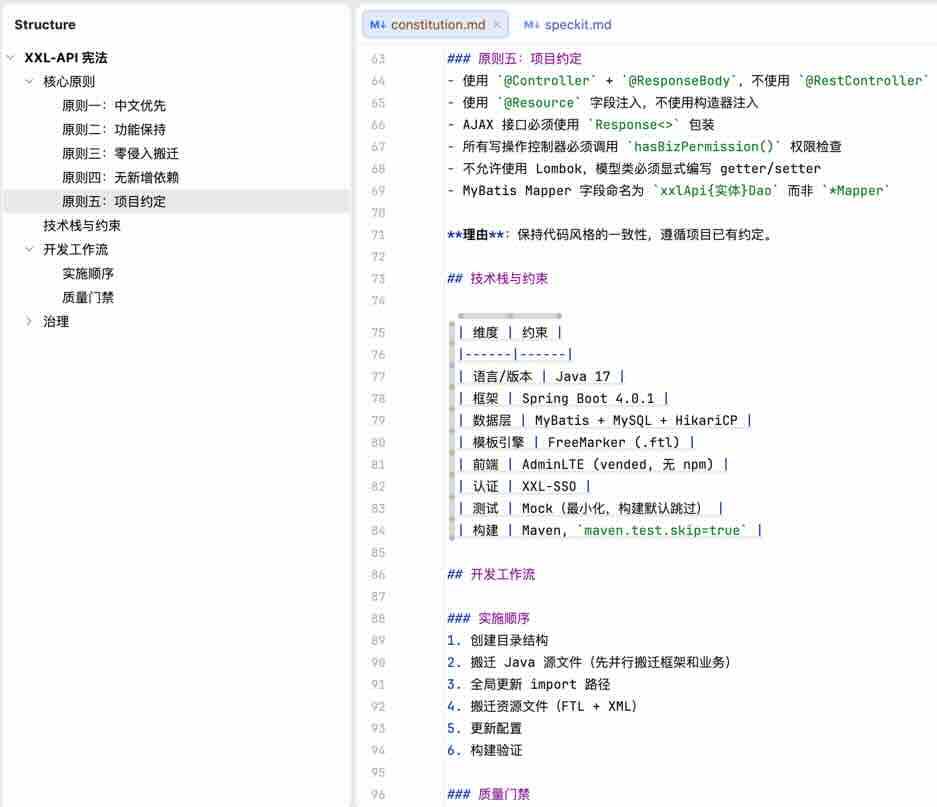
Execute the following commands to generate the "Project Constitution" (e.g., project agreements, technology stack and constraints, development workflows, etc.), ensuring consistency and controllability of subsequent specifications and code implementations.
# 创建项目宪法
/speckit.constitution

# 创建项目宪法,补充指定中文约束(否则默认生成 英文 内容)
/speckit.constitution 补充1条规则:所有规范文档使用中文描述
After execution, it will generate the .specify/memory/constitution.md file, with content as follows:
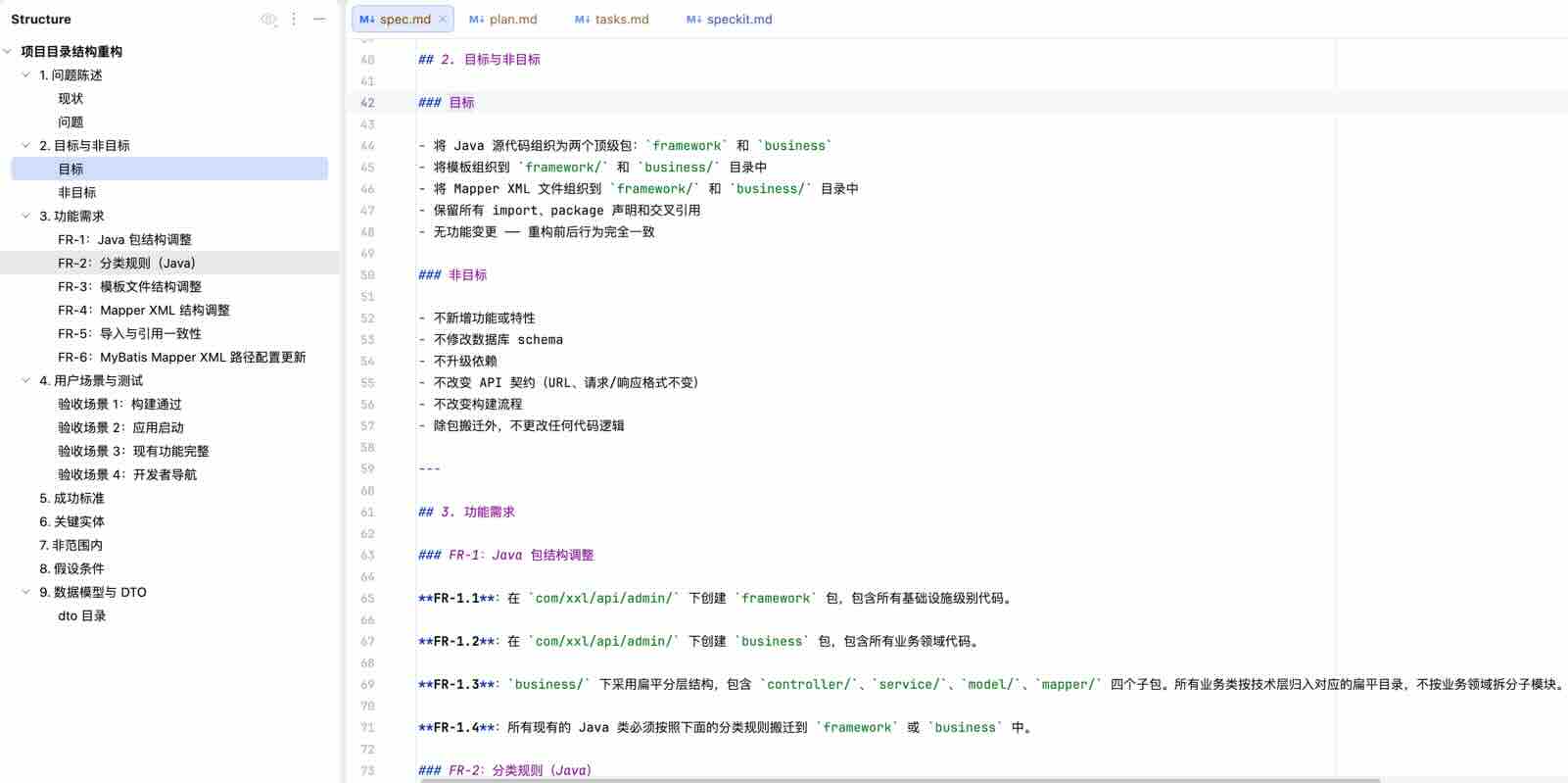
Execute the following command + Fill in the feature requirement description to generate the "Feature Specification (Spec)":
/speckit.specify  针对XXL-API项目按照如下要求重构:

1、按照下面项目规范结构,重构重构项目目录结构:

xxl-api-admin/src/main/java/com/xxl/api/admin
- /framework: 基础框架代码,包含公共的 登录、util、过滤器等组件。
- /business:业务代码,包含具体业务模块的 controller、service、model、mapper 子分层代码。
  xxl-api-admin/src/main/resources/templates
- /framework:基础模板,基础框架实体 对应的。
- /business:业务模板,业务领域实体对应的。
  xxl-api-admin/src/main/resources/mapper
- /framework:基础Mapper文件,基础框架实体 对应的。
- /business:业务Mapper文件,业务领域实体对应的。


2、业务代码分类判断逻辑:Java代码部分,当前 com/xxl/api/admin/controller/biz 下除了 UserController 都是 业务领域,保留User相关Java代码不变,其他按照规范调整。模板部分,当前 help.ftl、index.ftl、login.ftl 属于基础框架,其他属于业务领域;Mapper部分,当前 XxlApiUserMapper.xml 属于基础框架,其他属于业务部分。
After execution, it will generate the .specify/specs/001-project-structure-refactor/spec.md file, with content as follows:
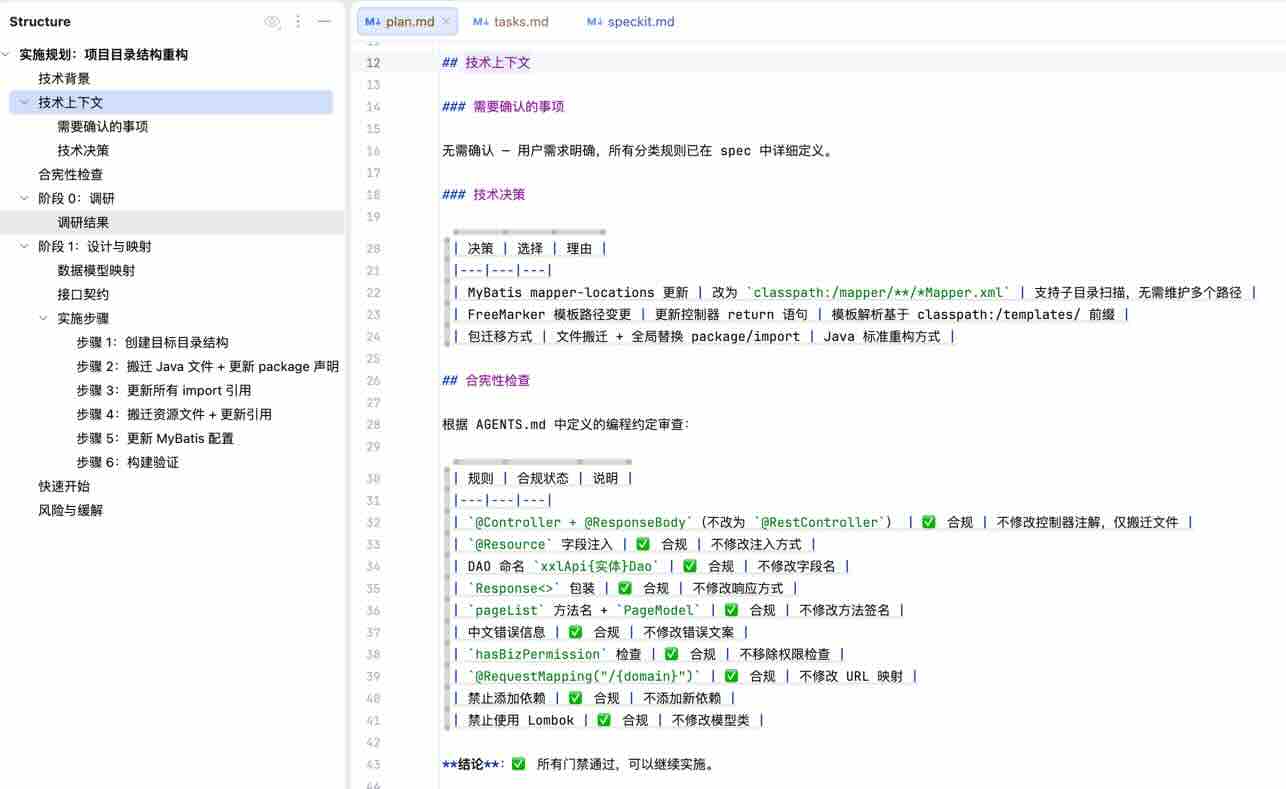
Execute the following command to generate the "Technical Plan":
/speckit.plan
After execution, it will generate the .specify/plans/001-project-structure-refactor/plan.md file, with content as follows:
Run the following command to generate “Task List”:
/speckit.tasks
After execution, it will generate the .specify/tasks/001-project-structure-refactor/tasks.md file, with content as follows:
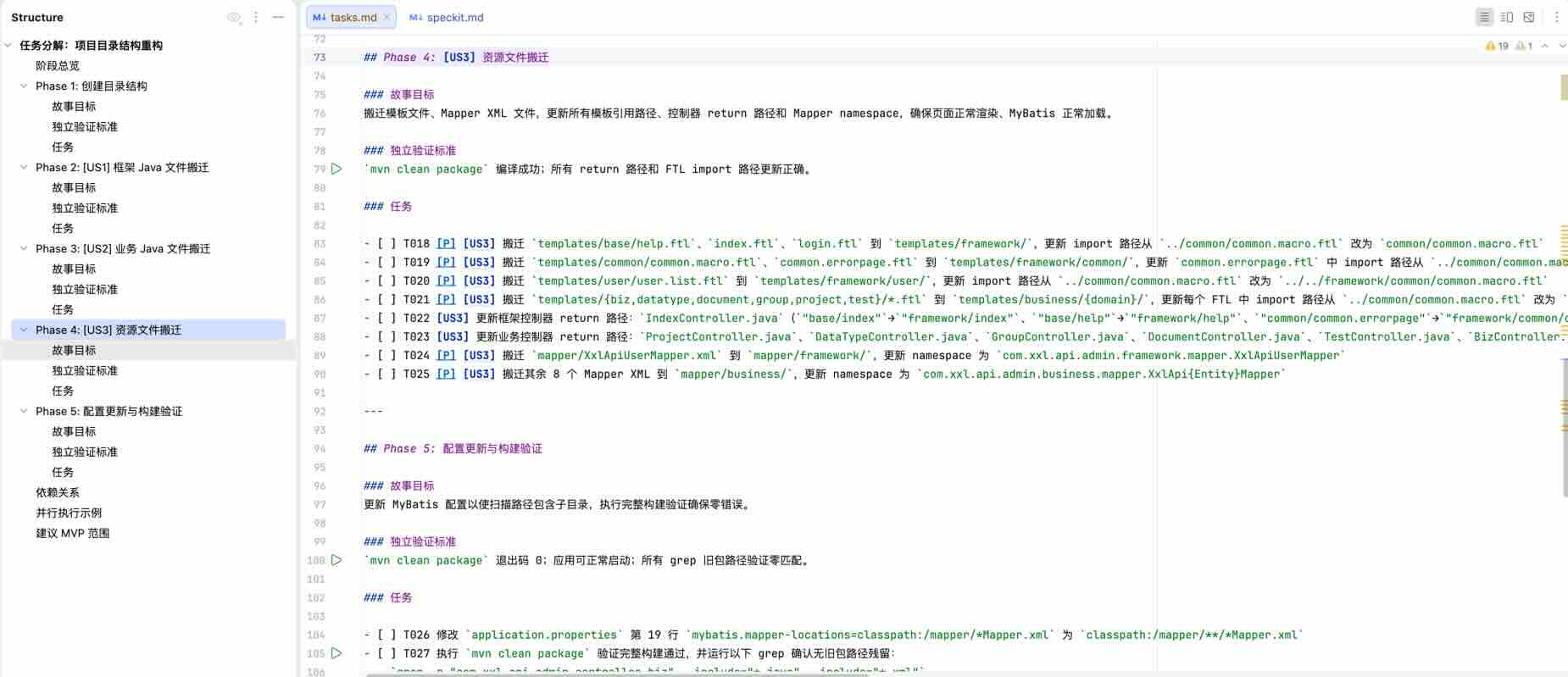
Run the following command to perform “code generation” based on the decomposed tasks (tasks.md):
/speckit.implement
The Agent will implement each task according to the task list (tasks.md) one by one, automatically checking against requirements.md upon completion of each task.
After all tasks are completed, manual review will be conducted to confirm compliance, and the code will be merged (the current PR has been merged into XXL-API master branch, meeting expectations).
constitution.mdOnce determined, do not modify frequently to ensure all participants follow the unified rulesSPEC.mdAvoid overly constraining implementation details, leaving room for AI to optimize technicallyOriginal source: JHSNS_URL_0__
This content is automatically aggregated by InertiaRSS (RSS Reader) for reading reference only. Original from — Copyright belongs to the original author.