












对于一个不熟悉的服务器或者是虽然是自己的服务器,但历史比较久远,对于上面安装了的一些软件包,我们记忆都慢慢模糊了。
我今天遇到一个情况,在安装一个工具x2openEuler时,安装失败,提示依赖冲突:
[root@VM-0-6-centos x2openeuler]# yum install x2openEuler-core-3.0.0-20250104.x86_64.rpm
...


我在网上都没发现别人有遇到这个问题,后面咨询了下ai,说可能是因为系统里安装了mysql的原因,这个工具会在系统中安装mariadb-server,安装时检查依赖,就发现和系统中的mysql有冲突。
在linux中,一个软件可能有多种安装方式。
如果要卸载这个冲突的mysql,首先还得知道,当初是怎么安装的。
我先通过rpm查询,判断是通过rpm安装的,还是源码编译安装的。
[root@VM-0-6-centos x2openeuler]# rpm -qa |grep mysql
mysql-community-common-5.7.36-1.el7.x86_64
mysql-community-libs-compat-5.7.36-1.el7.x86_64
zabbix-server-mysql-5.0.18-1.el7.x86_64
mysql-community-libs-5.7.36-1.el7.x86_64
mysql-community-server-5.7.36-1.el7.x86_64
rh-php72-php-mysqlnd-7.2.24-1.el7.x86_64
zabbix-web-mysql-scl-5.0.18-1.el7.noarch
mysql57-community-release-el7-9.noarch
mysql-community-client-5.7.36-1.el7.x86_64
输出有结果,那就是rpm方式安装的。
下面这个命令,还可以看到时间。
[root@VM-0-6-centos x2openeuler]# rpm -qa --last|grep mysql
zabbix-web-mysql-scl-5.0.18-1.el7.noarch      Sat 18 Dec 2021 04:16:33 PM CST
rh-php72-php-mysqlnd-7.2.24-1.el7.x86_64      Sat 18 Dec 2021 04:16:31 PM CST
zabbix-server-mysql-5.0.18-1.el7.x86_64       Sat 18 Dec 2021 04:11:05 PM CST
mysql-community-libs-compat-5.7.36-1.el7.x86_64 Sun 28 Nov 2021 02:15:46 PM CST
mysql-community-server-5.7.36-1.el7.x86_64    Sun 28 Nov 2021 02:15:45 PM CST
mysql-community-client-5.7.36-1.el7.x86_64    Sun 28 Nov 2021 02:15:24 PM CST
mysql-community-libs-5.7.36-1.el7.x86_64      Sun 28 Nov 2021 02:15:21 PM CST
mysql-community-common-5.7.36-1.el7.x86_64    Sun 28 Nov 2021 02:15:21 PM CST
mysql57-community-release-el7-9.noarch        Sun 28 Nov 2021 02:12:07 PM CST
接下来的问题是,这些rpm是直接通过从网上下载了rpm包并上传,然后执行rpm -ivh安装呢,还是通过yum install的方式安装的呢?
我在以前发现了如下命令:
yum history

这个命令,可以看到最近的20条yum安装,但是20条之外的,就看不到了。
如果你想看到20条之外的,可以使用如下命令:
yum history list all

这次,可以显示这个服务器的所有记录了。但是,你们可能发现了,第二列那里,竟然显示的是root啥的,不是具体的安装命令了。
不要着急,修改下如下配置:
# edit file "/etc/yum.conf" ==>>> and add this line somewhere in it
# 修改 /etc/yum.conf,增加如下行
history_list_view=cmds
然后重新执行,就正常了。如果只是临时生效,可以:
sudo yum --setopt=history_list_view=commands history list all
我这边搜了下mysql相关的,果然找到了,应该是第二条,第一行是这个yum事务的id,为56:
[root@VM-0-6-centos x2openeuler]# yum history list all |grep mysql
    59 | install zabbix-web-mysql | 2021-12-18 16:16 | Install        |   33 >
    56 | install mysql-server     | 2021-11-28 14:15 | I, O           |    6 ><
接下来,就看下这个56号事务的详情:
yum history info 56
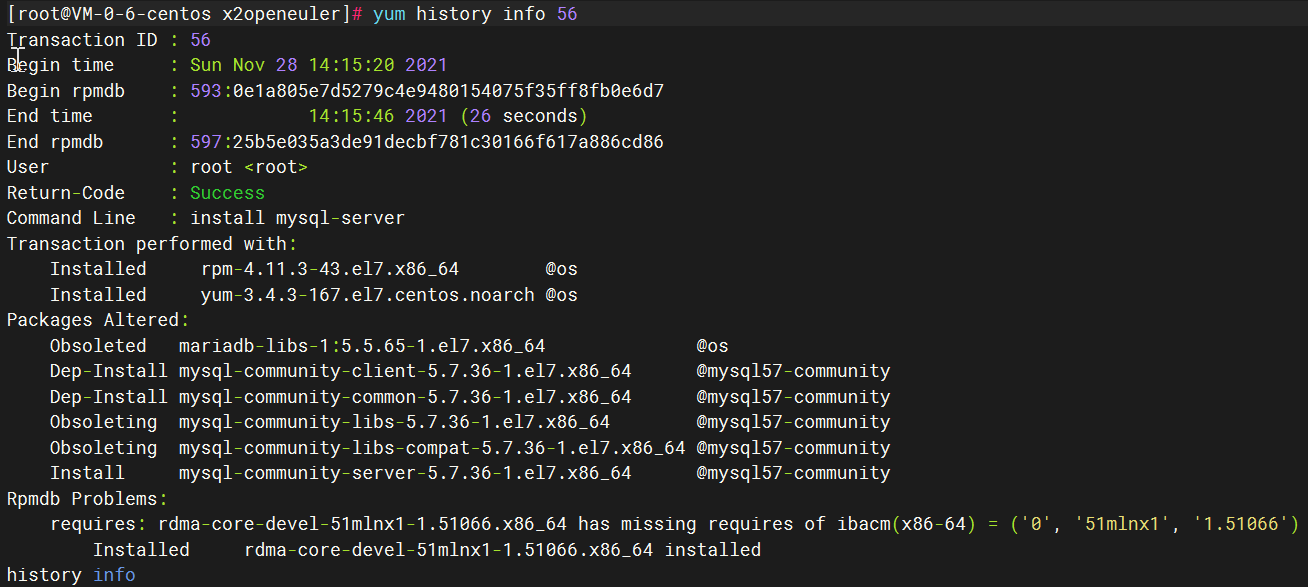
现在就确定了,就是这个事务,安装了mysql。
我们也可以通过其他命令,来找到对应的事务id。
[root@VM-0-6-centos x2openeuler]# yum history package-list \*mysql\*
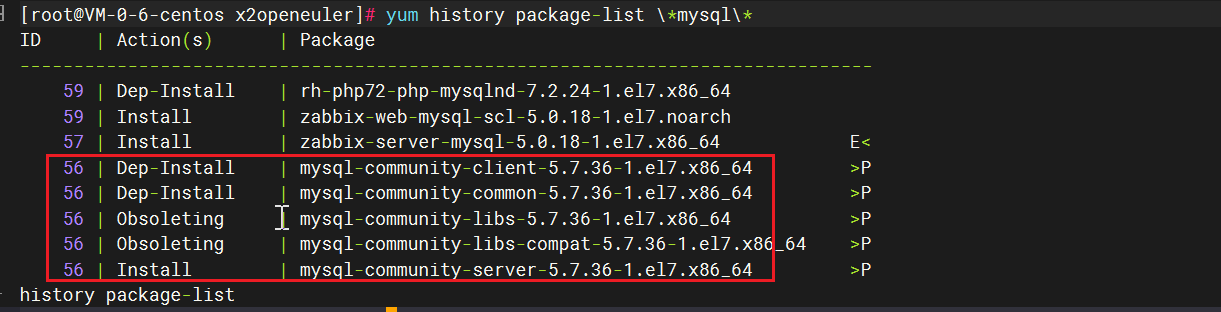
这里看到一个数字为56,我们通过查看 yum history info 56,确定了就是这个事务id。
yum history undo 事务id
结果我这里不知道为啥,卸载失败了:
[root@VM-0-6-centos x2openeuler]# yum history undo 56
Undoing transaction 56, from Sun Nov 28 14:15:20 2021
    Obsoleted   mariadb-libs-1:5.5.65-1.el7.x86_64              @os
    Dep-Install mysql-community-client-5.7.36-1.el7.x86_64      @mysql57-community
    Dep-Install mysql-community-common-5.7.36-1.el7.x86_64      @mysql57-community
    Obsoleting  mysql-community-libs-5.7.36-1.el7.x86_64        @mysql57-community
    Obsoleting  mysql-community-libs-compat-5.7.36-1.el7.x86_64 @mysql57-community
    Install     mysql-community-server-5.7.36-1.el7.x86_64      @mysql57-community
Error: No package(s) available to install
还是手动卸载吧:
rpm -e mysql-community-server-5.7.36-1.el7.x86_64
rpm -e mysql-community-client-5.7.36-1.el7.x86_64
rpm -e mysql-community-libs-compat-5.7.36-1.el7.x86_64
rpm -e mysql-community-libs-5.7.36-1.el7.x86_64
rpm -e mysql-community-common-5.7.36-1.el7.x86_64
此内容由惯性聚合(RSS阅读器)自动聚合整理,仅供阅读参考。 原文来自 — 版权归原作者所有。